Keychain 3: one long-lived SSH agent per user and host
A manager for ssh-agent and gpg-agent, now in Python.
At a glance
- What is it?
- The classic shell keychain tool rewritten in Python and shipped as a self-contained zipapp, coordinating a single ssh-agent across terminals, cron jobs and remote sessions, with optional GnuPG key warm-up and PKCS#11 hardware key support. The trade-offs are a GPL-3.0 licence, a POSIX-only target, and a rewritten tool whose shell predecessors you may already rely on.
- Who is it for?
- Keychain 3 suits a developer or administrator on a POSIX system who opens many terminals, runs cron jobs that need SSH access, and has been running the original shell version and wants the same behaviour with GnuPG integration and hardware key support. It does not suit a Windows user without WSL or Git Bash, since native Windows is not a supported target, and it does not fit a distribution that requires a permissive licence, because the project is GPL-3.0-only.
- Can I use it commercially?
- Yes, with conditions. GPL-3.0 is a copyleft licence: if you distribute software that includes it, you must release that software's source code under the same licence. Running it internally without distributing it does not trigger that obligation.
- Is it still maintained?
- Yes. The repository last received commits 2 days ago.
- What is it written in?
- Mainly Python, according to GitHub's language statistics.
Answers come from the project's GitHub data, last synced on November 7, 2026, and from our analysis. They are not legal advice.
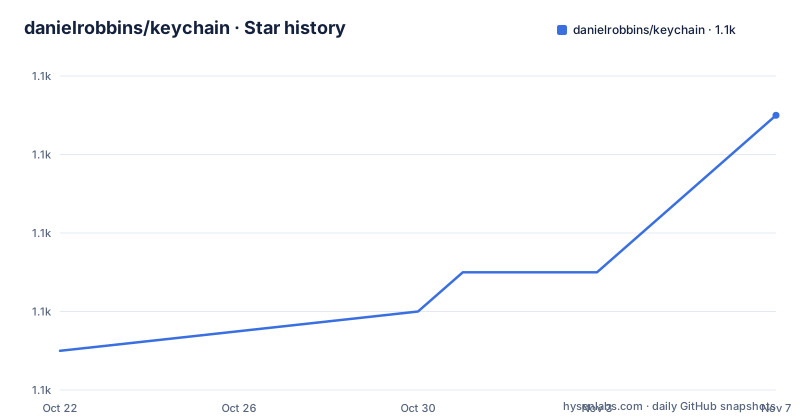
Star history
- danielrobbins/keychain1,111 ★ · +6
| Repository | 2026-10-22 | 2026-11-07 |
|---|---|---|
| danielrobbins/keychain | 1.1k | 1.1k |
6 Stars in the last 16 days, measured from the daily GitHub snapshot. Compare with other projects
Editorial analysis
The problem: ssh-agent is per session, not per user
Keychain orchestrates ssh-agent and gives you one coordinated, long-running SSH agent per user and host. For GnuPG it can also auto-warm your signing and encryption keys so they are ready to use.
The README states the problem it solves in three bullets. There is one agent per login session, so opening a new terminal gives you a new agent and another passphrase prompt. Cron jobs cannot find your agent, because background processes run in a different session. And there is no coordination between individual ssh-agent processes, since they are not aware of each other.
The fix is the same shape for all three. One agent per host, so all terminals share the same long-running agent. Persistent state, so cron jobs, remote sessions and background tasks can reconnect. And multi-terminal coordination, described with a concrete example: when VS Code restores five login terminals at once, they cooperate instead of duplicating effort or competing.
That last one is a real problem in modern terminal use, and the original shell tool could not have solved it. The README includes a diagram contrasting three terminals each starting their own agent and a cron job finding none, against all four reconnecting to a single agent.
The lineage is worth knowing. Keychain 3 is the evolution of the original Bourne shell-based tool created by Daniel Robbins in 2001, and the README says it preserves the single-file deployment model that made Keychain useful for over two decades while adding modern capabilities. The concepts behind it come from the author's original IBM developerWorks articles on OpenSSH key management.
The zipapp: one file, no dependencies, auditable
Keychain 3 ships as a Python zipapp, a single executable file with no third-party Python dependencies. It needs Python 3.9 or newer and the standard OpenSSH tools, ssh-agent and ssh-add, and the GPG features also require GnuPG.
The install is a download and a copy:
# Download from https://github.com/danielrobbins/keychain/releases
chmod +x keychain-3.0.0.pyz
sudo cp keychain-3.0.0.pyz /usr/local/bin/keychain
sudo chmod 755 /usr/local/bin/keychain

# Verify installation
keychain version
The auditability argument is the interesting part, and the README makes it explicitly. Because the zipapp is just a zip file, you can list its contents:
unzip -l /usr/local/bin/keychainNo hidden dependencies and no mystery code, everything is right there. For a tool that holds your SSH agent, that is a property worth having, since a user agent is being asked to run with your private keys loaded.
The package metadata backs the same claim. The `dependencies` list is empty, with a comment explaining that dataclasses and importlib.metadata are both in the standard library on Python 3.9 and later, which is the supported floor. The project ships a `keychain` console script mapped to `keychain.main:main`, and the package itself is split into `keychain`, `keychain.docs`, `keychain.output` and `keychain.runtime`.
The build is a Makefile. The `keychain.pyz` target stages the `src/keychain` tree, copies the `VERSION` file in, removes bytecode caches, writes a bootstrap `__main__.py`, compiles the stage with `compileall`, and then calls `python -m zipapp` with a shebang of `/usr/bin/env python3` and the compress flag. There is a separate `precompiled-pyz` target that bakes in the build machine's own interpreter path and byte-compiles with a checked-hash invalidation mode, so the artefact runs without recompiling on the target host.
Wiring it into bash, zsh and fish without blocking a login
The quick start keeps one key per line in `KEYCHAIN_KEYS` and quotes filenames containing spaces. The shell snippets differ in one important respect, which is how they handle non-interactive shells.
The bash version checks for an interactive shell and prompts only in that case:
KEYCHAIN_KEYS=(
    ~/.ssh/id_ed25519
    ~/.ssh/id_rsa
)

if [[ $- == *i* ]]; then
    eval "$(keychain add --eval "${KEYCHAIN_KEYS[@]}")"
else
    eval "$(keychain add --eval --noask)"
fi
The zsh version is shorter because `.zshrc` is read only by interactive shells, so it always prompts:
KEYCHAIN_KEYS=(
    ~/.ssh/id_ed25519
    ~/.ssh/id_rsa
)
eval "$(keychain add --eval "${KEYCHAIN_KEYS[@]}")"
And fish follows the same split with `status is-interactive` and `status is-login`:
set KEYCHAIN_KEYS \
    ~/.ssh/id_ed25519 \
    ~/.ssh/id_rsa

if status is-interactive
    eval "$(keychain add --eval $KEYCHAIN_KEYS)"
else if status is-login
    eval "$(keychain add --eval --noask)"
end
The rule the README states is that interactive terminals load your keys, while non-interactive login shells establish the agent environment without prompting, so a graphical login does not wait for input. That distinction is the whole reason for the `--noask` branch, and getting it wrong is how a keychain ends up hanging a login screen.
The `eval` pattern is the load-bearing part: the command prints shell code that sets the environment variables pointing at the agent socket, and the shell evaluates it. A caller that forgets to eval the output gets no environment at all.
What happens the first time you run it
The README walks through the sequence in five steps. Keychain checks if an ssh-agent is already running. If not, it starts one. It loads your private key, prompting for the passphrase once. It writes the agent's connection information to `~/.keychain/`. And every new shell after that reconnects automatically, with no more prompts.
That fourth step is the persistence mechanism. The directory `~/.keychain/` holds the agent's connection info, which is how a cron job in a different session finds an agent it did not start. That is the answer to the problem the original tool was written to solve, and it is worth understanding that the state lives on disk rather than in an environment variable inherited from a parent process.
To verify, the command is:
keychain listYou should see your key listed. Open a new terminal and run it again, and it is still there with no passphrase needed.
Configuration is optional. The README says no configuration file is needed and that Keychain works with zero setup, and that the optional `.keychainrc` file is for advanced customization only. The build Makefile reflects the same default-first approach, with a `DEFAULT_ACTIVATION` variable set to `prompt` that the build script writes into the package as generated defaults.
The documentation is embedded rather than installed as man pages. The `keychain man topic:env` command is referenced from the shell setup sections for the alternative configurations, and the repository has a `man/` directory with an `embedded-docs.txt` file that a build script turns into `src/keychain/docs/_doc_texts.json`.
GnuPG warm-up, PKCS#11 and the hardened defaults
The GnuPG side of the project is new relative to the original. Keychain can auto-warm your signing and encryption keys so they are ready to use, and the project description calls it a manager for ssh-agent and gpg-agent. The package description in the metadata says it manages ssh-agent and private keys with native GnuPG support, and the keywords list both gpg and gpg-agent.
The GnuPG side needs GnuPG installed, so it is an optional capability rather than a hard requirement.
PKCS#11 hardware key support is listed among the modern capabilities the rewrite adds. That is the feature that lets a hardware token hold the private key outside the agent's memory, and it is the reason the tool is described as orchestrating both agents rather than just one.
The README also lists hardened security defaults and a test suite of 700 or more unit and integration tests. The tests directory is a top level entry in the repository, and the count is specific enough to be a claim worth taking at face value given the size of the project.
Other modern capabilities listed for version 3 are coordinated multi-terminal activation, stable agent sockets, and cron and script integration.
For background on the decisions, the README links an article titled Why Keychain 3 Uses Python, which is where the reasoning behind the rewrite from Bourne shell to Python is set out.
Platform coverage and the Windows question
Keychain 3 is designed for POSIX-like systems with Python 3.9 or newer and OpenSSH, and optionally GnuPG. The README lists Linux, macOS, WSL, Git Bash, the BSDs, Solaris-derived systems and similar UNIX-like environments.
Native Windows is not a supported target yet, and the README says Windows users can run Keychain through WSL or Git Bash. That is a real limitation for a tool whose whole point is to integrate with a login shell, since PowerShell is a different shell with different startup files, and the environment propagation here is a shell-eval pattern rather than a Windows-native agent service.
The metadata classifiers are more generous than the README, listing Operating System as POSIX, MacOS and Microsoft Windows. The Windows classifier presumably reflects the WSL and Git Bash paths rather than native support, so the README is the more accurate document to read.
On macOS specifically, the interaction with the system keychain is a question the README here does not address, and a user moving from the original shell keychain should check the embedded man pages for how the agent is located on that platform, since macOS has its own agent conventions.
The licence is GPL-3.0-only, declared both in the `pyproject.toml` SPDX header and in the licence metadata field. For a tool distributed as a single file that a user copies into `/usr/local/bin`, the licence is mostly relevant to a distribution that wants to bundle it, and to a user who wants to modify it.
Where Keychain 3 is the wrong choice
The clearest wrong case is a machine where you cannot run a long-lived agent at all, such as a locked-down shared account on a bastion with a policy against agent forwarding. Keychain's value is entirely built on keeping one agent alive for a long time, and if that is not allowed, the tool has nothing to offer.
The second is native Windows without WSL or Git Bash. The README is explicit that it is not a supported target, and there is no PowerShell equivalent of the eval pattern documented here.
The third is a team that already solved this with a different tool and does not want two agents. If your environment already has a working agent setup, adding Keychain means a second layer deciding which agent to use, and the README's own warning about a single-file tool that manages a long-running process is exactly the kind of thing that can conflict with an existing arrangement.
The fourth is a distribution that will not ship a GPL-3.0 tool. The licence is GPL-3.0-only with no alternative grant, so a proprietary product that bundles it takes on GPL source-sharing obligations.
What Keychain 3 does have going for it is that it is a rewrite of something with two decades of use, that the rewrite kept the deployment model that made the original work, and that the artefact is one auditable file you can unzip and read. For a person whose workflow is many terminals, one passphrase, and a cron job that needs SSH, that is a specific and complete solution.
Editorial conclusion
Keychain 3 suits a developer or administrator on a POSIX system who opens many terminals, runs cron jobs that need SSH access, and has been running the original shell version and wants the same behaviour with GnuPG integration and hardware key support. It does not suit a Windows user without WSL or Git Bash, since native Windows is not a supported target, and it does not fit a distribution that requires a permissive licence, because the project is GPL-3.0-only. Before adopting it, run `keychain list` after installing to confirm the agent socket persists, check whether your existing shell profile already calls an older keychain, and read the embedded man pages with `keychain man topic:env` before rewriting your `.bash_profile`.
Frequently asked questions
How do I install Keychain 3?
Download the zipapp from the releases page, make it executable, copy it to `/usr/local/bin/keychain` and set mode 755. It needs Python 3.9 or newer and the standard OpenSSH tools, and the GPG features additionally require GnuPG.
How do I check that Keychain is working?
Run `keychain list`. Your key should be listed, and running the same command in a new terminal should show the same key with no passphrase prompt.
What does `keychain add --eval --noask` do?
It is the non-interactive form of the setup command, used in non-interactive login shells so that the agent environment is established without prompting for a passphrase and a graphical login does not wait for input.
Is Keychain 3 supported on native Windows?
No. The README says native Windows is not a supported target yet, and that Windows users can run it through WSL or Git Bash. The project otherwise targets Linux, macOS, the BSDs and similar UNIX-like systems.
Does Keychain 3 need any Python packages installed?
No. It ships as a self-contained zipapp with zero runtime dependencies, and the `dependencies` list in the project metadata is empty because everything it uses is in the standard library on Python 3.9 and later.
Official sources
Add this badge to your README
If you maintain this project, the badge below links readers to this analysis and shows its maintenance status from the daily GitHub snapshot. Paste the markdown into your README; add ?metric=license or ?metric=stars to the image URL for a different field.

[](https://hysenlabs.com/projects/danielrobbins-keychain)Star history chart for your README
[](https://hysenlabs.com/projects/danielrobbins-keychain)Was this useful?