google-font-to-svg-path turns a typed line into a fillable SVG path
Create an SVG path from a Google font
At a glance
- What is it?
- This is a browser tool that renders text set in a Google Font and hands you the resulting outlines as an SVG path, with controls for size, line height, kerning, union and per-character layers. Its README now points at Fontezzi, the author's hosted successor, where the same core editor is free.
- Who is it for?
- Adopt google-font-to-svg-path if you need a logo or wordmark as vector outlines from a Google Font and you want to keep everything in the browser, since the tool runs as a static site in the browser. Do not adopt it if you need batch output, layered compositions or shareable links, because the README says those moved to Fontezzi, where the core editor is free and the rest is paid.
- Can I use it commercially?
- Yes. MIT is a permissive licence: you can use, modify and sell software built on it, as long as you keep its copyright and licence notices.
- Is it still maintained?
- Yes. The repository last received commits 5 days ago.
- What is it written in?
- Mainly JavaScript, according to GitHub's language statistics.
Answers come from the project's GitHub data, last synced on November 7, 2026, and from our analysis. They are not legal advice.
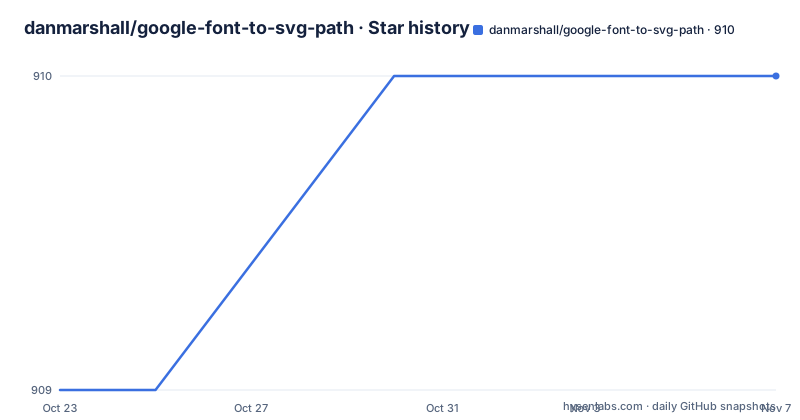
Star history
- danmarshall/google-font-to-svg-path910 ★ · +1
| Repository | 2026-10-23 | 2026-11-07 |
|---|---|---|
| danmarshall/google-font-to-svg-path | 909 | 910 |
1 Stars in the last 15 days, measured from the daily GitHub snapshot. Compare with other projects
Editorial analysis
What the tool does with the outline, not the text
google-font-to-svg-path creates an SVG path from a Google font. That is the entire description, and it is worth being precise about what happens in between, because the interesting output is the outline geometry rather than a rendered image.
The distinction matters. A web font renders as pixels on a screen or as a font file that a browser loads. An SVG path is a set of vector commands describing the shape of each glyph. The second is what you want when you need a logo, an icon set, a wordmark that has to scale, or text that has to be cut or laser engraved. You cannot get that from a screenshot of a web page, and you cannot easily get it from a font file without doing the outline extraction yourself.
This tool does the extraction for you, in the browser, and hands you the path.
The feature list is short and each item is a real decision rather than a toggle for its own sake. Text is entered in a textarea field that supports multiple lines, and you press Enter to create new lines. Size is the font size in units. Line Height is a multiplier for vertical spacing between lines, with 1.2 as the default, and the README explains the unit as 120% of the font size. Empty lines are automatically skipped, which is a small courtesy that saves an argument with the layout when you are pasting text with blank lines in it.
The rest of the parameters are about the geometry. Union combines overlapping paths, which matters because a glyph outline is usually drawn as a set of subpaths and overlapping counters can leave seams. Kerning applies font kerning, so the spacing between specific letter pairs is correct rather than uniform. Fill sets the colour of the paths. Separate Characters assigns each character to a separate layer, which is how you get individually editable letters in a design tool.
Other styling options are listed generically: bezier accuracy, fill colour, stroke, and so on. The bezier accuracy control is the one worth understanding, because it is the difference between a faithful reproduction of the font outline and a simplified approximation with fewer curve segments.
Why the README now points at Fontezzi
The README opens with a notice that changes how you should read everything else in it. It says the tool has evolved into Fontezzi, that everything here is 100% free there too, and lists what you gain: shadows, outlines, halos, arc warp and 15 or more effects, multi-layer compositions, snapshot comparison and Showdowns, shareable Showdown links as a Pro feature, React tsx export, batch automation from CSV as a Pro feature, and a mobile-friendly editor.
Then it states the commercial terms plainly. The core editor and basic effects are completely free. Pro adds cloud sync, batch automation and more.
This is a hosted service, so the split between what you can do in the browser for nothing and what you can do in the browser with a subscription is the practical dividing line for anyone deciding where to spend time.
Two things follow for an evaluator. First, the open repository is not the finished product any more; it is the free tier of a larger tool, maintained by the same author. Second, the features listed in the README of this repository are the ones that did not move behind the paywall, and they are all still here.
The repository itself is still active. The last push was on 2026-10-16 and the repository is not archived, so the code is current. The hosted tool is where the author expects new features to land.
So the choice for a user is straightforward. If you need the SVG path and nothing else, the free hosted version of the original tool does the job and the repository tells you exactly which controls it has. If you need the layered and batch features, that is Fontezzi, and the README is explicit that some of it is paid.
The stack is Astro with React, and the build is three npm scripts
The repository is a static site, and the package manifest makes the tooling plain.
  "scripts": {
    "dev": "astro dev",
    "build": "astro build",
    "preview": "astro preview",
Astro is the framework, React is the component layer, and the three commands cover the usual loop. The dev script starts the development server, build produces the static output, and preview serves that output locally.
The dependency list explains how the outline extraction works. opentype.js is the font parsing library, and maker.js is the geometry library. Between them they cover the two halves of the job: opentype.js reads the glyph outlines out of the font file, and maker.js handles the path operations, which is what makes the union option possible in the first place.
The rest of the stack is ordinary. lucide-react provides the icons, react and react-dom at version 19 are the UI runtime, @astrojs/react is the Astro integration for React components. @types/google.fonts is a type definition package for the Google Fonts catalogue data, and there is a matching google.fonts.d.ts file at the repository root. A github: dependency on another repository by the same author, danmarshall/tool-style, supplies the shared styling.
The dev dependencies are minimal: http-server for serving, and typescript. Note that the test script is a placeholder that echoes an error and exits with status 1, so there is no test suite in this repository. For a tool whose output is geometric data that people paste into design tools, that absence is worth noticing.
The repository root also contains astro.config.mjs and tsconfig.json, a 404.html for the deployed site, and public/ and src/ directories for the static assets and the source.
The separate characters option and the union setting do the real work
Two parameters change the shape of what you get out, and both are easy to skip past.
Separate Characters assigns each character to a separate layer. If you have ever wanted to rearrange the letters of a wordmark, animate them one by one, or hand a designer individual glyphs to position by hand, this is the feature that makes the output usable in a design tool rather than only as a flat picture. A single path containing the whole word is a picture. Separate paths containing individual letters are assets.
Union combines overlapping paths. The reason this matters is specific to how glyph outlines are constructed. A letter like O is usually described by two subpaths, an outer contour and an inner counter. Where they meet or overlap, leaving them unmerged can leave visible seams or produce a path that renders differently across renderers. Merging them produces a single continuous shape.
Bezier accuracy sits in the same family of concerns. Curves in a font outline are stored as Bezier segments, and a vector editor may approximate them with fewer or more segments than the font designer intended. The accuracy control lets you choose how closely the exported path follows the original curve, trading file size and editability against fidelity.
Kerning is the fourth. It applies font kerning, which in practice means specific pairs of characters, such as an A next to a V, are spaced according to the designer's intent rather than by a uniform advance width. Without it, a word set in a well-kerned font can look slightly wrong even though every letter is the right shape.
The line height control interacts with the others in a way that is easy to get wrong. Because each line is rendered separately with a multiplier against the font size, changing the size does not scale the spacing the way you would expect from a text editor. If you increase the size from 20 to 40, the line height multiplier is still 1.2, so the vertical spacing between lines changes proportionally to the size, but the ratio of line spacing to glyph height stays where you put it. That is what you want for a logo, and it is different from what a paragraph of body text wants.
Where this tool stops being the right answer
Four cases rule it out, and the first two are about scope rather than about the software.
The first is batch work. The README lists batch automation from CSV as a Pro feature of Fontezzi, which means the free original does not do it. If you need two hundred wordmarks, this tool is one-at-a-time by design.
The second is anything requiring composited layers or effects. Shadows, outlines, halos, arc warp and the 15 or more effects are all in the same paid list. The original tool produces a flat path and nothing else, and the layered compositions with snapshot comparison and Showdowns belong to the hosted product.
The third is a licensing question that the tool cannot answer for you. Google Fonts is a catalogue of fonts with different licences. The tool will happily render a font into an outline for you regardless of what that font's terms permit, and converting a glyph to a path does not remove the licence attached to the design. If the output is for commercial use, the check you need to make is on the specific font in the catalogue, not on this tool.
The fourth is a scripting or integration requirement. This is a browser application, not a library. The package manifest exposes no programmatic API, the main entry is index.js, and the build output is a static site. Anything that wants to run the conversion as part of a build step or a server request has to drive the browser yourself.
The MIT licence on the repository itself is permissive, and the LICENSE file at the root is the reference. For a project whose output is a derived work of a font, the interesting licence is the font's, not the tool's.
One more limitation worth stating: there is no test suite. The test script in package.json is a placeholder that exits with an error. For a tool that emits geometry which people will paste into vector editors and ship, that means each conversion is worth eyeballing in the editor before it goes anywhere.
Editorial conclusion
Adopt google-font-to-svg-path if you need a logo or wordmark as vector outlines from a Google Font and you want to keep everything in the browser, since the tool runs as a static site in the browser. Do not adopt it if you need batch output, layered compositions or shareable links, because the README says those moved to Fontezzi, where the core editor is free and the rest is paid. Before you rely on it, check the union setting and the separate characters option in your own font, because both change the path output, and confirm the licence of the specific Google Font you choose rather than assuming every font in the catalogue is free for commercial use.
Frequently asked questions
What does google-font-to-svg-path do?
It renders text set in a Google Font and exports the result as an SVG path, so you get vector outlines of the glyphs rather than a font reference or a bitmap.
Does the tool support text on multiple lines?
Yes. Text is entered in a textarea that supports multiple lines, you press Enter to create new lines, empty lines are skipped automatically, and a Line Height parameter, 1.2 by default, controls the spacing between lines.
What does the Separate Characters option do?
It assigns each character to a separate layer, so the exported path contains individual glyph paths you can reposition or edit individually rather than one flat path for the whole word.
Is google-font-to-svg-path still being maintained?
The repository is not archived and the last push was on 2026-10-16. The README notes the tool has evolved into Fontezzi, where the core editor is free and additional features such as batch automation and layered compositions are paid.
How do I run the project locally?
The package scripts are dev for astro dev, build for astro build and preview for astro preview, so the usual npm run dev, npm run build and npm run preview commands work once the dependencies are installed.
What licence is google-font-to-svg-path released under?
MIT, stated in the package.json license field and in the LICENSE file at the repository root. The licence of the individual Google Font you convert is a separate matter.
Official sources
Add this badge to your README
If you maintain this project, the badge below links readers to this analysis and shows its maintenance status from the daily GitHub snapshot. Paste the markdown into your README; add ?metric=license or ?metric=stars to the image URL for a different field.

[](https://hysenlabs.com/projects/danmarshall-google-font-to-svg-path)Star history chart for your README
[](https://hysenlabs.com/projects/danmarshall-google-font-to-svg-path)Was this useful?