Dinit supervises services with dependencies instead of runlevels
Service monitoring / "init" system
At a glance
- What is it?
- Dinit is a C++ service supervisor and init system where services declare their dependencies and Dinit decides the order, restarting dependents when a dependency dies. It ships as a daemon, a control tool, a linter and a monitor, and it is the init system on Chimera Linux and eweOS.
- Who is it for?
- Adopt Dinit if you want a service manager where ordering comes from declared dependencies rather than from numbered runlevels, or if you are packaging a distribution that wants a lightweight init without the systemd feature set. Do not adopt it if your services depend on systemd-specific features such as socket or timer units, since the documented service types are process, scripted, background process, internal and triggered.
- Can I use it commercially?
- Yes. Apache-2.0 is a permissive licence: you can use, modify and sell software built on it, as long as you keep its copyright and licence notices.
- Is it still maintained?
- Yes. The repository last received commits 1 day ago.
- What is it written in?
- Mainly C++, according to GitHub's language statistics.
Answers come from the project's GitHub data, last synced on November 7, 2026, and from our analysis. They are not legal advice.
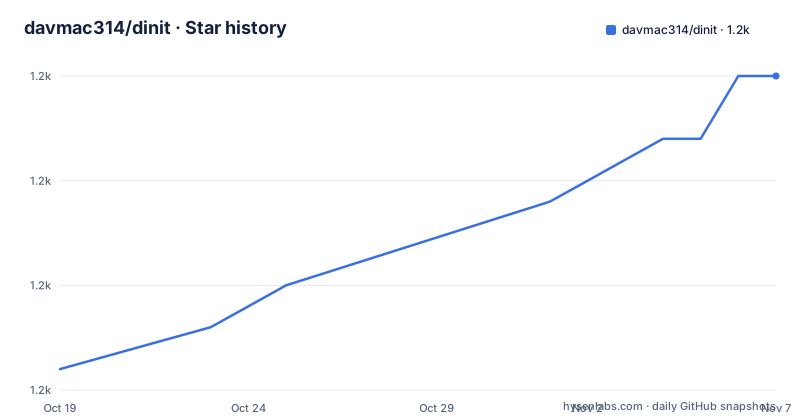
Star history
- davmac314/dinit1,185 ★ · +14
| Repository | 2026-10-19 | 2026-11-07 |
|---|---|---|
| davmac314/dinit | 1.2k | 1.2k |
14 Stars in the last 19 days, measured from the daily GitHub snapshot. Compare with other projects
Editorial analysis
Dependencies decide the start order, not runlevel numbers
Dinit describes itself as a service supervisor with dependency support that can also act as the system init program, created with the intention of providing a portable init system with dependency management. The dependency model is the whole point. If one service's operation depends on another, the latter is started first, and when a dependency dies, Dinit does something more careful than a blind restart: it first rolls back all dependent services and restarts them when their dependencies are satisfied again. The stated development goals are clean design, robustness, portability and usability, plus an explicit avoidance of feature bloat, and the README says Dinit is designed to integrate with rather than subsume other system software. That last point explains a design choice that would otherwise look like a gap: Dinit does not try to be a socket activation, timer and cgroup manager in one package.
Five service types, and foreground is the one you want
A service is nominally a persistent process or system state. The two main types are a process service, represented by an actual process, and a scripted service, which is started and stopped by running a process, often a shell script, to completion. There are also background process services for programs that put themselves in the background by forking, internal services that are useful for grouping other processes or acting as checkpoints, and triggered services that require an external event to start. The guidance on foreground versus daemon mode is the part worth memorising. Many programs run either way, and the choice is dictated by a command line switch such as the -D and -F switches on Samba's smbd. The documentation is direct that foreground mode should be used for programs registered as process services, because that is what allows Dinit to monitor the process. Get that wrong and the service runs, but Dinit cannot see it.
Service descriptions are plain files in a searched directory
Dinit finds services by reading service description files whose name matches the service they configure. The default system location is `/etc/dinit.d`, and `/usr/local/lib/dinit.d` and `/lib/dinit.d` are also searched. The default user location is `$HOME/.config/dinit.d`, which is the setting that lets the same daemon work as a user process manager. The file format is specified in the dinit-service manual page, and the daemon itself in dinit(8). Nothing in the mechanism is exotic: a directory of text files, one per service, each describing the process to run and what it depends on. That is a deliberate contrast with a compiled-in or single-file approach, and it is the reason a distribution packager can add a service without touching Dinit itself.
Four binaries, each with a narrow job
The tool suite is where the scope shows. `dinit` is the daemon. `dinitctl` controls it, starting and stopping services and checking their state, and is documented in dinitctl(8). `dinit-check` checks service descriptions for errors and acts as a linter, documented in dinit-check(8). `dinit-monitor` monitors a service and runs a command when the service state changes, documented in dinit-monitor(8). Full documentation is in the manual pages rather than in the README, which is a deliberate split: the README is an overview, and the getting started guide lives in the getting started document in the `doc` directory. The linter in particular is worth knowing about if you are packaging services, because it means a malformed description can be caught before it is deployed rather than at boot.
The same daemon runs as root or as a user
Dinit is designed to run in two roles. As a system service manager it runs as root and uses system paths for configuration. As a user process it runs as an ordinary user and uses paths in the user's home directory for configuration. The same binary, the same service description format and the same dependency semantics cover both, which is why the project describes itself as portable and can act as an init system or a user service manager on many distributions. The README notes that Dinit is used as the init system for Chimera Linux and eweOS, is an init system option for Artix Linux and antiX, and is packaged as a user service manager on many other Linux distributions and operating systems. The author asks readers to consider sponsoring the development, and the software is written by Davin McCall with contributions from many others.
Building it means running the top level Makefile
The repository ships a `configure` script, a `configs/` directory holding per-OS configuration fragments, and a top level Makefile that drives the rest. The default target builds the bundled library, the source tree and the manual pages, and then prints what to run next:
make
make check
make check-igr
make install
The `check` target runs the unit tests, `check-igr` the integration tests, and `install` installs the binaries and the man pages. The Makefile's `mconfig` target is where the auto-configuration happens: it looks for a script named after the output of `uname`, falls back to a configuration file with the same naming, and otherwise runs `./configure`. A separate `run-cppcheck` target exists for static analysis. The build is plain C++ with a bundled copy of the Dasynq event handling library, which the README notes was written specifically to support Dinit and is bundled so that a separate copy is not required for compilation, though the bundled version omits the documentation and test suite.
Where Dinit will not fit
The boundaries follow from the design goals rather than from bugs. Since Dinit integrates with other system software instead of replacing it, a service that depends on systemd unit features, cgroup accounting, or systemd's socket and timer activation will not simply work under it. The foreground-mode rule is the other practical constraint: a program that insists on daemonising itself cannot be supervised as a process service, which pushes you toward the background process service type and gives up the precise restart semantics. The README's guidance on reporting issues is also a signal about the project's shape. Feature requests are only welcome from people doing system integration, such as distribution package maintainers with a real problem, or from people willing to provide patches, with an issue opened for discussion in that case. That is a maintainer protecting a small, deliberately bounded codebase, and it tells you what kind of engagement the project will accept.
Editorial conclusion
Adopt Dinit if you want a service manager where ordering comes from declared dependencies rather than from numbered runlevels, or if you are packaging a distribution that wants a lightweight init without the systemd feature set. Do not adopt it if your services depend on systemd-specific features such as socket or timer units, since the documented service types are process, scripted, background process, internal and triggered. Verify first that a real service you depend on can run in the foreground, since the documentation is explicit that foreground mode is what lets Dinit monitor the process, and read the comparison document in the `doc` directory before you decide, because the project keeps a written comparison with similar software there.
Frequently asked questions
What is Dinit and how is it different from a runlevel based init?
Dinit is a C++ service supervisor and init system with dependency support. Instead of numbered runlevels, a service declares what it depends on, and Dinit starts the dependency first and rolls back and restarts dependents when a dependency dies.
What service types does Dinit support?
The documented types are process, scripted, background process, internal and triggered. A process service is an actual supervised process, a scripted service is started and stopped by running a process to completion, and internal services are useful for grouping other processes or acting as checkpoints.
Where does Dinit look for service description files?
The default system location is `/etc/dinit.d`, with `/usr/local/lib/dinit.d` and `/lib/dinit.d` also searched. The default user location is `$HOME/.config/dinit.d`, and the file name matches the service it configures.
Why should a service run in the foreground under Dinit?
The README states that foreground mode should be used for programs registered as process services, because that allows Dinit to monitor the process. The choice is usually dictated by a command line switch on the program itself.
How do I build and test Dinit from source?
The top level Makefile drives everything. The default target builds the library, sources and man pages, then `make check` runs the unit tests, `make check-igr` the integration tests and `make install` installs the binaries and manual pages.
Official sources
Add this badge to your README
If you maintain this project, the badge below links readers to this analysis and shows its maintenance status from the daily GitHub snapshot. Paste the markdown into your README; add ?metric=license or ?metric=stars to the image URL for a different field.

[](https://hysenlabs.com/projects/davmac314-dinit)Star history chart for your README
[](https://hysenlabs.com/projects/davmac314-dinit)Was this useful?