Pane: A Terminal-First Manager for Running Many Coding Agents in Parallel
Terminal-first, open-source AI agent manager for any CLI agent (agent agnostic), any OS (mac, windows, linux). The Open-Source Agentic Development Environment for running multiple coding agents in parallel. Run locally or self-host Remote Pane to manage agents from desktop or phone. Simplify multi-agent orchestration with the runpane CLI.
At a glance
- What is it?
- Pane is an open-source, agent-agnostic terminal manager that wraps any CLI coding agent with session-based worktrees, remote control, and orchestration tools. It targets developers who juggle multiple agents across repositories and need a structured way to keep them isolated and visible.
- Who is it for?
- Adopt Pane if you run multiple coding agents in parallel and want a terminal-first layer that handles worktree creation, port isolation, and remote control without replacing your agent. Do not adopt it if you prefer a full IDE integration or need a formal license, since the repository declares NOASSERTION and the README does not specify a license.
- Can I use it commercially?
- Check first. The repository uses a licence we do not classify automatically, so read its LICENSE file before any commercial use.
- Is it still maintained?
- Yes. The repository last received commits 1 day ago.
- What is it written in?
- Mainly TypeScript, according to GitHub's language statistics.
Answers come from the project's GitHub data, last synced on October 22, 2026, and from our analysis. They are not legal advice.
Star history
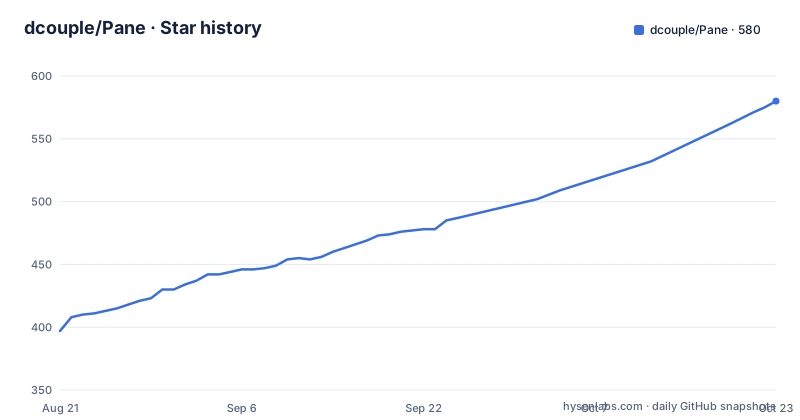
- dcouple/Pane575 ★ · +178
| Repository | 2026-08-21 | 2026-10-22 |
|---|---|---|
| dcouple/Pane | 397 | 575 |
178 Stars in the last 62 days, measured from the daily GitHub snapshot. Compare with other projects
Editorial analysis
The Problem: Air Traffic Control for Agents
Pane addresses a specific pain: developers who run several AI coding agents at once lose time to window juggling, copy-paste, and worktree management. The README compares this to air traffic control with a walkie-talkie. The core issue is not the models, which can work autonomously for hours, but the interaction layer. Pane positions itself as a manager, not a replacement. If a tool runs in a terminal, it can run inside Pane. That includes Claude Code, Codex, Cursor Agent, Aider, and Goose. The project targets developers who already use CLI agents and want a structured way to run them in parallel without abandoning their terminal workflow.
How Pane Works: Worktrees as the Core Mechanism
The README describes a session-based model where Pane creates a git worktree for each session. When you create a session, Pane adds the worktree; when you delete the session, it cleans up. A keyboard shortcut rebases from main. This removes the need to type git worktree commands manually. The isolation benefits of worktrees, such as separate branches and no conflicts, come without the usual friction. Pane also mirrors .env files and secrets from the root project into each worktree, so a new pane is runnable immediately. Each pane gets its own port range, which lets you run several dev servers without conflict. This is a concrete design choice: the worktree is the unit of isolation, and Pane hides its lifecycle.
Getting Started: Install Commands and Setup
The README gives a quick install for Mac and Linux: curl -fsSL https://runpane.com/install.sh | sh. For Windows PowerShell, it is irm https://runpane.com/install.ps1 | iex. The README notes that this bypasses macOS Gatekeeper and Windows SmartScreen prompts. Alternative methods include npx --yes runpane@latest for guided setup, pnpm dlx runpane@latest, pipx run runpane, or a persistent npm install with npm i -g runpane followed by runpane setup. The install script is the recommended path. For Remote Pane, the setup starts inside the app: install Pane on the host machine, then open Settings and connect with a pane-remote:// code. The CLI contract is documented in docs/RUNPANE_CLI_CONTRACT.md, with commands like runpane agent-context, runpane repos add, and runpane panes create.
Remote Pane: Self-Hosted Control from Anywhere
Remote Pane is a notable feature. It lets you run agents on a VM, WSL box, home server, or cloud machine while keeping the UI on your laptop or phone. The host machine holds the repos, terminals, git state, files, and agent credentials. The client connects with a pane-remote:// code. The README emphasizes that Remote Pane is self-hosted and open source. This is a different approach from cloud-only agent platforms: you control the compute and the data. The browser app at runpane.com/app is the client for phone or desktop. This is a real alternative to running everything locally, but it also means you need to manage the host machine yourself, including its security and availability.
Agent-Operable CLI: Letting Agents Manage Themselves
Pane ships with an agent-operable CLI. The commands runpane agent-context, runpane repos add, and runpane panes create let a coding agent discover Pane's command schema, register a repository, and open follow-up panes for issues or tasks. This is a contract, documented in docs/RUNPANE_CLI_CONTRACT.md, that turns Pane into a coordination layer that agents can invoke. The README does not show the exact output of agent-context, but the idea is clear: an agent can ask Pane what it can do, then create new panes without human intervention. This is a step beyond a manual UI, and it suggests a workflow where agents spawn sub-agents for parallel work. The design assumes the agent can parse the schema correctly, which may be a point of failure if the agent misinterprets the contract.
What's Missing: Limitations and Trade-offs
The README is clear about what Pane is not: it is not an IDE and not a terminal emulator. It manages agents without replacing them. That means you still need your agent of choice installed and configured. The project's license is listed as NOASSERTION, which is a red flag for organizations that require a clear open-source license. The README does not specify a license, so you cannot assume it is MIT or Apache. Another limitation is that the worktree lifecycle is automated, which is convenient but could be surprising if you have an existing worktree workflow. The README mentions a terminal rendering patch for Claude Code's scroll-jump bug, but it does not guarantee that all agent quirks are fixed. The install script bypasses OS prompts, which is convenient but also a security consideration: you are piping a remote script directly into your shell.
Alternatives and Comparisons: What Else Is Out There
The main alternative is manual worktree management plus a terminal multiplexer like tmux. That approach gives you the same isolation but requires you to run git worktree add, git worktree remove, and track paths yourself. Pane automates that, which is the core difference. Another alternative is an IDE-based multi-agent setup, such as using Cursor's built-in agent panels. That approach is more integrated with an editor but is not terminal-first and may not be agent-agnostic. Pane's README explicitly says it works with any CLI agent, which is a different trade-off: you get a consistent interface across agents, but you lose the deep editor integration. For remote control, the alternative is running agents on a cloud VM and using SSH, which gives you control but not the pane-based UI or the worktree automation. Pane's Remote Pane bundles those into one self-hosted service.
Maintenance and Upgrade Considerations
The repository is actively maintained, with multiple releases on the same day: v2.4.87, v2.4.86, and v2.4.85. The last push date is 2026-08-29, which suggests a high release cadence. That is good for bug fixes but also means the tool changes often, and you may need to keep up with the changelog at runpane.com/changelog. The install script downloads the latest version, so upgrades are likely a re-run of the same command. The README does not mention a migration path for configuration or sessions, so you should assume that major versions could change the data directory format. The data directory is referenced in Pane Chat, which starts there, so it is a central part of the state. If you self-host Remote Pane, you are responsible for patching the host machine. The license being NOASSERTION is a maintenance risk for legal review, as it may not be safe to redistribute or modify.
Editorial conclusion
Adopt Pane if you run multiple coding agents in parallel and want a terminal-first layer that handles worktree creation, port isolation, and remote control without replacing your agent. Do not adopt it if you prefer a full IDE integration or need a formal license, since the repository declares NOASSERTION and the README does not specify a license. Before relying on it for production work, verify the license terms with the maintainers, test the install script on your OS, and confirm that the worktree lifecycle matches your git workflow. The project is actively maintained with frequent releases, but the lack of a clear license is a concrete blocker for many organizations.
Frequently asked questions
How do I install Pane?
The recommended route is curl -fsSL https://runpane.com/install.sh | sh on Mac and Linux, or irm https://runpane.com/install.ps1 | iex on Windows PowerShell. Quieter alternatives are provided through the Node and Python package managers, and direct per-platform downloads are linked from the readme.
Does the Pane installer avoid the macOS or Windows security prompt?
Yes, and the readme says so. A line under the install commands states that the installer bypasses the macOS Gatekeeper and the Windows SmartScreen prompts on direct downloads.
Which coding agents does Pane support?
Any tool that runs in a terminal, with no plugin or SDK required. The named examples are Claude Code, Codex, Cursor Agent, Aider and Goose, and Pane is described as agent agnostic.
How does Pane handle git worktrees?
It treats them as invisible. Creating a session creates the worktree, deleting a session cleans it up, and a shortcut rebases from the mainline, so the worktree commands themselves are never typed.
What can a coding agent do to Pane itself?
Three commands are provided for that, one to read the command schema, one to add a repository and one to create panes, with the schema published as a contract document. The same commands are exposed to Claude Code, Codex and Cursor as tools over the protocol.
What does Remote Pane keep on the remote host?
The repositories, terminals, git state, files, agent credentials and compute all stay on the host machine, while the interface runs on your desktop or in a browser on your phone. Remote Pane is described as self-hosted and open source.
Official sources
Add this badge to your README
If you maintain this project, the badge below links readers to this analysis and shows its maintenance status from the daily GitHub snapshot. Paste the markdown into your README; add ?metric=license or ?metric=stars to the image URL for a different field.

[](https://hysenlabs.com/projects/dcouple-pane)Star history chart for your README
[](https://hysenlabs.com/projects/dcouple-pane)