WebXR Export: shipping a Unity project to the browser as a WebXR app
Develop and export WebXR experiences using Unity WebGL
At a glance
- What is it?
- unity-webxr-export is an Apache-2.0 Unity package that bridges the WebXR API into Unity WebGL, so a project built in the Unity editor in C# can be published as an immersive web experience. It covers AR and VR sessions, hand input, hit test and mixed reality capture, and it drops support for the Built-in Render Pipeline.
- Who is it for?
- Adopt unity-webxr-export if your team already works in Unity and C# and needs the result delivered as a web page rather than as a native or store app, since that is the case this package exists for and the alternative is rewriting the experience in a web stack.
- Can I use it commercially?
- Yes. Apache-2.0 is a permissive licence: you can use, modify and sell software built on it, as long as you keep its copyright and licence notices.
- Is it still maintained?
- Yes. The repository last received commits 87 days ago.
- What is it written in?
- Mainly JavaScript, according to GitHub's language statistics.
Answers come from the project's GitHub data, last synced on November 7, 2026, and from our analysis. They are not legal advice.
Star history
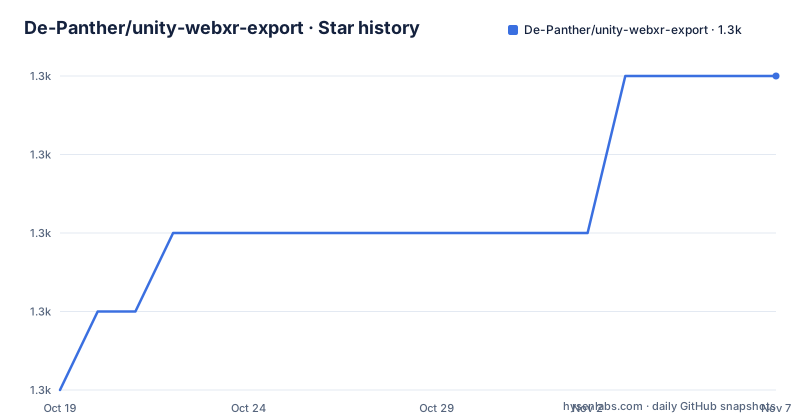
- De-Panther/unity-webxr-export1,267 ★ · +4
| Repository | 2026-10-19 | 2026-11-07 |
|---|---|---|
| De-Panther/unity-webxr-export | 1.3k | 1.3k |
4 Stars in the last 19 days, measured from the daily GitHub snapshot. Compare with other projects
Editorial analysis
The gap: Unity on the web, but with the WebXR API underneath
The project exists to close a specific mismatch. Unity WebGL already exports a Unity project to the browser, but the web platform for immersive hardware is the WebXR API, and the two do not talk to each other without a bridge. WebXR Export integrates the WebXR JavaScript API into Unity WebGL and lets you develop experiences in the familiar editor using C#. The audience is a team that has decided Unity is the right authoring tool and now needs the output to run on a headset or a phone through a browser, because a link is a much easier thing to share, embed and iterate on than a store build. The project supports both Augmented Reality and Virtual Reality WebXR immersive sessions, and the repository publishes a live demo plus a separate XR Interaction Toolkit demo so you can see the working result before installing anything. The topic list is telling about the audience: webar, webvr, mixed-reality-capture, webassembly and webgl all appear, which is a set of concerns that only exists when the deployment target is a browser.
Two packages, and the symlink trap that catches everyone
Installation comes as two Unity packages, and the documentation names a better option than downloading: import the WebXR Export and WebXR Interactions packages from OpenUPM, with the package ids com.de-panther.webxr and com.de-panther.webxr-interactions. Importing from git is the alternative, with per-package documentation in the Packages directory. Before either route, there is a compatibility notice that catches people out: this repository uses symlinks, so symlinks have to be enabled when you clone, which on a clone without the setting is done with:
git config core.symlinks trueThe other option the project offers is using it as a Unity Package (UPM). The two packages cover different ground. WebXR Export is the core, the part that turns a WebGL build into an immersive session, and WebXR Interactions is the layer that plugs into the Unity XR Interaction Toolkit, which is what the second demo shows. The repository itself is laid out the way a Unity project would be: MainProject/, DebugProjects/, XRInteractionToolkitDemo/, Packages/ containing the actual package sources, ArtSources/, Build/ for the web demo output, and a Documentation/ folder that the README points to for getting started.
Which WebXR modules map onto which Unity systems
The API support table is the most useful part of the documentation, because it shows exactly how the browser platform is mapped onto Unity's subsystems. The WebXR Device API supports the Unity Display and Input XR subsystems, which is the foundation everything else sits on. The WebXR Gamepads Module, including hapticActuators on supported devices, maps onto Unity's New Input System. The WebXR Augmented Reality Module and the WebXR Hit Test Module are supported, with the hit test currently limited to the viewer space Hit Test source and explicitly not using AR Foundation hit test. WebXR Hand Input supports the Unity XR Hands package, and WebXR Input Profiles are loaded through the WebXR Input Profiles Loader, which supports the XR Interaction Toolkit. On top of the standard set there is a Spectator Camera and a WebXR Mixed Reality Capture feature, with its own document in the Documentation folder. The project also states that version 0.20.0 and up includes Unity XR SDK support, and that the current releases are 0.25.0 for both packages, published on 2026-05-10.
A tested device matrix, and the two entries with known problems
The documentation lists the browsers and platforms the demo was tested on, which is unusually concrete and is the most useful thing in the README for planning a deployment. Chrome and Edge on Windows are covered. On Meta Quest hardware there is Quest Browser and Wolvic, on the Quest 1, 2 and Pro. Safari on Apple Vision Pro is listed, and Edge on Hololens 2. On Android, Chrome and the Samsung Internet browser both support AR and VR sessions. On iOS there is Mozilla WebXR Viewer, and the headset entries continue with Firefox Reality on VIVE Focus Plus, Wolvic on VIVE Focus 3, Helio on Magic Leap 2, PICO Browser and Wolvic on the PICO 4 and PICO 4E, and the default browser on Snap's Spectacles. Two caveats come with the list. Helio on Magic Leap One has a bug related to eye views, and the default browser on Spectacles has limited support for Hit Test, with a pointer to the Snap WebXR documentation. The Unity Editor versions required are listed too, from 2020.3.11f1 and 2021.1.4f1 through 2022.1, 2023.1 and 6000.0.23f1.
The polyfill path and the mobile caveat
Two things soften the browser story. The first is the WebXR Polyfill: if the user does not have a supported headset, browser or device, the content still works through it. That matters for a WebGL export, because a link that only runs on a Quest browser is a link almost nobody outside the team will open. The second is mobile, and the documentation is careful rather than optimistic. The asset works by using Unity's WebGL platform support and therefore shares the same limitations, so mobile support is limited and may not work. The project says it tried to make it light so mobile devices could handle it, and that it can run on high-end mobile devices with some optimizations, with a link to Unity's own WebGL browser compatibility documentation. There is also a spectating story in mixed reality capture, and the roadmap notes that AR Foundation support is the next item, with passthrough and see-through and hit test currently working without it. Version 0.20.0 also dropped support for the Built-in Render Pipeline, which the project says needs more investigation to add back.
How this differs from authoring WebXR directly in a web stack
The alternative approach is to skip Unity and write the experience for the browser with a web 3D stack, which is the route the linked resources in the project point towards, including the Immersive Web working group material, the WebXR samples and the WebXR Polyfill, and a separate Unity-adjacent project, SimpleWebXR, is listed under useful links. The difference in approach is where the authoring effort goes. A web-first build gets the platform directly: the WebXR API is the only thing you talk to, there is no WebGL compilation step, no asset pipeline conversion, and the download is whatever your bundler produces. Unity-first builds get a mature editor, a scene format, an animation system, a physics engine and an asset pipeline that a team already knows, at the price of a WebGL export that carries the Unity runtime into the page and inherits the WebGL platform's constraints, which the project itself says is why mobile support is limited. The trade is size, load time and engine fidelity against authoring speed and tooling. If the deliverable is a marketing page with one interactive scene, a web stack is usually the shorter path. If it is a large product with an art pipeline and physics, the Unity route pays for itself.
Editorial conclusion
Adopt unity-webxr-export if your team already works in Unity and C# and needs the result delivered as a web page rather than as a native or store app, since that is the case this package exists for and the alternative is rewriting the experience in a web stack. Do not adopt it if you need the Built-in Render Pipeline, if you depend on AR Foundation, or if you need a guaranteed mobile experience, since the package dropped the built-in pipeline at version 0.20.0, lists AR Foundation as the next item on the roadmap, and states that mobile support is limited. Before you start, clone with symlinks enabled, since the repository uses them, and check your target device against the browser compatibility list in the project documentation.
Frequently asked questions
How do I install WebXR Export in Unity?
The documentation recommends importing the WebXR Export and WebXR Interactions packages from OpenUPM, with the ids com.de-panther.webxr and com.de-panther.webxr-interactions. Importing from git is the alternative, and the repository uses symlinks, so `git config core.symlinks true` is needed if you clone it.
Which WebXR modules does the package support?
The WebXR Device API, the Gamepads Module including haptic actuators, the Augmented Reality Module, the Hit Test Module, Hand Input and Input Profiles. The hit test is currently limited to the viewer space source and does not use AR Foundation hit test.
Does it work on mobile devices?
Not reliably. The documentation states that the asset uses Unity's WebGL platform support and shares its limitations, so mobile support is limited and may not work, though it can run on high-end mobile devices with some optimizations.
What is the project status and current version?
The contributing section reminds readers that it is an experimental project. The latest listed releases are WebXR Export 0.25.0 and WebXR Interactions 0.25.0 from 2026-05-10, and the last push to the repository was on 2026-08-13.
What licence is unity-webxr-export released under?
The project is licensed under Apache-2.0, with the LICENSE file at the root of the repository. The changelogs for both packages are kept in the Packages directory.
Official sources
Add this badge to your README
If you maintain this project, the badge below links readers to this analysis and shows its maintenance status from the daily GitHub snapshot. Paste the markdown into your README; add ?metric=license or ?metric=stars to the image URL for a different field.

[](https://hysenlabs.com/projects/de-panther-unity-webxr-export)Star history chart for your README
[](https://hysenlabs.com/projects/de-panther-unity-webxr-export)Was this useful?