OmniVoice Studio, now VoiceStudio: a local voice app whose hardware support splits sharply by platform
Local voice clone, video dubbing, dictation and audiobook maker. The open-source ElevenLabs alternative.
At a glance
- What is it?
- debpalash/OmniVoice-Studio packages voice cloning, dubbing, dictation and audiobook narration into one desktop app built around the k2-fsa/OmniVoice model. What you get depends heavily on your machine: Apple Silicon and x64 GPUs run engines locally, while Intel Macs and Windows on ARM get a reduced setup.
- Who is it for?
- VoiceStudio suits people with an Apple Silicon Mac on macOS 13.3 or later, or an x64 Windows or Linux machine with an NVIDIA GPU, who want cloning, dubbing and dictation without sending audio to a hosted service. Intel Mac owners and Windows on ARM users get a reduced setup and should look elsewhere unless they already run a second machine for the backend.
- Can I use it commercially?
- Yes, with strict conditions. AGPL-3.0 is a network copyleft licence: if people use a modified version over a network, for example as a hosted service, you must offer them its source code under the same licence.
- Is it still maintained?
- Yes. The repository received new commits within the last day.
- What is it written in?
- Mainly Python, according to GitHub's language statistics.
Answers come from the project's GitHub data, last synced on November 13, 2026, and from our analysis. They are not legal advice.
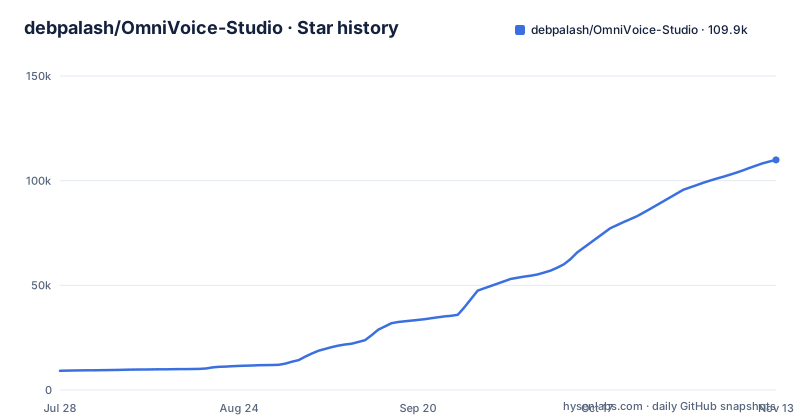
Star history
- debpalash/OmniVoice-Studio109,937 ★ · +100,744
| Repository | 2026-07-28 | 2026-11-13 |
|---|---|---|
| debpalash/OmniVoice-Studio | 9.2k | 109.9k |
100,744 Stars in the last 108 days, measured from the daily GitHub snapshot. Compare with other projects
Editorial analysis
The repository now ships under the VoiceStudio name
The project indexed as debpalash/OmniVoice-Studio now calls itself VoiceStudio. Its download, CI and release links point at github.com/debpalash/VoiceStudio, the website is voicestudio.sh, and the older homepage palash.dev/omnivoice still appears in the repository metadata. Inside, the Python package is still named omnivoice and the JavaScript workspace is omnivoice-studio-monorepo, both at version 0.5.7. The name OmniVoice also refers to something narrower: the default engine is powered by k2-fsa/OmniVoice, a TTS model by Han Zhu that is bundled in the omnivoice/ directory. So a search for OmniVoice can land on either the model or this desktop app, and they are not the same thing. The app wraps that model plus many other engines in an Electron interface with a Python backend.
Six jobs share one workspace, and cloning depends on a clean reference
VoiceStudio puts six tasks behind one interface. Voice cloning turns a clean reference recording into speech in a familiar voice, and the guide linked for it is docs/audio-quality.md, which tells you where the effort goes: the reference recording. Video dubbing translates a video and times the new speech to the original. Voice design generates a voice from a written description instead of a recording. Dictation runs through a floating widget backed by local transcription. Narration covers stories, audiobooks and queued batch jobs. For automation there is a local API, an MCP server, reusable recipes and watch folders, so a folder of scripts can be turned into audio without opening the app each time. The headline claims 646 languages, but it does not break that figure down per engine or per feature, so a dubbing plan for a less common language should start with docs/feature-catalog.md.
Engines arrive one download at a time through the Model Manager
The app does not install every engine up front. VoiceStudio, the default engine built on k2-fsa/OmniVoice, is the starting point, and the Model Manager lets you pick from dozens of other engines and download only the models you need, with a separate guide at docs/downloading-models.md and a screen for model packs. The practical effect is that the first install is not the full catalog. Trying a second engine for a language or a voice style the default does not handle well is an extra download, and the list of what exists sits in docs/feature-catalog.md rather than on the front page. On Linux, GPU acceleration through Vulkan applies only to supported GGUF engines, so which engine you pick also decides whether a non-NVIDIA GPU is used at all.
Apple Silicon gets Metal, Intel Macs get only the interface
The stable macOS build targets Apple Silicon on macOS 13.3 or later and runs local engines with Metal (MPS). There are three ways in: Homebrew, a DMG you drag into Applications, or a one-command installer. The Homebrew route needs a tap and a trust step before the cask installs:
brew tap debpalash/tap
brew trust --cask debpalash/tap/voicestudio
brew install --cask debpalash/tap/voicestudio
The installer is a single pipe to sh:
curl -fsSL https://voicestudio.sh/install | shIntel Macs are marked Limited. The interface runs there, but it has to connect to a VoiceStudio backend on another computer, so an Intel MacBook on its own cannot clone or dub anything. If macOS reports that "VoiceStudio is damaged and can't be opened", Gatekeeper blocked the app; the download is not broken, and docs/install/macos.md has the quarantine fix.
Windows on ARM runs the Python backend under CPU emulation
The stable Windows build is x64 on Windows 10 or 11, with NVIDIA CUDA, CPU, and AMD ROCm as an opt-in path covered in docs/install/windows-rocm.md. AMD owners therefore have extra setup that NVIDIA owners skip. Installation is either the EXE from the releases page or one PowerShell line:
irm https://voicestudio.sh/install.ps1 | iexWindows on ARM is labelled experimental. The interface is native, but the x64 Python backend runs under emulation on the CPU. That means no GPU acceleration on those machines, and every cloning, dubbing or transcription job runs through an emulated CPU backend. For long audiobook batches or video dubbing, an ARM laptop is the wrong host, and connecting to a backend elsewhere is the better plan.
Linux gets five package formats but Vulkan only for GGUF engines
Linux is a stable x64 target with NVIDIA CUDA, CPU, and Vulkan for supported GGUF engines. Packages come as AUR, Snap, DEB, AppImage and Nix, and the repository carries a snap/ directory and a top-level flake.nix to back the last two. The hardware line is the part to read carefully. CUDA covers NVIDIA cards; ROCm appears in the Windows line, while the Linux stable line names Vulkan, and only for GGUF engines. An AMD or Intel GPU on Linux helps only when the engine you chose in the Model Manager is one of those GGUF engines; everything else runs on the CPU. Pick the engine first, then decide whether your GPU matters.
Source builds need Python 3.11, bun and setuptools held below 80
Running from source means two toolchains. pyproject.toml requires Python 3.11 or newer, with torch and torchaudio 2.4 or newer, transformers 5.10.0 or newer and gradio 6.15.1 or newer. The JavaScript side pins [email protected] as its package manager, and the dev:web script runs setup:api, then starts the API and the frontend together through concurrently, killing both if either fails. One dependency pin is a known trap. WhisperX and faster-whisper import pkg_resources at runtime, and setuptools 80 and later dropped it, so an unpinned install fails with No module named 'pkg_resources' and the app reports No ASR backend is ready. The project caps setuptools below 80 for this reason; installing into an existing environment with a newer setuptools breaks transcription. The Makefile holds only maintainer release shortcuts, not build steps.
AGPL with a paid exit for closed-source use
VoiceStudio is licensed AGPL-3.0-only. A commercial license is available for proprietary or closed-source use without AGPL obligations, through [email protected]. The bundled omnivoice TTS model by Han Zhu stays Apache-2.0 upstream, which the project notes is AGPL-compatible. For individuals running it on their own machine the app is free; a company embedding it in a closed product has to either meet the AGPL terms or buy that license. Development is current: v0.5.7 shipped on October 26, 2026, the same day as v0.5.7-beta.3, and the last push landed on November 2, 2026. A separate mobile line is tagged on its own, with mobile-v0.5.7-beta.2 published on October 24, 2026, and it is still a beta.
Editorial conclusion
VoiceStudio suits people with an Apple Silicon Mac on macOS 13.3 or later, or an x64 Windows or Linux machine with an NVIDIA GPU, who want cloning, dubbing and dictation without sending audio to a hosted service. Intel Mac owners and Windows on ARM users get a reduced setup and should look elsewhere unless they already run a second machine for the backend. Companies shipping closed-source products need the commercial license. Before committing, confirm in docs/feature-catalog.md that the engine you want covers your target language, and when running from source keep setuptools below 80 so WhisperX transcription keeps working.
Frequently asked questions
Is OmniVoice free to use?
OmniVoice Studio, now VoiceStudio, is free and open source under AGPL-3.0-only. A commercial license for closed-source use without AGPL obligations is available through [email protected].
How to install OmniVoice Studio?
On Apple Silicon Macs use Homebrew with brew install --cask debpalash/tap/voicestudio after tapping and trusting debpalash/tap, a DMG, or the curl installer. On Windows x64 run irm https://voicestudio.sh/install.ps1 | iex, and on Linux choose AUR, Snap, DEB, AppImage or Nix.
What is OmniVoice Studio?
It is a local voice app, now named VoiceStudio, for voice cloning, voice design, video dubbing, dictation, transcription and audiobook narration. Its default engine is powered by k2-fsa/OmniVoice, with dozens of other engines in the Model Manager.
How to use OmniVoice Studio?
Install the app, pick and download an engine in the Model Manager, then use the cloning, dubbing, voice design, dictation or narration tools. For automation it offers a local API, MCP, reusable recipes and watch folders.
Official sources
Add this badge to your README
If you maintain this project, the badge below links readers to this analysis and shows its maintenance status from the daily GitHub snapshot. Paste the markdown into your README; add ?metric=license or ?metric=stars to the image URL for a different field.

[](https://hysenlabs.com/projects/debpalash-omnivoice-studio)
[](https://hysenlabs.com/projects/debpalash-omnivoice-studio)Star history chart for your README
[](https://hysenlabs.com/projects/debpalash-omnivoice-studio)Was this useful?