demisto/content: the Cortex XSOAR content repository, where playbooks and integrations are shared
Demisto is now Cortex XSOAR. Automate and orchestrate your Security Operations with Cortex XSOAR's ever-growing Content Repository. Pull Requests are always welcome and highly appreciated!
At a glance
- What is it?
- This is the MIT licensed repository behind the Cortex XSOAR security orchestration platform, holding playbooks, Python and JavaScript automation scripts, integrations, report templates and test data. The content is portable through the open COPS playbook format, but every script in it is written to run inside the XSOAR platform, with Docker as the sandbox.
- Who is it for?
- Adopt this repository if you run Cortex XSOAR and want to start from playbooks, scripts or integrations that other security teams have already written, since the COPS format means you can import a peer's playbook and modify it rather than starting from a blank canvas. Do not adopt it as a standalone Python library, because the scripts are written to execute inside the platform and rely on its runtime, and do not assume the MIT licence covers the platform itself.
- Can I use it commercially?
- Yes. MIT is a permissive licence: you can use, modify and sell software built on it, as long as you keep its copyright and licence notices.
- Is it still maintained?
- Yes. The repository last received commits 1 day ago.
- What is it written in?
- Mainly Python, according to GitHub's language statistics.
Answers come from the project's GitHub data, last synced on November 7, 2026, and from our analysis. They are not legal advice.
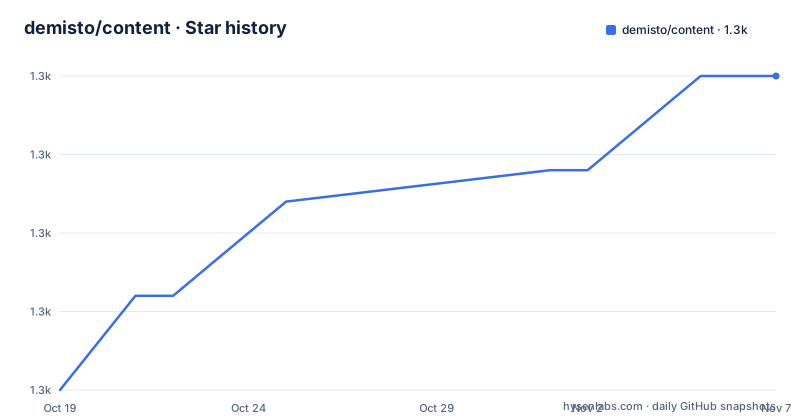
Star history
- demisto/content1,325 ★ · +10
| Repository | 2026-10-19 | 2026-11-07 |
|---|---|---|
| demisto/content | 1.3k | 1.3k |
10 Stars in the last 19 days, measured from the daily GitHub snapshot. Compare with other projects
Editorial analysis
Content, not a library you import
This repository is the content repository of the Cortex XSOAR Platform, formerly Demisto, and it holds playbooks, automation scripts, report templates and other useful content contributed by security practitioners. The stated motivation is to open up the toolset and make it a collaborative process for the security community, sharing useful knowledge and flexible, customizable tools.
The word content is the one to hold on to. Nothing here is a Python package you add to your own application, even though the primary language is Python. The scripts are written to run inside the Cortex XSOAR Platform, the integrations are integrations for that platform, and the playbooks are consumed by its visual editor. The repository is MIT licensed, which makes the content reusable, but reuse means importing a pack into the platform, not importing a module into your codebase.
The scale of the repository reflects that. The tree has `Packs/` for the packaged content, `Tests/`, `TestData/` and `TestPlaybooks/` for the automated test suites that come with it, `Config/`, `Documentation/`, `Templates/` and `Images/` for the assets each pack needs, plus `contribution/`, `docs/`, a `content-descriptor.json` and a `validation_config.toml`.
Documentation for contributors lives in the Content Developer Portal at xsoar.pan.dev rather than in the repository, and the contribution guide is on the same site, so the README is an invitation and a map rather than a manual.
Playbooks travel as COPS files
The playbook model is the part of the platform that the repository most clearly wants to share. The visual playbook editor lets you add and modify tasks, create control flow according to the answers returned from your queries, and automate work with your existing security tools, services and products.
The portability mechanism is the open playbook format, COPS, whose specification lives in its own repository. You can export your work to a file in the COPS format and import playbooks shared by peers who have done the same. For a team building a detection or response workflow, that means the unit of sharing is a file, and the unit of reuse is another team's file, edited rather than written from scratch.
The repository also describes a broader plan, releasing more and more playbooks for interesting scenarios and inviting pull requests for playbooks people have built themselves. The AI and human collaboration angle is visible in the tree as well, with a `.ai/` directory, an `AGENTS.md` file, `.guardrails/` and a `.hooks/` directory, which suggests AI assistance is part of the contribution workflow rather than an afterthought.
Scripts that drive products and react to their output
The scripts are written in Python or JavaScript and perform Security Operations tasks inside the platform. The description of what they do is specific: they can query or send commands to a long list of existing security products, and react based on the output. The design intent is that you take the logic and the way you want to work and write your own scripts, which gives maximum flexibility.
Two operational details in that description matter for anyone planning to use this content. The products and services you drive can be online cloud based or on-premises setups, and the platform provides tools to support more complex topologies, such as when the product's subnet is firewalled off. That second point is the one that decides whether a script will work in your environment, because a script that assumes a direct path to a management console is not a script that runs everywhere.
Integrations are the other half of the executable layer. They are written in JavaScript or Python, they enable the platform to orchestrate security and IT products, and each integration provides capabilities in the form of commands, where each command usually reflects a product capability, that is, an API, and returns both a human readable and a computer readable response. The dual response format is what lets a playbook branch on the machine readable form while an analyst reads the human readable form in the timeline.
Docker is the sandbox for scripts
The platform runs Python scripts and integrations in a controlled environment using Docker, and the repository says you can configure an existing Docker image from the Cortex XSOAR Docker Hub Organization or create a new one to suit your needs.
That is the practical answer to the question of how a script gets a dependable environment. A script that shells out to a binary, or depends on a specific library version, gets an image rather than whatever happens to be installed on the host, and that is what makes a shared script reproducible for someone else.
For contributors, the same idea shows up in the development setup. The README explains the devcontainer badges, and the Remote Containers and Codespaces links open VS Code, install the `Remote-Containers` extension if it is not there, clone the source into a container volume and spin up a development container configured with the recommended settings. The prerequisite is stated plainly: you need VS Code and Docker installed already.
The repository also carries a `.devcontainer/` directory, so the development container setup is checked in with the code rather than living only behind a badge.
The contribution pipeline is the real engineering
What makes this repository more than a dump of files is the machinery around it, and the configuration files show it clearly.
The Python side is managed with Poetry, with the project declaring Python 3.10 up to but not including 3.15, and the tool configuration sets Ruff to a line length of 130 targeting py311. The development group pins `demisto-sdk` at 1.39.11, with a comment that this version only affects GitHub Actions and that the SDK version is controlled elsewhere in the infrastructure repository. That comment is the clearest statement of the boundary here: this repository is validated by tooling whose version is set somewhere else.
The dependency groups are equally revealing. The GitHub Actions group pulls in `pytest`, `requests`, `PyGithub`, `gitpython`, `sendgrid` and `slack_sdk`, which is what a repository whose CI opens pull requests, talks to GitHub and posts to chat needs. The typing group carries a long list of stub packages, from `types-requests` to `types-paramiko`, which is the convention for typing a large legacy codebase that was not written with type hints from the start.
The JavaScript side exists for the documentation tooling, with `markdownlint` and the MDX compiler in the `package.json`, whose licence field reads ISC while the Python project metadata reads MIT, a small inconsistency in a repository that is MIT licensed overall.
[tool.poetry]
name = "content"
version = "0.1.0"
description = "Cortex XSOAR content"
authors = ["Cortex XSOAR"]
license = "MIT"
package-mode = false
Where the content repository is the wrong answer
The first wrong case is a team without the platform. Every script in this repository assumes a Cortex XSOAR runtime around it, with its task model, its context object, its way of returning results and its handling of errors. A script lifted into a plain Python service will not run as written, and rewriting it means rewriting the parts that talk to the platform, which is the majority of the interesting code.
The second wrong case is a team that only needs a single automation. A Python script that queries one API and posts one message does not need a container image, a pack, a test suite and a playbook. The overhead of the platform is only worth it when several automations need to be chained and the chaining is where the value is.
The third is a licensing assumption. The content is MIT licensed, which is genuinely useful, but that licence covers the content, not the platform that runs it. Importing community content is not the same as being licensed to run the platform, and a content pack may also reference integrations or products you do not have.
On maintenance, the last push to the repository was on 2026-10-19 and the repository has no GitHub releases, so the version of any pack you find is the version on the day you pull it. The `validation_config.toml`, the `Tests/` tree and the `demisto-sdk` dependency all point to a validation pipeline that runs on pull requests, and the contribution guide is the place to see what a new pack has to satisfy before it lands.
Editorial conclusion
Adopt this repository if you run Cortex XSOAR and want to start from playbooks, scripts or integrations that other security teams have already written, since the COPS format means you can import a peer's playbook and modify it rather than starting from a blank canvas. Do not adopt it as a standalone Python library, because the scripts are written to execute inside the platform and rely on its runtime, and do not assume the MIT licence covers the platform itself. Verify first that the pack you are pulling in matches the XSOAR version you run, that the `demisto-sdk` version the CI uses, pinned at 1.39.11 in the project configuration, matches your own tooling, and that the Docker image an integration needs is available for your deployment.
Frequently asked questions
What does the demisto/content repository contain?
It is the Cortex XSOAR content repository, holding playbooks, automation scripts written in Python or JavaScript, integrations, report templates written in JSON and the test data that comes with them, organised into packs under the `Packs/` directory.
How do I share a playbook with another team?
The platform's visual playbook editor lets you export your work to a file in the COPS format and import playbooks shared by peers. The specification for that open playbook format lives in the separate demisto/COPS repository.
Do the scripts in demisto/content run outside Cortex XSOAR?
No. The scripts are built to run inside the Cortex XSOAR Platform, where they can query or send commands to security products and react based on the output. They run in Docker images from the Cortex XSOAR Docker Hub Organization or one you build yourself.
How are contributions to demisto/content validated?
The repository carries test suites under `Tests/`, `TestData/` and `TestPlaybooks/`, a `validation_config.toml` and a `content-descriptor.json`, and it pins `demisto-sdk` at 1.39.11 for its GitHub Actions. The contribution guide and the Content Developer Portal at xsoar.pan.dev describe what a new or modified piece of content has to satisfy.
Official sources
Add this badge to your README
If you maintain this project, the badge below links readers to this analysis and shows its maintenance status from the daily GitHub snapshot. Paste the markdown into your README; add ?metric=license or ?metric=stars to the image URL for a different field.

[](https://hysenlabs.com/projects/demisto-content)Star history chart for your README
[](https://hysenlabs.com/projects/demisto-content)Was this useful?