Kraken 2: taxonomic classification built for speed and rewrite
The second version of the Kraken taxonomic sequence classification system
At a glance
- What is it?
- Kraken 2 is the second version of the Kraken taxonomic sequence classification system, written in C++ and released under the MIT licence. It is a full rewrite rather than a compatible successor, which is the single fact that matters most when you plan an adoption.
- Who is it for?
- Kraken 2 suits teams that classify reads against a reference and want a C++ implementation with a permissive licence and a documented manual, and it fits environments already standardised on Galaxy or Bioconda. It does not suit anyone who must keep Kraken 1 databases or scripts working unchanged, since the project states that Kraken 2 is not backwards compatible with Kraken 1.
- Can I use it commercially?
- Yes. MIT is a permissive licence: you can use, modify and sell software built on it, as long as you keep its copyright and licence notices.
- Is it still maintained?
- Yes. The repository last received commits 1 day ago.
- What is it written in?
- Mainly C++, according to GitHub's language statistics.
Answers come from the project's GitHub data, last synced on November 7, 2026, and from our analysis. They are not legal advice.
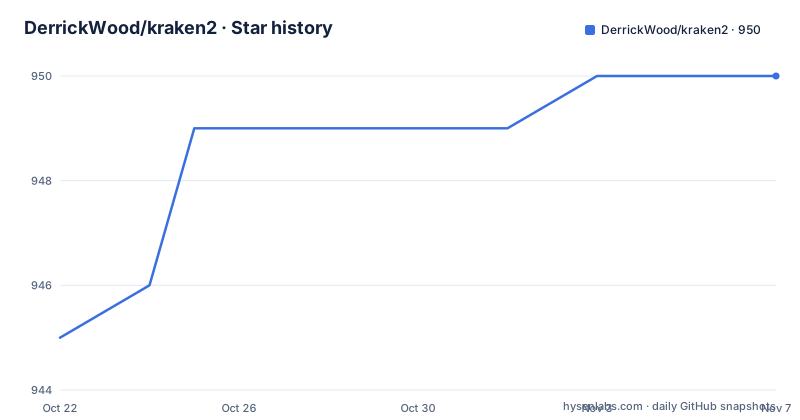
Star history
- DerrickWood/kraken2950 ★ · +5
| Repository | 2026-10-22 | 2026-11-07 |
|---|---|---|
| DerrickWood/kraken2 | 945 | 950 |
5 Stars in the last 16 days, measured from the daily GitHub snapshot. Compare with other projects
Editorial analysis
Kraken 2 is a rewrite with a different compatibility contract
The classification problem Kraken 2 addresses is the one every metagenomics pipeline runs into: reads are matched against a reference database, and the result is a taxonomic label per read, which rolls up to a community profile. The project describes itself plainly as the second version of the Kraken taxonomic sequence classification system, and its primary language is C++.
The important detail is buried in the README's pointer to the first version's paper, where a note states that Kraken 2 is a rewrite of Kraken 1 and is not backwards compatible with it. That single sentence removes a category of surprise that usually shows up weeks into a migration. Databases built for one version are not the databases of the other, and the same goes for anything you wrote around the older command line. A team that upgrades in place and keeps its old reference data will find the classifier refusing to read it, and the error message will not explain why.
So the audience splits cleanly. If you are choosing a classifier today, Kraken 2 is a reasonable candidate with a permissive licence and a recent release history. If you are maintaining an existing Kraken 1 pipeline, adopting Kraken 2 is a migration project, not a version bump, and you should budget for rebuilding the reference and revalidating results.
What the repository layout reveals about the build
The top-level listing gives a clear picture of how the project is put together, and it is worth reading before you clone anything.
Source lives in src/, data files in data/, tests in tests/ and the manual in docs/. The scripts/ directory is the interesting one. The Makefile enumerates the shell and Perl files in that directory plus four named entry points: scripts/k2, scripts/kraken2-build, scripts/kraken2 and scripts/kraken2-inspect. Four separate commands rather than one with many flags tells you the project splits the work into build the database, run the classification, inspect what is inside a database, and a shorter alias, rather than asking a single binary to do everything.
Alongside those, the root has CMakeLists.txt next to a Makefile, so two build systems coexist, plus install_kraken2.sh, a.travis.yml continuous integration file, a.readthedocs.yaml configuration for hosted documentation, a CHANGELOG.md, a VERSION file and a.github/ directory. The presence of both make and CMake is common in C++ projects that want to accommodate different distribution packaging, and the readthedocs configuration indicates the manual is published as rendered docs rather than only living in the repository.
make install puts the scripts and binaries where you point them
There is no package manager recipe in the repository itself for a plain source build, so the documented path is the Makefile. The target file defines three targets, all, clean and install, and the install target is the interesting one. Here it is in full:
all:
	$(MAKE) -C src all

install:
	mkdir -p "$(KRAKEN2_DIR)" && \
	cp $(SCRIPTS) "$(KRAKEN2_DIR)" && \
	cd src && $(MAKE) install KRAKEN2_DIR="$(KRAKEN2_DIR)"
Read the install target carefully, because it explains the deployment model. It creates the target directory, copies the scripts into it, then descends into src and runs the install there with the same directory passed down. In other words, the scripts and the compiled binary land side by side in one place, and that directory is chosen by you through KRAKEN2_DIR. The build itself is delegated to src through a recursive make, so the actual compilation rules live in the source subdirectory rather than at the root.
For a first use, the sequence is short: run make to build, then make install with KRAKEN2_DIR set to the location on your PATH, and check that the copied entry points such as scripts/kraken2 and scripts/k2 are executable from there. The Makefile also defines a clean target that recurses into src, so you can unwind a build without touching anything outside the tree. If you would rather not compile at all, the README carries a badge for installing through Bioconda and a link to the European Galaxy server, which both offer the tool without a local build.
--report-minimizer-data folds KrakenUniq into the report
One feature ties Kraken 2 back to a separate tool. The README points to the paper describing KrakenUniq and states that KrakenUniq's HLL-based functionality is incorporated into Kraken 2 when the --report-minimizer-data flag is used, as described in the Operating Manual.
That is a specific architectural decision worth understanding before you design a report. HyperLogLog based counting is what lets a report estimate the number of distinct taxa without holding every observed k-mer in memory, which is the memory problem that keeps large-scale classification runs from finishing on a modest machine. The trade-off is that the two paths are not the same computation. Without the flag, the classifier reports what it counted during the run. With the flag, the report is built from minimizer data using HLL based estimates, which is the KrakenUniq approach and gives coverage-style numbers instead of raw read counts.
Practical consequence: if downstream code parses the report, the two modes are not interchangeable, and a report that switches to minimizer data can look different from a plain one. Decide which mode you are validating first, and pin it in your pipeline configuration so that two runs are comparable. The flag is documented in the Operating Manual rather than on the README page, which is where the details of the report format live.
The manual and the papers carry the usage detail
The README for this project is short by design. It states what Kraken 2 is, points the reader to the Operating Manual at docs/MANUAL.html for details on how to use it, and then lists four publications.
Those four references are not padding. There is the paper describing the first version of Kraken, which the README flags because Kraken 2 is a rewrite of it, the paper describing KrakenUniq, the Kraken 2 paper itself, and a protocol paper describing use of Kraken 2. The protocol paper is the one to read if you are trying to reproduce published results, since a protocol is a parameter set, and it makes the difference between a comparison that is fair and one that is not.
Two release notes also matter for anyone pinning versions. The most recent tag is v2.18.0-RC1, published on 2026-10-20, and it is marked as a release candidate rather than a final release. Before that, version 2.17.2 was published on 2026-09-23, and v2.17.1 on 2025-11-24. The last push to the repository was on 2026-10-20 as well, so the tree is current, and the presence of a versioned CHANGELOG.md and a VERSION file at the root gives you a way to see what changed between the tags you already use and the one you are considering.
Where Kraken 2 is the wrong tool
There are situations where Kraken 2 is a poor fit, and two of them are stated facts rather than opinions.
The first is a strict Kraken 1 compatibility requirement. The project says outright that it is not backwards compatible, so an environment with a curated set of Kraken 1 databases, wrapper scripts and validated result files cannot switch without work. The second is a pipeline that cannot accept a candidate release. The newest tag is a release candidate, and while the preceding final release is less than a year old, production pipelines that pin versions should decide whether a tag ending in RC1 is acceptable at all.
There is also a documentation boundary. The README page itself gives almost no operational detail and delegates everything to the Operating Manual in docs/MANUAL.html. That is a good design for a tool with many options, but it means you cannot evaluate Kraken 2 from the repository front page alone. Anyone choosing between classifiers needs the manual in hand.
Finally, the licensing is genuinely permissive. The repository carries the MIT licence, which is short and imposes few conditions on use in commercial or academic work, and that is a real advantage over tools with copyleft or bespoke terms. It does not, however, tell you anything about the databases you classify against, which are separate artefacts with their own provenance and their own terms, and those are not covered by the licence of this code.
Editorial conclusion
Kraken 2 suits teams that classify reads against a reference and want a C++ implementation with a permissive licence and a documented manual, and it fits environments already standardised on Galaxy or Bioconda. It does not suit anyone who must keep Kraken 1 databases or scripts working unchanged, since the project states that Kraken 2 is not backwards compatible with Kraken 1. Before adopting it, read docs/MANUAL.html for the database workflow, check the CHANGELOG.md and the VERSION file to see whether the v2.18.0-RC1 tag is acceptable in your pipeline, and confirm that the build installs cleanly with make install into your own KRAKEN2_DIR.
Frequently asked questions
Is Kraken 2 backwards compatible with Kraken 1?
No. The README states that Kraken 2 is a rewrite of Kraken 1 and is not backwards compatible with it, so databases and scripts written for the first version are not expected to work unchanged. The Operating Manual in docs/MANUAL.html covers how to use Kraken 2.
How do I build and install Kraken 2 from source?
The Makefile at the repository root defines all, clean and install targets, and the install target copies the scripts from scripts/ and the built binaries into the directory you name in KRAKEN2_DIR. A recursive make is used to build the src/ subdirectory, and CMakeLists.txt is also provided for CMake based builds. The README also links a Bioconda install recipe and the European Galaxy server as alternatives to building locally.
What does the --report-minimizer-data flag do in Kraken 2?
According to the README, KrakenUniq's HLL-based functionality is incorporated into Kraken 2 when the --report-minimizer-data flag is used. The flag is described in the Operating Manual, and it changes how the report is computed compared with a standard run.
What licence is Kraken 2 released under and is it still being worked on?
The repository is released under the MIT licence, which places few conditions on reuse. The last push was on 2026-10-20, along with the v2.18.0-RC1 tag, and version 2.17.2 was published on 2026-09-23, so the tree is current. A CHANGELOG.md and a VERSION file at the repository root record what changes between tags.
Official sources
Add this badge to your README
If you maintain this project, the badge below links readers to this analysis and shows its maintenance status from the daily GitHub snapshot. Paste the markdown into your README; add ?metric=license or ?metric=stars to the image URL for a different field.

[](https://hysenlabs.com/projects/derrickwood-kraken2)Star history chart for your README
[](https://hysenlabs.com/projects/derrickwood-kraken2)Was this useful?