Web Archives turns archive lookup into a context menu, with six browser builds
Browser extension for viewing archived and cached versions of web pages, available for Chrome, Edge and Safari
At a glance
- What is it?
- Web Archives is a GPL-3.0 browser extension that finds archived and cached copies of the page you are on, across a configurable set of archive and search engines. One source tree produces six separate builds, from Chrome to Samsung Internet.
- Who is it for?
- Web Archives fits someone who reads dead links daily, does research on pages that keep changing, or needs to cite a stable snapshot of a volatile page, and who wants one interface across several browsers. It does not fit anyone who needs to archive a page themselves, since it retrieves existing snapshots rather than creating them, and the engine list lives in a wiki rather than the README, so confirm your sources before relying on a specific one.
- Can I use it commercially?
- Yes, with conditions. GPL-3.0 is a copyleft licence: if you distribute software that includes it, you must release that software's source code under the same licence. Running it internally without distributing it does not trigger that obligation.
- Is it still maintained?
- Yes. The repository last received commits 133 days ago.
- What is it written in?
- Mainly JavaScript, according to GitHub's language statistics.
Answers come from the project's GitHub data, last synced on November 7, 2026, and from our analysis. They are not legal advice.
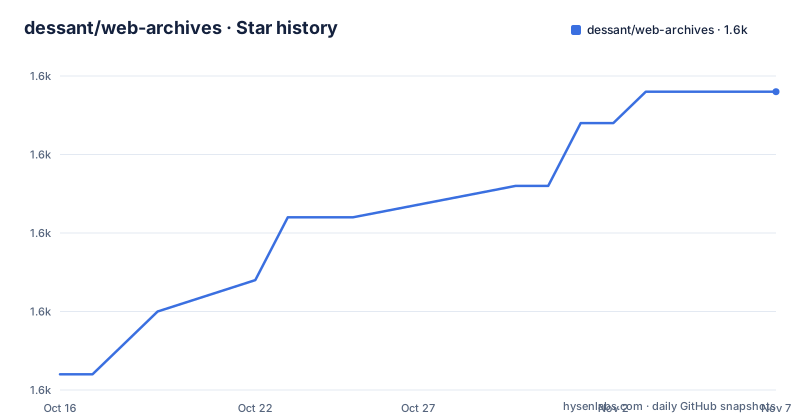
Star history
- dessant/web-archives1,612 ★ · +9
| Repository | 2026-10-16 | 2026-11-07 |
|---|---|---|
| dessant/web-archives | 1.6k | 1.6k |
9 Stars in the last 22 days, measured from the daily GitHub snapshot. Compare with other projects
Editorial analysis
One source tree, six target environments
The package.json build matrix is the clearest description of what this project is. Six environments are targeted, each with a development and a production script: chrome, edge, firefox, opera, safari and samsung.
Each target is selected by an environment variable rather than a branch. Every build script sets TARGET_ENV and then calls a single private script, so the underlying gulp build is identical and only the target differs. There is also a zip step, with a private _build:prod:zip that runs the production build and then a gulp zip task, again parameterised by TARGET_ENV.
That structure is the answer to a problem extension authors usually have: browsers differ in manifest format, in background script model and in review requirements, and maintaining six forks is how a project dies. One tree with a target variable keeps the differences in configuration.
The package is marked type module, version 7.3.3, licensed GPL-3.0-only, with a bugs URL pointing at GitHub issues. Around it sit babel.config.js for transpilation, webpack.config.js and gulpfile.js as the two build systems, postcss.config.js for styles, a .browserslistrc defining the browser targets, and .prettierrc.yml for formatting.
The .nvmrc pins a Node version for contributors, and .npmrc is present for registry configuration.
Search engines are configured data, not code
The extension's job is to take the URL of the page you are on and ask a set of services what they have for it. The interesting design decision is that the set is user-controlled.
The README describes a diverse set of archive and cache sources as supported, which can be toggled and reordered from the extension's options. The full list of supported engines lives in a wiki page, Search-engines, linked from the README, rather than in the README itself or in the source.
That has a real consequence for anyone evaluating the extension. You cannot tell from the repository what the defaults are, and you cannot tell which engines a new release added. If you depend on a specific source, you have to look it up in the wiki rather than assume it is enabled. The repository topics list wayback-machine and yandex among others, which indicates some of what is supported.
The reordering feature is the other half of this. Because the results appear as a list, the order determines what you click first. Someone who checks two sources and ignores the rest can put those two at the top and effectively ignore the rest, which turns a broad feature into a narrow one without patching anything.
Searches can be initiated from the context menu and from the browser toolbar, so the two entry points are the right-click menu on a page and a toolbar button.
Distribution spans four stores and two models
The extension is published on five store listings, and the split between them tells you how the project handles review policies.
Chrome is on the Chrome Web Store, Firefox on addons.mozilla.org under the addon name view-page-archive, Edge on the Microsoft Edge Add-ons store, and Opera on addons.opera.com under view-page-archive-cache. Safari is different: the homepage is an App Store listing for Web Archives for Safari on macOS, not a Safari extension gallery entry.
That matters for anyone modifying the code. Each store has its own review process, and an extension distributed through five of them needs five maintainer accounts and five submission paths. The project is distributed through multiple browser stores, and the GPL-3.0 licence applies to the source code.
The store names are also inconsistent, which suggests the Firefox and Opera listings were created earlier under different names and kept. If you search a store for this project by its repository name rather than by the store name, you may not find it.
Copyright is held by Armin Sebastian from 2017 to 2026, and funding is handled through Patreon, PayPal and Bitcoin links rather than a single platform.
What this extension does not do
The direction of travel is worth being precise about, because the name invites the wrong assumption.
Web Archives retrieves existing archived and cached versions. It does not create them. There is no save page, no snapshot submission and no self-hosted capture in the description or the feature set. If you want to preserve what you are looking at right now, you need something else.
It is also a lookup tool rather than a reader. The output is a list of links to other services' copies, opened in the usual way. It does not render an archived page inside the extension, strip scripts, or give you a unified reading view across sources.
Coverage is the other limit. A page behind a login may not have been archived by a service that saw only a login form. The extension cannot do anything about either case, and the README does not claim it filters results by availability, so the number of sources you see is not the number of hits you get.
Finally, every search sends the URL to an external service. That is inherent to the design, and for a URL on an internal network or one you would rather not disclose, the extension is asking a third party about your browsing.
Where direct archive URLs or a manual bookmark fit better
The alternatives split by how much you want to click.
Going straight to the archive is the zero-installation option. Using a single archive service directly can be useful when you already know which service to query. The extension's value is that it queries many at once and shows you which of them actually has the page, which is a real saving when you do not know what was crawled.
A bookmarking tool is the capture option. If your problem is that a page will disappear, saving it yourself with a reader or archiving extension solves the problem at the time you see it, while this extension only helps after the page is gone. The two are complementary rather than competing, and the capture tool is the one that prevents the problem.
A note-taking tool with an extension that fetches page content serves a third purpose: preserving the content alongside your notes, in a form you can search later. That captures more than a link and is the right choice if you need the text, not the URL.
The distinguishing feature of Web Archives is really the multi-source query. If you only use one archive, you are paying for the other five to return nothing.
Editorial conclusion
Web Archives fits someone who reads dead links daily, does research on pages that keep changing, or needs to cite a stable snapshot of a volatile page, and who wants one interface across several browsers. It does not fit anyone who needs to archive a page themselves, since it retrieves existing snapshots rather than creating them, and the engine list lives in a wiki rather than the README, so confirm your sources before relying on a specific one. First step is installing from the browser store and checking which engines are enabled by default, then reordering or disabling them in the options so the menu is not dominated by sources you never use.
Frequently asked questions
Which browsers does Web Archives support?
The extension is published for Chrome, Edge, Firefox, Opera and Safari on macOS through their respective stores, and the build scripts also target samsung, meaning Samsung Internet. Each target is built from one source tree using a TARGET_ENV variable.
How do I change which archive services Web Archives searches?
Supported search engines can be toggled and reordered from the extension's options. The full list is documented in the project wiki under Search-engines rather than in the README.
Can Web Archives save a page for later?
No. It finds existing archived and cached versions of a page, it does not create new snapshots. If you need to capture the current version, you need a separate archiving or reader extension.
What licence is Web Archives released under?
GNU General Public License v3.0, with package.json specifying GPL-3.0-only and the LICENSE file at the repository root. Copyright is held by Armin Sebastian for 2017 to 2026.
How do I build Web Archives from source?
The package defines build scripts per target that set TARGET_ENV and call a shared gulp build, with separate development and production variants and a zip task. Babel, webpack, gulp and postcss handle transpilation, bundling and styles.
Official sources
Add this badge to your README
If you maintain this project, the badge below links readers to this analysis and shows its maintenance status from the daily GitHub snapshot. Paste the markdown into your README; add ?metric=license or ?metric=stars to the image URL for a different field.

[](https://hysenlabs.com/projects/dessant-web-archives)Star history chart for your README
[](https://hysenlabs.com/projects/dessant-web-archives)Was this useful?