regexgen: a Node 6 engine floor, MIT with no license file, and a redundant trie
GitHub describes it as Generate regular expressions that match a set of strings. The repository metadata lists JavaScript as its primary language. This article stays within the project description and details documented in the GitHub repository README.
At a glance
- What is it?
- regexgen turns a list of strings into a regular expression by building a trie, minimising it as a finite automaton and solving it algebraically. The interesting parts are the places where the page, the manifest and the tree disagree, and the one step in the algorithm that the next step throws away.
- Who is it for?
- regexgen suits someone who has a handful of strings that must all match and wants the pattern written for them, particularly when the strings share structure deep in the middle rather than at the start. Four things to know before you depend on it.
- Can I use it commercially?
- Not without permission. GitHub finds no licence file in the repository, and without a licence all rights are reserved by default: you may read the code but not reuse it. Check the README, or ask the authors, before using it.
- Is it still maintained?
- Probably not. The repository last received commits 32 months ago, on February 15, 2024.
- What is it written in?
- Mainly JavaScript, according to GitHub's language statistics.
Answers come from the project's GitHub data, last synced on October 22, 2026, and from our analysis. They are not legal advice.
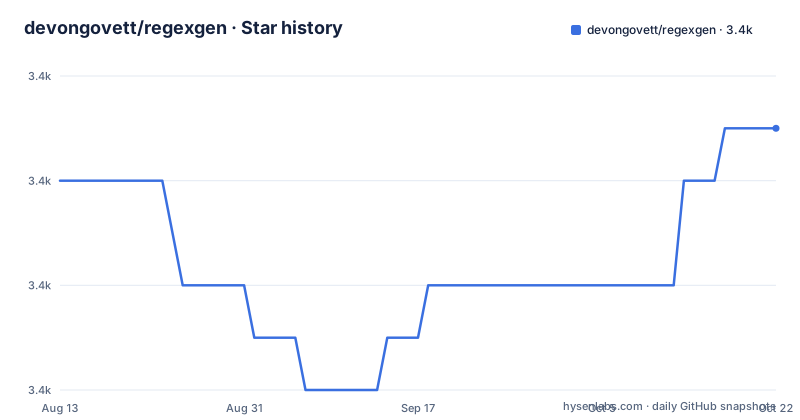
Star history
- devongovett/regexgen3,425 ★ · +1
| Repository | 2026-08-13 | 2026-10-22 |
|---|---|---|
| devongovett/regexgen | 3.4k | 3.4k |
1 Stars in the last 70 days, measured from the daily GitHub snapshot. Compare with other projects
Editorial analysis
The trie step builds a structure the next step throws away
The algorithm is described in three numbered steps, and reading them in order reveals that the first is redundant. Step one builds a trie of the input strings, and the page is candid about its limits: each edge is a single character, which removes redundancies at the start of the strings, but common branches further down are not merged. So a trie collapses shared prefixes and nothing else. Step two then observes that a trie is a tree shaped deterministic finite automaton, so automaton algorithms apply, and runs a minimisation algorithm over it to merge the indistinguishable states, which is exactly the merging step one said it had not done. Step three converts the minimised automaton into a regular expression. So the shape of the tool is: build a naive structure, then discard most of it. That is not a criticism, since building a trie is cheap and the minimisation does the real work, but it explains why the output is tighter than a prefix-only tool would give you. The library interface shows both shapes:
const regexgen = require('regexgen');

regexgen(['foobar', 'foobaz', 'foozap', 'fooza']); // => /foo(?:zap?|ba[rz])/
With only two strings that share a prefix, the class can be driven directly:
const {Trie} = require('regexgen');

let t = new Trie;
t.add('foobar');
t.add('foobaz');

t.toRegExp(); // => /fooba[rz]/The solve is described as elegant, with optimisations added on top
Step three names the method: the minimised automaton is turned into a regular expression by an algebraic method that expresses the automaton as a system of equations which can be solved for the pattern. The page calls that method quite elegant, which is about right for it, and then immediately qualifies the praise by saying that additional optimisations are made along the way. Two are named. Common substrings are hoisted out of an alternation, which is what stops the output reading as a wall of alternatives, and character class ranges are used, which is why the example produces a bracket of two characters rather than a group with a pipe. The result of all this is an abstract syntax tree for the pattern, and only then is it turned into a string and handed to the runtime's regular expression compiler. So the shape of the output is chosen before any string is produced, which is why the character class in the worked example is a range rather than two branches.
MIT is claimed twice and there is no licence file in the tree
The licence story has a hole in it. The page ends with the word MIT as its own licence section. The manifest repeats it in the licence field. And the repository's own licence metadata reports nothing at all, which is what the packaging metadata says when it has no answer. There is no licence file at the root of the tree either. The root contains an editor settings file, a git ignore file, the page itself, the implementation entry point, the manifest, a source directory, a test directory and the directory holding the command line entry point. So a reader has two consistent statements from the project and one silent field from the platform, and no file to consult. For a package this small it is a five minute fix, and for anyone shipping it inside a product it is the kind of gap that stalls a legal review.
The engine floor is Node 6 and the unicode output needs a newer runtime
The manifest declares support for Node 6 and later. The unicode section describes an output mode that retains code points instead of surrogate pairs, producing a pattern in the ES2015 style with brace escapes and the unicode flag, and then says such patterns are compatible with current versions of Node and the latest browsers. Those two statements describe different runtimes. A Node 6 runtime cannot compile the brace escape form, so a consumer whose environment genuinely satisfies the declared floor cannot use the feature the page recommends for anything outside the basic ASCII case. Six is also several major versions behind anything current, and the fact that it is still declared says the floor has not been revisited. The practical advice is to ignore the declared floor and require whatever Node your application already needs, then treat the package as a normal dependency.
The escaping and the code point handling are both third-party packages
There are exactly two runtime dependencies, and they map onto the two things the page describes as hard. One is a JavaScript escaping library, which is what turns the abstract syntax tree into a string that the runtime will accept without further escaping by hand. The other is the package that does Unicode code point handling, which is what makes the difference between the surrogate pair output and the code point output possible. So neither the string escaping nor the unicode treatment is implemented here; this project is the trie, the minimisation, the algebraic solve and the output shape. The single development dependency is a test runner, and the test script is that runner with no arguments. The tree is correspondingly small, which is the strongest argument for the package: you can read all of it.
The first positional argument on the command line is the flag string
The command line interface is described in three sentences. You run the binary, it prints a usage line showing an optional bracket of flags followed by a list of strings, and that optional first parameter is the set of flags to add to the generated pattern, with a case insensitive flag given as the example. The design is small and pleasant to use, and it has one consequence worth knowing: because the first argument is interpreted as flags, an input string beginning with a hyphen sits in an ambiguous position. The usage line implies the flags come first, so a caller with a leading hyphen in the data needs to know whether the tool will treat it as options, and the page says nothing about escaping or about a separator. The library interface has no such ambiguity, since the strings arrive as an array, which is a good reason to prefer it in anything automated.
No release tags, no lockfile and no visible CI
The distribution story is thin in three specific ways. There are no GitHub releases at all, so nothing in the repository marks a version boundary; the manifest says version 1.3.0, and that number comes from the package registry rather than from a tag you can point at. There is no lock file in the tree, so a consumer resolving the two runtime dependencies gets whatever satisfies the declared ranges at the moment of install rather than the versions the author tested. And there is no continuous integration configuration among the root entries, so the test suite is presumably run locally or by a service configured elsewhere. The page does describe a worked unicode example with expected output, which is the kind of documentation that substitutes for a test fixture when you are reading the code. None of this makes the package unsuitable; it makes it a library you would vendor rather than depend on blindly.
Editorial conclusion
regexgen suits someone who has a handful of strings that must all match and wants the pattern written for them, particularly when the strings share structure deep in the middle rather than at the start. Four things to know before you depend on it. It is small, a handful of files with one runtime dependency pair, which makes it easy to read and easy to vendor. The unicode output you get with the flag needs a runtime that supports it, while the manifest declares a floor of Node 6. The licence is claimed as MIT in two places but there is no licence file in the tree and the repository metadata reports nothing, so resolve that before shipping it. And the repository has no release tags and was last pushed on 2024-02-15, so the version you install from a package registry is the only version identifier you have.
Frequently asked questions
Is there a regex generator?
This repository is one. The package generates a regular expression that matches a set of strings, is installed from npm with `npm install regexgen`, and works either by passing an array of strings or by building a trie yourself and asking it for a pattern. It declares version 1.3.0 and support for Node 6 and later, and the manifest gives MIT as its licence.
How does regexgen build the pattern?
In three stages. It builds a trie of the input strings, which collapses shared prefixes. It then treats that trie as a deterministic finite automaton and applies a minimisation algorithm to merge indistinguishable states, which is what factors out structure deeper in the strings. Finally it converts the minimised automaton into a regular expression using an algebraic method, with additional optimisations such as hoisting common substrings out of an alternation and emitting character class ranges, producing a syntax tree that is turned into a string and compiled.
What is the difference between regexgen's default output and its unicode flag?
By default the output is a standard JavaScript regular expression with Unicode code points converted into UCS-2 surrogate pairs. Supplying the flag requests an ES2015 compatible pattern that retains the code points instead, written with brace escapes and the unicode flag. The page says those patterns work with current versions of Node and the latest browsers, and may transfer to other languages more easily.
What licence is regexgen under?
The page states MIT and the package manifest repeats MIT, but there is no licence file at the root of the repository and the repository's licence metadata reports nothing. The tree itself is small, holding the implementation entry point, a source directory, a test directory, the command line entry point directory and the manifest, so there is no other file to consult.
Official sources
Add this badge to your README
If you maintain this project, the badge below links readers to this analysis and shows its maintenance status from the daily GitHub snapshot. Paste the markdown into your README; add ?metric=license or ?metric=stars to the image URL for a different field.

[](https://hysenlabs.com/projects/devongovett-regexgen)Star history chart for your README
[](https://hysenlabs.com/projects/devongovett-regexgen)Was this useful?