pydash: A Python Utility Library for Lodash-Style Operations
The kitchen sink of Python utility libraries for doing "stuff" in a functional way. Based on the Lo-Dash Javascript library.
At a glance
- What is it?
- pydash is a Python utility library modeled after Lo-Dash, aimed at developers who want functional helpers for common collection and object operations. It supports Python 3.10 through 3.14, but its README directs large-dataset users toward fnc.
- Who is it for?
- Adopt pydash when a Python project benefits from a broad Lodash-inspired utility layer and accepts its Python-specific memory profile. Do not choose it for generator-first processing or very large datasets when the README points you to fnc instead.
- Can I use it commercially?
- Yes. MIT is a permissive licence: you can use, modify and sell software built on it, as long as you keep its copyright and licence notices.
- Is it still maintained?
- Yes. The repository last received commits 3 days ago.
- What is it written in?
- Mainly Python, according to GitHub's language statistics.
Answers come from the project's GitHub data, last synced on November 7, 2026, and from our analysis. They are not legal advice.
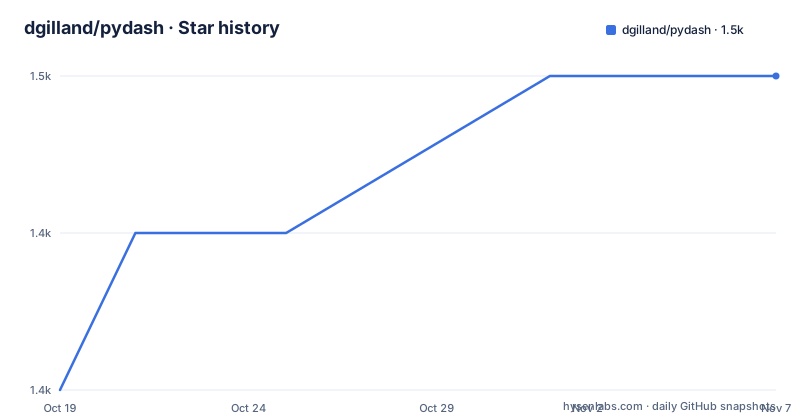
Star history
- dgilland/pydash1,450 ★ · +2
| Repository | 2026-10-19 | 2026-11-07 |
|---|---|---|
| dgilland/pydash | 1.4k | 1.5k |
2 Stars in the last 19 days, measured from the daily GitHub snapshot. Compare with other projects
Editorial analysis
What pydash Solves for Python Developers
pydash addresses the need for a consolidated collection of utility functions in Python codebases that otherwise need repeated local helpers for transformations, object access, and other common operations. Its README describes it as the "kitchen sink of Python utility libraries for doing 'stuff' in a functional way" and explicitly places its design lineage beside the Lo-Dash JavaScript library. That makes it relevant to Python developers familiar with Lodash-style APIs or to teams moving shared utility logic between JavaScript and Python environments.
The project is a library rather than an application or service. There is no command-line program, server, database, or configuration service documented in the README. Its package metadata identifies the intended audience as developers and classifies it under utilities and Python modules. The metadata also marks the development status as `Production/Stable`, although that classification is a package declaration and not an independent guarantee of compatibility with every application.
The scope is broad rather than focused. The repository description promises a collection of utilities, while the README specifically calls it a "kitchen sink." That wording indicates breadth, but it does not enumerate the complete API. The documentation site is therefore the appropriate place to inspect the actual functions before deciding whether a particular operation is available.
The Functional Collection-Helper Design
The repository layout places the implementation under `src/` and the test suite under `tests/`, with documentation under `docs/` and development configuration in `pyproject.toml`, `tox.ini`, and `tasks.py`. This is the standard shape of a Python package with source code, automated tests, maintained documentation, and contributor tooling. The package metadata states that the implementation is based on Lo-Dash, so the design reference is functional utility programming rather than a framework with a central application runtime.
The README does not provide a function signature, module map, execution trace, or complete API index. It therefore confirms the project’s functional orientation but does not establish the exact data-flow behavior of an individual helper. The phrase "functional way" should be read as a design description, not as proof that every operation is immutable or side-effect free. A caller should inspect the documentation for a specific function to learn whether it returns a new collection, mutates an input, accepts an iteratee, or handles `None` and missing values in a particular way.
The Python implementation is packaged through `setuptools`. `pyproject.toml` uses `setuptools.build_meta` as the build backend and reads the version from the `pydash.__version__` attribute. The source tree is therefore installed as a normal importable Python package, but the README does not document an exact import statement or a first API call.
Installing pydash From the Project Configuration
The README identifies PyPI as the package source and links to the project’s GitHub repository, documentation, and GitHub Actions workflow. It does not include a pip installation command. The repository configuration does show how development dependencies are declared. `requirements.txt` installs the local project with its development extras:
-e .[dev]That file is intended for a checkout of the repository and expands to the local package plus the packages listed under the `dev` optional dependency group. It is not evidence that a production deployment should install every development tool. For a package consumer, the relevant source listed by the project is its PyPI page. For a contributor, the editable requirements file is the concrete setup entry point in the repository.
The build system requires `setuptools>=61.0` and `wheel`, and the project requires Python `>=3.10`. The metadata names `typing-extensions>3.10,!=4.6.0` as a runtime dependency. A reader should therefore check the Python version and dependency resolution before installation. The repository does not document a lockfile, a platform restriction, or a service deployment procedure.
First Use Requires the API Documentation
A first executable use cannot be reproduced from the README because it contains no Python example. The documented location is `http://pydash.readthedocs.io`, linked from the README and from the project metadata as `https://pydash.readthedocs.org`. The README gives links to PyPI, GitHub Actions, and the repository, but it does not name a starter function or show expected output.
That omission matters for evaluation. A library can be installed successfully and still be a poor fit if the required helper is absent or if its calling convention differs from the Lodash function a developer expects. Before integrating it, inspect the documentation’s function index, the relevant signature, behavior for empty or missing values, and any mutation guarantees. The package metadata confirms Python 3.10 through 3.14 classifiers, yet the README does not document backward compatibility with earlier Python releases.
The project’s test files may provide examples, but their contents are not included in the README. They should not be treated as evidence for a specific API unless the actual file is reviewed. The repository’s `CHANGELOG.rst`, `CONTRIBUTING.rst`, `DEVGUIDE.rst`, and `docs/` directory are the relevant places to investigate usage, contribution expectations, and change history.
Memory Trade-offs and the fnc Alternative
The clearest limitation is stated by the project itself. The README tells readers who need a library that is "more memory efficient and better suited for large datasets" to check `fnc`. The reason given is architectural: fnc is built around generators and iteration and uses iteratee-first function signatures. This is a meaningful distinction because a broad helper collection and a generator-centered processing model impose different costs and design assumptions.
pydash is therefore a weaker fit for streaming processing, memory-constrained pipelines, or workloads where intermediate collections are expensive. Its README does not state that pydash is lazy or memory efficient, and it gives no benchmark or memory measurement. It would be inaccurate to claim a particular slowdown or memory multiplier. The defensible conclusion is narrower: the project itself redirects large-dataset users to a generator-based alternative.
fnc is also a real alternative, not merely a passing mention. It shares the same author in the README link and focuses on iteration, while pydash focuses on a broad Lodash-style utility surface. Teams should choose based on the dominant workload rather than treating the two libraries as interchangeable.
Packaging, Licensing, and Maintenance Signals
pydash is licensed under the MIT license, as stated by the repository description and the `LICENSE.rst` entry. The package metadata declares `license = "MIT"`. This identifies the license, but it does not replace review of the license text and does not answer questions about how a particular application distributes the package.
The project metadata supports Python 3.10 and newer and lists classifiers for Python 3.10, 3.11, 3.12, 3.13, and 3.14. The runtime dependency is narrowly specified as `typing-extensions>3.10,!=4.6.0`, with the excluded version written exactly that way in `pyproject.toml`. Development tooling includes `build`, `coverage`, `ruff`, `mypy`, `pytest`, `tox`, `twine`, Sphinx-related packages, and other test and documentation packages. This creates a larger upgrade surface for contributors than for applications that install only the base package.
The repository is not archived, and its last push was on 2026-10-07. It has no GitHub releases, so there is no release entry to use as a version or upgrade milestone. The repository includes `CHANGELOG.rst`, which is the project-specific source to consult for recorded changes. The README does not define a support policy for older Python versions or a compatibility window for function behavior.
Editorial conclusion
Adopt pydash when a Python project benefits from a broad Lodash-inspired utility layer and accepts its Python-specific memory profile. Do not choose it for generator-first processing or very large datasets when the README points you to fnc instead. Verify the available API examples in the Read the Docs documentation, confirm Python compatibility, and review the dependency and packaging configuration before integration.
Frequently asked questions
What is pydash used for in Python?
pydash is a utility library for common Python operations in a functional, Lo-Dash-inspired style. The README describes it as a broad kitchen-sink collection rather than a single-purpose package.
How do I install pydash for development?
For a repository checkout, `requirements.txt` contains `-e .[dev]`, which installs the local project and its development extras. The README links to PyPI for package distribution and does not provide a separate pip command.
What Python versions does pydash support?
The project requires Python `>=3.10` and includes classifiers for Python 3.10, 3.11, 3.12, 3.13, and 3.14.
Is pydash suitable for large datasets?
The README says to check fnc when memory efficiency and large-dataset suitability matter. fnc is built around generators and iteration, while pydash does not make those claims in its README.
What license does pydash use?
pydash is declared under the MIT license in the repository description and `pyproject.toml`. The project also includes a `LICENSE.rst` file.
Official sources
Add this badge to your README
If you maintain this project, the badge below links readers to this analysis and shows its maintenance status from the daily GitHub snapshot. Paste the markdown into your README; add ?metric=license or ?metric=stars to the image URL for a different field.

[](https://hysenlabs.com/projects/dgilland-pydash)Star history chart for your README
[](https://hysenlabs.com/projects/dgilland-pydash)Was this useful?