Youtarr: a Docker-only YouTube archiver that mirrors playlists into Plex, Jellyfin and Emby
Self-hosted web app that automates downloading, organizing, and scheduling YouTube channel content with support for Plex, Kodi, Emby and Jellyfin
At a glance
- What is it?
- Youtarr wraps yt-dlp in a scheduler, a metadata pipeline and a one-way watch-status sync, and it refuses to run outside Docker. The design is opinionated enough that the deployment decision comes before the feature list.
- Who is it for?
- Adopt Youtarr if you already run Plex, Jellyfin or Emby on a Linux host with Docker Compose and you want channel subscriptions, cron scheduling and NFO metadata handled by one container. Skip it if you need a native Node install, if you want a lighter single-purpose downloader, or if you are unwilling to keep a MariaDB volume healthy across upgrades.
- Can I use it commercially?
- Yes. ISC is a permissive licence: you can use, modify and sell software built on it, as long as you keep its copyright and licence notices.
- Is it still maintained?
- Yes. The repository received new commits within the last day.
- What is it written in?
- Mainly TypeScript, according to GitHub's language statistics.
Answers come from the project's GitHub data, last synced on November 13, 2026, and from our analysis. They are not legal advice.
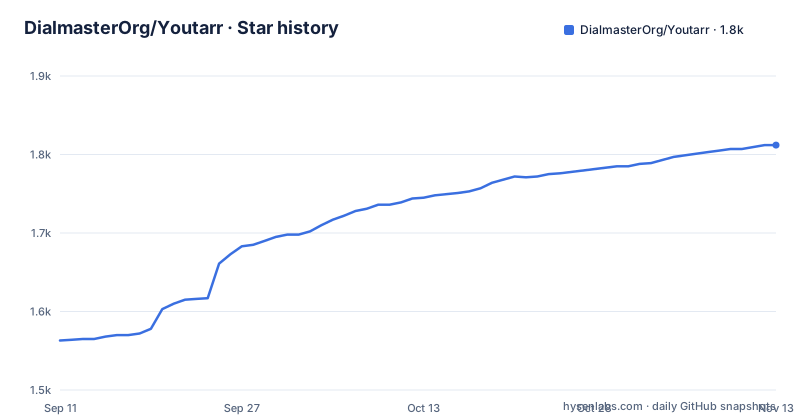
Star history
- DialmasterOrg/Youtarr1,812 ★ · +249
| Repository | 2026-09-11 | 2026-11-13 |
|---|---|---|
| DialmasterOrg/Youtarr | 1.6k | 1.8k |
249 Stars in the last 63 days, measured from the daily GitHub snapshot. Compare with other projects
Editorial analysis
The gap Youtarr fills between yt-dlp and a media server library
yt-dlp downloads a video. It does not decide which videos to download next week, it does not write NFO files, and it does not tell Plex that a new episode exists. Youtarr is the layer above it. The README describes the project as a self-hosted downloader that subscribes to channels and playlists, generates metadata for media servers, and mirrors subscribed YouTube playlists into Plex, Jellyfin and Emby as native playlists. The stated audience is people who want YouTube content inside the same library interface they already use for films and television, with the archive surviving deletion or a channel going private. A second audience is visible in the feature list: the in-app playback modal and the standalone mode mean a household can run Youtarr with no media server at all, using the web UI as the player. Channel grouping into subfolders such as __kids, __music and __news exists so one Youtarr instance can feed several separate libraries, which is a family-curation argument rather than a storage argument.
What actually runs: yt-dlp, MariaDB, and a reconciliation loop
Youtarr is a TypeScript application, and the repository notes backend test coverage of 89 percent and frontend coverage of 87 percent in its badges, which tells you the project treats its own behaviour as something worth pinning down. The download engine is yt-dlp, invoked under the hood. State lives in MariaDB. The interesting part is the reconciliation between those two and the filesystem. Downloads are organised by channel with metadata and thumbnails, and the app keeps a download history with duplicate prevention so a re-run does not fetch the same video twice. When you move, rename or convert a file outside Youtarr, for example from .mp4 to .mkv, you trigger a rescan from Settings, Maintenance and Rescan, and the database is reconciled against what is on disk. Daily and startup scans pick up changes without manual intervention. Watch status flows in the opposite direction: Youtarr pulls per-video watched state from Plex, Jellyfin and Emby for every user on the server, not just the admin account, surfaces a Watched chip on listing pages, and allows filtering by watched or unwatched. The README is explicit that this is one-way. Youtarr never writes back to your servers, so it cannot mark something watched in Plex on your behalf.
Getting it running means Docker Compose, and only Docker Compose
The prerequisites listed are Docker, Docker Compose, Git and a Bash shell, with Git Bash named for Windows users. The README states plainly that Youtarr runs exclusively via Docker and that direct npm start or Node deployments are unsupported. The documented path is a fresh install started with ./start.sh. That script matters more than it looks, because the database note says fresh installs started that way use Docker named-volume storage for MariaDB, while existing bind-mounted installs and plain docker compose up -d installs may use ./database. On virtualised filesystems the bind-mount layout is described as risky for MariaDB schema migrations, with Table ... doesn't exist in engine and Incorrect information in file given as the symptoms. The documented remedy is a migration from bind mount to named volume in docs/DATABASE.md. Once the stack is up, the web interface is on port 3087 by default, and the Swagger documentation is served at http://localhost:3087/swagger, which is the entry point for anyone wiring Youtarr into an existing automation setup. Configuration is otherwise driven from the web UI: quality settings from 360p to 4K globally or per channel, cron-based scheduling, SponsorBlock segment removal, content ratings, Discord webhook alerts, and auto-cleanup rules that combine age, free space and watched state with dry-run previews before anything is deleted.
The database volume is the part most likely to bite you
Most self-hosted media tools fail loudly when their storage is wrong. Youtarr can fail quietly, because the failure mode described in the README is a MariaDB schema migration that does not complete on a bind mount sitting on a virtualised filesystem. The symptoms named are engine-level table errors, not a clean crash on startup. If you installed with docker compose up -d rather than ./start.sh, you may be on the layout the documentation flags as risky, and you may not find out until the next upgrade touches the schema. This is not a hypothetical edge case invented for the review. It is prominent enough that the README puts it in a callout above the documentation index. The practical consequence is that the deployment method you choose on day one constrains how painful upgrades are later, and migrating afterwards is a documented procedure rather than a flag flip. Anyone running Youtarr on a NAS, an ARM board or Docker Desktop should read docs/DATABASE.md before the first subscription, not after the first error.
Where Youtarr is the wrong tool
If you want a single video downloaded to a folder, Youtarr is a poor fit. You would be running a web application, a database and a scheduler to do what yt-dlp does in one command. The project does not pretend otherwise, but it is worth stating because the feature list reads like a superset of everything a downloader could do. The second case is a host without Docker. The README rules out Node deployments outright, so a constrained environment where containers are not available is simply not supported, regardless of how well the TypeScript would run there. Third, the playlist mirroring into Plex, Jellyfin and Emby is limited to those three servers. Kodi is named among the media server targets for metadata, and a universal .m3u file is written for any other player, but the native playlist mirroring does not extend to Kodi or to anything else. If your library lives somewhere else, you get files and an .m3u, not integration. Fourth, watch-status sync only reads. A workflow that depends on Youtarr marking videos watched in your media server will not work, because that direction is not implemented.
Pinchflat and Tube Archivist take different positions on the same problem
The README names two alternatives directly. Pinchflat is the closest in shape: a self-hosted YouTube downloader with a web interface, and the README notes that Youtarr predates it, with first commits in May 2023 against January 2024 for Pinchflat, and that the two arrived at similar solutions independently. Tube Archivist is the other named project, and it is a different kind of thing: an archive with its own browsing interface rather than a pipeline feeding someone else's media server. The repository ships a comparison document at docs/YOUTARR_VS_ALTERNATIVES.md that covers Plex integration, in-app playback, watch-status tracking, content ratings, REST API, filename templating and transcript search. That list is itself informative, because it implies the projects diverge most on the media-server side and on search over transcripts. The honest summary is that Youtarr's distinguishing bets are the playlist mirroring into three named servers, the one-way watch-status pull across all users, and the REST API with Swagger documentation. If none of those three matter to you, the choice between these tools comes down to interface preference and how much you want a database in the loop.
Release cadence, licence and what to check before you commit
The project is not archived, and the release history shows a steady rhythm: v1.81.0 on 28 August 2026, v1.81.1 on 1 September, v1.82.0 on 8 September, with the last push to main on 9 September 2026. Three releases in under two weeks is a fast cadence, and it cuts both ways. Fixes arrive quickly. So do schema migrations, which is exactly the operation the database note warns about on the wrong storage layout. Youtarr is licensed under ISC, a permissive licence that places few conditions on redistribution or modification. That is a statement about the licence text, not legal advice, and anyone embedding Youtarr in a commercial product or redistributing a modified image should read the ISC terms and the licences of bundled components, yt-dlp among them, rather than relying on this summary. The maintenance cost that matters here is not patching. It is the database volume, the rescan workflow after you touch files by hand, and the fact that yt-dlp moves with YouTube's changes, so the container needs updating even when you change nothing. Before the first subscription, confirm three things: that your install used the named-volume layout or that you have migrated to it, that your media server is one of the three supported for playlist mirroring, and that the features you actually need appear in docs/YOUTARR_VS_ALTERNATIVES.md rather than only in the feature list.
Editorial conclusion
Adopt Youtarr if you already run Plex, Jellyfin or Emby on a Linux host with Docker Compose and you want channel subscriptions, cron scheduling and NFO metadata handled by one container. Skip it if you need a native Node install, if you want a lighter single-purpose downloader, or if you are unwilling to keep a MariaDB volume healthy across upgrades. Before committing, verify that your host can run the named-volume database layout described in docs/DATABASE.md, confirm your media server is one of the three supported for playlist mirroring, and check the comparison doc for the features you cannot live without.
Frequently asked questions
Can Youtarr run without Docker?
No. The quick start states that Youtarr runs exclusively via Docker and that direct npm start or Node deployments are unsupported, and the required prerequisites are Docker, Docker Compose, Git and a Bash shell. The npm manifest still carries a start script pointing at the server entry file, but the page disclaims using it.
What database does Youtarr use, and what is the default password?
The compose file runs a MariaDB 10.3 container with a root password that defaults to 123qweasd when the variable is not set, a database name defaulting to youtarr, and an internal port defaulting to 3321 that is not published to the host. Only the root credentials are used unless a non-root database user is configured.
Why does Youtarr warn about bind-mounted database storage?
The compose file says bind-mounted MariaDB data can become corrupted during schema migrations on Docker Desktop, on ARM hosts and on some NAS or virtualised filesystems, and points at a separate ARM compose file or a migration script. The README names Table ... doesn't exist in engine and Incorrect information in file as the errors to look for, and advises starting fresh installs with the start script so the database uses a named volume.
Does Youtarr write watch status back to Plex or Jellyfin?
No. Watch status is pulled per video from Plex, Jellyfin and Emby for every user on the server, shown as a badge and usable as a filter, and the page states the sync is one way and that Youtarr never writes back to those servers.
How does Youtarr handle containers that run as root?
By default the service runs as root with uid and gid zero, for compatibility with existing setups. Two variables switch it to a non-root user, and the compose comments require four host directories with correct ownership beforehand, warning that Docker creates them as root when they do not exist.
Does Youtarr support Kodi, and how do playlists reach other players?
Kodi is named as a supported media server in the description and feature list, while playlist mirroring and watch status sync name Plex, Jellyfin and Emby. For anything else the application writes a universal .m3u file alongside the native playlist mirrors.
Official sources
Add this badge to your README
If you maintain this project, the badge below links readers to this analysis and shows its maintenance status from the daily GitHub snapshot. Paste the markdown into your README; add ?metric=license or ?metric=stars to the image URL for a different field.

[](https://hysenlabs.com/projects/dialmasterorg-youtarr)Star history chart for your README
[](https://hysenlabs.com/projects/dialmasterorg-youtarr)Was this useful?