Dimensional: A Python-Native Agent OS for Robots That Skips ROS
Dimensional is the agentic operating system for physical space. Command humanoids, quadrupeds, drones, and other hardware platforms in natural language and build multi-agent systems that work seamlessly with physical input (cameras, lidar, actuators).
At a glance
- What is it?
- Dimensional (dimos) is a pre-release Python SDK and runtime for commanding humanoids, quadrupeds, and drones through natural language and MCP, with built-in SLAM, spatial memory, and simulation. It trades ROS compatibility for a simpler, agent-first workflow, but its hardware support is uneven and its license is unstated.
- Who is it for?
- Adopt Dimensional if you are a Python developer prototyping with Unitree Go2 or G1 robots, want to skip ROS, and need agentic control, SLAM, and spatial memory in one package. Do not adopt it for production, for unsupported hardware like DJI Mavic drones or force-torque sensors, or if you require a clear open-source license, since the repository declares NOASSERTION.
- Can I use it commercially?
- Check first. The repository uses a licence we do not classify automatically, so read its LICENSE file before any commercial use.
- Is it still maintained?
- Yes. The repository received new commits within the last day.
- What is it written in?
- Mainly Python, according to GitHub's language statistics.
Answers come from the project's GitHub data, last synced on October 22, 2026, and from our analysis. They are not legal advice.
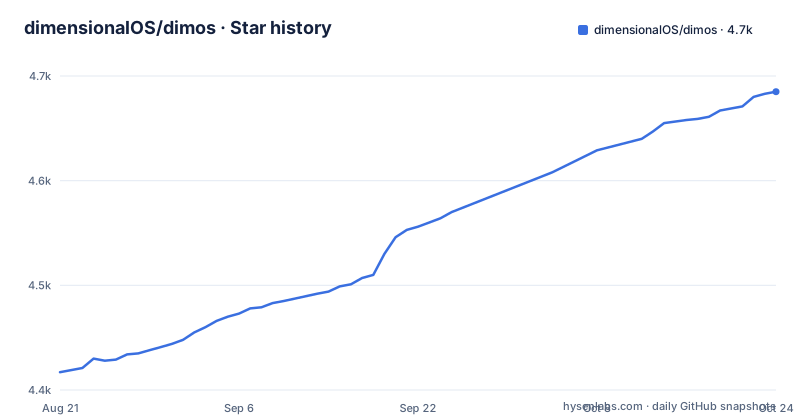
Star history
- dimensionalOS/dimos4,680 ★ · +263
| Repository | 2026-08-21 | 2026-10-22 |
|---|---|---|
| dimensionalOS/dimos | 4.4k | 4.7k |
263 Stars in the last 62 days, measured from the daily GitHub snapshot. Compare with other projects
Editorial analysis
What Dimensional Solves and Who It Targets
Dimensional is an operating system for generalist robotics, aimed at developers who want to build physical applications in Python without touching ROS. The README states it integrates with 'the majority of robot manufacturers' and supports humanoids, quadrupeds, drones, and arms. The core pitch is agent-native development: you can 'vibecode' robots in natural language, meaning you issue high-level commands like 'hey Robot, go find the kitchen' and the system translates that into navigation and control. This targets robotics engineers who find ROS's C++ and node graph too heavy, and AI developers who want to attach LLM agents to physical hardware. It also appeals to researchers who need multi-agent systems that subscribe to perception streams like lidar and camera, down to motor drivers. The project is explicitly a pre-release beta, so the audience is early adopters willing to tolerate instability.
The Architecture: Agents as Native Modules
The system's architecture is built around agents that run as native modules, not as separate processes or containers. According to the README, agents subscribe to any embedded stream, from perception (lidar, camera) and spatial memory down to control loops and motor drivers. This is a different design from ROS, where nodes communicate over a middleware bus. Here, everything lives in a single Python runtime, which simplifies deployment but also means a crash in one agent could take down the whole system. The CLI manages the lifecycle: you run blueprints, inspect state, interact with agents, and call skills via MCP. The MCP (Model Context Protocol) integration is central, letting external agents like Claude Code or OpenClaw drive the robot through a standardized interface. The README shows commands like `dimos mcp list-tools` and `dimos mcp call move_to`, which suggests a skill-based API where actions are exposed as callable tools.
Installation and First Run: Real Commands
Installation is designed to be simple, with an interactive script: `curl -fsSL https://raw.githubusercontent.com/dimensionalOS/dimos/main/scripts/install.sh | bash`. For manual setups, there are guides for Ubuntu 22.04/24.04, NixOS, and macOS (the latter marked as alpha). The Python package is installed via `uv`, not pip directly: `uv pip install 'dimos[base,unitree]'`. After that, you can replay a recorded quadruped session without hardware: `dimos --replay run unitree-go2`. The README warns that the first run downloads about 75 MB from LFS, so you need network access. For simulation, you install the `sim` extra and run `dimos --simulation run unitree-go2` or `dimos --simulation run unitree-g1-sim` for the humanoid. To control a real Unitree quadruped over WebRTC, you set `export ROBOT_IP=<YOUR_ROBOT_IP>` and run `dimos run unitree-go2`. There is also a webcam demo (`dimos run demo-camera`) that needs no robot, which is a good way to test the installation.
Navigation, Mapping, and Spatial Memory: The Built-in Capabilities
Dimensional includes a full navigation stack: SLAM, dynamic obstacle avoidance, route planning, and autonomous exploration, both natively and via ROS. The v0.0.13 release notes mention navigation, relocalization, loop closure, map loading/saving, and realtime mapping. This is a substantial feature set for a Python-only SDK, as most robotics stacks rely on C++ libraries. The spatial memory subsystem is described as 'spatio-temporal RAG', which means it combines retrieval-augmented generation with spatial and temporal data. It supports object localization and permanence, so a robot can remember where an object was and infer where it might be now. This is useful for tasks like 'find the kitchen' where the robot needs to recall a map and navigate. The replay command `dimos --replay --replay-db go2_bigoffice run unitree-go2-memory` demonstrates temporal memory replay, which suggests you can test memory features without live hardware.
Hardware Support: A Mixed Bag of Stability Tiers
The README lists hardware with color-coded stability: green for stable, yellow for beta, orange for alpha, and red for experimental. Unitree Go2 pro/air is stable, while the Unitree B1 is experimental. The Unitree G1 humanoid is beta, as are the Xarm and AgileX Piper arms. Drones (MAVLink and DJI Mavic) are alpha, and the force-torque sensor is experimental. This is a honest admission of maturity, but it means you cannot assume your robot works out of the box. The v0.0.14b1 release adds dimTELE, described as 'out of the box remote teleoperation on every robot', but that claim is broad. If you have a robot not listed, you will likely need to write your own integration, and the documentation for that is not in the README. The project also has an openFT-sensor repository for force-torque, but it is marked experimental, so expect rough edges.
Limitations and Failure Modes
The most obvious limitation is the license: the repository declares NOASSERTION, which means there is no clear open-source license. This is a legal red flag for any commercial or even internal use, as you cannot know your rights to modify, distribute, or sublicense the code. The project is also in pre-release beta, so APIs can change between versions; the release history shows rapid iteration, with v0.0.13.post1 and v0.0.14b1 within weeks. Another limitation is hardware dependence: the replay mode works without hardware, but real control requires specific robots and network setup (e.g., WebRTC for Unitree). If you have a different drone or arm, you may be stuck. The simulation mode requires MuJoCo and the `sim` extra, which adds dependencies. Finally, the agentic features rely on an LLM, and the README shows a local option with Ollama, but that requires you to run `ollama serve` separately, and the quality of natural language control depends on the model. There is no mention of safety mechanisms for physical robots, which is concerning for real-world use.
Alternatives: ROS and Other Agent Frameworks
The primary alternative is ROS (Robot Operating System), which Dimensional explicitly tries to avoid. ROS provides a mature middleware, a huge ecosystem of drivers, and tools like RViz for visualization. The difference is that ROS is language-agnostic (C++ and Python), uses a node-based architecture, and has a steep learning curve. Dimensional's approach is to embed everything in Python and expose agents via MCP, which is simpler for AI developers but less flexible for hardware integration. Another alternative is using the underlying robot SDKs directly, such as Unitree's own SDK for Go2, which gives you low-level control but no agentic layer. There are also other agent frameworks like LangChain or AutoGPT, but they are not designed for physical robots; Dimensional's value is that it connects LLM agents to sensors and actuators natively. For simulation, you could use MuJoCo directly, but you would have to build the control and perception stack yourself. The trade-off is clear: Dimensional offers a faster path to a working agentic robot, but you trade away the maturity and community of ROS.
Maintenance and Upgrade Costs
The project is actively maintained, with a last push in July 2026 and regular releases. However, the pre-release status means you should expect breaking changes. The README does not provide a migration guide or deprecation policy, so upgrading from v0.0.13 to v0.0.14 might require changes to your blueprints or config. The installation uses `uv`, which is modern but adds a tool dependency; you need to ensure your CI or deployment environment has `uv` installed. The system also depends on external services like LFS for downloading replay data, which could fail in restricted networks. For hardware, the WebRTC connection to a real robot requires a stable network, and the simulation mode requires MuJoCo, which has its own licensing (Apache 2.0 for MuJoCo, but check). The docs are linked but not included in the README, so you need to visit docs.dimensionalos.com for details. Overall, the maintenance cost is moderate: you need to track releases, test your blueprints after each update, and be prepared to debug issues without a large community, as the project is young.
Editorial conclusion
Adopt Dimensional if you are a Python developer prototyping with Unitree Go2 or G1 robots, want to skip ROS, and need agentic control, SLAM, and spatial memory in one package. Do not adopt it for production, for unsupported hardware like DJI Mavic drones or force-torque sensors, or if you require a clear open-source license, since the repository declares NOASSERTION. Before committing, verify the license, check the stability of your specific platform (stable, beta, alpha, or experimental), and test the replay and simulation modes to confirm they match your hardware expectations.
Frequently asked questions
How do I install dimOS?
The guided installer is recommended: it sets up system dependencies, Python 3.12 and dimOS, and prints the command that activates the environment. Run scripts/install.sh --help for non-interactive and advanced options, or follow the manual steps for Ubuntu, macOS or Nix. Ubuntu 22.04 and 24.04 are the primary target, general Linux is marked not CI-tested, and macOS is marked alpha.
Can I try dimOS without robot hardware?
Yes. Running dimos --replay run unitree-go2 replays a recorded quadruped session covering SLAM, costmap and A* planning, and dimos run demo-camera uses a webcam. The first replay downloads roughly 75 MB from Git LFS and shows a black rerun window while it does, and simulation runs add the --simulation flag.
Which robots does dimOS support, and how stable is each one?
Support is published in tiers from stable to experimental. The Unitree Go2 pro and air are stable, the Unitree B1 is experimental, the Unitree G1 humanoid is beta, the Xarm and AgileX Piper arms are beta, MAVLink and the DJI Mavic are alpha, and the force torque sensor is experimental.
What does the dimos CLI do?
It manages the full lifecycle for a dimOS application: running blueprints, inspecting state, interacting with agents, and calling skills over MCP. Runs are selected by runfile name plus a mode flag such as --replay or --simulation, and hardware runs read the robot address from the ROBOT_IP environment variable.
Official sources
Add this badge to your README
If you maintain this project, the badge below links readers to this analysis and shows its maintenance status from the daily GitHub snapshot. Paste the markdown into your README; add ?metric=license or ?metric=stars to the image URL for a different field.

[](https://hysenlabs.com/projects/dimensionalos-dimos)Star history chart for your README
[](https://hysenlabs.com/projects/dimensionalos-dimos)