cordova-plugin-ble-central: Bluetooth Low Energy from a Cordova app
Bluetooth Low Energy (BLE) Central plugin for Apache Cordova (aka PhoneGap)
At a glance
- What is it?
- cordova-plugin-ble-central gives a JavaScript application the central role in a Bluetooth Low Energy conversation, with scanning, connecting, characteristic reads and writes, notifications and L2CAP transfer, on iOS, Android and in the browser. It is maintained, Apache-2.0 licensed, and honest about its edges, including a slim variant that hands Android permission handling back to the developer.
- Who is it for?
- Adopt cordova-plugin-ble-central when you maintain a Cordova or Capacitor application that talks to BLE hardware and you need something with years of real peripheral support behind it, since the examples directory covers heart rate, battery, and vendor specific devices from several hardware makers. It is the wrong tool for a greenfield mobile project, because a native SDK or a maintained Capacitor community plugin will serve you better.
- Can I use it commercially?
- Yes. Apache-2.0 is a permissive licence: you can use, modify and sell software built on it, as long as you keep its copyright and licence notices.
- Is it still maintained?
- Yes. The repository last received commits 100 days ago.
- What is it written in?
- Mainly Java, according to GitHub's language statistics.
Answers come from the project's GitHub data, last synced on November 7, 2026, and from our analysis. They are not legal advice.
Star history
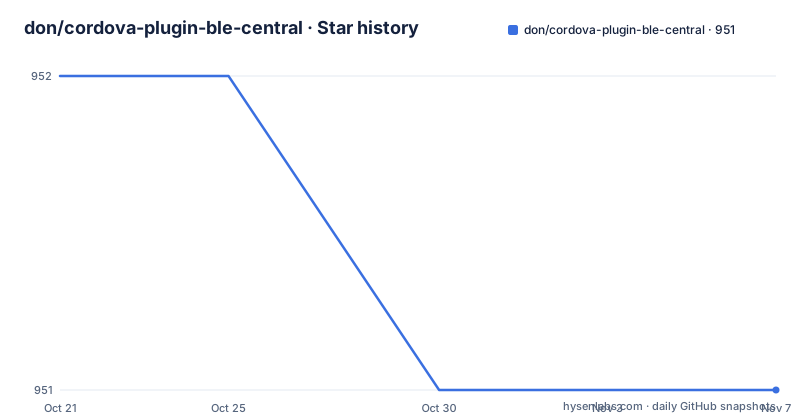
- don/cordova-plugin-ble-central951 ★ · -1
| Repository | 2026-10-21 | 2026-11-07 |
|---|---|---|
| don/cordova-plugin-ble-central | 952 | 951 |
-1 Stars in the last 17 days, measured from the daily GitHub snapshot. Compare with other projects
Editorial analysis
The central role, and what the plugin actually does
The plugin enables communication between a phone and Bluetooth Low Energy peripherals, and it provides a JavaScript API for iOS and Android. The feature list is short enough to state in full, and it is the central role in the BLE sense, the device that discovers and connects to peripherals rather than advertising as one.
The six capabilities are scanning for peripherals, connecting to a peripheral, reading the value of a characteristic, writing a new value to a characteristic, being notified when a characteristic's value changes, and transferring data over L2CAP channels.
Two details in the README explain how the model is designed to work. Advertising information is returned when you scan for peripherals, so the scan result carries what the device is advertising rather than only its address. Service, characteristic and property information is returned when you connect, so the connection result describes what the device offers. All access is via service and characteristic UUIDs, and the plugin manages handles internally.
That last point is the one that matters to a developer. A Bluetooth stack at the native level deals in handles, in indices into a table of the device's services and characteristics, and those indices are only valid for the lifetime of a connection. A plugin that hides them behind UUIDs means the code you write against a peripheral does not have to be rewritten when the peripheral's attribute table is reordered, and the handle bookkeeping happens where it belongs, in the plugin.
Simultaneous connections to multiple peripherals are supported, which is what makes the plugin usable for anything more complex than talking to one sensor at a time.
The examples directory is the real evidence of what this works with
The README points at the examples directory for ideas on how the plugin can be used, and that directory is worth more attention than the feature list, because it names the hardware people have actually driven with this plugin.
There is a battery example, a heartrate example, which is the standard Bluetooth SIG profile and therefore the easiest way to test a BLE implementation, and then a set of vendor specific ones. There is bluefruitle, metawear, redbearlab, rfduinoLedButton, robosmart, sensortag, and sensortag_cc2650, the last being a Texas Instruments sensor tag with a CC2650 radio.
Two things follow from that list. First, the plugin is used with real peripherals from several hardware makers rather than with one reference device, which is the kind of breadth that shows up in a plugin's issue tracker as variety. Second, the examples include devices whose chips are old, which is a hint about what a BLE plugin has to cope with: the TI CC2650, for instance, is a part from several years ago, and a plugin that works with it works with a lot of other hardware too.
The README is also explicit about two adjacent things this plugin is not for. It is not intended for scanning beacons, and it points at cordova-plugin-ibeacon for that. And if you want to create Bluetooth devices rather than talk to them, it points at cordova-plugin-ble-peripheral, written by the same author. That kind of scoping, with the alternative named and linked, saves a reader from filing a feature request that already exists elsewhere.
A plugin like this is a compatibility surface, so the examples are effectively the compatibility matrix.
Platforms, and a version matrix that tells you what to expect
The supported platforms are listed as iOS, Android 6 and later with 8.1 or greater recommended, and the browser where navigator.bluetooth is supported.
The Cordova side has an explicit matrix, and the table is the most useful thing in the README for a team upgrading:
Cordova 10 or newer, cordova-ios 6.2.0 or newer, cordova-android 12.0 or newer, and cordova-browser marked as not tested.
Two things are worth reading off that table. The first is that the plugin tracks the current Cordova platform packages rather than old ones, and the README recommends always using the latest Cordova and platform packages to ensure correct function. The second is the cordova-browser cell, which says not tested. The browser platform is listed as supported in the platform section, because the web Bluetooth API exists, and the matrix says the browser platform has not been tested with this plugin. That is a useful distinction for anyone planning to run the same code in a browser during development, and the safe conclusion is to treat the browser as unverified and test it yourself if you depend on it.
The Capacitor side is handled in the same README with its own workflow, and the badge row in the header shows separate CI workflows for Cordova builds and for Capacitor builds, so both paths are exercised by the project's own continuous integration. A plugin that is tested in two build systems is a plugin that has to work around the differences between them, and the permission configuration below is where those differences show up.
Installation, and the preferences that control background behaviour
The Capacitor route is two commands, an install and a sync:
npm install cordova-plugin-ble-central
npx cap sync
The configuration that matters goes in the cordova preferences section of the Capacitor config file, and the README shows the shape:
const config = {
  ...
  cordova: {
    preferences: {
      ...
      bluetooth_restore_state: "true",
      accessBackgroundLocation: "false",
    },
  }
}
The two preferences are about background operation, and each is platform specific. bluetooth_restore_state is an iOS option that enables Bluetooth state restoration, which allows an app to be woken up to receive scan results and peripheral notifications, and the README says it is needed for background scanning support. accessBackgroundLocation is an Android option that tells the plugin to request the ACCESS_BACKGROUND_LOCATION permission on Android 10 and 11 so that scanning keeps working when the app is not visible.
The Cordova route passes the same settings as install variables, and the README recommends the latest Cordova and platform packages:
$ cordova plugin add cordova-plugin-ble-central --variable BLUETOOTH_USAGE_DESCRIPTION="Your description here" --variable IOS_INIT_ON_LOAD=true|false --variable BLUETOOTH_RESTORE_STATE=true|false --variable ACCESS_BACKGROUND_LOCATION=true|falseAll of the variables can be modified after installation by updating the values in package.json, which is the Capacitor way of doing it and is worth knowing because a variable set at install time is invisible to a later build.
There is one more iOS variable with a distinctive purpose. IOS_INIT_ON_LOAD prevents the Bluetooth plugin from being initialised until the first access to the ble window object, and the reason given is that it allows an application to warn the user before the Bluetooth access permission is requested. That is a small thing with a large effect on the perceived quality of a permission prompt, and it is the kind of option that only exists because somebody asked for it.
The iOS platform also needs manual work in Info.plist. NSBluetoothAlwaysUsageDescription must be set to a descriptive text shown to the user on first access to the Bluetooth adapter, and the README warns in bold that if this is not defined the app will crash. Adding bluetooth-central to UIBackgroundModes is optional and enables background receipt of scan information and BLE notifications.
The slim variant, and the Android permission conflict it exists to solve
There is a section of the README about Android permission conflicts, and it is short enough to be worth quoting, because it describes a real problem with a real solution.
If you are having Android permissions conflicts with other plugins, the advice is to use the slim variant of the plugin instead, installed as cordova plugin add cordova-plugin-ble-central@slim. The variant excludes all Android permissions, leaving it to the developer to ensure the right entries are in place.
The reason this matters is structural rather than cosmetic. Cordova merges the permissions declared by every installed plugin into one manifest, and a plugin that declares a broad permission set can conflict with another plugin that declares the same permission with different attributes, or with an application that has its own requirement. The usual outcome is a build failure with a message about conflicting declarations, and the usual fix is to remove one of the declarations, which for a plugin means not using the plugin as shipped.
The slim variant inverts that. Instead of the plugin insisting on its permissions, the application declares exactly what it needs, which is both the way to avoid the conflict and the more honest arrangement, since an application that never scans in the background should not claim the background location permission.
The machinery for it is visible in the repository. There is a tools directory with make-slim-variant.mjs, which the package scripts call through the slimify command, and a stripDuplicatePermissions.js script at the root, and the package.json version command runs tools/set-plugin-version.mjs and then stages plugin.xml, so the plugin manifest and the npm version are kept in step by a script rather than by hand.
TypeScript definitions, and the odd little test suite
TypeScript definitions are provided by the plugin, and the way to use them is a triple-slash reference at the top of any file that uses it:
/// <reference types="cordova-plugin-ble-central" />The types file is at the root of the repository as types.d.ts, and the package manifest points the types field at it, so a project that imports the plugin through npm gets the definitions without the reference, and a project that does not install it directly can pull them in with the reference.
The test story is unusual, and it is worth describing accurately rather than generously. The package has one test script, and it is:
"test": "tsc types.d.ts"So the check is a TypeScript compilation of the declaration file. That verifies the types are syntactically valid and internally consistent, and it is genuinely useful, but it is not a test suite. There is a tests directory in the repository, and the CI workflows for Cordova and Capacitor build the plugin for real platforms, which is where the practical verification happens: a plugin that compiles and runs against an iOS and an Android toolchain has been checked more thoroughly than most unit test suites would check it, and it has been checked on the platforms that matter.
The other devDependency is @xmldom/xmldom, which is an XML implementation for JavaScript, and that is the clue about what else the tooling does. The plugin.xml file and the package.json have to agree, since Cordova reads the former and npm the latter, and the tools scripts exist to keep them consistent. The stripDuplicatePermissions.js script and the set-plugin-version.mjs script are both about that consistency problem, and the @xmldom dependency is what lets a script parse and rewrite the plugin manifest.
Licence, releases and the state of Cordova itself
The licence is Apache-2.0, recorded in the package manifest, in the npm badge in the README header and in the LICENSE file at the repository root. This describes the published terms rather than legal advice.
The release history shows a project that is still being worked on. Version 2.0.0 was published on 2025-02-13, v1.7.9 minutes earlier the same day, and v1.7.8 on 2024-09-12. The last push was on 2026-07-31, the repository is not archived, and the header carries a maintained badge with the year on it. The npm keywords list both cordova and capacitor, and the README documents the Capacitor path as the primary one, with the Cordova path still supported and still versioned.
The judgement has two halves. On the plugin itself, the picture is good: a maintained, permissively licensed, widely packaged plugin with a long history of device support behind it, a slim variant that solves a real problem, and CI that builds on both supported build systems.
On the platform, the picture is more complicated, and it is not the plugin's fault. A new mobile project starting today would normally reach for a native SDK or for the maintained Capacitor plugin ecosystem instead. That is why the README leads with the Capacitor workflow and why the npm keywords include capacitor. The plugin is a good answer to the question of how to keep an existing Cordova or Capacitor application talking to BLE hardware, and a weaker answer to the question of what to build a new application on.
One more practical note for a team adopting it in a Capacitor project: the plugin is listed as supporting iOS, Android and browser in the cordova platforms array in the manifest, and the browser entry is not tested, so the same caution applies there as anywhere else the browser is named.
Editorial conclusion
Adopt cordova-plugin-ble-central when you maintain a Cordova or Capacitor application that talks to BLE hardware and you need something with years of real peripheral support behind it, since the examples directory covers heart rate, battery, and vendor specific devices from several hardware makers. It is the wrong tool for a greenfield mobile project, because a native SDK or a maintained Capacitor community plugin will serve you better. Before adopting, read the platform matrix, because cordova-browser is explicitly not tested, and decide whether you need the slim variant, which drops the Android permissions and makes your application responsible for declaring them.
Frequently asked questions
What does cordova-plugin-ble-central do?
It is a Bluetooth Low Energy central plugin for Cordova and Capacitor that lets JavaScript scan for peripherals, connect to them, read and write characteristic values, receive notifications when a characteristic changes, and transfer data over L2CAP channels, on iOS, Android and supported browsers.
Which platforms and versions does the plugin support?
iOS, Android 6 and later with 8.1 or greater recommended, and the browser where navigator.bluetooth is supported. The Cordova matrix asks for Cordova 10 or newer, cordova-ios 6.2.0 or newer and cordova-android 12.0 or newer, and cordova-browser is listed as not tested.
How do I install the plugin with Capacitor?
Run npm install cordova-plugin-ble-central and then npx cap sync. Behaviour is configured through the cordova preferences section of the Capacitor config file, for example bluetooth_restore_state for iOS state restoration and accessBackgroundLocation for the Android 10 and 11 permission.
What is the slim variant of the plugin for?
It is for resolving Android permission conflicts with other plugins. Installed as cordova-plugin-ble-central@slim, it excludes all Android permissions and leaves the developer to declare the right ones, which avoids the manifest conflicts that come from several plugins declaring the same permission.
Does the plugin support beacon scanning?
No. The README states the plugin is not intended for scanning beacons and points at cordova-plugin-ibeacon for that, and for creating Bluetooth devices it points at cordova-plugin-ble-peripheral.
Official sources
Add this badge to your README
If you maintain this project, the badge below links readers to this analysis and shows its maintenance status from the daily GitHub snapshot. Paste the markdown into your README; add ?metric=license or ?metric=stars to the image URL for a different field.

[](https://hysenlabs.com/projects/don-cordova-plugin-ble-central)Star history chart for your README
[](https://hysenlabs.com/projects/don-cordova-plugin-ble-central)Was this useful?