WTM puts a code generator and four ViewModel base classes under your ASP.NET Core app
Use WTM to write .netcore app fast !!!
At a glance
- What is it?
- WTM is a .NET rapid development framework whose real argument is its code generator plus four ViewModel base types, and whose cost is that your pages inherit from a framework-specific shape.
- Who is it for?
- Adopt WTM if your team is building a conventional admin-style back office in C#, you want the LayUI server-rendered path, and you are willing to check how its built-in data permission fits whatever your database already has. Do not adopt it if your UI is already built in React or Vue by a separate front-end team.
- Can I use it commercially?
- Yes. MIT is a permissive licence: you can use, modify and sell software built on it, as long as you keep its copyright and licence notices.
- Is it still maintained?
- Yes. The repository last received commits 133 days ago.
- What is it written in?
- Mainly C#, according to GitHub's language statistics.
Answers come from the project's GitHub data, last synced on November 13, 2026, and from our analysis. They are not legal advice.
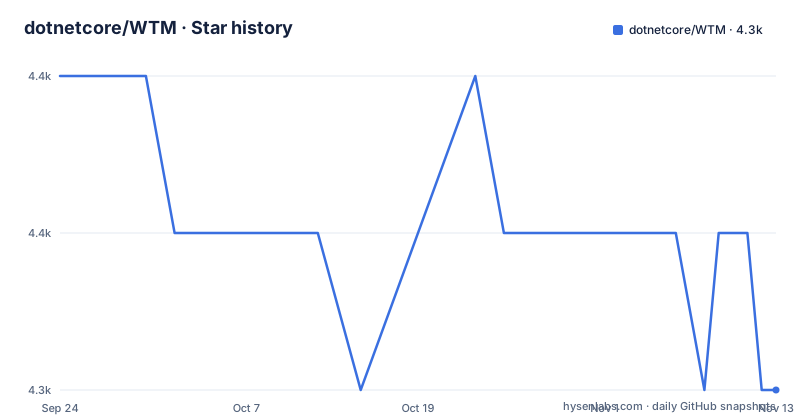
Star history
- dotnetcore/WTM4,349 ★ · -2
| Repository | 2026-09-24 | 2026-11-13 |
|---|---|---|
| dotnetcore/WTM | 4.4k | 4.3k |
-2 Stars in the last 50 days, measured from the daily GitHub snapshot. Compare with other projects
Editorial analysis
The generator is the product, not the runtime library
Most ASP.NET Core frameworks ship libraries and leave the code to you. WTM inverts that. It ships four NuGet packages, `WalkingTec.Mvvm.Core`, `WalkingTec.Mvvm.Mvc`, `WalkingTec.Mvvm.Mvc.Admin` and `WalkingTec.Mvvm.TagHelpers.LayUI`, and a code generator that emits both server-side and client-side code for the same data model at once.
The reason that matters is stated plainly in the README: under the client-side mode, the generator writes the server code and the client code together, which it claims reduces the communication cost between front-end and back-end developers. That is the whole pitch.
A catch a skim misses: the README claims support for LayUI, React and VUE, but the CI table only lists builds against SDK v2.2.300, v3.1.101, v5.0.103 and v6.0.101. Meanwhile the Dockerfile at the repository root builds from `mcr.microsoft.com/dotnet/sdk:10.0`. The published build matrix and the container image target different major runtime generations, so read the Dockerfile when your SDK is newer than v6.0.101 rather than trusting the badge.
Four ViewModel base types decide what a page can do
WTM reduces most CRUD screens to a choice of four base classes, and the choice is the design.
`CrudVM` carries the common add, edit and delete paths. `ListVM` adds paging and export. `ImportVM` and `TemplateVM` add Excel import, which is how bulk data enters the system. `BatchVM` covers operations applied to many selected rows at once. Any screen that does not fit one of these shapes is where the framework stops helping.
Building screens on these base types is a reasonable bargain for internal tools, where every screen looks like every other screen, and a poor one for a public-facing product with an unusual flow, where you are fighting an inherited shape rather than extending an interface.
The framework also bundles the back-office furniture most such apps need anyway: users, roles, user groups, data permission, page permission, menus, logs, mail, SMS and file handling, plus single sign on, a portal mode, distributed database support and simplified integration with Redis and DFS. That list is long enough that you should check which pieces you would otherwise be writing yourself before you accept the dependency.
Data permission is the part that will decide your schema
Mentioned in the feature list without explanation is data permission.
The README does not document how those filters are expressed, whether they compose with an existing row-level security model, or how they behave when a record is read through a relationship rather than a direct query. If your organisation already solves row visibility in the database, you now have two systems competing for the same problem, and the one written in C# is the one nobody will find when a report leaks.
The same silence applies to rollback, background jobs, and auditing beyond the mention of logs. Treat each of those as a question to answer before committing a team to the framework, not a feature to discover in month two.
Getting a running app: the online generator and the repository Dockerfile
WTM does not ask you to clone and wire anything up first. The README points to an online generator at http://wtmdoc.walkingtec.cn/setup, where you configure a project and generate the solution without installing the framework locally. That is the shortest path to a first run and the one the project wants you to take.
For the framework's own demo, the repository ships a two-stage Dockerfile that publishes the demo project and copies the output onto the ASP.NET runtime image. The publish step and the entrypoint are the two lines worth reading before you try it, because the demo assembly name is the process entrypoint.
FROM mcr.microsoft.com/dotnet/sdk:10.0 AS build
WORKDIR /app

COPY . .
RUN dotnet publish "./demo/WalkingTec.Mvvm.Demo/WalkingTec.Mvvm.Demo.csproj" -c Release -o /app/out
The runtime stage sets the listening address to port 80 through `ASPNETCORE_URLS` and runs the published DLL directly:
ENV ASPNETCORE_URLS http://+:80
ENV ASPNETCORE_ENVIRONMENT Production
ENTRYPOINT ["dotnet", "WalkingTec.Mvvm.Demo.dll"]
One thing to know before you go looking for image handling bugs: the file carries a note that System.Drawing is no longer supported on Linux in .NET 6+, and directs you to SkiaSharp or ImageSharp instead. If your application draws or encodes images, you will be doing that swap yourself.
Where the generated code becomes your code
Two files in the repository root hint at how much of the process is project-specific rather than automated. `QA.md` and `TODO.md` sit next to `CHANGELOG.md`, `CONTRIBUTING.md` and `VERSION.md`, and `common.props` with `version.props` hold shared build settings.
The `demo/` directory holds `WalkingTec.Mvvm.ConsoleDemo` and `WalkingTec.Mvvm.Vue3Demo` alongside the main demo the Dockerfile publishes. Read those before generating anything. They are the framework author's answer to how the client-side mode is meant to be wired, and they are more informative than the feature list.
Against ASP.NET Core scaffolded directly, and against Vue or React without a generator
The obvious alternative is not another framework. It is plain ASP.NET Core with Entity Framework Core and nothing else, scaffolding controllers by hand. The difference in approach is directness: you own every layer, so auth, authorization, paging and import are code you write and code you can read. WTM's approach is inheritance, where those behaviours already exist but arrive attached to a base class and a layout you did not choose. Plain ASP.NET Core costs far more per screen and wins on anything unusual.
The other alternative is a client-side framework such as Vue or React used on its own, with a hand-written API layer. Here the generator is the differentiator rather than the base classes: WTM writes the endpoint and the component together from one model, and the client-side modes are listed as stable for React and VUE alongside LayUI and Blazor. If your front-end team already owns its own component library and design system, that pairing is work you throw away.
The repository is not archived and the last push was on 2026-07-05, but the most recent tagged release in the list is v8.1.12 from 2024-10-10, so code on the `dotnet10` branch has moved on since the last tagged release. Note the README's own routing caveat: it says version 5.0x lives in the VNext branch, while the default branch of the repository is `dotnet10`. The documentation site is the authority for which branch matches your SDK, not the branch name you land on.
Seven maintainers, a Gitter room and two QQ groups
Support for a framework this shape rests on how quickly someone answers when a generated page behaves oddly.
The people behind it are small in number and easy to reach in a specific way. The project describes itself as a team of seven developers and links a Gitter room plus two QQ groups, one of them marked full. The README also asks for C#, React and VUE contributors, which tells you where the maintainers expect gaps to be.
That is a real answer for a reader who wants to know whether anyone will read an issue, and a narrower one than an open governance structure. A seven-person team with chat-based support and no published support policy is something to price into your own timeline rather than rely on.
Editorial conclusion
Adopt WTM if your team is building a conventional admin-style back office in C#, you want the LayUI server-rendered path, and you are willing to check how its built-in data permission fits whatever your database already has. Do not adopt it if your UI is already built in React or Vue by a separate front-end team. Before anything else, generate a project at http://wtmdoc.walkingtec.cn/setup and read the CRUD, paging and data permission code it produces for your own entity, because that generated code is the product you are really evaluating.
Frequently asked questions
What is WTM (WalkingTec.Mvvm) used for?
WTM is a rapid development framework based on .NET Core for building web applications in C#. It supplies CrudVM, ListVM, ImportVM and BatchVM base classes plus a code generator, and it targets LayUI, React and VUE user interfaces.
How do you install WTM?
The README directs you to an online project generator at http://wtmdoc.walkingtec.cn/setup, where a WTM project can be generated without installing anything locally. The framework itself is consumed as NuGet packages including WalkingTec.Mvvm.Core and WalkingTec.Mvvm.Mvc.
Which UI frameworks does WTM support?
The README lists server-side LayUI, client-side React and client-side VUE, and adds a server and client Blazor mode, marking each as stable. The code generator can write server-side and client-side code together in the client-side modes.
What does the WTM code generator produce?
Under the client-side mode, it generates server-side and client-side code at the same time. The README frames this as reducing the communication cost between front-end and back-end developers.
Does WTM include user management and permissions?
The README lists built-in user, role, user group, data permission, page permission, menu, log, mail, SMS and file handling. It does not document how data permission filters are expressed or how they interact with an existing database-level security model.
How large is the team behind WTM?
The project describes itself as a team of seven developers, links a Gitter room plus two QQ groups, and asks for C#, React and VUE contributors.
Official sources
Add this badge to your README
If you maintain this project, the badge below links readers to this analysis and shows its maintenance status from the daily GitHub snapshot. Paste the markdown into your README; add ?metric=license or ?metric=stars to the image URL for a different field.

[](https://hysenlabs.com/projects/dotnetcore-wtm)Star history chart for your README
[](https://hysenlabs.com/projects/dotnetcore-wtm)Was this useful?