DroidDeck runs Steam Gaming Mode on Android phones, but only on the right Adreno GPU
DroidDeck brings the SteamOS experience to Android
At a glance
- What is it?
- DroidDeck is a GPL-3.0 Android app that packages a Linux runtime, FEX, Wine and Proton so Steam and other PC storefronts run on a phone. This piece covers the hardware cut-off, the setup switches Android forces on you, how x86 games are executed, and the limits the project states itself.
- Who is it for?
- DroidDeck is for people with an Adreno 730 or newer, or any Adreno 8xx, who want to run their existing Steam, GOG, Epic or Battle.net libraries on Android without rooting the phone. Owners of Mali, Xclipse, PowerVR or Adreno 710 devices should not install it, since those GPUs are unsupported.
- Can I use it commercially?
- Yes, with conditions. GPL-3.0 is a copyleft licence: if you distribute software that includes it, you must release that software's source code under the same licence. Running it internally without distributing it does not trigger that obligation.
- Is it still maintained?
- Yes. The repository received new commits within the last day.
- What is it written in?
- Mainly Kotlin, according to GitHub's language statistics.
Answers come from the project's GitHub data, last synced on November 25, 2026, and from our analysis. They are not legal advice.
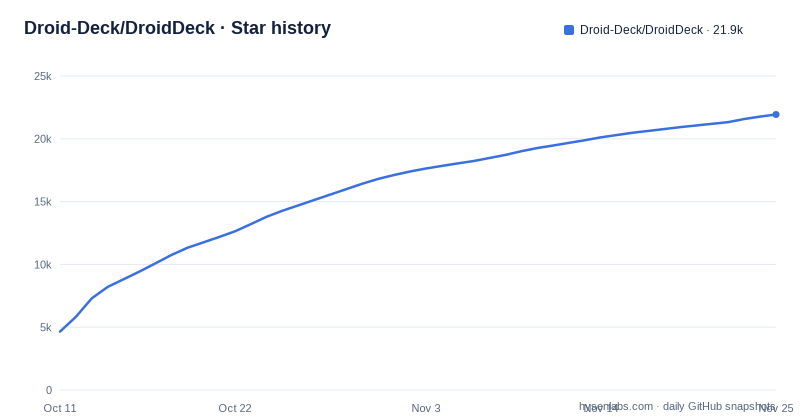
Star history
- Droid-Deck/DroidDeck21,932 ★ · +17,279
| Repository | 2026-10-11 | 2026-11-25 |
|---|---|---|
| Droid-Deck/DroidDeck | 4.7k | 21.9k |
17,279 Stars in the last 45 days, measured from the daily GitHub snapshot. Compare with other projects
Editorial analysis
The GPU in your phone decides whether DroidDeck is an option
DroidDeck needs Android 9 or newer, and the hardware line is drawn by GPU rather than by Android version. Supported devices have an Adreno 730 or newer, or any Adreno 8xx. Adreno 6xx is marked experimental. Mali, Xclipse, PowerVR and the Adreno 710 are unsupported outright. No root is needed.
The consequence is blunt: a recent flagship with a Mali or Xclipse GPU cannot run it, however fast the rest of the phone is. Games use Mesa Turnip with its per render pass memory choice. Storage matters too. The runtime takes about 3 GB, and the desktop and emulators add 1.1 GB.
Android 12 and newer make you lift child process limits for Steam
Installation is four steps: install the APK, install the Linux runtime from inside the app, press Play and sign in to Steam. The fourth step is where Android gets in the way. On Android 14 and newer you have to turn on Disable child process restrictions in Developer options yourself. On Android 12 and 13, Steam's first launch shows a Fix it for me button that walks you through the same change.
The setting lives in Developer options and applies to the whole phone, not only to DroidDeck. If you are not comfortable enabling Developer options on a daily-use phone, that is the point to stop.
x86 games reach an ARM phone through FEX, Proton and a proot Linux
DroidDeck runs a Linux userland under proot and executes x86 code with FEX. Windows games go through Wine and Proton on top of that, with the runtime, shim, input and controller layers built on WinNative and Bannerlator by maxjivi05. x86 programs that link OpenSSL 3 use the copy in Steam Linux Runtime 4.0, and x86 Linux games get the /etc/asound.conf that pressure-vessel writes.
AppImages are handled in two ways. The build sets the platform name under AT_PLATFORM so sharun AppImages start through the userland-execve loader, while x86 AppImages, and arm64 ones whose runtime cannot unpack on Android, are unpacked with uruntime. Several Wine internals are reimplemented around Android's constraints: WriteProcessMemory hooks fall back to /proc/<pid>/mem, Wine write watches rely on userfaultfd, and droiddeck-ntsync follows the Linux ntsync semantics. The Steam client itself runs with TU_DEBUG=sysmem.
Desktop compositing is software rendered and Firefox runs with less sandboxing
The project states its limits in three short sentences, and each has a practical cost. Compatibility and performance vary by device, so a game that runs well on one Adreno 8xx phone is not guaranteed to run the same on another. Desktop compositing is software rendered, so the full Linux desktop does not get the GPU path that games get; treat it as a utility for file management and launchers rather than a place to play.
Firefox sandboxing is reduced under proot. If you use the Linux desktop to browse, you are running a browser with weaker isolation than it has on a normal Linux install. Keep that in mind before signing in to important accounts from inside the desktop session.
GOG, Epic and Battle.net each come in through a different borrowed client
Beyond Steam, DroidDeck integrates GOG, Epic Games, Xbox and other storefronts. Epic Games and GOG build on Phobos's adaptation of Legendary and gogdl, and GOG install script registry entries are read the way Heroic Games Launcher reads them. Epic's official Linux launcher preview runs through FEX, a setup that is outside Epic's listed Linux support, so problems there are not something Epic will treat as a supported configuration.
Battle.net support, by kayakyakr, runs Blizzard's own client inside Proton. The client is downloaded from Blizzard and not bundled. Installs drive Blizzard's Agent the way barncastle's Battle.Net-Installer does. Without Steam running, Battle.net games see the controller as an Xbox 360 pad through PROTON_SPOOF_STEAMINPUT_VIDPID.
Compatibility is fixed one game at a time
The credits double as a list of per-title fixes, which tells you how compatibility is achieved: by hand, game by game. DiRT 3 and DiRT Showdown keep their telemetry socket the way RoccoC's DiRTTelemetryErrorFix does. Black Ops III and Dark Souls Remastered start without umu-protonfixes, because its 311210.py and 570940.py scripts fail under ARM64 Proton. ReSkate uses the launch option from its own README and D3D12 feature level 12_1.
The flip side is that a game not yet on anyone's radar may need a similar fix before it starts. Device reports and preview builds live on the project's Discord, and bug reports go in #bug-reports with the zip produced by the app's Share logs button.
Releases ship from GitHub only, every few days
DroidDeck has no website. Download it only from the repository's Releases page. Release cadence is fast: 0.6.7 was published on 2026-10-29, 0.6.9 on 2026-10-31, and a playstore-inputs-20261103 release of PlayStore component inputs on 2026-11-03. The last push to main was on 2026-11-02. The install link on the project page still points to DroidDeck-0.6.7.apk, so check the Releases list for the newest build rather than following that link. Release notes are kept in docs/releases.
The project says it is 100% open source with no ads, no telemetry and no source withheld, under GPL-3.0. It is not affiliated with Valve, which owns Steam and Proton, or with any of the hardware brands it mentions.
Building the APK needs Docker, Rust and the Android NDK
A local build needs Docker, Java 17, the Android SDK and NDK, Rust through rustup, GitHub CLI, Python 3 and zstd. One script prepares everything:
tools/build_local.shThe APK appears in app/build/outputs/apk/release/ and is installed with tools/deploy_local.sh. Later builds can skip preparation with ./gradlew :app:assembleRelease, which reuses the prepared inputs. Unit tests run with ./gradlew -PskipRust=true :app:testDebugUnitTest, and the helper and preload suite with bash tools/test_local.sh. Windows builders have tools/run_windows.ps1 and tools/prepare_windows_runtime.py instead.
Editorial conclusion
DroidDeck is for people with an Adreno 730 or newer, or any Adreno 8xx, who want to run their existing Steam, GOG, Epic or Battle.net libraries on Android without rooting the phone. Owners of Mali, Xclipse, PowerVR or Adreno 710 devices should not install it, since those GPUs are unsupported. Before installing, check your GPU against that list, free about 4.1 GB, and download only from the GitHub Releases page, because the project has no website.
Frequently asked questions
What is DroidDeck?
DroidDeck is a GPL-3.0 Android app that brings the SteamOS experience to Android: Steam Gaming Mode, a full Linux desktop, GOG, Epic Games, Xbox and other storefronts, and Steam VR.
How do I install DroidDeck on Android?
Download the APK from the DroidDeck GitHub Releases page, install the Linux runtime in the app, press Play and sign in to Steam. On Android 14 and newer, first enable Disable child process restrictions in Developer options.
What does DroidDeck do?
DroidDeck runs a Linux runtime on Android and executes x86 PC games through FEX, Wine and Proton, so Steam and other PC stores run on a phone with an Adreno 730 or newer, or any Adreno 8xx GPU.
Is DroidDeck legit?
DroidDeck is a public GPL-3.0 project that states it has no ads, no telemetry and no withheld source. It has no website, so the only official download is the GitHub Releases page of Droid-Deck/DroidDeck.
Official sources
Where developers are discussing it
Posts on Hacker News, dev.to and Lobsters that link to this repository, found by our scan of those communities. 0 in the last 30 days; newest first.
- DroidDeck brings the SteamOS experience to AndroidHacker News · Oct 13, 2026 · 1 points · 0 comments
- DroidDeck brings the SteamOS experience to AndroidHacker News · Oct 5, 2026 · 1 points · 0 comments
Add this badge to your README
If you maintain this project, the badge below links readers to this analysis and shows its maintenance status from the daily GitHub snapshot. Paste the markdown into your README; add ?metric=license or ?metric=stars to the image URL for a different field.

[](https://hysenlabs.com/projects/droid-deck-droiddeck)
[](https://hysenlabs.com/projects/droid-deck-droiddeck)Star history chart for your README
[](https://hysenlabs.com/projects/droid-deck-droiddeck)Was this useful?