k8sec: A Minimal CLI for Kubernetes Secrets Without the YAML
CLI tool to manage Kubernetes Secrets easily
At a glance
- What is it?
- k8sec is a small Go CLI that reads and writes Kubernetes Secrets as key=value pairs, with dotenv import and export. It trades flexibility for speed and simplicity, and it suits operators who want to avoid editing YAML or base64 by hand.
- Who is it for?
- Adopt k8sec if you manage Secrets in a single cluster, prefer plain key=value syntax over YAML manifests, and want a tool that works with your existing kubeconfig and context flags. Skip it if you need multi-document YAML output, secret encryption, or fine-grained access control beyond what kubectl offers.
- Can I use it commercially?
- Yes. MIT is a permissive licence: you can use, modify and sell software built on it, as long as you keep its copyright and licence notices.
- Is it still maintained?
- Yes. The repository last received commits 21 days ago.
- What is it written in?
- Mainly Go, according to GitHub's language statistics.
Answers come from the project's GitHub data, last synced on October 4, 2026, and from our analysis. They are not legal advice.
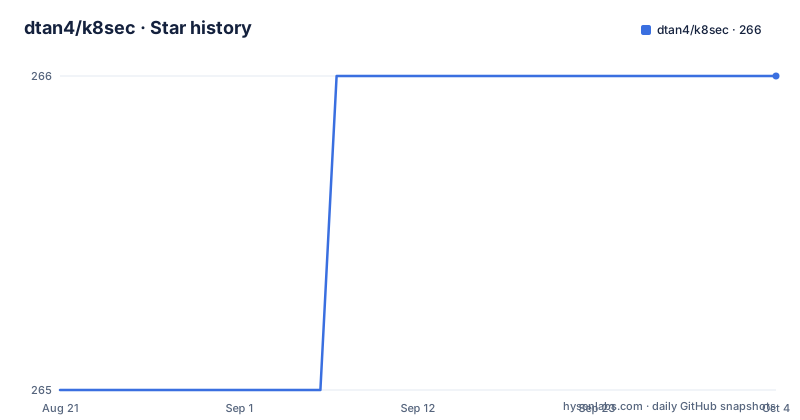
Star history
- dtan4/k8sec266 ★ · +1
| Repository | 2026-08-21 | 2026-10-04 |
|---|---|---|
| dtan4/k8sec | 265 | 266 |
1 Stars in the last 44 days, measured from the daily GitHub snapshot. Compare with other projects
Editorial analysis
What k8sec Solves for Kubernetes Operators
Kubernetes Secrets are stored as base64-encoded key-value pairs, and the standard way to manage them is through kubectl with YAML or JSON manifests. That works, but it forces you to write a manifest, base64-encode every value, and apply it. k8sec removes that ceremony. It is a command-line tool that lets you list, set, unset, load, and dump Secret data using plain key=value arguments. The intended user is someone who lives in a terminal and wants to update a Secret without opening an editor or running multiple kubectl commands. The README positions it as a tool to manage Secrets easily, and the command set reflects that: five subcommands, each doing one thing. It is not a full Secrets management platform. It is a focused utility for quick edits and dotenv-style workflows.
How k8sec Works: Commands and Data Flow
k8sec talks to the Kubernetes API using your existing kubeconfig. The global options include --context, --kubeconfig, and --namespace, so it respects the same configuration you use with kubectl. The list command prints a table of Secret names, types, keys, and values. Values are shown as plain text by default, but you can pass --base64 to see the raw encoded form. The set command takes a Secret name followed by KEY=VALUE pairs. It updates the Secret in place, adding or replacing keys. The unset command removes one or more keys from a Secret. The load command reads dotenv format text, either from a file with -f or from stdin, and applies all key-value pairs to a named Secret. The dump command does the reverse: it writes a Secret's data as dotenv text, optionally to a file with -f, and with --noquotes to omit surrounding quotes. The data flow is straightforward: you give k8sec a name and some key-value pairs, it sends a patch or update to the API server, and the cluster stores the result.
Getting k8sec Running: Installation and First Commands
You can install k8sec with Homebrew on macOS by tapping dtan4/tools and running brew install k8sec. Precompiled binaries are available for Windows, macOS, and Linux on the Releases page. If you prefer to build from source, the README shows go get -d github.com/dtan4/k8sec, then cd into the source directory and run make install. After installation, you can list all Secrets in the default namespace with k8sec list. To see a specific Secret, add its name: k8sec list rails. The output is a table with columns for NAME, TYPE, KEY, and VALUE. To set a new key, run k8sec set rails rails-env=production. If the value is already base64-encoded, use --base64: k8sec set --base64 rails foo=ZHRhbjQ=. To remove a key, k8sec unset rails rails-env. To load a .env file, k8sec load -f .env rails, or pipe it in: cat .env | k8sec load rails. To dump a Secret to a file, k8sec dump -f .env rails. These commands are short and avoid the need to construct a YAML manifest.
Limitations: Where k8sec Is the Wrong Tool
k8sec has a narrow scope, and that is a limitation as much as a strength. It only manages Secret data, not the Secret object's metadata, labels, annotations, or type. If you need to set a Secret of type kubernetes.io/dockerconfigjson or tls, k8sec will not help you create it; you still need kubectl or a manifest. The dump command outputs dotenv format, which is fine for environment variables but not for structured data like a JSON blob that you want to inspect as JSON. There is no encryption, no rotation, no audit log, and no way to compare a local file with the cluster state before applying. The README does not mention any dry-run mode or diff capability. If you accidentally run k8sec set with a typo in a key name, it will add a new key rather than warn you. For teams that need change control or secret versioning, k8sec is too thin. It also assumes you have a kubeconfig that points to the right cluster; if you manage multiple clusters, you must pass --context every time or set it in your environment.
Alternatives: kubectl and External Secrets Operators
The most direct alternative is kubectl itself. You can create a Secret with kubectl create secret generic, edit it with kubectl edit, and view it with kubectl get secret -o yaml. The difference is that kubectl works with YAML and base64, so you need to encode values manually or use stringData in a manifest. k8sec abstracts that away by accepting plain key=value pairs and handling encoding for you. For dotenv workflows, you could write a small script around kubectl to read a .env file and generate a manifest, but k8sec does it in one command. On the other end of the spectrum, tools like the External Secrets Operator sync secrets from cloud providers like AWS Secrets Manager or HashiCorp Vault into Kubernetes. That approach is for teams that want a single source of truth outside the cluster. k8sec is the opposite: it operates directly on the cluster with no external dependency. Choose k8sec if you want a simple, interactive tool. Choose an operator if you need automated rotation or central management.
Maintenance and License: What to Expect
The repository is not archived, and the most recent release, v0.9.0, was pushed on May 29, 2025. The previous release, v0.8.0, came in March 2022, and v0.7.0 in March 2020. That gap suggests maintenance is occasional rather than continuous. The README requires Kubernetes 1.18 or above, which is a reasonable baseline for modern clusters, but it does not mention support for newer API versions or deprecations. The project is licensed under MIT, which means you can use, modify, and distribute it freely, but you get no warranty. The contribution guide asks for go test ./... and gofmt -s before submitting a pull request, which indicates a clean Go codebase. If you adopt k8sec, you should be comfortable with the fact that releases are infrequent. The v0.9.0 release is recent, so the project is not dead, but do not expect a steady stream of feature updates. Verify that the binary you download matches your operating system and that the checksums are published, though the README does not mention checksums explicitly.
Editorial conclusion
Adopt k8sec if you manage Secrets in a single cluster, prefer plain key=value syntax over YAML manifests, and want a tool that works with your existing kubeconfig and context flags. Skip it if you need multi-document YAML output, secret encryption, or fine-grained access control beyond what kubectl offers. Before adopting, verify that the current release v0.9.0 supports your Kubernetes version (1.18 or above per the README) and test the load and dump commands against a non-production Secret to confirm the dotenv parsing matches your file format. The tool is MIT-licensed and has a clear maintenance history, but its last release before v0.9.0 was in 2022, so check the repository for recent activity before relying on it in production.
Frequently asked questions
How do I install k8sec?
Three ways. On macOS, tap dtan4/tools and install k8sec through Homebrew. Otherwise use a precompiled binary for Windows, OS X or Linux from the releases page, or build from source with go get -d, a cd into the GOPATH checkout, and make install.
Can k8sec import a .env file into a Kubernetes secret?
Yes. The load command reads key=value lines from a file with -f or from standard input, and dump writes the same format back, quoting values unless you pass --noquotes, so the round trip works in a pipe as well as on disk.
What version of Kubernetes does k8sec need?
The stated requirement is Kubernetes 1.18 or above. The module manifest is compiled against a much newer client-go and API library, so the stated floor describes the oldest supported cluster rather than the build environment.
What version does a locally built k8sec binary report?
The version hardcoded in the Makefile, which is v0.6.0. It is stamped into the binary at link time alongside the commit and a build date, while the newest release tag is v0.9.0.
Official sources
Add this badge to your README
If you maintain this project, the badge below links readers to this analysis and shows its maintenance status from the daily GitHub snapshot. Paste the markdown into your README; add ?metric=license or ?metric=stars to the image URL for a different field.

[](https://hysenlabs.com/projects/dtan4-k8sec)Star history chart for your README
[](https://hysenlabs.com/projects/dtan4-k8sec)