openGym: a self-hosted workout tracker that keeps everything in one ./data folder and binds logins to your hostname
Self-hosted gym & body-weight tracker — plan routines, log workouts (supersets, warm-ups, cardio), see which muscles are trained, fatigued or detrained, import from FitNotes/Strong/Hevy, passkey login. Your data, your server.
At a glance
- What is it?
- openGym is an AGPL-3.0 gym and body-weight tracker that runs as two Docker containers, stores users and workouts in a local folder, and signs people in with passkeys. It is a strong fit for lifters who want their training history on their own server, provided they can put it behind HTTPS and lock down signup before sharing the address.
- Who is it for?
- openGym fits lifters and small groups who already run Docker, own a domain with TLS, and want progression rules, plate math and imports from FitNotes, Strong or Hevy without handing data to a hosted service. Passkeys require a secure context and an appropriate relying-party hostname; localhost is supported for local use, and the project also documents optional password login.
- Can I use it commercially?
- Yes, with strict conditions. AGPL-3.0 is a network copyleft licence: if people use a modified version over a network, for example as a hosted service, you must offer them its source code under the same licence.
- Is it still maintained?
- Yes. The repository received new commits within the last day.
- What is it written in?
- Mainly JavaScript, according to GitHub's language statistics.
Answers come from the project's GitHub data, last synced on November 21, 2026, and from our analysis. They are not legal advice.
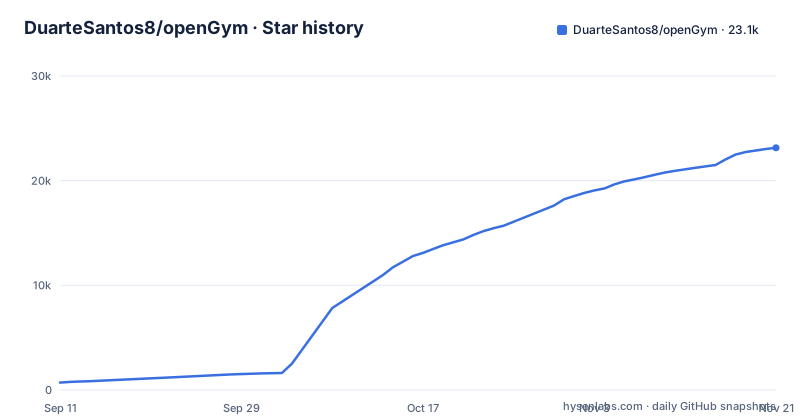
Star history
- DuarteSantos8/openGym23,136 ★ · +22,426
| Repository | 2026-09-11 | 2026-11-21 |
|---|---|---|
| DuarteSantos8/openGym | 710 | 23.1k |
22,426 Stars in the last 71 days, measured from the daily GitHub snapshot. Compare with other projects
Editorial analysis
Two containers: a framework-free Node API and a web proxy in front of it
openGym ships as a Compose project named opengym. The api service is described in docker-compose.yml as passkey auth plus per-user data, written in Node with no framework, and published as ghcr.io/duartesantos8/opengym-api:latest. A second container builds the React frontend in a multi-stage build, serves it, and proxies /api to the API.
That proxy is the only way in. The API listens on PORT (default 3000), and the web container proxies to the same value, so changing PORT in .env moves both at once. Because the web container overwrites X-Forwarded-For and X-Real-IP with the real peer, TRUST_PROXY defaults to 1, which lets the sign-in throttle count requests per client instead of treating every request as coming from the web container.
Persistence is a bind mount, not a database server. ./data on the host maps to /data in the container (DATA_DIR=/data) and holds users, passkeys, per-user state and the session secret. There is no Postgres or MongoDB to operate, which keeps a home server simple and puts all the weight on that one folder.
Starting openGym on localhost:8080 with docker compose
The .env.example file works unchanged on the machine running Docker. Its local-testing block sets the passkey relying party to localhost and the web port to 8080:
RP_ID=localhost
ORIGIN=http://localhost:8080
WEB_PORT=8080
RP_NAME=openGym
Copy it to .env, then start the stack in the background:
docker compose up -dOpen http://localhost:8080 and create a profile with a passkey. The compose file offers two ways to get the API image: docker compose pull fetches the prebuilt one, and docker compose up --build builds it from the api/ directory. Anyone who wants to try the interface before installing can use the in-browser demo at opengym.ch/demo/, which the README describes as the real app with example data.
The first useful session is short. Pick one of the four starter plans (Push/Pull/Legs, Upper/Lower, Full Body, 5x5), which load as ordinary editable routines, and today's workout starts itself with weights pre-filled from the previous session.
Passkeys break if the hostname changes or TLS is missing
Passkeys are bound to the exact hostname, and browsers only allow them over HTTPS, with localhost as the one exception. A deployment on a LAN IP over plain HTTP will not let anyone register. For a real deployment, .env.example asks you to put openGym behind a reverse proxy or tunnel that terminates TLS and set RP_ID and ORIGIN to your domain, for example RP_ID=gym.example.com and ORIGIN=https://gym.example.com, with the proxy pointed at WEB_PORT.
The hostname binding has a second cost. Choose the domain once. Passkeys registered against one RP_ID are tied to that name, so moving the instance to a new hostname leaves existing users with credentials that no longer match. Password sign-in can be switched on per instance as a fallback, and new devices pair with a one-time code or QR, but neither replaces planning the domain before your first user registers.
Signup is open on a fresh instance until you claim the admin seat
A fresh openGym instance has open signup and no admin. With FIRST_USER_ADMIN=1, the first profile created becomes the admin, and admins get an Admin dashboard link in Settings to see users, disable accounts, generate invite codes, view workout history and set up the AI Coach. The setting is off by default.
"First" has a strict meaning in .env.example: the instance had no profiles at all when that profile registered. An instance that already has profiles promotes nobody when you upgrade, and an instance whose profiles were all deleted counts as fresh again. The consequence for anyone exposing openGym on a public domain: if you share the address before registering yourself, a stranger can create the first profile and, with FIRST_USER_ADMIN=1 set, become the admin. Register your own profile first. This alone does not close signup: the README lists INVITE_ONLY as off by default, so enable it if new profiles should require an invite. On an older instance, admins are added by listing user IDs (from Settings, Account, Account ID, or the users array in ./data/db.json) in .env, and a first-user admin is marked "admin": true in ./data/db.json.
./data is the whole backup, and coach-auth is kept out of it on purpose
Everything that matters lives under ./data: users, passkeys, per-user state, the session secret, db.json, and an uploads/ folder with the photos and videos attached to custom exercises. The comment in docker-compose.yml says to back it up, and the documented backup is a tar of the data/ directory. Losing that folder means losing every account and every logged set.
A sibling mount, ./coach-auth, holds the provider credential cache for the AI Coach. It sits outside ./data deliberately so that a live refresh token never ends up in the backup archive. Nothing in it needs backing up: if it is lost, you sign the provider in again.
For portability beyond the server, each user can export everything as one JSON file, or export workouts and body data as CSV, and share a single plan as a small file or a PDF.
The AI Coach needs a separate API build target
The default API image has no AI runtime and no AI dependency. That is the image every instance has always had. Opting into the AI Coach means building a different target:
API_TARGET=coach docker compose up --build apiThe --build flag is not optional here. Because the api service also sets an image: line, Compose would otherwise pull the prebuilt default image instead of building the coach one, and the AI Coach would never appear. Anyone running only docker compose pull is on the default target by definition. Setup of the coach happens from the admin dashboard afterwards.
Progression rules that refuse to add load after missed reps
The README's case against most workout apps is that they keep your data on their servers and push a subscription. openGym imports from Strong and Hevy (Hevy by CSV or API key), plus FitNotes and Apple Health weight exports, and then applies its own progression engine on your server. Rules can be set per routine or per exercise: linear, Greyskull LP, double progression through a visible rep range, triple progression (reps, then sets, then load), or adding time. Each target explains why it is that number, missed reps never add load, and stalls trigger a deload.
Plate math covers barbell, EZ bar, trap bar and Smith machine from the plates you own, and each gym keeps its own plates, dumbbells, bars and machine stacks. When two devices edit at once, changes merge field by field instead of overwriting each other.
The project is licensed AGPL-3.0, has a CLA.md for contributors, and was last pushed on 2026-11-02. Recent releases are v1.4.2, v1.4.3 and v1.4.4 (published 2026-11-03, titled a fresh look, Modules and Google Play), with the CHANGELOG.md and ROADMAP.md in the repository root.
Editorial conclusion
openGym fits lifters and small groups who already run Docker, own a domain with TLS, and want progression rules, plate math and imports from FitNotes, Strong or Hevy without handing data to a hosted service. Passkeys require a secure context and an appropriate relying-party hostname; localhost is supported for local use, and the project also documents optional password login. Before exposing the service, set FIRST_USER_ADMIN=1 and register the first profile yourself; set INVITE_ONLY=1 if registrations should require an invite, and confirm ./data is backed up.
Frequently asked questions
How does openGym compare with Hevy?
openGym runs on your own server and keeps data in a folder you control, while it can import an existing Hevy history by CSV or API key. The README does not publish a feature-by-feature comparison with Hevy.
Does openGym work without a server?
Yes. The iPhone, iPad and Android apps work on their own with no server and no account, or connected to your own openGym instance.
Can openGym run over plain HTTP on a domain?
Not with passkeys. Browsers only allow passkeys over HTTPS, with localhost as the exception, so a domain deployment needs a reverse proxy or tunnel that terminates TLS and matching RP_ID and ORIGIN values.
Official sources
Where developers are discussing it
Posts on Hacker News, dev.to and Lobsters that link to this repository, found by our scan of those communities. 0 in the last 30 days; newest first.
- OpenGym, A self-hosted gym and body-weight tracker (AGPL)Hacker News · Sep 23, 2026 · 1 points · 1 comments
Add this badge to your README
If you maintain this project, the badge below links readers to this analysis and shows its maintenance status from the daily GitHub snapshot. Paste the markdown into your README; add ?metric=license or ?metric=stars to the image URL for a different field.

[](https://hysenlabs.com/projects/duartesantos8-opengym)Star history chart for your README
[](https://hysenlabs.com/projects/duartesantos8-opengym)Was this useful?