DC-SDK: a Cesium derivative aimed at Chinese basemap providers
DC-SDK is based on the open source project Cesium for the second development of two three-dimensional WebGis application framework , the framework optimizes the use of Cesium and adds some additional features , designed for developers to quickly build WebGis application.🌎
At a glance
- What is it?
- DC-SDK is a JavaScript framework built on Cesium that adds base layers for Baidu, Tianditu, ArcGIS and Google plus overlay and scene tools, packaged on npm as @dvgis/dc-sdk. Its asset layout requirement is strict, and its licensing statements disagree with each other.
- Who is it for?
- DC-SDK suits front-end teams who already know Cesium and need Chinese base map providers, without writing the coordinate and layer plumbing themselves. It does not suit teams that want a small library, that expect vendor neutral licensing, or that cannot restructure their build to copy static assets into libs/dc-sdk/resources.
- Can I use it commercially?
- Yes. Apache-2.0 is a permissive licence: you can use, modify and sell software built on it, as long as you keep its copyright and licence notices.
- Is it still maintained?
- Yes. The repository last received commits 149 days ago.
- What is it written in?
- Mainly JavaScript, according to GitHub's language statistics.
Answers come from the project's GitHub data, last synced on November 7, 2026, and from our analysis. They are not legal advice.
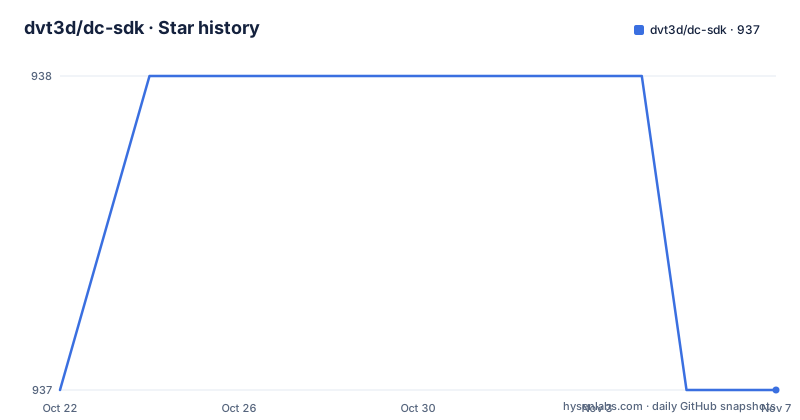
Star history
- dvt3d/dc-sdk937 ★ · +0
| Repository | 2026-10-22 | 2026-11-07 |
|---|---|---|
| dvt3d/dc-sdk | 937 | 937 |
0 Stars in the last 16 days, measured from the daily GitHub snapshot. Compare with other projects
Editorial analysis
Cesium with a Chinese basemap layer stack
DC-SDK is described as a two and three dimensional WebGIS application framework built on the open source Cesium project through a second round of development. The framework optimises the use of Cesium and adds features on top, and the stated goal is to let developers build WebGIS applications quickly.
The additions are visible in the example gallery shipped in the repository. The examples/ directory holds folders for animation, baselayer, datav, echarts, effect, event, html, layer, mini-scene, model, offline, primitive, setting, terrain and tools, alongside bundled libraries such as echarts.min.js and turf.min.js. The baselayer previews in the README show Baidu, Tianditu and ArcGIS tiles, and the model folder shows 3D Tiles with a custom shader.
The intended reader is stated plainly in the README warning: this is a JS and GIS framework package, and developers need front-end and GIS experience. That is not a throwaway line. The package assumes you know what a viewer is, that you can debug a scene that fails to render, and that you will read a configuration file rather than a getting started guide.
The published description in package.json frames it as a 2D and 3D all-in-one framework whose keywords include Cesium, WebGL, heatmap and turf. The ecosystem assumption is a project already doing map work, with the framework supplying the parts that would otherwise be written per provider.
The DC namespace and a Viewer constructed by hand
The API surface shown in the README is small. The start snippet assigns the namespace to a global and waits for the framework to report readiness before constructing a viewer:
global.DC = DC
DC.ready({}).then(()=>{
    let viewer = new DC.Viewer()
})
Two details carry weight. First, DC.ready takes a configuration object, so initialisation options are passed at the ready call rather than through separate setter calls. Second, the viewer is constructed explicitly rather than being a singleton that already exists, which means the caller controls when and where a scene exists.
The package entry point in package.json is dist/index.js and the type field is module, so the package ships as ES modules. The build scripts point at a gulp pipeline with several targets: build, build:node, build:iife and build:release, plus a dev task that clears dist first with rimraf. The prepublishOnly hook runs the release build, so what lands on npm is the release bundle rather than a raw source tree.
The top level entries also show a docs/ directory built with VitePress, since the scripts include docs:dev and docs:build, and a server.js driven by an express dependency for serving the examples locally.
The libs/dc-sdk/resources path is not optional
This is the single most important operational detail in the README, and it is the kind of thing that turns into an afternoon of debugging.
The DC framework sets CESIUM_BASE_URL to ./libs/dc-sdk/resources/. To make the 3D scene render properly you must copy the Cesium related static resource files, namely Assets, Workers and ThirdParty, into the libs/dc-sdk/resources directory of the project. The alternative is to set DC.config.baseUrl to point the static resource base somewhere else.
The CDN route has the same constraint. The README says to put the resources in the project root directory libs/dc-sdk, and warns that if you put them in another directory the framework will not run properly. The included script tags load the JavaScript bundle and the stylesheet from jsDelivr:
<script src="https://cdn.jsdelivr.net/npm/@dvgis/dc-sdk/dist/dc.min.js"></script>
<link
  href="https://cdn.jsdelivr.net/npm/@dvgis/dc-sdk/dist/dc.min.css"
  rel="stylesheet"
  type="text/css"
/>
The reason is not mysterious. Cesium loads workers and web assets at runtime from a base URL, and DC-SDK changes that base URL to its own resource directory. If the directory is empty, the scene has no workers to spin up and the globe never draws. The fix is always the same shape: copy the assets, or point baseUrl at them.
Copying the Cesium assets through webpack, Vue and Vite
Because the assets must land in a fixed path, the build tool has to do the copying. The README gives one recipe per bundler, and each uses copy-webpack-plugin against the installed package.
For webpack, the plugin copies the package resource directory into the expected location:
// webpack.config.js
const path = require('path')
const CopywebpackPlugin = require('copy-webpack-plugin')
const dvgisDist = './node_modules/@dvgis'

module.exports = {
  plugins: [
    new CopyWebpackPlugin([
      {
        from: path.join(dvgisDist, 'dc-sdk/dist/resources'),
        to: 'libs/dc-sdk/resources',
      },
    ]),
  ],
}
Vue 2 uses the same source and target through chainWebpack, and Vue 3 uses the patterns form of the plugin, writing into dist/libs/dc-sdk/resources so the copy survives into the built output.
Vite is the shortest of the three, because a dedicated plugin exists:
// vite.config.js
import { defineConfig } from 'vite'
import DC from '@dvgis/vite-plugin-dc'

export default defineConfig({
  plugins: [DC()],
})
Project templates are linked for each of these, including a Vue 2 template, a Vue 3 template, a webpack template and a Vite template. That is a reasonable amount of hand-holding for a framework whose main integration risk is a directory layout.
Running the examples locally with yarn
The repository ships the example gallery, and running it is a two step process with yarn:
  yarn run build
  yarn run server
The build script clears dist and runs the gulp build task, and the server script is the gulp server task, which is where the express dependency in package.json comes in. For the example site the same style of static asset placement applies, since the examples index loads scripts from the repo.
Installing the package itself is straightforward, with npm or yarn:
yarn add @dvgis/dc-sdk
-------------------------
npm install @dvgis/dc-sdk
The README recommends the npm or yarn route for bundler based projects, and the import style is a namespace import with the stylesheet pulled in alongside:
import * as DC from '@dvgis/dc-sdk'
import '@dvgis/dc-sdk/dist/dc.min.css'
Note the separate CSS import. The framework ships its own stylesheet and expects it to be loaded explicitly, which is easy to forget when wiring the namespace into an existing design system. The README also notes that the configuration described in that section mainly applies to the npm or yarn way of working.
Apache 2.0 in the repository, MIT in package.json
Two licence statements sit side by side, and they disagree. The licence field on the repository says Apache-2.0, the README badge reads Apache 2, and the tree contains a file named LICENSE.MD. The package.json published to npm declares a different licence:
  "name": "@dvgis/dc-sdk",
  "version": "5.0.0",
  "license": "MIT",
For a package consumed through npm, the manifest is the string most tools read, so an organisation running a licence scan over its dependency tree will see MIT. For a fork or a vendored copy, LICENSE.MD is what governs. Which one applies to your use is a question for whoever handles licensing in your organisation, but the discrepancy itself is a finding worth raising before the package enters a build.
The README adds a Copyright section with four conditions. The framework is described as a basic platform, completely open source, which can be modified and reconstructed by any individual or institution without the authors authorization. The authors state they are not responsible for problems arising from modification by individuals and organizations, that some industrial plug-ins and tools will be added later with code open sourced appropriately, and that the released package may be used permanently and free of charge by any person or organization subject to two conditions: complete package reference, and reserving the copyright information in the console output.
That second condition is unusual. Keeping the copyright notice in console output is a requirement attached to free use, so if you strip the console banner for a production deployment you are outside the terms the README sets out. That deserves attention from whoever owns compliance.
Version drift between npm, tags and the last push
The repository is not archived, and the last push was on 2026-06-12. The most recent tagged release listed is 4.1.1 from 2025-01-06, preceded by 4.0.0 in 2024-11-09 and 3.4.0 in 2024-05-07. The package.json in the tree reports version 5.0.0.
So there are three version numbers in play and they do not line up: a package manifest at 5.0.0, a latest release tag at 4.1.1, and code that was pushed to master in June 2026. That is not a complaint about the project so much as a warning about how you pin it. A team that wants stability should install a published npm version and record which one, because the master branch can move under you at any time and carries no tag.
The documentation surface is also split. The README links an online docs site in Chinese, the repository contains a docs/ folder built with VitePress, and the examples gallery is served from the project homepage. All of it is oriented towards Chinese speaking developers, with a separate README_zh.md alongside the English one and parallel CHANGES_zh.md and CHANGES_en.md files. For an English speaking team, the Chinese docs are the primary source and the README is the summary.
The commercial direction is hinted at but not defined. The README mentions that some industrial plug-ins and tools will be added in a later stage, and links a PayPal support button. There is no pricing page, no licence list for those plugins, and no stated release date, so a plan that depends on them cannot be made from what is published.
Editorial conclusion
DC-SDK suits front-end teams who already know Cesium and need Chinese base map providers, without writing the coordinate and layer plumbing themselves. It does not suit teams that want a small library, that expect vendor neutral licensing, or that cannot restructure their build to copy static assets into libs/dc-sdk/resources. Before adopting, install @dvgis/dc-sdk, point DC.config.baseUrl or copy the Cesium Assets, Workers and ThirdParty folders into libs/dc-sdk/resources, and confirm the scene renders before building on it, because the framework states it will not run properly if the resources sit anywhere else.
Frequently asked questions
How do I install DC-SDK?
The package is published on npm as @dvgis/dc-sdk and can be added with yarn add @dvgis/dc-sdk or npm install @dvgis/dc-sdk. A CDN build is also published on jsDelivr, with the script and stylesheet loaded from the dist folder.
Why does my DC-SDK scene fail to render?
The README states the DC framework sets CESIUM_BASE_URL to ./libs/dc-sdk/resources/, so the Cesium Assets, Workers and ThirdParty files must be copied into that directory, or DC.config.baseUrl must point at the correct static resource base. If the resources sit in another directory the framework will not run properly.
Which map providers does DC-SDK support?
The example gallery shows base layer previews for Baidu, Tianditu and ArcGIS, and the repository topics include amap, baidu, google and tdt alongside cesium and webgis. The framework also includes overlay, layer, terrain and scene tool examples.
What licence is DC-SDK under?
The repository and its badge indicate Apache-2.0 with a LICENSE.MD file, while package.json declares "license": "MIT" for the published npm package. The README copyright section also requires complete package reference and reserving the copyright information in the console output.
How do I start a DC-SDK viewer?
The README shows assigning the namespace and waiting for readiness before constructing the viewer, using DC.ready({}).then(()=>{ let viewer = new DC.Viewer() }). The package is an ES module with dist/index.js as the entry point.
Official sources
Add this badge to your README
If you maintain this project, the badge below links readers to this analysis and shows its maintenance status from the daily GitHub snapshot. Paste the markdown into your README; add ?metric=license or ?metric=stars to the image URL for a different field.

[](https://hysenlabs.com/projects/dvt3d-dc-sdk)Star history chart for your README
[](https://hysenlabs.com/projects/dvt3d-dc-sdk)Was this useful?