Mitsubishi CN105 ESPHome gives a Mitsubishi heat pump local control over UART
ESPHome firmware inspired by GeoffDavis’s esphome-mitsubishiheatpump, directly integrating the SwiCago library within its codebase.
At a glance
- What is it?
- MitsubishiCN105ESPHome is ESPHome firmware that speaks the reverse engineered CN105 serial protocol of Mitsubishi indoor units, so a heat pump or Lossnay can be controlled from Home Assistant, a browser or MQTT without a vendor cloud. It is an unofficial implementation, the repository states no licence, and it demands soldering and a logic level shifter.
- Who is it for?
- MitsubishiCN105ESPHome suits an owner of a Mitsubishi Electric unit with a CN105 port who wants local control without a vendor cloud, and who is comfortable soldering a connector and flashing firmware. It is the wrong choice if you need an officially supported product with a warranty, because the project states it is an unofficial implementation of a reverse engineered protocol used at your own risk, and a poor match if your unit lacks a CN105 header.
- Can I use it commercially?
- Yes. BSD-2-Clause is a permissive licence: you can use, modify and sell software built on it, as long as you keep its copyright and licence notices.
- Is it still maintained?
- Yes. The repository received new commits within the last day.
- What is it written in?
- Mainly C++, according to GitHub's language statistics.
Answers come from the project's GitHub data, last synced on November 7, 2026, and from our analysis. They are not legal advice.
Star history
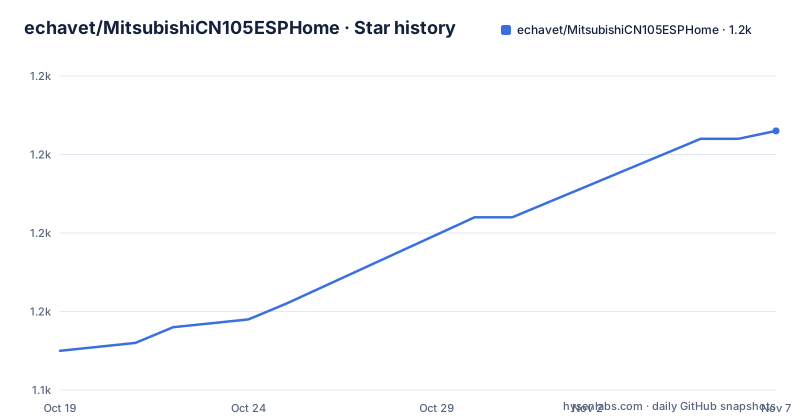
- echavet/MitsubishiCN105ESPHome1,173 ★ · +28
| Repository | 2026-10-19 | 2026-11-07 |
|---|---|---|
| echavet/MitsubishiCN105ESPHome | 1.1k | 1.2k |
28 Stars in the last 19 days, measured from the daily GitHub snapshot. Compare with other projects
Editorial analysis
What the CN105 port unlocks
Mitsubishi Electric indoor units expose an internal connector called CN105, and talking to it is what this firmware is for. The project describes itself as a firmware for ESP32 microcontrollers supporting UART communication via the CN105 Mitsubishi connector, with the purpose of enabling complete control of a compatible Mitsubishi heat pump or Lossnay through Home Assistant, a web interface, or any MQTT client.
The use case is narrow and specific. The intended user owns a Mitsubishi Electric heat pump, air conditioner or Lossnay that includes a CN105 communication port, and wants to drive the air handler or indoor unit over local communication. Most commonly that means Home Assistant, but the same control surface is available to a browser or an MQTT client, which matters for anyone who does not run Home Assistant but does run a small server.
The stated benefit is fully local control without reliance on a vendor network, plus additional visibility, finer control, and even improved energy efficiency and comfort when the remote temperature features are used. The visibility part is concrete in the feature list: sensors for power usage and outdoor temperature, compressor frequency for energy monitoring, diagnostic sensors for understanding indoor unit behaviour in AUTO mode, and the i-see sensor.
The installation cost is equally concrete. You need a WiFi capable ESP32 or ESP8266, a bidirectional logic level shifter, and a 5-pin plug to connect to the heat pump indoor unit. ESPHome loads the custom firmware onto the device, and the browser or Home Assistant sends temperature setpoints, external temperature references and settings to the heat pump. Basic soldering skills and the ability to flash firmware to a microcontroller are required, though the project notes that ESPHome makes the flashing as painless as possible.
Two upstream projects, merged into one component set
The lineage matters because the differences between this project and its ancestors are exactly what this project exists to fix.
The first ancestor is geoffdavis's esphome-mitsubishiheatpump, an ESPHome component for Mitsubishi heat pumps. This project states that it maintains all functionalities of that original project, and lists them: wireless control of Mitsubishi Comfort HVAC equipment via ESP8266 or ESP32 using the ESPHome framework, instant feedback of command changes via the RF remote to Home Assistant or MQTT, direct control independent of the remote, a slightly modified version of the SwiCago/HeatPump Arduino library for direct communication via the internal CN105 connector, full mode and vane orientation support added as an extra component within the core climate component, and a thermostat in Home Assistant with compressor frequency monitoring, also as an extra component within the core climate component.
The second ancestor is the SwiCago HeatPump library, which contains the reverse engineered protocol implementation. The stated purpose of this project is to integrate that protocol directly into the ESPHome component classes, rather than calling out to a separate Arduino library.
The benefit of that integration is visible in the communication layer. The original SwiCago library had a limitation that caused delays in the ESPHome loop(), and this project addresses it with enhanced UART communication. Byte-by-byte reading inside the loop() function means no data loss or lag, since the component reads continuously without blocking ESPHome. UART writes are followed by non-blocking reads, and responses are accumulated byte by byte and processed when complete, which allows command stacking without delays and a more responsive interface. The 2026.5.2 release notes describe an architecture refactor and a FrameParser state machine, which is the structural form of that work.
The hardware, and the part people get wrong
The board list is specific about what has actually been tried, and the caution on ESP8266 is worth reading before buying anything.
Tested hardware includes the generic ESP32 Dev Kit, the M5Stack ATOM Lite, the M5Stack ATOM S3 Lite with modifications, the M5Stack NanoC6 tested over both wifi and thread, the M5Stack StampS3, the Seeed Studios Xiao ESP32S3, and the WeMos D1 Mini Pro on ESP8266.
The ESP8266 warning is important: boards such as the WeMos D1 Mini clones, LOLIN in particular, tend to be unreliable in this application and may require an external voltage regulator to work. Some users have successfully used ESP8266 based devices, but if you are purchasing new hardware for this project, the recommendation is to focus on the more modern and powerful ESP32-S3 based devices.
The other hardware requirement is the bidirectional logic level shifter, and that is not an optional accessory. The ESP32 works at 3.3V logic levels while the CN105 connector on the indoor unit is a 5V UART, so the shifter sits between the microcontroller and the unit and handles the level translation in both directions. A plain wire connection is the kind of shortcut that works on the bench and damages a pin later, and a 5-pin plug is needed to reach the connector on the unit.
For firmware loading, ESPHome is the tool, installed independently or as a Home Assistant add-on. The repository also carries a hacs.json file, which is the metadata the Home Assistant Community Store uses, and a set of example configurations under examples/ for the M5Stack Atom S3, the Xiao ESP32S3, a dual setpoint setup, a modular HVAC setup and root configurations, which is the fastest way to find a starting point that matches the hardware you own.
Which units work, and where the features thin out
The compatibility rule is simple: indoor units with a CN105 header are generally compatible, and the HeatPump wiki carries a comprehensive list of supported models. Beyond that list, units listed as compatible with the Mitsubishi Kumo Cloud interface will likely work here too, because they use the same CN105 connector and serial protocol.
The units tested by project contributors include the MFZ-KA09NA, the MLZ-KP12NA, several MSXY-FN10VE and R2 variants, a run of MSZ-AP models from 20VGK through 50VGK, the MSZ-AP35VGD2, and the MSZ-AY series including the MSZ-AY20 and MSZ-AY25.
The important qualification is the one in the caution box. This is an unofficial implementation of the reverse engineered Mitsubishi protocol, and although the authors and contributors have extensively tested the firmware across several similar implementations and forks, not all units support every feature. Some capabilities are model specific, which is why the project carries a setpoint table for the MSZ-A24NA enabled with msz_a24na_setpoint_table: true, using a unique bytecode to Celsius mapping for that unit.
A related detail is Fahrenheit handling. The project maps unit conversions onto Mitsubishi's own, as the documentation puts it, creative math, so that Home Assistant and external thermostats stay in sync rather than drifting by a degree across the conversion. A dedicated release fixed a double conversion in the climate proxy, which is the kind of bug that only shows up for users in Fahrenheit regions and is a useful signal about which details have been hardened.
The project also points to a commercial official route for people who need an officially supported way to control a Mitsubishi device over WiFi, which is the honest alternative if the caveat about reverse engineered protocols does not sit well with you.
ESPHome version floor, and the shims that keep older builds working
The stated requirement is ESPHome 2025.7 or later, with 2025.11 and later recommended for the native ClimateTraits feature flags and the FixedVector select options. Versions from 2025.7 to 2025.10 remain buildable through compile-time API shims, tracked in issue 733.
That distinction between the minimum and the recommended version is the sort of detail that saves an evening. The shims exist so that a project pinned to a slightly older ESPHome still compiles, but they are compatibility scaffolding, not the path the component is developed against, and behaviour that depends on the newer feature flags will not be available in the older builds.
The repository structure shows the shape of the work. There is a components/ directory and a separate custom_components/ directory, the latter being the convention for a component installed through the Home Assistant Community Store, along with hacs.json at the root, an icon.svg and a logo.svg for that listing. A tests/ directory is present, and the 2026.5.2 release notes mention 183 unit tests along with the architecture refactor and the FrameParser state machine, which is a meaningful amount of test coverage for firmware that otherwise talks to hardware you cannot mock.
There is also a docs/ directory, a captures/ directory that appears to hold captured protocol traffic for reference, and the examples/ directory already mentioned. The .vscode/ directory suggests the project is developed in VS Code.
A note on the ecosystem rather than the code: this is a single maintainer's repository with no stated support commitment, and the releases are dated by calendar version, 2026.5.2, 2026.5.1 and 2026.3.2, rather than by semantic version. A calendar version tells you when the release was made, which is what a firmware user wants, and it tells you nothing about compatibility, so read the release notes before upgrading rather than assuming a patch is safe.
No licence file, reverse engineered protocol, use at your own risk
Two things deserve attention before anyone builds this.
The first is the licence. The licence field for this repository is listed as unknown and the repository root contains a README, the source directories, examples and assets, with no LICENSE file among the top level entries. That means there is no grant of rights attached to the code, which is a real constraint if you intended to fork it, redistribute it or base commercial work on it, and a question worth raising with the maintainer rather than assuming.
The second is the caution itself, which is worth reading in full rather than skimming. The project states that it is an unofficial implementation of the reverse engineered Mitsubishi protocol based on the SwiCago library, that the authors and contributors have extensively tested the firmware across several similar implementations and forks, that not all units support every feature, that it is free to use but at your own risk, and that a commercial solution is available if you need an officially supported method to control a Mitsubishi device over WiFi.
That is a coherent position rather than a hedge. A reverse engineered protocol on hardware you own, controlling your own heat pump, is a reasonable personal project, and the risk is bounded in a specific way: the failure mode is a heat pump that does not respond or that is misconfigured, not a remote attacker with access to your home. But the risk is not zero. A heat pump is a safety relevant device in a cold climate, and a firmware that writes setpoints to it has consequences if it gets them wrong.
The maintenance picture, for what it is worth, is that the repository is not archived and the last push was on 2026-10-13, so work is continuing. The most recent tagged releases are 2026.5.2 on 2026-05-11, 2026.5.1 on 2026-05-02 and 2026.3.2 on 2026-03-28, so the released versions trail the current work in the branch.
Editorial conclusion
MitsubishiCN105ESPHome suits an owner of a Mitsubishi Electric unit with a CN105 port who wants local control without a vendor cloud, and who is comfortable soldering a connector and flashing firmware. It is the wrong choice if you need an officially supported product with a warranty, because the project states it is an unofficial implementation of a reverse engineered protocol used at your own risk, and a poor match if your unit lacks a CN105 header. Before building, confirm your indoor unit has a CN105 port, put a bidirectional logic level shifter between the ESP32 and the unit, and read the ESPHome version note, since 2025.7 is the minimum and 2025.11 or later is recommended.
Frequently asked questions
What hardware do I need to use the Mitsubishi CN105 ESPHome firmware?
A WiFi capable ESP32 or ESP8266, a bidirectional logic level shifter, and a 5-pin plug to connect to the heat pump indoor unit, plus basic soldering skills. ESP32-S3 based boards are recommended over ESP8266 boards, which are described as unreliable in this application.
Which ESPHome version does MitsubishiCN105ESPHome need?
ESPHome 2025.7 or later is required, and 2025.11 or later is recommended for the native ClimateTraits feature flags and FixedVector select options. Versions 2025.7 to 2025.10 remain buildable through compile-time API shims, tracked in issue 733.
Which Mitsubishi units are supported?
Generally, indoor units with a CN105 header are compatible, and units compatible with the Mitsubishi Kumo Cloud interface will likely work because they use the same connector and protocol. Units tested by contributors include the MFZ-KA09NA, MLZ-KP12NA, several MSXY-FN variants, the MSZ-AP range and the MSZ-AY series.
Is this firmware officially supported by Mitsubishi?
No. The project states it is an unofficial implementation of the reverse engineered Mitsubishi protocol and is used at your own risk, and it notes that not all units support every feature. A commercial officially supported WiFi option is linked from the project documentation.
Official sources
Add this badge to your README
If you maintain this project, the badge below links readers to this analysis and shows its maintenance status from the daily GitHub snapshot. Paste the markdown into your README; add ?metric=license or ?metric=stars to the image URL for a different field.

[](https://hysenlabs.com/projects/echavet-mitsubishicn105esphome)Star history chart for your README
[](https://hysenlabs.com/projects/echavet-mitsubishicn105esphome)Was this useful?