egg is an e-graph library where the clock, not the algorithm, is the first config decision
egg is a flexible, high-performance e-graph library
At a glance
- What is it?
- egg gives Rust programs a library for e-graphs and equality saturation, with optional features for a linear programming rewrite rule, serde support and reports; the README spends its configuration section on clock selection and the Makefile spends its time on no_std.
- Who is it for?
- Adopt egg if you are building a term-rewriting system in Rust, whether an optimizer, a synthesizer or a verifier, and you want the equality saturation machinery rather than a Datalog-based alternative. Do not adopt it if your rewriting rules are naturally relational and you want incremental execution, since the README points at egglog as a different approach with a language-based design and composable analyses.
- Can I use it commercially?
- Yes. MIT is a permissive licence: you can use, modify and sell software built on it, as long as you keep its copyright and licence notices.
- Is it still maintained?
- Yes. The repository last received commits 25 days ago.
- What is it written in?
- Mainly Rust, according to GitHub's language statistics.
Answers come from the project's GitHub data, last synced on October 23, 2026, and from our analysis. They are not legal advice.
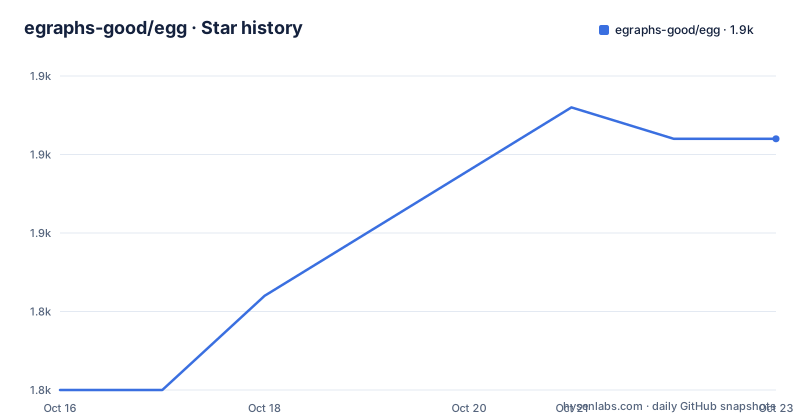
Star history
- egraphs-good/egg1,853 ★ · +8
| Repository | 2026-10-16 | 2026-10-23 |
|---|---|---|
| egraphs-good/egg | 1.8k | 1.9k |
8 Stars in the last 7 days, measured from the daily GitHub snapshot. Compare with other projects
Editorial analysis
A library for equality saturation, not an application
egg is described as a library for e-graphs and equality saturation, and the README says what that is for: program optimizers, synthesizers, verifiers, and more. It is a building block, not a tool you run.
The packaging is plain Rust. Cargo.toml names the package egg, version 0.11.0, edition 2024, licensed MIT, with the description "An implementation of egraphs" and the category data-structures. The dependency list includes hashbrown, indexmap, smallvec, rustc-hash, spin, num-bigint, num-traits, log, and thiserror, with several configured to disable their default features.
One dependency is worth a second look.
symbol_table = {git = "https://github.com/mwillsey/symbol_table", rev = "a716c39a4aa4757c910c93fc10c5c7fa8f467133", default-features = false, features = ["global"]}The symbol table is pinned to a git revision rather than a crates.io version, which means your build reaches out to GitHub for that crate. For a library that many downstream projects depend on, that is a supply-chain decision baked into the manifest, and it is worth knowing before a build fails behind a firewall.
The README also asks users to cite a BibTeX file in the repository and to add their project to an Awesome E-graphs page, which is how you find out what else is built on it.
Clock selection is the documented configuration decision
The one configuration topic the README gives real space to is timing.
By default egg uses Quanta for clock reads. Quanta can make clock reads cheaper, but may take up to 200 ms to initialize. If that startup cost matters to you, the fix is a feature change on the dependency rather than any code.
[dependencies.egg]
# Keep your existing dependency source here.
default-features = false
features = ["std"]
Turning off default features removes quanta and falls back to std::time::Instant. The README's advice to compile with --release when measuring performance is in the same spirit: this is a library that people benchmark, and the clock and the build profile are both part of the measurement.
Benchmarks are first-class here. Setting EGG_BENCH_CSV to a filename appends a row per test to a csv.
EGG_BENCH_CSV=math.csv cargo test --test math --release -- --nocapture --test --test-threads=1So the benchmark workflow is the test workflow with an environment variable set, single-threaded, which is a good sign for anyone planning to compare rewrite strategies rather than just run them.
The feature matrix decides what you can build
The features block in Cargo.toml is the API surface in miniature. The default set is std plus quanta.
std pulls in env_logger and symbolic_expressions, and enables the std variants of hashbrown, indexmap, num-bigint, num-traits, log, rustc-hash and symbol_table. Turning std off is what makes a no_std build possible, and the Makefile verifies that path on every run.
Then there are the optional capabilities, each with its own dependency. lp brings in good_lp, a linear programming solver, for rewrite rules that need to choose among alternatives rather than fire unconditionally. serde-1 adds serde with derive. reports adds serde_json, which is what you need if you want to emit the analysis results as JSON. vectorize is another optional dependency with a name that suggests converting e-graph output into something a later stage consumes, and symbolic_expressions is optional and tied to the standard feature set for interoperating with symbolic expression formats.
The practical consequence is that some capabilities you may expect are not in the default build. If your rules need the lp feature you opt in explicitly, and the Makefile runs cargo test --release --features=lp so that path is exercised in CI rather than only in your project.
Optional dependencies also mean optional documentation and optional bugs: a downstream project on the default features never compiles the lp path, so an error there surfaces to you rather than to everyone.
Tests double as worked examples
The README points at three files in the tests directory, and they are described as interesting rather than as coverage.
prop.rs implements propositional logic and proves some simple theorems. math.rs implements real arithmetic with a little symbolic differentiation. lambda.rs implements a small lambda calculus using egg as a partial evaluator.
That is the clearest available picture of what the library is for. A partial evaluator, a symbolic differentiator and a theorem prover over propositional logic are three programs where the right answer is not one expression but an equivalence class of them, which is precisely the situation equality saturation is designed for.
Two practical notes from the same section. Some tests may time out, and the suggestion is to try cargo test --release if that happens. And proof production is a mode: the Makefile deliberately skips the examples in proof-production mode, running cargo test --release with the test-explanations feature, which suggests the library can emit explanations for rewrites and that producing them costs time enough to exclude from the default run.
The Makefile is the real CI specification
Contributing means running make before you commit, and the README says why: it runs all the tests and lints that CI will, including those under feature flags.
What that expands to is more useful than the instruction.
all: test nits

test:
	cargo test --release
	cargo test --release --no-default-features --features std
	cargo test --release --features=lp
	cargo test --release --features "test-explanations"
	cargo test --no-default-features
Five test invocations: the default build, the standard-library-only build without quanta, the linear programming feature, the explanations feature, and a bare no_std build.
The nits target is the documentation half.
nits:
	rustup component add rustfmt clippy
	cargo fmt -- --check
	cargo clean --doc
	cargo doc --no-deps --all-features
	cargo deadlinks
The clippy invocations are present but commented out, so a local make run checks formatting and documentation but not lints, even though the components are still installed.
One external dependency creeps in for contributors: the Cbc solver is required to run the lp feature locally, so a full make needs a solver you do not otherwise need to write an optimiser.
Where egg is the wrong tool
The README names the alternative itself, which is more useful than a comparison written from the outside.
egglog is presented as a system providing an alternative approach to equality saturation based on Datalog, with a language-based design, incremental execution and composable analyses, and it lives in a separate repository with its own paper and a web demo.
The distinction that matters in practice is incremental execution. egg's iteration is a saturation loop: you run rewrites until the e-graph stops growing. For a workload where facts arrive one at a time and you want the analysis updated for the new fact without redoing the work, a Datalog-based system with incremental execution is the better fit, and egglog's composable analyses give you a different way to reason about the same problem space.
There is also the model cost. An e-graph holds every equivalence class it discovers, and a rewrite system that fires eagerly can grow the graph faster than you expect. egg gives you the merge and rebuild machinery and the benchmark harness to measure it, but it does not tell you when you have written too many rules, and the tests directory is a better guide to realistic rule counts than any documentation.
Practically, if your transformation is a straight rewrite toward a normal form you can name, a simpler term-rewriting loop may be all you need.
Versioning, editions and where the documentation lives
Cargo.toml declares version 0.11.0 on edition 2024, and the README's usage example matches.
[dependencies]
egg = "0.11.0"
Edition 2024 means a recent toolchain, and the repository ships a rust-toolchain file, so the compiler version is defined by the checkout rather than by your machine.
The repository has no GitHub releases, and CHANGELOG.md is at the repository root. Since the crate is consumed through Cargo with a caret range, your lockfile is what actually pins the version, and a semver-compatible 0.11.x will be picked up automatically on a fresh resolve.
Documentation is split three ways, and the split changes over time. docs.rs carries the released API docs and the tutorials, egraphs-good.github.io carries the egg website and the main-branch documentation for egg itself, and the repository has doc/ with the logo and project assets. Zulip is linked for chat, which is where an e-graph community actually answers questions.
MIT licensing is stated in both Cargo.toml and the LICENSE file.
Editorial conclusion
Adopt egg if you are building a term-rewriting system in Rust, whether an optimizer, a synthesizer or a verifier, and you want the equality saturation machinery rather than a Datalog-based alternative. Do not adopt it if your rewriting rules are naturally relational and you want incremental execution, since the README points at egglog as a different approach with a language-based design and composable analyses. Verify first that your rewrite rules can be expressed as e-class rewrites before you commit, that your project tolerates edition 2024, and that the default quanta feature does not hurt your startup, since it may take up to 200 ms to initialize and the fix is a feature flag rather than a code change. The last push was on 2026-09-28, MIT licensed, and there are no GitHub releases, so pin 0.11.0 in Cargo.toml and track CHANGELOG.md.
Frequently asked questions
How do I add egg to a Rust project?
Add egg = "0.11.0" under [dependencies] in Cargo.toml, and compile with --release if you are measuring performance. The crate is published on crates.io as egg and the current version in Cargo.toml is 0.11.0 on edition 2024.
Why does egg take a long time to start up?
By default egg uses Quanta for timing, which can make clock reads cheaper but may take up to 200 ms to initialize. Set default-features = false and features = ["std"] on the egg dependency to fall back to std::time::Instant.
What are the optional features of egg?
The default set is std plus quanta. Optional dependencies include good_lp for the lp feature, serde for serde-1, and serde_json for reports, plus symbolic_expressions and vectorize. Disabling std is what enables a no_std build.
When should I use egglog instead of egg?
The README points to egglog as an alternative approach to equality saturation based on Datalog, with a language-based design, incremental execution and composable analyses. That makes it the better fit when facts arrive incrementally rather than in one saturation run.
How do I benchmark egg?
Set the EGG_BENCH_CSV environment variable to a filename and run the relevant test target in release mode, for example EGG_BENCH_CSV=math.csv cargo test --test math --release -- --nocapture --test --test-threads=1. Each test appends a row to the csv.
Official sources
Add this badge to your README
If you maintain this project, the badge below links readers to this analysis and shows its maintenance status from the daily GitHub snapshot. Paste the markdown into your README; add ?metric=license or ?metric=stars to the image URL for a different field.

[](https://hysenlabs.com/projects/egraphs-good-egg)Star history chart for your README
[](https://hysenlabs.com/projects/egraphs-good-egg)Was this useful?