home-connect-hass rebuilds BSH appliance control from the Home Connect API
Alternative (and improved) Home Connect integration for Home Assistant
At a glance
- What is it?
- home-connect-hass is a Home Assistant custom integration for BSH made appliances that generates its entities from the Home Connect API instead of a fixed list. It gives you program switches, number selectors, service calls, cloud push updates and program start and finish triggers, and it costs you a developer app registration and a rate limited cloud API.
- Who is it for?
- home-connect-hass is the right pick if you own a Bosch, Siemens, Constructa or Neff appliance with programs and options that the built-in Home Assistant integration does not expose, and you are willing to register a Home Connect developer application and live with the cloud API. It is the wrong pick for a single status display, for a self-hosted instance without a public redirect URI, or if the built-in integration already covers your model.
- Can I use it commercially?
- Yes. MIT is a permissive licence: you can use, modify and sell software built on it, as long as you keep its copyright and licence notices.
- Is it still maintained?
- Yes. The repository last received commits 6 days ago.
- What is it written in?
- Mainly Python, according to GitHub's language statistics.
Answers come from the project's GitHub data, last synced on November 7, 2026, and from our analysis. They are not legal advice.
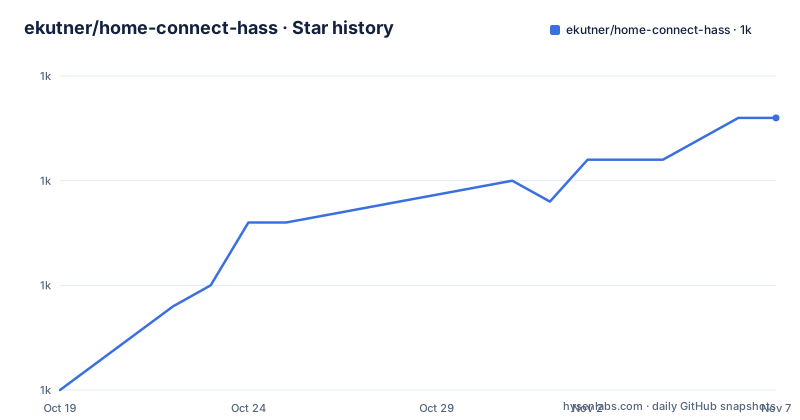
Star history
- ekutner/home-connect-hass1,033 ★ · +13
| Repository | 2026-10-19 | 2026-11-07 |
|---|---|---|
| ekutner/home-connect-hass | 1k | 1k |
13 Stars in the last 19 days, measured from the daily GitHub snapshot. Compare with other projects
Editorial analysis
The built-in Home Connect integration stops short on real appliances
Home Assistant already ships an integration for Home Connect enabled appliances, and the project is explicit about the gaps it is filling. The documentation says the built-in one is basic, that it generates entities which are not always supported by the connected appliances, and that it tends to stop getting status updates after a while. Those are three different complaints, and each one points at a design difference rather than a bug.
The audience is specific: owners of Home Connect enabled appliances made by BSH under the Bosch, Siemens, Constructa and Neff brands. The project is not affiliated with either BSH or Home Assistant, and it installs as a Home Assistant custom integration through HACS, where it is listed as a default integration.
Two traits of the ecosystem shape everything else. The appliances are cloud connected, so control goes through the Home Connect service on the internet rather than over a local protocol. And the integration needs its own credentials, which means registering an application on the Home Connect developers site, with the usual consequences of asking a vendor for API access. The project is MIT licensed, so there is no licensing obstacle to running it, but there is a registration obstacle.
Entities come from the API, so they match the machine you own
The central mechanism is dynamic discovery. The documentation states that all entities are read from the API and reflect the true capabilities of the appliance, and that the entities providing complete control over programs, program options and global settings are likewise read from the API and are therefore specifically applicable to the connected appliances. In practice that means an entity set that changes with the model and firmware of your machine rather than a fixed list maintained in the integration code.
The entities are split by interaction style. Options and settings that can be changed are exposed as Select, Switch or Number entities, chosen according to what the value actually is, so a temperature in degrees and a program choice are both usable in an automation without special handling. Read only status values, and some selectable options, are exposed as Sensor or Binary Sensor entities for display purposes. A Start Program button entity is provided so a program can be started from the dashboard, and program and option selections are additionally available as a service, which is the form an automation script needs.
What the API does not describe cannot be exposed. That is the honest limit of the approach, and it cuts both ways: a dishwasher model with an extra program gets a switch for it, but an appliance whose firmware hides a capability keeps it hidden. The documentation also notes that all names support translation, but only the English translation is currently provided.
Cloud push state and reconnect handling are the parts built in does not do
The second headline feature is how state reaches Home Assistant. The documentation says the state of all entities is updated in real time with a cloud push type integration, and it lists clean handling of appliances disconnecting and reconnecting from the cloud, plus clean handling of new appliances being added or removed from the service. That pairing matters more than it sounds. A push model means the integration is not polling the service on a timer, which is where rate limits and stale states come from, and explicit reconnect handling means a dishwasher that loses its Wi-Fi overnight does not leave a permanently unavailable entity behind.
The event surface is the other half. Status events published by the Home Connect service are exposed as Home Assistant events, and Program Started and Program Finished are exposed as triggers for building automation scripts. So a workflow that should start when the oven finishes, or when the washing machine enters a specific phase, can be written as a trigger rather than as a template sensor polled on a schedule.
The implementation detail worth noting is that it is a pure async implementation, which the documentation gives as the reason for reduced load on the platform. For a Home Assistant instance running on a small box with a dozen appliances, that is the difference between a quiet integration and a busy one. The tradeoff is that everything depends on the vendor cloud being reachable, since a local fallback is not described anywhere in the documentation.
Registering a Home Connect developer application before you install
There is a prerequisite that catches people out, and the documentation walks through it in detail. You create an application on the Home Connect developers site, using the Authorization Code Grant Flow, and you copy the resulting Client ID and Client Secret for the next step. The settings that matter are the redirect URI and a few checkboxes:
OAuth Flow
Authorization Code Grant Flow
Redirect URI
https://my.home-assistant.io/redirect/oauth
Add additional redirect URIs
Leave unchecked
Enable One Time Token Mode
Leave unchecked
Sync to China
Only check if you are located in China
The Home Connect User Account for Testing field takes the email address you use in the Home Connect mobile app, and the application ID can be anything, with home-connect-alt given as an example. If your application was created before July 2022 you will most likely have to update the redirect URI to the value above, and the documentation warns that changes to existing applications can take a few hours to apply, so patience is required.
The warning that matters most is in bold in the original: the email addresses of both the regular user account and the developer account must use only lowercase letters, or the integration will not work. That is a failure mode with no error message in the integration, only in the documentation.
If you run a self-hosted Home Assistant with a public address, the redirect URI changes shape, and the my default config has to be disabled first because it redirects your site to my.home-assistant.io:
Redirect URI
https://<your-FQDN-name>[]:<your-SSL-port>]/auth/external/callback
The angle brackets and stray brackets above are reproduced as the documentation writes them, so treat that line as a shape to fill in rather than a value to copy.
HACS install, credential cleanup and the pre-flight checks
Once the developer application exists, the install is ordinary Home Assistant work. The documentation calls HACS the easiest route and points at the HACS button, and the repository is shaped for it with a hacs.json file and the integration code under custom_components/. Before installing, the pre-installation steps ask you to make sure your Home Assistant instance is configured correctly to point at your local instance, to power on all appliances, and then to turn the Wi-Fi off on your phone and confirm the appliances still work in the Home Connect mobile app. That last step is the useful diagnostic: if the appliance depends on the phone for a connection, the cloud will not reach it.
One cleanup step is easy to miss and painful to ignore. If you have installed the integration before and your credentials changed, go to Settings, then Devices and Services in Home Assistant, click the three-dot menu in the top right corner, select Application credentials, find the previous credentials row for this integration and delete it. Leaving a stale credential row behind is the kind of thing that produces an authentication error with no obvious cause.
The project also ships a tools/ directory, a CLAUDE.md file, a .devcontainer/ folder and a .vscode/ folder at the top level, which points to a development setup that expects a containerised editor rather than a copy and paste workflow.
Rate limits, known issues and a beta tagged release
The documentation has dedicated sections for dealing with API rate limits and for known issues, plus one for reporting bugs, another for enabling debug logging, and a further one on setting the log mode. That structure tells you something about the shape of the project: it is a client of somebody else's API, so the failure modes are the vendor's rate limits, the vendor's schema changes and the OAuth handshake, and the project invests in tracing rather than in features. The bug report section asks for specific information, and the log mode section is there to make the needed detail extractable.
Release history is healthy but not steady in a way you can plan around. The published versions are 1.5.0-b1 on 2026-08-30, 1.4.2 on 2026-06-22 and 1.4.1 on 2026-05-16, so the current line is a beta of the next minor version, and the last push was on 2026-09-01. The documentation has a Beta Releases section, which suggests beta versions are a normal part of the distribution here rather than an exception.
The cloud dependency is the constraint that never disappears. Rate limits are a property of the Home Connect service, and the integration sits on the public internet side of it. If you need local control of a laundry appliance, this project is not that, and neither is the built-in integration it replaces.
When the built-in integration is still the right answer
The built-in Home Assistant integration is the real alternative, and the difference is one of cost rather than capability. It ships with Home Assistant, so there is no developer application to register, no Client ID and Client Secret to manage, and no OAuth redirect URI to keep in sync with your instance. If all you need is a switch for a machine that is already exposed by the built-in integration, the built-in one removes every step in the previous two sections.
What you give up is exactly what this project adds. The documentation's complaint is that the built-in integration generates entities the appliance does not support and stops receiving status updates after a while, and its answer is to read capabilities from the API at runtime, push state instead of polling, and expose program control, option control and lifecycle triggers.
So the decision turns on the appliance, not on the platform. A user with one oven that the built-in integration already models well gains nothing here. A user with a Bosch or Siemens machine whose programs and options are missing or stale in Home Assistant gains a control surface that matches the machine, at the price of a cloud API, a rate limit and a developer app.
Editorial conclusion
home-connect-hass is the right pick if you own a Bosch, Siemens, Constructa or Neff appliance with programs and options that the built-in Home Assistant integration does not expose, and you are willing to register a Home Connect developer application and live with the cloud API. It is the wrong pick for a single status display, for a self-hosted instance without a public redirect URI, or if the built-in integration already covers your model. Verify first that the redirect URI you register matches the instance you run, that the appliance appears with the entity set you expect after the first sync, and that you read the rate limit section before scripting repeated calls against the Home Connect service.
Frequently asked questions
What is home-connect-hass and which appliances does it support?
It is a Home Assistant custom integration for Home Connect enabled appliances made by BSH under the Bosch, Siemens, Constructa and Neff brands. It is not affiliated with BSH or Home Assistant and is MIT licensed.
Do I need a Home Connect developer app to use home-connect-hass?
Yes. The installation instructions start with creating an application on the Home Connect developers site, using the Authorization Code Grant Flow with the redirect URI https://my.home-assistant.io/redirect/oauth, then copying the Client ID and Client Secret.
What is different from the built-in Home Assistant Home Connect integration?
The built-in one is described as basic, generating entities that are not always supported by the appliance and tending to stop getting status updates. This one reads entities from the API so they match the appliance, updates state with cloud push, and exposes program and option control plus Program Started and Program Finished triggers.
How do I install home-connect-hass?
The documentation calls HACS the easiest route, and the repository includes a hacs.json file with the integration under custom_components/. Before installing, power on all appliances, turn the Wi-Fi off on your phone and confirm the appliances still work in the Home Connect mobile app.
Is home-connect-hass actively maintained?
The repository is not archived and the last push was on 2026-09-01, with releases 1.5.0-b1 on 2026-08-30, 1.4.2 on 2026-06-22 and 1.4.1 on 2026-05-16. The documentation has a dedicated section on beta releases, and 1.5.0-b1 is a beta build.
Official sources
Add this badge to your README
If you maintain this project, the badge below links readers to this analysis and shows its maintenance status from the daily GitHub snapshot. Paste the markdown into your README; add ?metric=license or ?metric=stars to the image URL for a different field.

[](https://hysenlabs.com/projects/ekutner-home-connect-hass)Star history chart for your README
[](https://hysenlabs.com/projects/ekutner-home-connect-hass)Was this useful?