Element UI: A Vue 2 Component Library That Refuses to Die
GitHub describes it as A Vue.js 2.0 UI Toolkit for Web. The repository metadata lists Vue as its primary language. The metadata lists the MIT license. This article stays within the project description and details documented in the GitHub repository README.
At a glance
- What is it?
- Element UI is a mature Vue.js 2.0 toolkit from Ele.me, now frozen at v2.15.14. It solves the problem of building admin dashboards and internal tools quickly, but its future belongs to Element Plus.
- Who is it for?
- Adopt Element UI if you are maintaining an existing Vue 2 application that needs a stable, well-documented component set with no major changes ahead. Do not start a new project with it, because the README explicitly says Vue 3 users should use Element Plus, and the last release was in August 2023.
- Can I use it commercially?
- Yes. MIT is a permissive licence: you can use, modify and sell software built on it, as long as you keep its copyright and licence notices.
- Is it still maintained?
- Probably not. The repository last received commits 27 months ago, on August 20, 2024.
- What is it written in?
- Mainly Vue, according to GitHub's language statistics.
Answers come from the project's GitHub data, last synced on November 15, 2026, and from our analysis. They are not legal advice.
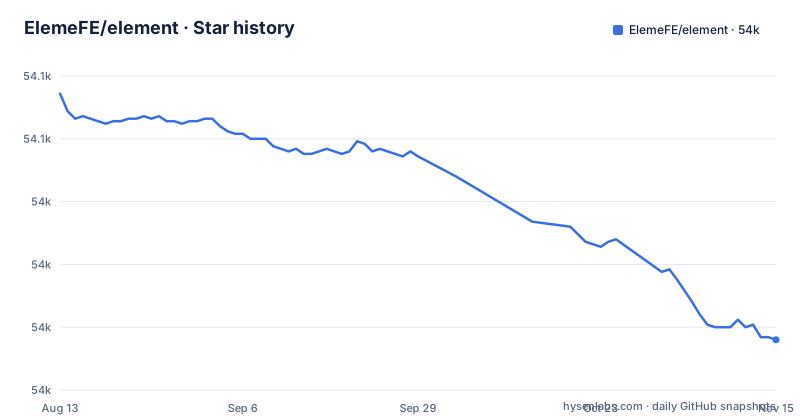
Star history
- ElemeFE/element53,970 ★ · -98
| Repository | 2026-08-13 | 2026-11-15 |
|---|---|---|
| ElemeFE/element | 54.1k | 54k |
-98 Stars in the last 94 days, measured from the daily GitHub snapshot. Compare with other projects
Editorial analysis
What Element UI Actually Provides
Element UI is a UI toolkit for Vue.js 2.0, built by the food delivery company Ele.me. It gives you a set of reusable components like buttons, forms, tables, and dialogs, all styled with a consistent visual language. The intended audience is web developers building data-heavy interfaces: admin panels, dashboards, back-office systems. The README positions it as a general web toolkit, but the component list and the design patterns point squarely at enterprise-style applications. If you need a date picker, a pagination table, or a notification toast, Element UI offers a ready-made solution. It is not a design system with tokens and guidelines; it is a pragmatic collection of widgets that you drop into a Vue 2 project and start using.
How the Component Architecture Works
Element UI integrates with Vue through a plugin system. The README shows two usage patterns. The first is full import: you call Vue.use(Element) and every component becomes available globally. The second is on-demand import: you pull in specific components like Select and Button, then register them individually with Vue.component(Select.name, Select). That second pattern matters for bundle size, because a full import pulls in the entire library. The components themselves follow Vue 2's standard props and events model. There is no special runtime or compiler step; you write templates as you normally would. The library also ships a default theme called theme-chalk, which you import as CSS. The documentation mentions theme customization and an online preview tool, so you can adjust colors without touching the source. This is a conventional Vue component library, not a framework that imposes its own data flow.
Getting Started: Install and First Component
The install command is straightforward: npm install element-ui -S. After that, the quick start example imports Vue and Element, then calls Vue.use(Element). For a minimal setup, that is all you need. The README also demonstrates a tree-shakable alternative: import { Select, Button } from 'element-ui' and register each component by name. You will also need to include the CSS file, typically via import 'element-ui/lib/theme-chalk/index.css'. The README links to a Quick Start in the documentation for more information, and lists starter kits separately. There is an element-starter repository for a basic project, and a Laravel-specific starter for PHP developers. The browser support statement says modern browsers and Internet Explorer 10+, which is a wider net than most Vue 3 libraries offer. For a developer who wants a working UI in an hour, this install path is as simple as it gets.
Maintenance Status: The Elephant in the Room
The README is explicit: Element will stay with Vue 2.x. For Vue 3, the project points to Element Plus, a community-developed project. The last release on the dev branch is v2.15.14 from August 2023. That means the library is in maintenance mode. It receives no new features, and likely only critical bug fixes. The repository is not archived, so the project is not formally dead, but the activity has slowed to a crawl. For a Vue 2 project that is already in production, this is acceptable. For a new project, it is a warning sign. You are adopting a library whose upstream is effectively frozen. The maintainers have made their position clear: the future is Element Plus. If you start a Vue 2 app today, you are locking yourself into a stack that the ecosystem is actively leaving.
A Real Limitation: Vue 2 Only and No New Features
The most obvious failure mode is that Element UI will not work with Vue 3. If your team plans to migrate to the Composition API or take advantage of Vue 3's performance improvements, you cannot carry Element UI along. The README's recommendation to use Element Plus is not a suggestion; it is a hard boundary. Another limitation is the lack of active development. Issues that require new components or significant refactors will likely go unanswered. The documentation, while comprehensive, was written for an older era of Vue. The theme customization is possible, but it relies on a separate preview tool and may require deep CSS overrides for non-trivial changes. If you need a component that is not in the library, you have to build it yourself, and you cannot expect the maintainers to add it. This is the wrong tool for a project that needs ongoing UI evolution or a migration path to Vue 3.
The Alternative: Element Plus and the Migration Path
Element Plus is the community successor to Element UI, built for Vue 3. The README links to it directly, so there is no ambiguity. The README only describes Element Plus as a community-developed project recommended for Vue 3, so check its own documentation for API differences. If you are on Vue 2 and considering Element Plus, you must first migrate your application to Vue 3, then replace Element UI with Element Plus. That is a two-step process that requires planning. The README does not provide a step-by-step migration guide; it only points to the Element Plus repository.
Licence and Upgrade Cost
Element UI is released under the MIT license, which gives you broad freedom to use, modify, and distribute the code, including in commercial products. The README does not mention any contributor license agreement or additional restrictions, so the MIT terms apply. For maintenance, the cost is low in the short term: the library is stable, and you can keep using it without updates. The long-term cost is the inevitable need to migrate. The upgrade path is not free. You will need to switch to Element Plus, which means checking every component you use for API changes. The documentation site for Element UI remains live, so you can reference it during migration. But do not expect any new releases to ease the transition. The project's own README is the clearest signal: for Vue 3, use Element Plus. That is the upgrade cost, and it is a real one.
Editorial conclusion
Adopt Element UI if you are maintaining an existing Vue 2 application that needs a stable, well-documented component set with no major changes ahead. Do not start a new project with it, because the README explicitly says Vue 3 users should use Element Plus, and the last release was in August 2023. Before committing, verify that your target browsers match the stated support (modern browsers and IE 10+), and check whether your project can tolerate a library that is in maintenance mode rather than active development.
Frequently asked questions
what is element
In this repository, element is ElemeFE/element, the Vue.js 2.0 UI Toolkit for Web published to npm as element-ui at version 2.15.14, with main entry lib/element-ui.common.js and typings types/index.d.ts. Its description in package.json is A Component Library for Vue.js.
What is a simple definition of element?
For this project, element means the component library rather than a scientific term. It is a Vue.js 2.0 UI Toolkit for Web under the MIT license, documented in English, Chinese, Spanish, and French, and it states that Element will stay with Vue 2.x.
what is element in science
Nothing in this repository addresses chemistry. Here element is ElemeFE/element, a Vue.js 2.0 UI Toolkit for Web whose homepage is element.eleme.io and whose npm package is element-ui, with separate sibling repositories for React and Angular.
how to install element 3d in after effects
That question is about a different product, since this repository is a Vue.js 2.0 UI Toolkit for Web rather than a video plugin. Here the install is one shell command, npm install element-ui -S, and after that you either register everything with Vue.use(Element) or import individual components such as Select and Button and register each with Vue.component using its name property. The package is element-ui at version 2.15.14, released 2023-08-24, and it requires Vue 2.x.
What is called the element?
The project answers that name for itself: element is ElemeFE/element, MIT licensed, with the npm package named element-ui and the homepage at element.eleme.io. It carries Editor helpers for Atom and Visual Studio Code, separate ports called Element for React and Element for Angular, and starter kits named element-starter and element-in-laravel-starter.
Official sources
Add this badge to your README
If you maintain this project, the badge below links readers to this analysis and shows its maintenance status from the daily GitHub snapshot. Paste the markdown into your README; add ?metric=license or ?metric=stars to the image URL for a different field.

[](https://hysenlabs.com/projects/elemefe-element)Star history chart for your README
[](https://hysenlabs.com/projects/elemefe-element)Was this useful?