Pow attaches animation to the moment a SwiftUI value changes
Delightful SwiftUI effects for your app
At a glance
- What is it?
- Pow is an MIT-licensed SwiftUI package from Emerge Tools that gives particle, haptic and shine effects a trigger: a watched value, not a gesture. It is a small, focused library that assumes you already know how to build a SwiftUI app and want the confirmation moment handled for you.
- Who is it for?
- Adopt Pow if your app already uses SwiftUI on Apple platforms and you want like buttons and toggle feedback to look finished without hand-writing particle timelines. Do not adopt it if your team needs animations outside Apple platforms, or if you need a motion system with designers in the loop rather than a fixed set of effects.
- Can I use it commercially?
- Yes. MIT is a permissive licence: you can use, modify and sell software built on it, as long as you keep its copyright and licence notices.
- Is it still maintained?
- Activity is slowing. The repository last received commits 7 months ago.
- What is it written in?
- Mainly Swift, according to GitHub's language statistics.
Answers come from the project's GitHub data, last synced on November 15, 2026, and from our analysis. They are not legal advice.
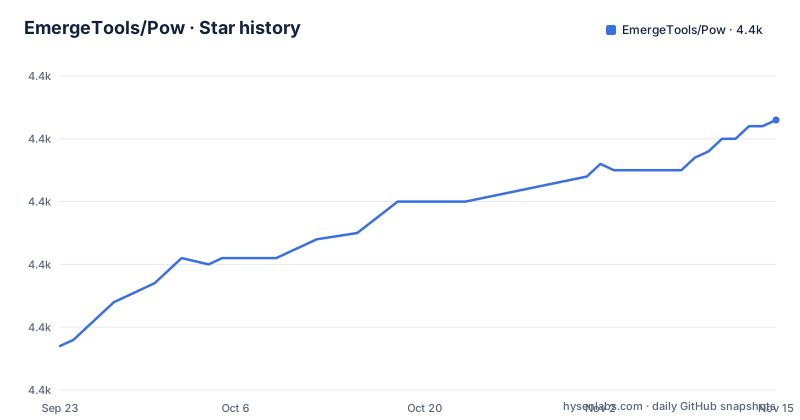
Star history
- EmergeTools/Pow4,433 ★ · +36
| Repository | 2026-09-23 | 2026-11-15 |
|---|---|---|
| EmergeTools/Pow | 4.4k | 4.4k |
36 Stars in the last 53 days, measured from the daily GitHub snapshot. Compare with other projects
Editorial analysis
The gap Pow fills is a button with nothing to say
SwiftUI gives you transitions between views and gives you `withAnimation` for state changes you drive yourself. Neither one reacts to a value the way a phone app usually wants to react. A like button in a social feed changes a count, and on a real device the user expects something at the tap point: a burst, a bump, a short buzz. Writing that means building particle views, offsetting them over time, and tying the lifetime to a state change that may or may not still exist when the animation ends.
Pow takes that trigger decision away from you. It ships two families of work: transitions for views entering and leaving, and change effects that fire every time a value you name updates. The change effect side is the reason to look. You attach one with the `changeEffect` modifier and hand it a value to watch, and the effect runs when that value changes rather than when you call something.
The package targets iOS 15.0 and later, macOS 12.0, Mac Catalyst 15.0 and later, and visionOS beta 6 with Xcode 15.1 beta 3. Those floors are the first thing to check, because they are non-negotiable and they are stated plainly rather than buried. The last push was on 2026-04-13.
How changeEffect keys an animation off a watched value
The mechanism is the modifier, not an object you own. `changeEffect` takes an `AnyChangeEffect` plus the value to observe, and every effect is a static factory returning that same erased type. That erasure is the design decision worth noticing. Your view code never names a concrete effect class, so swapping shake for spray changes one argument and nothing else, and a project can build a house style by handing out its own factories that return `AnyChangeEffect`.
Here is the shape of a like button. The `value:` argument is `post.likes`, and `isEnabled:` is `post.isLiked`, which is what lets the spray stay silent when the value moves for a reason other than the user.
Button {
    post.toggleLike()
} label: {
    Label(post.likes.formatted(), systemName: "heart.fill")
}
.changeEffect(.spray { heart }, value: post.likes, isEnabled: post.isLiked)
.tint(post.isLiked ? .red : .gray)
The tint line is there for a reason. Ping, for one, is coloured by the current tint style, so pairing an effect with `.tint` is a way to control its colour.
Spray and rise emit real SwiftUI views, not sprites
The two particle effects, spray and rise, take a `@ViewBuilder` closure rather than an image name. Whatever you return from that closure becomes the particle, so a particle can be an icon, a text label, or a composed view. `spray` emits multiple particles in different shades and sizes moving up from the origin point. `rise` emits particles that float upward while moving side to side.
Both take the same three parameters: an `origin` of type `UnitPoint` defaulting to `.center`, a `layer` of type `ParticleLayer` defaulting to `.local`, and the view builder.
The signature makes the defaults explicit:
static func spray(origin: UnitPoint = .center, layer: ParticleLayer = .local, @ViewBuilder _ particles: () -> some View) -> AnyChangeEffectBecause the builder is generic, the cost of a particle is whatever the view costs. A single system image is cheap; a particle built from text or a stack of shapes costs more.
Every effect has a parameterised twin hiding behind the simple one
Read the API as pairs, because the package is built that way. The shake effect has a bare form and `shake(rate: ShakeRate)` with a rate you choose. Shine appears three times: bare, `shine(duration: Double)`, and `shine(angle: Angle, duration: Double = 1.0)` taking an angle plus a duration that defaults to 1.0.
That angle is measured against the current `layoutDirection`, where 0 degrees sweeps toward the trailing edge and 90 degrees sweeps toward the bottom edge. The bare shine moves from the top leading edge to the bottom trailing edge.
Ping also comes in two forms, one that takes a shape and a count and one that adds a `style` of type `some ShapeStyle`. The simplest call reads:
static func ping(shape: some InsettableShape, count: Int) -> AnyChangeEffectPing adds shapes that grow and fade out behind the view, coloured by the current tint. Jump takes a single `height` of type `CGFloat` and bounces a few times before settling. These are small APIs, and the pairs are what make them tunable rather than fixed.
Adding the package and the first effect in an Xcode project
Installation goes through Swift Package Manager, and the README gives two paths: add the repository in Xcode under File then Add Package, or list the dependency in a Package.swift you already maintain. The dependency line is one entry:
.package(url: "https://github.com/EmergeTools/Pow", from: Version(1, 0, 0))Then it has to be attached to a target as a product, which is the step people miss when a package resolves but nothing links:
.product(name: "Pow", package: "Pow")The floor in that snippet is 1.0.0, which is why the repository also carries a directory named `0.x.x to 1.0.0 Update Guide/` for anyone crossing over from the previously closed source Pow framework. The transition guide the README points at for that migration renders as a link with no target, so a migrating team should look in that directory or file an issue.
For a working reference, the repository ships an Example app under `Example/` with an Xcode project and screenshots.
Where Pow stops: real hardware, real audio policy, a fixed effect set
Several effects need a device to say anything. The haptic effects wrap `UINotificationFeedbackGenerator.FeedbackType` and `UIImpactFeedbackGenerator.FeedbackStyle`, plus a `feedbackHapticSelection` variant, and the Simulator will not reproduce what a user feels on a phone. Sound feedback is weaker still. The documentation states that this effect will not interrupt or duck other audio, and that it is not guaranteed to trigger, because the outcome depends on the user's silent switch and the current playback device. Any acceptance testing for these effects has to happen on hardware, not in a simulator pass.
The second limit is scope. Pow is a fixed catalogue: spray, haptic feedback, jump, ping, rise, shake, shine, spin, and a sound effect. A team whose motion language is bespoke will end up writing those views by hand and keeping Pow only for the transitions.
The third is the platform floor. visionOS support is stated as beta 6 requiring Xcode 15.1 beta 3, which is a narrow and dated toolchain condition, and the same absence of a Linux or Android path means this package is not portable.
SwiftUIX is the neighbouring shelf, not a replacement
The obvious comparison is SwiftUIX, a SwiftUI extension library from the same ecosystem, and the difference is one of kind rather than quality. SwiftUIX is a general extension set: custom controls, layout helpers, modifier wrappers and utilities spread across many small features. Pow is one narrow feature done in depth, particle and haptic feedback driven by a watched value.
That shows up in the code you write. With SwiftUIX you adopt a whole library's surface area to pick up a handful of conveniences. With Pow you add one product, learn `changeEffect` and its erased `AnyChangeEffect`, and keep your dependency list shorter for the feedback problem specifically. You can also hold both at once, since neither claims the other's ground.
The fairest way to choose is by the question in front of you. If the gap is a control that does not exist, SwiftUIX is the shelf to browse. If the gap is that a tap produced no feedback and you want one in a single modifier, Pow is already the whole answer.
Editorial conclusion
Adopt Pow if your app already uses SwiftUI on Apple platforms and you want like buttons and toggle feedback to look finished without hand-writing particle timelines. Do not adopt it if your team needs animations outside Apple platforms, or if you need a motion system with designers in the loop rather than a fixed set of effects. Check first that your deployment target clears iOS 15.0 and macOS 12.0, since that floor rules out older apps, and read the visionOS line before you build for that platform.
Frequently asked questions
How do I add Pow to a SwiftUI project?
Add the repository as a Swift package dependency, either through File then Add Package in Xcode or by listing it in Package.swift, then attach the product to your target. The dependency is written as a package URL with a version floor of 1.0.0.
What triggers a Pow change effect?
A change to the value you pass to the changeEffect modifier, rather than a tap or gesture. You name the value to watch and can gate the effect further with isEnabled.
Which platforms and versions does Pow support?
iOS 15.0 and later, macOS 12.0, Mac Catalyst 15.0 and later, and visionOS beta 6, the last of which requires Xcode 15.1 beta 3.
Official sources
Add this badge to your README
If you maintain this project, the badge below links readers to this analysis and shows its maintenance status from the daily GitHub snapshot. Paste the markdown into your README; add ?metric=license or ?metric=stars to the image URL for a different field.

[](https://hysenlabs.com/projects/emergetools-pow)Star history chart for your README
[](https://hysenlabs.com/projects/emergetools-pow)Was this useful?