Hoard is a drop-in malloc for programs whose threads fight over the heap
The Hoard Memory Allocator: A Fast, Scalable, and Memory-efficient Malloc for Linux, Windows, and Mac.
At a glance
- What is it?
- Hoard is an Apache 2.0 licensed memory allocator for Linux, macOS and Windows that replaces malloc without source changes, either by linking it in or by preloading it. It targets three specific scaling problems, heap contention, false sharing and memory blowup, and its own benchmark directory carries the numbers the project claims against mimalloc, jemalloc and glibc.
- Who is it for?
- Hoard is worth trying on a server that is allocation heavy and scales poorly with cores, since enabling it costs one environment variable and a rebuild of nothing. It is the wrong choice if you have a memory footprint problem with a single threaded workload, or if you cannot rebuild the program on Windows with the dynamic C runtime, since static runtime executables cannot be intercepted.
- Can I use it commercially?
- Yes. Apache-2.0 is a permissive licence: you can use, modify and sell software built on it, as long as you keep its copyright and licence notices.
- Is it still maintained?
- Yes. The repository last received commits 5 days ago.
- What is it written in?
- Mainly C++, according to GitHub's language statistics.
Answers come from the project's GitHub data, last synced on November 7, 2026, and from our analysis. They are not legal advice.
Star history
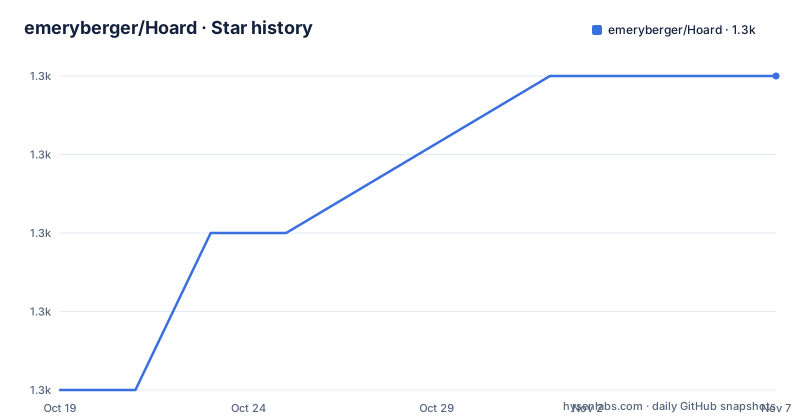
- emeryberger/Hoard1,256 ★ · +4
| Repository | 2026-10-19 | 2026-11-07 |
|---|---|---|
| emeryberger/Hoard | 1.3k | 1.3k |
4 Stars in the last 19 days, measured from the daily GitHub snapshot. Compare with other projects
Editorial analysis
The problem is contention, false sharing and blowup
Hoard is presented as a drop-in replacement for malloc that can improve application performance, especially for multithreaded programs running on multiprocessors and multicore CPUs, with no source code changes necessary. You either link it in or set one environment variable.
The why section names three specific problems, and they are the whole argument for the project.
The first is contention. The README states that multithreaded programs often do not scale because the heap is a bottleneck, and that when multiple threads simultaneously allocate or deallocate memory, the allocator will serialize them. The consequence it draws is uncomfortable: programs making intensive use of the allocator actually slow down as the number of processors increases. It also notes that a program may be allocation intensive without you realizing it, for instance if it makes many calls to the C++ Standard Template Library.
The second is false sharing, where threads on different CPUs end up with memory in the same cache line. The README calls the effect of accessing these falsely shared cache lines hundreds of times slower than accessing unshared cache lines, and states that Hoard is designed to prevent false sharing.
The third is blowup, where the memory needed to run an application can be multiplied by the number of CPUs on the machine, so four CPUs could mean four times as much memory. The project claims a provable bound on memory consumption.
Those three are the cases where a different allocator can matter. A program that allocates rarely, or one that is single threaded, will see little from any of this.
Enabling it on Linux and macOS is a preload, not a rebuild
The installation section separates the platforms, and the Unix path is the cheap one. On Linux you may need to install the appropriate version of libstdc++-dev first, for example libstdc++-12-dev.
sudo apt install libstdc++-devThen Hoard is used either by linking it with your executable or by setting an environment variable pointing at the shared library.
export LD_PRELOAD=/path/to/libhoard.soOn macOS the equivalent is DYLD_INSERT_LIBRARIES.
export DYLD_INSERT_LIBRARIES=/path/to/libhoard.dylibThis is the property that makes Hoard easy to evaluate. Nothing about your build changes, and the same binary can be run with and without the allocator, which is exactly what you want when you are trying to find out whether the heap is your bottleneck.
For macOS there is also a Homebrew route, which installs the library and creates a hoard command that runs Hoard with anything from the command line.
brew tap emeryberger/hoard
brew install --HEAD emeryberger/hoard/libhoardhoard myprogram-goes-hereThe Homebrew formula is installed from HEAD rather than a tagged release, so what you get is the current development state of the library rather than a pinned version.
Building from source needs CMake and produces the shared library
The source build covers Mac OS X, Linux and Windows WSL2, and the sequence is the standard CMake one.
git clone https://github.com/emeryberger/Hoard
mkdir build && cd build
cmake ..
make
The repository is laid out so that the pieces of an allocator are visible: an allocators/ directory with the individual allocator implementations, src/ for the shared library and tools, benchmarks/ for the evaluation suite, the top level test_malloc.cpp and bench_malloc.cpp, doc/ for documentation, and a scripts/ directory. There is also an AUTHORS file, a COPYING and LICENSE file, a NOTICE file, a NEWS file and a todo.md, which is the kind of housekeeping a project of this age accumulates.
Building on Windows works differently, and the README is explicit about why. Hoard uses Microsoft Detours for function interposition on Windows, and Detours is downloaded and built by CMake automatically.
git clone https://github.com/emeryberger/Hoard
cd Hoard
mkdir build && cd build
cmake ..
cmake --build . --config Release
That produces build\Release\hoard.dll along with withdll.exe and setdll.exe, and it supports x86, x64, ARM and ARM64 architectures.
The last push was on 2026-07-19, and the project is not archived. The release history is a little confusing, because the newest tag is 3.2 from 2025-12-30, described as improved Windows support and numerous fixes, while the previous listed release is 3.13 from 2019-01-02 and before that 3.12 from 2015. The numbering restarted, so tag names do not sort chronologically.
On Windows, a static C runtime means Hoard cannot intercept anything
The Windows section contains the clearest constraint in the entire README, and it is a hard one. Programs must be compiled with /MD, the dynamic C runtime, for Hoard to intercept allocations. Programs compiled with /MT, the static C runtime, have the allocation functions embedded directly in the executable, which Hoard cannot intercept.
That is not a tuning issue but a structural one, and it decides the deployment route before you get to any performance question.
With unmodified executables, which the README calls the recommended route, withdll.exe injects Hoard into any program at runtime, similar to LD_PRELOAD on Linux.
build\Release\withdll.exe /d:build\Release\hoard.dll yourapp.exe [args...]The second route permanently modifies the executable by editing its import table, and setdll.exe does the work, with a /d flag to add and an /r flag to remove.
# Add Hoard to executable (creates backup as .exe~)
build\Release\setdll.exe /d:build\Release\hoard.dll yourapp.exe

# Remove Hoard from executable
build\Release\setdll.exe /r:hoard.dll yourapp.exe
The third route is to link it in at build time, with the /MD requirement visible in the command line itself.
cl /Ox /MD yourapp.cpp /link hoard.libSo on Windows you have three options with different operational footprints: runtime injection for a single execution, import table editing for a permanent change that leaves a .exe~ backup, or a rebuild of your application against hoard.lib. On Linux and macOS the equivalent is a single environment variable and nothing else.
The benchmark directory is where the claims live
The benchmarks/ directory contains the benchmarks used to evaluate and tune Hoard, and the README describes how the results are presented. All benchmarks were run on a 192-core, 2-node NUMA system with AMD EPYC processors, and the graphs are normalized to Hoard, with 1.0 meaning Hoard, shown as the green line, and values above the line meaning worse than Hoard.
The key finding stated in the summary is that Hoard achieves 1.3 to 1.5 times higher throughput than mimalloc, jemalloc and glibc on server workloads. That is the project's own measurement on its own machine, and the README is explicit about the hardware, which is the detail that makes such a claim checkable rather than decorative. A throughput ratio from a different allocator set on a different machine would not be comparable, and a reader should treat the number as a starting point for their own comparison rather than a fact.
What the benchmark directory gives a user is a place to run the comparison themselves, which is more useful than the ratio. The repository also has a bench_malloc.cpp at the top level, and the presence of todo.md suggests an active list of known gaps.
The competitor set named in the summary is worth reading as a positioning statement. mimalloc and jemalloc are the modern general purpose allocators a team would otherwise choose, and glibc is the system allocator. Hoard is not claiming to be the only fast allocator, only that on this workload it outperforms the three of them while also bounding memory consumption and avoiding false sharing.
Licence, adoption and the age of the code
Hoard has been released under the Apache License, version 2.0, which the README lists among the licensing notes and which is what the LICENSE and COPYING files at the repository root hold. For a component that gets linked into a proprietary server, that is the least surprising choice available.
The adoption list in the README is dated but informative, since it describes the kind of workload Hoard was built for. Companies listed include AOL, British Telecom, Cisco, Credit Suisse, Reuters, SAP, the Royal Bank of Canada and Novell, among others. The open source projects listed include the Asterisk telephony project, the Bayonne GNU telephony server, the Cilk parallel programming language, the GNU Common C++ system, the OpenFOAM computational fluid dynamics toolkit and the SafeSquid web proxy. The README also notes that Hoard is a standard compiler option for the Standard Performance Evaluation Corporation's CPU2006 benchmark suite for the Intel and Open64 compilers.
What that list shows is a long-lived design aimed at a specific problem, and it is worth being explicit about what that means. A drop-in allocator that predates most of the current allocator landscape will have had to be maintained to keep working with modern toolchains and libstdc++ versions, and the Windows support in the 3.2 release, dated 2025-12-30, is described as improved, which suggests that part of the work is catching up rather than leading.
For an organisation deciding whether to depend on it, the licence is settled, the adoption record is long, and the question left is whether the current build behaves well on your toolchain and your workload.
Editorial conclusion
Hoard is worth trying on a server that is allocation heavy and scales poorly with cores, since enabling it costs one environment variable and a rebuild of nothing. It is the wrong choice if you have a memory footprint problem with a single threaded workload, or if you cannot rebuild the program on Windows with the dynamic C runtime, since static runtime executables cannot be intercepted. Verify first that your allocation profile is actually the problem, using the benchmarks/ directory that ships with the project, and read the Linux and macOS preload instructions before you assume the Windows path will behave the same.
Frequently asked questions
How do I use Hoard on Linux?
Build it with CMake and then either link it with your executable or set LD_PRELOAD to point at libhoard.so, for example export LD_PRELOAD=/path/to/libhoard.so. On Linux you may need to install libstdc++-dev first.
Why does Hoard not work with my Windows program?
Programs must be compiled with /MD, the dynamic C runtime, because programs built with /MT have the allocation functions embedded in the executable and Hoard cannot intercept them. On Windows you can inject with withdll.exe, edit the import table with setdll.exe, or link against hoard.lib.
What problems is Hoard designed to fix?
The README names three: heap contention, where the allocator serialises threads and programs slow down as processors are added, false sharing, where threads on different CPUs end up using the same cache line, and memory blowup, where the memory needed can multiply by the number of CPUs.
How does Hoard compare with mimalloc and jemalloc?
The README states that Hoard achieves 1.3 to 1.5 times higher throughput than mimalloc, jemalloc and glibc on server workloads, measured on a 192-core, 2-node NUMA system with AMD EPYC processors. The benchmarks directory in the repository contains the benchmarks used to evaluate and tune Hoard.
What licence is Hoard under?
Apache License 2.0, with the terms in the LICENSE and COPYING files at the repository root. The README lists the Apache license release among the licensing notes.
Official sources
Add this badge to your README
If you maintain this project, the badge below links readers to this analysis and shows its maintenance status from the daily GitHub snapshot. Paste the markdown into your README; add ?metric=license or ?metric=stars to the image URL for a different field.

[](https://hysenlabs.com/projects/emeryberger-hoard)Star history chart for your README
[](https://hysenlabs.com/projects/emeryberger-hoard)Was this useful?