enigo: one Rust API over X11, Wayland and native input backends
Cross platform input simulation in Rust
At a glance
- What is it?
- enigo is a Rust crate that simulates keyboard and mouse events on Windows, macOS and Linux, where the hard part is not the API but the backend a Linux session actually allows.
- Who is it for?
- enigo fits test harnesses, GUI automation and tooling that needs to type and click on any of the three main desktop platforms from one Rust API, and it is a reasonable default on Windows and macOS where the backends are stable. Step back on Linux if your session is Wayland and the libei route is still experimental, and do not treat BSD as a supported target because no machine or CI runner exercises it.
- Can I use it commercially?
- Yes. MIT is a permissive licence: you can use, modify and sell software built on it, as long as you keep its copyright and licence notices.
- Is it still maintained?
- Yes. The repository last received commits 6 days ago.
- What is it written in?
- Mainly Rust, according to GitHub's language statistics.
Answers come from the project's GitHub data, last synced on November 7, 2026, and from our analysis. They are not legal advice.
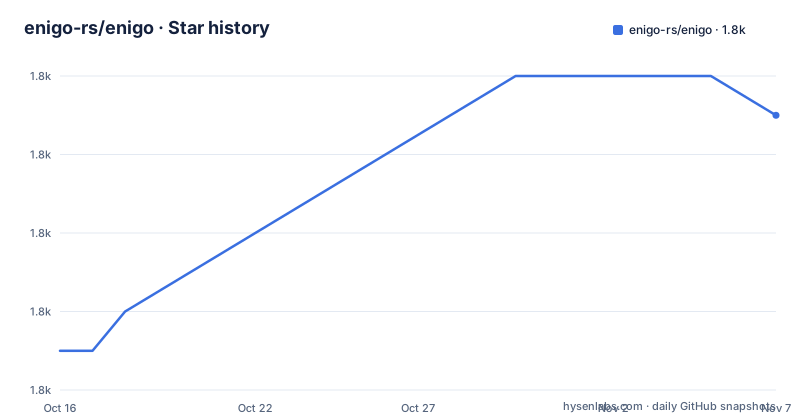
Star history
- enigo-rs/enigo1,803 ★ · +6
| Repository | 2026-10-16 | 2026-11-07 |
|---|---|---|
| enigo-rs/enigo | 1.8k | 1.8k |
6 Stars in the last 22 days, measured from the daily GitHub snapshot. Compare with other projects
Editorial analysis
Input simulation where the API is the easy half
Automated tests, macro tools and GUI scrapers all hit the same wall: the operating system has no portable way to pretend a key was pressed or a mouse moved. enigo is a Rust library for that job, described in the manifest as a cross-platform (Linux, Windows, macOS & BSD) library to simulate keyboard and mouse events, and the README puts it more plainly as cross platform input simulation in Rust. The call surface is small enough to learn in a minute. You create an Enigo handle from a Settings value, then call methods such as move_mouse, button and text on it, and each of those returns a Result so a failure surfaces at the call site rather than as a silent no-op. The crate sits in the crates.io categories development-tools::testing, api-bindings, hardware-support, os and simulation, which tells you the intended users: engineers wiring automation into an existing Rust test suite.
The backend is the part that actually varies
On Windows and macOS there is one native path per platform. On Linux there are several, and the choice is not made at runtime, it is a compile time decision taken through Cargo features. The manifest sets default = ["x11rb"], so a plain dependency gives you the X11 route through the x11rb crate. Enabling the xdo feature switches to the xdo library instead, which is why Linux users are told they may have to install libxdo-dev. Then there are wayland and libei, and the README is direct about their status: Enigo can also use wayland protocols and libei to simulate input but there are currently some bugs with it, which is why they are hidden behind feature flags. The feature list in the manifest confirms the shape of the choice:
[features]
default = ["x11rb"]
tokio = ["ashpd/tokio", "dep:tokio"]
smol = ["ashpd/async-io"]
libei = ["dep:reis", "dep:futures", "dep:nom"]
platform_specific = []
serde = ["dep:serde"]
xdo = []
x11rb = ["dep:x11rb", "dep:nom"]
Read that list as a menu of Linux situations rather than a set of independent switches, since the x11rb and xdo entries both target X11 sessions while the wayland and libei entries target Wayland compositors.
Getting the crate and its native prerequisites
enigo is published on crates.io and documented on docs.rs, and the manifest pins edition 2024 with rust-version 1.87, so your toolchain has to be new enough. The repository itself is the source of truth for the manifest, and the docs.rs metadata shows the feature set the documentation is built with: features = ["x11rb", "wayland", "libei", "smol", "platform_specific", "serde"]. No extra native library is needed for the default X11 path. The xdo path is different, and the README names the packages per distribution:
apt install libxdo-devThat is the Debian based command. The README also gives pacman -S xdotool for Arch, dnf install libX11-devel libxdo-devel for Fedora, and emerge -a xdotool for Gentoo. Install the one matching your distribution before you build with the xdo feature enabled, otherwise the build fails on a missing library.
A first run: three calls and their results
The README gives one short example, and it is enough to understand the ownership model. You construct Enigo with Settings::default(), and from then on the handle is mutable, which is what lets it hold whatever state the backend needs.
let mut enigo = Enigo::new(&Settings::default()).unwrap();

enigo.move_mouse(500, 200, Abs).unwrap();
enigo.button(Button::Left, Click).unwrap();
Two details are worth noticing. The mouse call takes an explicit coordinate mode, Abs in this case, so relative and absolute positioning are both expressible through the same handle. The same example then passes a plain string to enigo.text, which is the one call that does more than a key press, since characters have to reach the platform text input path. The repository ships examples for each area, including key.rs, keyboard.rs, layout.rs, mouse.rs, platform_specific.rs, serde.rs, sync.rs and timer.rs, and the README points there for more than the snippet above.
Two platform details that bite: DPI and permissions
On Windows, mouse coordinates and display size use physical pixels, not logical ones. The README explains the consequence for callers: enigo temporarily switches the calling thread to per-monitor DPI awareness for those queries, so you do not need to change the process DPI awareness mode yourself. That is a deliberate choice, and it also means the coordinate you pass is a physical pixel value that has to line up with where a real cursor would land on a scaled display. The other trap is security policy. The README states that some platforms have security measures in place to prevent programs from entering keys or controlling the mouse, and it points to a separate Permissions.md document for what you need to do to allow it. On Linux under Wayland that is not a formality, because the compositor mediates input, which is exactly why the Wayland and libei paths are marked experimental.
Serialization and the async runtime choices
enigo can serialize and deserialize its commands, and that switch is off by default. The README says that if you want to be able to serialize and deserialize commands for enigo, you need to activate the serde feature, and the manifest wires it as serde = ["dep:serde"]. The repository includes examples/serde.rs for that path, and the serde crate itself is a normal optional dependency with the derive feature enabled. What serialization buys you is the ability to express an input sequence as data, hand it to another process, or replay it later, which is how a recorded UI interaction becomes a fixture rather than a script. Alongside that sit two runtime integrations, tokio and smol, each a thin wrapper that forwards to ashpd with the matching async runtime. The xdg_desktop feature in the manifest extends the same direction, pulling in the ashpd screenshot capability alongside the desktop portal.
What is unproven, and what the licence lets you do
Three gaps deserve a plain statement. The Wayland and libei backends are experimental and the README says there are currently some bugs with them. BSD support is conditional, because enigo also works on BSDs if they use X11 or Wayland, but the author has no machine to test it and there are no GitHub Action runners for it, so the support is not explicitly listed. And the repository has no GitHub releases at all, so the crate's published history lives on crates.io and in CHANGES.md, which the README points to when you need to know what to do after upgrading from a previous version. The licence is MIT, stated identically in the README and the manifest, which permits use in closed and open projects alike, though that is a licence reading rather than advice. Maintenance is current: the last push was on 2026-10-16, and the current manifest version is 0.6.1.
Editorial conclusion
enigo fits test harnesses, GUI automation and tooling that needs to type and click on any of the three main desktop platforms from one Rust API, and it is a reasonable default on Windows and macOS where the backends are stable. Step back on Linux if your session is Wayland and the libei route is still experimental, and do not treat BSD as a supported target because no machine or CI runner exercises it. Before you commit, pin a version from crates.io, read Permissions.md for the platform you target, and run the test suite with cargo test --all-features -- --test-threads=1 on a disposable machine, since those tests move the mouse and open applications.
Frequently asked questions
Does enigo work on Wayland?
Wayland and libei input simulation exist in enigo behind the wayland and libei feature flags, but the README marks both as experimental and notes there are currently some bugs with them. The default feature set is x11rb, which is the X11 route.
How do I install enigo in a Rust project?
The crate is published on crates.io as enigo, with the current manifest version 0.6.1, edition 2024 and rust-version 1.87, so your toolchain must support Rust 1.87 or newer. The default feature set needs no extra native library; only the xdo feature requires libxdo-dev on Linux.
Why do my enigo key presses get blocked?
Some platforms have security measures in place to prevent programs from entering keys or controlling the mouse, and the README points to the Permissions.md document for what has to be allowed first. On Linux the Wayland compositor mediates input, so permission handling matters more there than on Windows or macOS.
Can enigo serialize input commands?
Yes, but the capability is off by default. You need to activate the serde feature, and the repository includes an example at examples/serde.rs that shows the approach.
Is enigo safe to run its own test suite on my machine?
No, not on a machine you care about. The README warns that the tests move the mouse, enter text, press keys and open some applications, and that they must run sequentially, which is what the cargo test --all-features -- --test-threads=1 command is for.
Official sources
Add this badge to your README
If you maintain this project, the badge below links readers to this analysis and shows its maintenance status from the daily GitHub snapshot. Paste the markdown into your README; add ?metric=license or ?metric=stars to the image URL for a different field.

[](https://hysenlabs.com/projects/enigo-rs-enigo)Star history chart for your README
[](https://hysenlabs.com/projects/enigo-rs-enigo)Was this useful?