fre:ac bundles its own CD ripper, but building it means three Makefiles in order
The fre:ac audio converter project
At a glance
- What is it?
- fre:ac is a C++ audio converter under GPL-2.0 with an integrated ripper, tag editor and multi-threaded engine, shipped as packages for five platforms. The real cost of building from source is that fre:ac is the third step in a chain: smooth, then BoCA, then fre:ac.
- Who is it for?
- Adopt fre:ac if you want one program to rip, tag and convert across FLAC, MP3, MP4/AAC and Opus, since integrating a separate ripper, tagger and transcoder is the friction it removes. Do not adopt it from source unless you can install development packages for GTK 3, libcdio, libpulse and the rest, because the build is a three-project chain rather than a single make.
- Can I use it commercially?
- Yes, with conditions. GPL-2.0 is a copyleft licence: if you distribute software that includes it, you must release that software's source code under the same licence. Running it internally without distributing it does not trigger that obligation.
- Is it still maintained?
- Yes. The repository last received commits 3 days ago.
- What is it written in?
- Mainly C++, according to GitHub's language statistics.
Answers come from the project's GitHub data, last synced on October 23, 2026, and from our analysis. They are not legal advice.
Star history
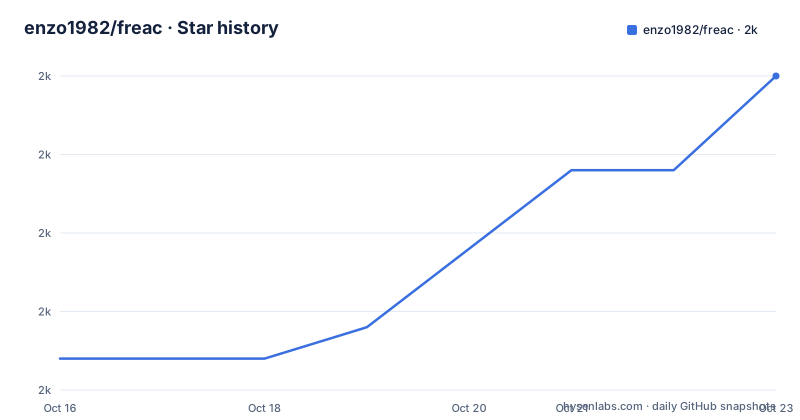
- enzo1982/freac1,990 ★ · +9
| Repository | 2026-10-16 | 2026-10-23 |
|---|---|---|
| enzo1982/freac | 2k | 2k |
9 Stars in the last 7 days, measured from the daily GitHub snapshot. Compare with other projects
Editorial analysis
One program for ripping, tagging and converting
fre:ac is a free and open source audio converter that supports audio CD ripping, tag editing and conversion between formats. The stated feature list covers MP3, MP4/AAC, Opus and FLAC, an integrated CD ripper, player and tag editor, playlists, cue sheets and chapters, and a fast multi-threaded conversion engine that can convert to multiple formats at once.
Several of those are less common in converters and are the reason to pick this one. It can verify lossless input and output files, which catches a failed rip or a lossy stage you did not intend. It supports freedb and CDDB queries and submits, so metadata lookup is built in rather than bolted on. It supports ripping hidden tracks, HTOA, and fully automated CD ripping, so a disc can be handled without manual track offsets. And there is support for using command line codecs, which is the escape hatch when the bundled encoder does not do what you need.
The user interface is available in 40+ languages, and there is an optional command line interface. That last point is the one to check first if you are scripting: the project ships `freaccmd` alongside the GUI, so batch conversion does not require driving a window.
The licence is GPL-2.0, with `COPYING` at the repository root. That matters more here than for most applications, because fre:ac is a user-facing program you distribute, and the source-build instructions are part of that.
Five platforms, and two of the Linux packages are compromised
Pre-built packages exist for Windows, macOS, Linux and FreeBSD, and the README documents each route explicitly.
On Windows there are two variants, an .exe with a setup wizard that creates start menu icons, and a .zip with no installer that you extract and run as `freac.exe`. There is also a Microsoft Store listing, and three community-maintained package manager commands:
choco install freac
scoop install freac
winget install fre:ac
macOS is a .dmg you open and drag to Applications, or MacPorts:
sudo port install freacLinux is where the caveat sits. fre:ac is available as a Snap, a Flatpak and an AppImage, and the README states plainly that the Snap and Flatpak versions run in restricted environments and might offer limited functionality. The AppImage needs one step after download:
chmod a+x freac*.AppImageFreeBSD has a port, `sudo pkg install freac`, or a .tar.gz archive you extract and run. Haiku is covered too through HaikuPorts with `pkgman install freac`.
So for Linux the honest ranking is: AppImage if you want unrestricted filesystem and device access for CD ripping, since that is the feature most likely to break in a sandbox, and Snap or Flatpak only if you accept the restriction.
Compiling means smooth, then BoCA, then fre:ac
This is the section that decides whether you build from source at all. fre:ac depends on two sibling projects by the same author, and the order is not optional: the BoCA audio component framework and the smooth Class Library. The README says to build and install those first.
The development packages needed are listed per project. For the smooth Class Library: libbz2, libcurl, libfribidi, libgtk+3.0, libjpeg and libxml2. For the BoCA component framework: libcdio, libcdio-paranoia, libexpat, libpulse on Linux only, and liburiparser. For fre:ac itself: libudev on Linux only.
Once the dependencies are in place, each project is built the same way:
make
sudo make install
run for smooth, then BoCA, then fre:ac, in that order. Afterwards the binaries land at `/usr/local/bin/freac` for the application and `/usr/local/bin/freaccmd` for the command line interface. The repository layout supports this: `smooth/` and `boca/` are present as directories alongside `.gitmodules`, which means they are git submodules that have to be initialised before the tree will build.
The Makefile is split across `Makefile`, `Makefile-options` and `Makefile-commands`, with the options file included at the top. The object list is a decent map of the architecture: separate objects for the converter, decoder, encoder, processor, verifier, locking, and worker versus worker_singlefile, plus separate CDDB query, cache and submit modules.
What fre:ac is not, and the release picture
The conversion engine names in the Makefile hint at the boundaries. There is a single-file worker path distinct from the general worker, and there are DSP and encoder configuration components, so custom processing is a component question rather than a script question. There is no documented batch profile format or watched-folder mode in the README, so if you need scheduled unattended conversion, the command line interface is the surface to evaluate and the README does not document its options.
The comparison is straightforward. fre:ac earns its place when the workflow is a disc, not a file: ripping with HTOA handling, verifying the rip, looking up metadata, tagging, and converting in one session is a chain of five tools that fre:ac collapses into one.
On releases, the recent tags are v1.1.7 from 2023-03-05 and v1.1.6 from 2022-01-21, with a `continuous` build tag from 2026-10-06. The last push was on 2026-10-06 and there is a GitHub Actions workflow for continuous Linux builds. The combination is worth reading carefully: the project is being worked on continuously, but the last versioned release is more than three years old. Distributors package from the repository, not from a tag, which means the version string in a packaged fre:ac may not correspond to any release you can find.
Localisation runs through CrowdIn, with `.crowdin.yml` at the root and an `i18n/` directory, which is why 40+ languages is credible rather than aspirational.
Editorial conclusion
Adopt fre:ac if you want one program to rip, tag and convert across FLAC, MP3, MP4/AAC and Opus, since integrating a separate ripper, tagger and transcoder is the friction it removes. Do not adopt it from source unless you can install development packages for GTK 3, libcdio, libpulse and the rest, because the build is a three-project chain rather than a single make. Verify first which package you actually want, since the README warns that the Snap and Flatpak builds run in restricted environments and may have reduced functionality, while the AppImage and the platform packages do not.
Frequently asked questions
How do I install fre:ac on Linux?
A Snap, a Flatpak and an AppImage are available. The README warns that the Snap and Flatpak builds run in restricted environments and might offer limited functionality. After downloading the AppImage, mark it executable with `chmod a+x freac*.AppImage` and run it.
What do I need to build fre:ac from source?
Build and install the smooth Class Library and the BoCA audio component framework first, then fre:ac, using `make` followed by `sudo make install` for each. Development packages include libbz2, libcurl, libfribidi, libgtk+3.0, libjpeg, libxml2, libcdio, libcdio-paranoia, libexpat, libpulse on Linux, liburiparser and libudev on Linux.
Does fre:ac have a command line interface?
Yes. The command line tool is `freaccmd`, installed at `/usr/local/bin/freaccmd` alongside `/usr/local/bin/freac` for the graphical application. The README does not document its options.
Which audio formats does fre:ac support?
MP3, MP4/AAC, Opus and FLAC. It also supports playlists, cue sheets and chapters, verifies lossless input and output, and can convert to multiple formats at once using a multi-threaded engine.
Official sources
Add this badge to your README
If you maintain this project, the badge below links readers to this analysis and shows its maintenance status from the daily GitHub snapshot. Paste the markdown into your README; add ?metric=license or ?metric=stars to the image URL for a different field.

[](https://hysenlabs.com/projects/enzo1982-freac)Star history chart for your README
[](https://hysenlabs.com/projects/enzo1982-freac)Was this useful?