Revista 3: A Photography Portfolio Theme Built on Astro with a Heavy Documentation Load
Just a photography theme built on Astro
At a glance
- What is it?
- Revista 3 is a single-author photography portfolio and blog theme for Astro v7.1.6, organized into six content collections and deployable to Cloudflare Workers or Docker. It prioritizes speed and visual design, but its maintenance cost is tied to a sprawling documentation structure and a rapid release cycle.
- Who is it for?
- Revista 3 is suitable for a solo photographer or writer who wants a fast, type-safe Astro site with multiple content types and is willing to follow the project's own documentation map. It is not ideal for teams needing a minimal theme, because the repository is heavy with nested README files and custom scripts that you must understand before modifying.
- Can I use it commercially?
- Check first. The repository uses a licence we do not classify automatically, so read its LICENSE file before any commercial use.
- Is it still maintained?
- Yes. The repository last received commits 3 days ago.
- What is it written in?
- Mainly HTML, according to GitHub's language statistics.
Answers come from the project's GitHub data, last synced on October 24, 2026, and from our analysis. They are not legal advice.
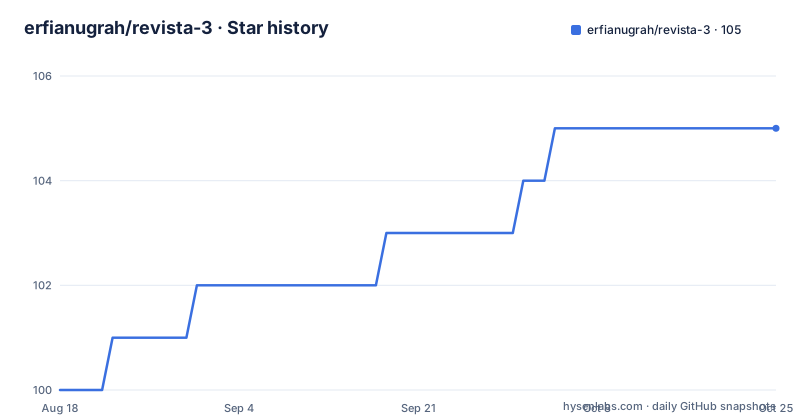
Star history
- erfianugrah/revista-3105 ★ · +5
| Repository | 2026-08-18 | 2026-10-24 |
|---|---|---|
| erfianugrah/revista-3 | 100 | 105 |
5 Stars in the last 67 days, measured from the daily GitHub snapshot. Compare with other projects
Editorial analysis
What Revista 3 Solves and Who It Serves
The core audience is someone comfortable with Astro's content collections and TypeScript, because the theme exposes many moving parts. The documentation index points to a docs/README.md, and the repository includes README files for components, layouts, pages, content, and Docker. That level of documentation is rare for a personal theme, but it also signals that the project expects you to read before you modify.
How the Content Collections and Routing Work
One detail worth noting is the 'zeitweilig' collection, which translates from German as 'temporary'. The README describes it as 'temporary thoughts', so it is a place for ephemeral posts. That is a design choice that adds a fourth content type beyond the usual blog and portfolio split. It increases the complexity of the content model, but it also gives the author a way to separate fleeting notes from permanent articles.
Getting It Running: Commands and Configuration
The theme uses Tailwind CSS v4, as noted in the global.css file description. That means styling is utility-first, and the breakpoints are customized to 800px, 1200px, 1900px, and 2500px. If you are not familiar with Tailwind v4's configuration, you may need to read the styles/global.css file to understand how the theme is customized. The scripts directory includes theme.ts for dark mode, lightbox.ts for image viewing, and rss.ts for RSS link visibility. These are client-side scripts that you can modify, but they are part of the build.
Deployment Options: Cloudflare Workers and Docker
The release cadence is notable: v5.9.2 was pushed on 2025-12-08, with v5.9.1 and v5.9.0 in the days before. That is a rapid update cycle, which could mean active development or frequent bug fixes. The v5.9.1 release fixed an author image aspect ratio issue, so the project is being refined. For an adopter, that means you should check the latest release before starting, because the repository is not stagnant.
Performance Features and Their Trade-offs
The custom breakpoints at 800px, 1200px, 1900px, and 2500px are unusual. Most sites use 768px, 1024px, and 1280px. The 2500px breakpoint targets ultra-wide monitors, which is a specific audience. That could be a problem if you want to reuse the theme for a typical blog, because the responsive design is tuned to the author's preferences. You would need to adjust those breakpoints to match your content.
Dark Mode, RSS, and SEO: The Built-in Extras
The custom 404 page is a differentiator. Most themes use a generic 404, but this one has a quote rotation and a 'since 1994' counter, which is a quirky personal detail. For a photographer's portfolio, that can be a memorable touch. For a professional client site, it might be inappropriate. The choice is yours, but it shows that the theme is opinionated.
Limitations and When It Is the Wrong Tool
Another failure mode is the build-time HTTP fetch retry helper (undici-retry.ts). If the build process fetches external resources, a network failure during build could break the deployment. The retry helper mitigates that, but it adds a dependency on external services. If those services are slow or unavailable, your build time increases. The README does not specify what external resources are fetched, so you would need to inspect the scripts to understand the risk.
Alternatives: A Simpler Astro Starter or a Static Site Generator
The key difference is that Revista 3 is a finished product with a specific design and content model, while an Astro starter is a blank canvas. If you adopt Revista 3, you inherit the author's design decisions, including the burgundy 404 page and the 'since 1994' counter. Those are not easy to remove without modifying the components and scripts. With a starter, you start from zero and add only what you need. That is a fundamental difference in maintenance cost.
Maintenance and Upgrade Cost
The upgrade path is not documented beyond the release notes. There is no migration guide for going from v5.8 to v5.9, for example. You would need to compare the changes manually if you have a custom fork. That is a real cost. The project is actively maintained, which is good, but the lack of a license and the rapid release cycle mean you should pin the exact version you use and test before deploying.
Editorial conclusion
Revista 3 is suitable for a solo photographer or writer who wants a fast, type-safe Astro site with multiple content types and is willing to follow the project's own documentation map. It is not ideal for teams needing a minimal theme, because the repository is heavy with nested README files and custom scripts that you must understand before modifying. Before adopting it, verify that the Astro v7.1.6 dependency matches your build environment, check the Cloudflare Workers static assets integration in v5.9.0, and confirm that the NOASSERTION license permits your intended use. If you want a simpler path, consider a stock Astro starter with a single blog collection and no custom deployment scripts.
Frequently asked questions
What content collections does revista-3 ship with?
Six, all under src/content and all configured through content.config.ts with the glob loader: long_form, short_form, muses, zeitweilig, authors and cv. Each collection gets its own RSS feed, so a reader can follow photography without the writing.
How do I run revista-3 locally?
The dev script runs astro dev, and start is bound to the same command. Build runs astro build after a prebuild step that syncs README versions, preview runs astro preview, and a postbuild step runs pagefind against the dist directory to index the built site for search.
What does the revista-3 Docker image contain?
Three lines on top of busybox:1.37. It copies the built dist directory into /var/www and runs busybox httpd on port 80. There is no Node runtime in the image, so any route Astro did not prerender will not resolve.
Why will the revista-3 compose file fail on my machine?
It joins a network named servarr_lan declared as external, which is a shared macvlan from another stack, and it hardcodes a LAN address of 10.0.71.58. Without a network of that name the stack will not start until you create it or change the definition.
Is dark mode in revista-3 remembered between visits?
Yes. The ThemeToggle component stores the choice in localStorage, and the shared helpers for reading, applying and toggling the preference live in src/scripts/theme.ts. The dark theme is a deep charcoal background with light text.
Official sources
Add this badge to your README
If you maintain this project, the badge below links readers to this analysis and shows its maintenance status from the daily GitHub snapshot. Paste the markdown into your README; add ?metric=license or ?metric=stars to the image URL for a different field.

[](https://hysenlabs.com/projects/erfianugrah-revista-3)Star history chart for your README
[](https://hysenlabs.com/projects/erfianugrah-revista-3)Was this useful?