TableView for Android: A Java Table Component with Sorting, Filtering, and Pagination
GitHub describes it as TableView is a powerful Android library for displaying complex data structures and rendering tabular data composed of rows, columns and cells.. The repository metadata lists Java as its primary language. The metadata lists the MIT license. This article stays within the project description and details documented in the GitHub repository README.
At a glance
- What is it?
- TableView is an Android library that renders tabular data from a separate model object, with automatic column width, sorting, filtering, and pagination. It is a Java-based option for apps that need complex tables without building a custom RecyclerView adapter.
- Who is it for?
- Adopt TableView if you need a ready-made table with sorting, filtering, and pagination in a Java Android app and you can accept a library that has not been updated since March 2021. Do not use it if you require active maintenance, Kotlin-first APIs, or support for the latest Android versions.
- Can I use it commercially?
- Yes. MIT is a permissive licence: you can use, modify and sell software built on it, as long as you keep its copyright and licence notices.
- Is it still maintained?
- Probably not. The repository last received commits 43 months ago, on March 17, 2023.
- What is it written in?
- Mainly Java, according to GitHub's language statistics.
Answers come from the project's GitHub data, last synced on October 21, 2026, and from our analysis. They are not legal advice.
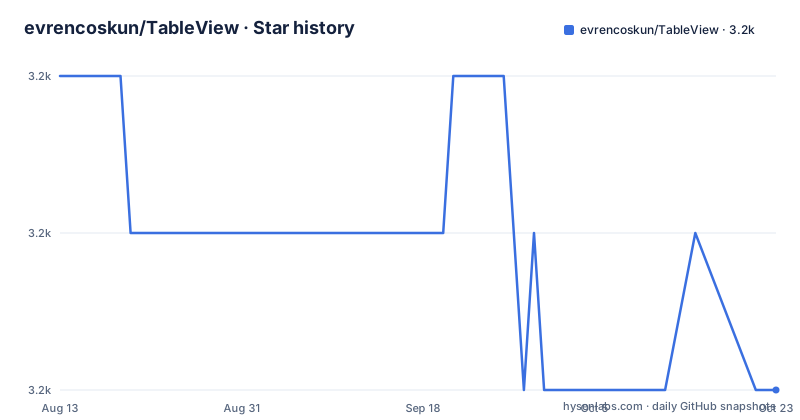
Star history
- evrencoskun/TableView3,181 ★ · -2
| Repository | 2026-08-13 | 2026-10-21 |
|---|---|---|
| evrencoskun/TableView | 3.2k | 3.2k |
-2 Stars in the last 69 days, measured from the daily GitHub snapshot. Compare with other projects
Editorial analysis
What TableView Solves and Who It Targets
TableView addresses a specific pain: building a scrollable, sortable, filterable table in Android without hand-rolling a RecyclerView adapter and a dozen ViewHolders. The library renders rows, columns, and cells from a separate model object, which the README emphasizes as a core design point. The target audience is Android developers who work in Java and need to display complex data structures, such as database query results or price lists, in a tabular format. The README lists sample apps including a database client for MySQL and PostgreSQL and a price list app, which suggests the library is used in real-world data-heavy apps. If your app already uses RecyclerView for lists, TableView offers a higher-level abstraction that handles column width calculation, sorting, and pagination out of the box.
Core Mechanism: Model-Driven Rendering and Column Width Calculation
TableView does not render a static layout. Instead, it relies on a separate model object that holds the data, and the library maps that model to cells, rows, and columns. The README states that each column width can be calculated automatically by considering the largest cell content. That is a concrete mechanism: the library measures all cells in a column and sets the width to fit the widest one. This behavior removes the manual width management that plagues table layouts in Android. The action listener interface lets you respond to touch interactions on each cell, which is useful for clickable rows or cells. The data flow is straightforward: you provide a model, TableView renders it, and you listen for user actions. The library also supports hiding and showing rows and columns, which is a feature that many simple table implementations lack.
Installation and Setup via JitPack
To use TableView, you add the JitPack repository to your project's build.gradle. The README gives two steps. First, in the allprojects repositories block, add maven { url 'https://jitpack.io' }. Second, add the dependency implementation 'com.github.evrencoskun:TableView:v0.8.9.4'. That is the latest release from March 2021. The library is distributed only through JitPack, not through Google's Maven repository. This means your build depends on JitPack's availability and uptime. The README points to the project's wiki for documentation, but the supplied material does not include the wiki content. To get a working table, you will need to look at the sample app in the repository, which the README says demonstrates how to create your own TableView. The setup is minimal, but the actual adapter and model classes are not shown in the README, so expect to read the sample code.
Sorting, Filtering, and Pagination: The Practical Features
The feature list in the README is specific: columns can be sorted in ascending or descending order, filtering by more than one data is supported, and pagination is built in. Sorting is triggered by user interaction, presumably on column headers. Filtering by multiple criteria is a step beyond simple text search, and pagination helps with large datasets. These features are not trivial to implement in a custom RecyclerView table, so they are the main reason to adopt TableView. However, the README does not explain how sorting and filtering are configured. Are they enabled by default or opt-in? The documentation is on the wiki, which is not included in the supplied material. That gap is a real friction point. You will need to experiment with the sample app or read the source to understand the API for these features.
Maintenance Status and Upgrade Cost
The last push to the repository was on March 18, 2021, and the latest release v0.8.9.4 is from the same date. There have been no commits or releases since then. The README includes a donations section with a personal appeal from the creator, which suggests that maintenance was already a concern. For a library that has been dormant for over four years, the upgrade cost is a double-edged sword. On one hand, the API is stable because it has not changed. On the other hand, you are integrating a library that has not been tested against newer Android versions, which may have breaking changes in the Android framework or in build tools. The MIT license, as shown in the README, permits modification and redistribution, so you can fork the project and patch it yourself if needed. That is a mitigation, but it adds maintenance burden to your team.
Limitations and When It Is the Wrong Tool
The most obvious limitation is the lack of updates since 2021. Android evolves, and a library that is not maintained may break on newer API levels or with new Gradle versions. The README does not mention Kotlin support, and the library is written in Java, which is fine for Java projects but a mismatch for Kotlin-first teams. Another limitation is that the README does not document the full API. You must rely on the wiki and the sample app, which are not part of the supplied material. If your table needs complex cell rendering, such as images or custom views, the library may not support it out of the box. The README only mentions rows, columns, and cells, not custom view inflation. For a simple static table, a plain TableLayout might be simpler. For a highly customized table with virtualized rows, a custom RecyclerView with a GridLayoutManager gives you more control. TableView is the wrong tool if you need active development or if your data model does not fit the model-driven approach.
Alternatives: RecyclerView and Third-Party Libraries
The primary alternative is to build a table with RecyclerView and a GridLayoutManager. That approach gives you full control over row and cell rendering, and you can implement sorting and filtering yourself. The difference is that RecyclerView is a lower-level component: you write the adapter, the ViewHolder, and the layout managers. TableView abstracts away that boilerplate, but at the cost of flexibility. Another alternative is to use a third-party library like FlexibleTable or similar, but the README does not mention any. Since TableView has not been updated, a custom RecyclerView implementation is often a safer bet for new projects because it is not dependent on an abandoned library. However, for a quick prototype or an internal tool with a short lifespan, TableView's built-in sorting and pagination can save days of work. The trade-off is clear: choose TableView for speed of implementation, or choose RecyclerView for long-term maintainability.
Editorial conclusion
Adopt TableView if you need a ready-made table with sorting, filtering, and pagination in a Java Android app and you can accept a library that has not been updated since March 2021. Do not use it if you require active maintenance, Kotlin-first APIs, or support for the latest Android versions. Before integrating, verify that the JitPack dependency resolves in your build environment, test on your target Android API levels, and review the wiki for the exact model and adapter classes you must implement.
Frequently asked questions
What is TableView?
In this repository it is an Android library for rendering tabular data made of rows, columns and cells. The data lives in a separate model object rather than being handed over through an adapter, and columns can size themselves from their widest value, sort in either direction, be hidden and shown, be filtered on more than one field, and be paginated, with a touch listener per cell.
Where is TableView located?
Not a question this repository addresses. It is an Android library, and the name's other meanings come from unrelated uses of the same two words rather than from anywhere in this project.
How do I use a table view in JavaFX?
Nothing here relates to that desktop toolkit. This is an Android library, installed by adding a repository for an on-demand build service and one dependency line carrying an exact version, with the documentation living in the project's wiki.
Is TableView safe to depend on?
The repository makes no such claim. What it documents is a distribution model in which your build asks a third-party build service to fetch the project from source by tag, rather than downloading a published artifact, which is a supply-chain property worth weighing rather than a security guarantee.
Official sources
Add this badge to your README
If you maintain this project, the badge below links readers to this analysis and shows its maintenance status from the daily GitHub snapshot. Paste the markdown into your README; add ?metric=license or ?metric=stars to the image URL for a different field.

[](https://hysenlabs.com/projects/evrencoskun-tableview)Star history chart for your README
[](https://hysenlabs.com/projects/evrencoskun-tableview)