SysDVR: streaming Nintendo Switch game output to a PC without a capture card
Stream switch games to your PC via USB or network
At a glance
- What is it?
- SysDVR is a GPL-2.0 Nintendo Switch sysmodule that forwards game video and audio to Windows, Mac, Linux or Android over USB or a WiFi connection. Video quality is fixed at 720p at 30fps by the Switch hardware, and the README states the tool does not fully replace a hardware capture card.
- Who is it for?
- SysDVR is appropriate for Switch homebrew users who want a no-hardware-cost recording path for games with video recording enabled and are running in handheld mode for USB or using WiFi for network streaming. Users who need to capture games without the recording flag, record system navigation, or stream from a docked Switch over USB should use a hardware capture card instead.
- Can I use it commercially?
- Yes, with conditions. GPL-2.0 is a copyleft licence: if you distribute software that includes it, you must release that software's source code under the same licence. Running it internally without distributing it does not trigger that obligation.
- Is it still maintained?
- Yes. The repository last received commits 98 days ago.
- What is it written in?
- Mainly C++, according to GitHub's language statistics.
Answers come from the project's GitHub data, last synced on October 20, 2026, and from our analysis. They are not legal advice.
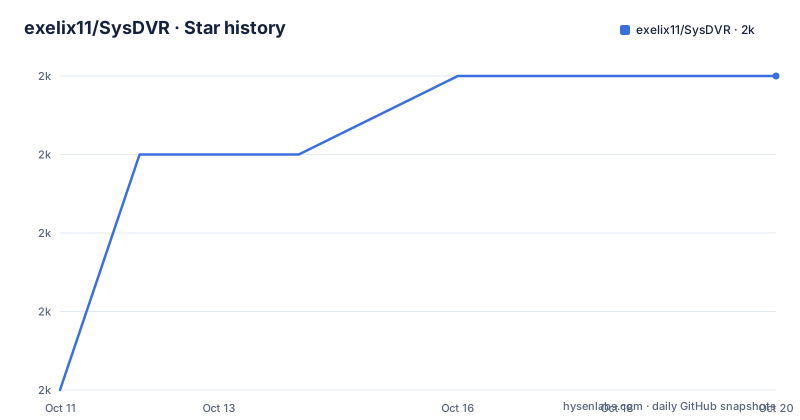
Star history
- exelix11/SysDVR2,040 ★ · +4
| Repository | 2026-10-11 | 2026-10-20 |
|---|---|---|
| exelix11/SysDVR | 2k | 2k |
4 Stars in the last 9 days, measured from the daily GitHub snapshot. Compare with other projects
Editorial analysis
A sysmodule reads game output from grc:d, not from the HDMI port
SysDVR is a Nintendo Switch sysmodule, a background process that runs within a custom firmware environment alongside the Switch's own operating system. Its access to game frames comes through grc:d, the Switch's internal recording service. Credits in the repository name the people who reversed grc:d and wrote the service wrapper that makes the interception possible, and they single out mission2000 specifically for the suggestion on how to fix audio lag.
This route through grc:d defines the scope of what SysDVR captures. Only game output passes through that service. System UI, the home menu, and any homebrew application running as an applet do not appear in the stream. Capture begins when a game starts rendering and stops at the boundary of the game process. A player who switches to the home menu mid-session will see the video freeze on whatever frame the game last produced.
On the receiving side, the tool is cross-platform: Windows, Mac, Linux and Android clients are all supported, and the same SysDVR installation on the Switch serves all four.
720p at 30fps is a hardware limit, and audio arrives uncompressed
Video output format is fixed by the Switch hardware, not by any configuration option in SysDVR. Frames come out at 720p at 30fps encoded with h264, and the README marks this explicitly as a hardware limit. No setting can raise the resolution or the frame rate because SysDVR passes along what the Switch encoder produces without re-encoding it.
Audio takes a different path. 16-bit PCM at 48kHz stereo, uncompressed, is what the audio track delivers. This creates an asymmetry with the video: the h264 video track carries lossy compression that limits its bandwidth footprint, while the PCM audio sends every sample in full. On a congested WiFi connection, the uncompressed audio adds meaningfully to the total bandwidth despite the 720p ceiling on the video track.
Latency is described as very low with an optimal setup, and the README says most games are playable. That qualifier matters. Performance on the USB path depends on cable quality, and on the WiFi path on signal strength and interference. Poor conditions in either case will degrade the experience, and both bad USB wires and low WiFi signal are named as specific degradation factors.
USB mode is for handheld play only; network mode covers docked and handheld
Two transport modes are available. USB connects the Switch directly to a PC and is described as the path to very low latency. Network mode sends the stream over WiFi to any compatible device on the same network.
USB mode has one hard constraint: it cannot be used when the Switch is docked. The dock uses the USB port for charging and for HDMI output to the television, and SysDVR cannot share that connection. USB streaming is therefore limited to handheld play. Anyone who wants to record or stream a docked session must use network mode instead.
Network mode covers both configurations, docked and handheld. It inherits the WiFi variability described in the README: low signal, interference, or distance from the router can degrade quality significantly. Both modes fall under the same caution in the README that stream quality depends heavily on the environment, with low WiFi signal and bad USB cable quality cited as the specific degrading factors. Getting audio and video to stay in sync over a poor connection requires attention to the physical setup before adjusting any software settings.
Game compatibility depends on Nintendo's recording flag, and dvr-patches extends it at a cost
SysDVR can only capture games that have video recording enabled. This is the same flag that allows the long-press on the capture button to save a short video clip on the Switch. Games without the flag produce no stream at all. Nothing in the README gives a count of which titles have the flag set; the compatibility boundary is defined by each game's individual settings, and the only way to verify is to test the long-press on the capture button in-game.
A workaround exists in a separate repository, exelix11/dvr-patches. This project contains patches that extend compatibility to most games. The README's phrasing is that as it may cause issues it is hosted on a different repo and must be installed manually. That wording is the author's explicit acknowledgment that the workaround carries risks the core project does not, and that users who want it must opt in independently and set it up themselves.
Nothing in the SysDVR README describes which titles the patches affect or what categories of issues they may produce. Anyone who installs dvr-patches is working from that repository's own documentation, and the SysDVR troubleshooting path and the dvr-patches troubleshooting path are distinct from that point forward.
The client is a C# project that speaks a custom protocol over RTSP
SysDVR separates into two codebases. The sysmodule runs on the Switch and is written in C++. Client-side code runs on the PC or Android device; a SysDVR.sln solution file at the repository root and a Client/ directory indicate a C# project.
Network transport uses RTSP. RTSPSharp, an open-source C# RTSP library from ngraziano, is named in the credits as the base. Bonta, a member of the project's Discord server, is credited for significant help implementing a custom RTSP server on top of it. A protocol.md file at the repository root documents the communication format between the Switch module and the PC client, which is useful for anyone building a compatible receiver or troubleshooting stream drops at the protocol level.
USB transport borrows its implementation from mtp-server-nx, a project from the retronx-team. Reusing that USB stack means SysDVR's USB path shares code with another established homebrew project rather than maintaining a USB implementation from scratch. A SysDVRConfig/ directory also sits at the repository root alongside Client/ and sysmodule/.
SysDVR does not replace a capture card, and the README says so directly
The README states it plainly: with the documented limitations, this sysmodule does not fully replace a capture card. That judgment sits at the end of the Limitations section and is the most direct editorial statement in the file.
A hardware capture card reads the HDMI output of a device and records whatever appears there, including menus, overlays and system UI. SysDVR reads game output from grc:d, so everything outside the game process is invisible to it. Capture cards work with any title; SysDVR works only on titles with the recording flag set, or with dvr-patches installed from a separate repository. A docked Switch sends video over HDMI, and a capture card on that cable records it. SysDVR's USB path cannot run while the dock is in use.
For users who have a modded Switch, play titles with recording enabled, and want to stream or record without buying hardware, SysDVR covers that gap precisely. Outside those conditions, a capture card is the documented answer.
Firmware 6.0.0 is the minimum, and the full usage guide now lives in the wiki
Switch firmware 6.0.0 is the documented minimum for running SysDVR. No maximum tested firmware version appears in the README, so checking the wiki before installation is the recommended first step. Full setup instructions moved to the wiki at github.com/exelix11/SysDVR/wiki; the README now holds the feature list and limitations but not the setup sequence. A troubleshooting guide is also on the wiki, and the README directs all questions there before opening a GitHub issue. When a GitHub issue is needed, the README specifies using the provided template.
Building from source is documented in building.md at the repository root. C# client code sits under Client/ and the Switch-side module under sysmodule/, reflecting the two-codebase split. A Discord server handles questions the wiki does not cover. The README also points to the GitHub issue tracker but specifies using the provided template before opening an issue; a question submitted without the template format may not receive a timely response. Support is therefore split between two channels, and the wiki troubleshooting page is the expected first stop for both.
Building from source requires working through building.md at the repository root alongside SysDVR.sln, the C# solution entry point for the client. Anyone modifying the client code must start from that solution file; the sysmodule under sysmodule/ is the C++ counterpart.
Version 6.3 was released on 2026-02-10, v6.2.2 on 2025-11-17, and the last push was on 2026-07-16; the project carries a GPL-2.0 licence, and anyone distributing a modified build should read those terms alongside the CFW's own licence conditions.
Editorial conclusion
SysDVR is appropriate for Switch homebrew users who want a no-hardware-cost recording path for games with video recording enabled and are running in handheld mode for USB or using WiFi for network streaming. Users who need to capture games without the recording flag, record system navigation, or stream from a docked Switch over USB should use a hardware capture card instead. Before installing, confirm your Switch firmware is at least version 6.0.0, verify that target games support the long-press capture button, and read the common issues wiki page before debugging connection drops or audio problems.
Frequently asked questions
Does SysDVR work with all Nintendo Switch games?
No. SysDVR only captures games that have video recording enabled, which is the same flag that lets you long-press the capture button to save a video on the Switch. A separate repository called dvr-patches provides a workaround for most other games, but the README notes it may cause issues and requires manual installation from that separate project.
Can SysDVR stream while the Nintendo Switch is docked?
Network streaming over WiFi works in both handheld and docked configurations. USB streaming is not available when the Switch is docked, because the dock uses the same USB connection for charging and HDMI output to the television.
What video quality does SysDVR stream?
Video is fixed at 720p at 30fps with h264 compression. The README describes this as a hardware limit of the Nintendo Switch. Audio is 16-bit PCM at 48kHz stereo and is not compressed.
Does SysDVR have a configuration tool?
A SysDVRConfig/ directory exists at the repository root alongside Client/ and sysmodule/. Neither the README nor the feature list explains what it configures or whether it runs on the Switch or on the PC.
Where can I get help if SysDVR is not working?
The README directs users to the common issues page in the wiki at github.com/exelix11/SysDVR/wiki as the first step. A Discord server is also available, and the GitHub issue tracker requires using the provided template before opening an issue.
Official sources
Add this badge to your README
If you maintain this project, the badge below links readers to this analysis and shows its maintenance status from the daily GitHub snapshot. Paste the markdown into your README; add ?metric=license or ?metric=stars to the image URL for a different field.

[](https://hysenlabs.com/projects/exelix11-sysdvr)Star history chart for your README
[](https://hysenlabs.com/projects/exelix11-sysdvr)Was this useful?