ha-floorplan: SVG Controls for Home Assistant
Bring new life to Home Assistant. By mapping entities to a SVG-object, you're able to control devices, show states, calling services - and much more. Add custom styling on top, to visualize whatever you can think of. Your imagination just became the new limit.
At a glance
- What is it?
- ha-floorplan maps Home Assistant entities and actions to SVG elements for use as a Lovelace card or panel. It suits users who want an interactive floorplan, but SVG authoring and mapping add setup work compared with a standard entity dashboard.
- Who is it for?
- Adopt ha-floorplan if the floorplan itself should serve as the dashboard and you are willing to maintain its SVG mappings. Do not choose it for a quick entity dashboard without adding spatial value.
- Can I use it commercially?
- Yes. Apache-2.0 is a permissive licence: you can use, modify and sell software built on it, as long as you keep its copyright and licence notices.
- Is it still maintained?
- Yes. The repository last received commits 40 days ago.
- What is it written in?
- Mainly TypeScript, according to GitHub's language statistics.
Answers come from the project's GitHub data, last synced on October 23, 2026, and from our analysis. They are not legal advice.
Star history
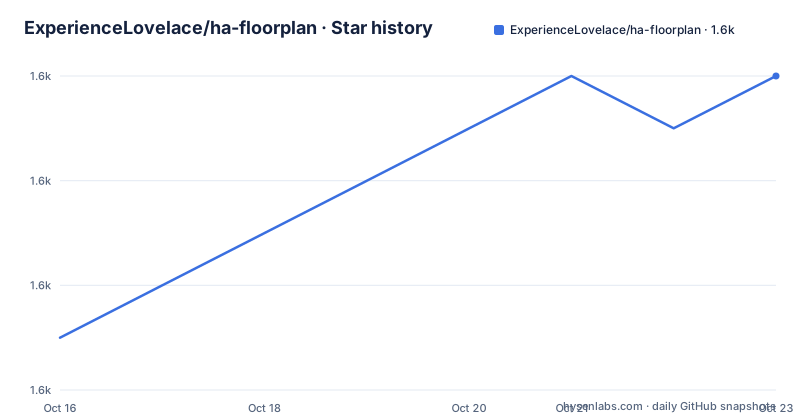
- ExperienceLovelace/ha-floorplan1,630 ★ · +5
| Repository | 2026-10-16 | 2026-10-23 |
|---|---|---|
| ExperienceLovelace/ha-floorplan | 1.6k | 1.6k |
5 Stars in the last 7 days, measured from the daily GitHub snapshot. Compare with other projects
Editorial analysis
Why ha-floorplan Treats SVG as a Home Dashboard
ha-floorplan addresses a specific Home Assistant problem: turning a drawn floorplan into an interface that reflects and controls the home instead of leaving the drawing as a static image. It is intended for Home Assistant users who already work with entities and Lovelace, want devices presented in their physical rooms, and are willing to treat an SVG file as part of the dashboard definition. The project can appear as a Lovelace card or a panel, allowing the same floorplan concept to sit inside a dashboard or occupy a dedicated view.
The SVG approach has a practical consequence. Geometry is not merely artwork placed beside the controls. Individual SVG objects become reference points for Home Assistant data and behavior. A light, sensor, appliance, or another controllable object can be represented at its location. The repository description says that mapped objects can display states, trigger visual changes, call services, and receive custom styling.
That model is most useful when spatial context carries information. A room boundary or fixture occupies the position a resident expects, making the interface resemble the home rather than a sequence of generic tiles. For the same resident, a standard Lovelace entity card can be faster to configure because it does not require matching dashboard behavior to drawn objects. ha-floorplan is therefore better suited to an intentional floorplan interface than to a general inventory of entities.
How SVG Objects Connect to Home Assistant
The documented flow starts with an SVG file. Its objects provide the visual and interactive structure, while the floorplan configuration connects those objects to Home Assistant entities, states, actions, and styles. The repository description states that this mapping can control devices, show states, and call services. In this arrangement, SVG supplies identity and position, while the configuration supplies the relationship between a drawn object and a Home Assistant capability.
The repository layout indicates a compiled TypeScript frontend. Source code is under `src/`, automated tests are under `tests/`, and webpack and Playwright configuration files sit at the repository root. The `package.json` main entry is `dist/floorplan.js`. This points to a browser module loaded by Home Assistant rather than a server-side integration installed through Home Assistant's Python configuration process.
That distinction affects deployment and upgrades. Users register a JavaScript resource with Home Assistant and configure a card or panel. They are not adding a device platform under a Home Assistant configuration directory. The README does not include the complete card, panel, entity, action, or styling schema. For exact selector formats, service-call syntax, and style rules, the linked Usage documentation and live examples are the appropriate sources.
Installing ha-floorplan Through HACS
The README recommends HACS for installation and links to the project's quick-start guide. It also permits downloading the latest version directly from the GitHub Releases page. Those are the two acquisition routes named by the project. Because the README does not document where a manually downloaded release must be placed or how Home Assistant must serve it, a direct-install tutorial should follow the project's own deployment instructions rather than assume a path.
The documented HACS route begins with the linked Installation guide. After adding the repository and installing ha-floorplan through HACS, the compiled resource is referenced as `floorplan.js`. The exact HACS interface steps are not printed in the README excerpt, so there is no justified reason to invent button names or navigation labels here.
HACS is the path recommended by the README. It also fits the resource URL shown in the project configuration: `/hacsfiles/ha-floorplan/floorplan.js`. The Releases route remains useful when HACS is not available or when an operator needs the release asset directly, but it requires attention to hosting. Anyone choosing that route should first consult the current quick-start documentation and confirm where it expects `floorplan.js` to be served.
Registering floorplan.js and Completing a First Use
Home Assistant must load the compiled module before rendering ha-floorplan. The README provides this resource template:
resources:
  - url: /hacsfiles/ha-floorplan/floorplan.js
    type: module
The URL assumes that the project files are available under `/hacsfiles/ha-floorplan/`, as they normally are when the installed files are exposed through that HACS path. The `type: module` entry tells Home Assistant to load `floorplan.js` as an ES module. The README does not state whether an open browser session must be refreshed after the resource is added, so an operator should not expect an immediate interface update without checking the current quick-start guide.
The first floorplan still requires two coordinated assets: a usable SVG and a configuration that maps its objects to entities or actions. Stable, recognizable SVG objects are important because the visual representation and configuration must refer to the same geometry. The repository links live examples and a Usage guide for the exact mapping syntax.
For a limited first use, one room and one clearly controlled entity is enough to check the basic path. The operator can then verify that the intended SVG object appears, that its state is displayed, and that a documented action reaches the expected Home Assistant service. This tutorial does not provide invented YAML keys or entity identifiers because the README excerpt does not show them. The linked example should supply the correct configuration shape for the selected release.
Running the TypeScript Build and Developer Commands
Contributors who want to work on the frontend can install the npm dependencies using the command printed in the README:
npm installThis reads the dependencies declared in `package.json`. The repository also contains `package-lock.json`, which records the dependency graph used by npm. `package.json` declares `"type": "module"`, so the project uses the ES module format.
The production bundle is built with:
npm run buildAccording to `package.json`, this runs webpack with the production environment. The package's main output is `dist/floorplan.js`, corresponding to the resource registered with Home Assistant. A developer build is available through:
npm run build:devThis invokes webpack without the production environment selection recorded in the script. For local development, the README identifies `npm run start`, which starts the example suite through the webpack development server. The package also defines test and end-to-end test scripts, including `npm run test` and `npm run test:e2e`. These commands show the project's available workflow; they do not establish that a particular checkout passes.
The README directs contributors to `package.json` for other options. It also links Playwright configuration at the repository root, which is consistent with the presence of browser-oriented end-to-end tooling. Before changing the code, a contributor can inspect `webpack.config.js`, `jest.config.js`, and `playwright.config.ts` to understand how those commands are connected to the build and test setup.
SVG Constraints, Licensing, and Upgrade Cost
The main limitation is the coordination required between artwork and configuration. An attractive SVG is not enough if its objects cannot be selected consistently. The object naming, mapping rules, entity identifiers, and action definitions all need to remain aligned when the floorplan changes. The README does not document a dedicated mapping validator or comprehensive diagnostics, so malformed configuration may require comparison with live examples and the Usage guide.
This model can also be the wrong tool for a small dashboard. Adding a few controllable entities does not inherently require floorplan geometry. If the goal is a compact collection of states or controls, a native Lovelace card may involve less setup and fewer visual references to maintain. ha-floorplan becomes more defensible when room position, device placement, and a dedicated panel view are central requirements.
License metadata needs attention. The repository description identifies the project as `Apache-2.0`, and the root contains a `LICENSE` file. However, `package.json` declares `"license": "ISC"`. The README does not explain that discrepancy. Users should clarify the applicable terms with the project maintainers before copying source or incorporating the card into a separately distributed bundle. This is a compliance check, not a legal conclusion.
Upgrade work is tied to both the card and its mappings. The repository is not archived, and its last push was on 2026-09-13. Release `v1.2.0`, published on 2026-07-14, added a simple visual configuration editor and fixed an elements-rule bug. Release `v1.1.6`, published on 2026-05-23, added haptic feedback, a touch-event fix, data-field support, and maintenance work. These changes can reduce configuration work, but upgrading can still require checking SVG selectors, entity references, touch behavior, and styling in the Home Assistant browser environment.
Editorial conclusion
Adopt ha-floorplan if the floorplan itself should serve as the dashboard and you are willing to maintain its SVG mappings. Do not choose it for a quick entity dashboard without adding spatial value. First verify the HACS installation, browser rendering of the SVG, entity references, and service actions. Check the license discrepancy before redistribution, because the repository says Apache-2.0 while `package.json` says ISC.
Frequently asked questions
How do I install ha-floorplan in Home Assistant?
The README recommends installing ha-floorplan through HACS. It also says that the latest `floorplan.js` can be downloaded from GitHub Releases, although it does not document the manual hosting steps.
Can ha-floorplan be used as both a Lovelace card and a panel?
Yes. The repository description and README list both Lovelace-card and panel usage. The linked Usage documentation contains the detailed configuration rather than the README excerpt.
Does ha-floorplan control Home Assistant devices through the SVG?
The project maps SVG objects to Home Assistant entities and supports state visualization and service calls. The exact mapping and action syntax is documented in the linked Usage guide.
Official sources
Add this badge to your README
If you maintain this project, the badge below links readers to this analysis and shows its maintenance status from the daily GitHub snapshot. Paste the markdown into your README; add ?metric=license or ?metric=stars to the image URL for a different field.

[](https://hysenlabs.com/projects/experiencelovelace-ha-floorplan)Star history chart for your README
[](https://hysenlabs.com/projects/experiencelovelace-ha-floorplan)Was this useful?