Factor bootstraps itself from a boot image, on ARM64 and RISC-V as well as x86
Factor programming language
At a glance
- What is it?
- Factor is a BSD-2-Clause concatenative, stack-based language with dynamic types, extensible syntax, macros and garbage collection, fully compiled while still supporting interactive development. The README spends most of its space on building and bootstrapping, including RISC-V RV64GC and RV32GC targets under QEMU.
- Who is it for?
- Adopt Factor if you want a concatenative language with a real compiled implementation, a full library and deployment tooling that produces portable stand-alone binaries. Do not adopt it expecting mainstream hiring pool or ecosystem reach, since the project is a small BSD effort whose recent work is disproportionately in RISC-V and cross-compilation infrastructure.
- Can I use it commercially?
- Yes. BSD-2-Clause is a permissive licence: you can use, modify and sell software built on it, as long as you keep its copyright and licence notices.
- Is it still maintained?
- Yes. The repository last received commits 1 day ago.
- What is it written in?
- Mainly Factor, according to GitHub's language statistics.
Answers come from the project's GitHub data, last synced on October 23, 2026, and from our analysis. They are not legal advice.
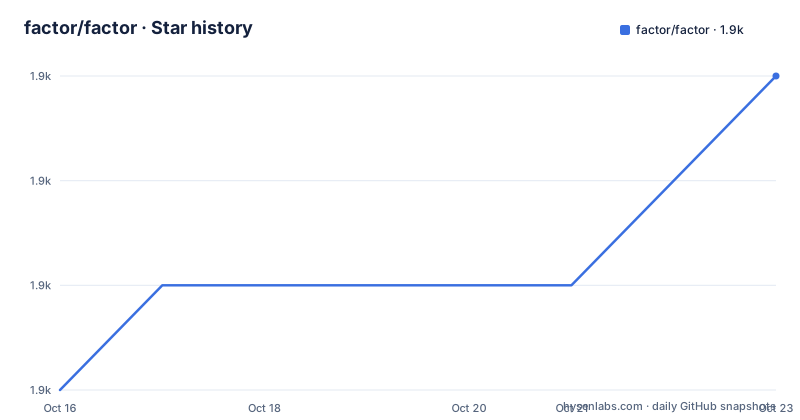
Star history
- factor/factor1,865 ★ · +3
| Repository | 2026-10-16 | 2026-10-23 |
|---|---|---|
| factor/factor | 1.9k | 1.9k |
3 Stars in the last 7 days, measured from the daily GitHub snapshot. Compare with other projects
Editorial analysis
Concatenative and stack-based, with high-level features rather than a toy
Factor is a concatenative, stack-based programming language with high-level features including dynamic types, extensible syntax, macros and garbage collection.
The adjective to sit with is high-level. A concatenative language that only had a stack and a compiler would be an interesting exercise; one with dynamic types, a macro system and extensible syntax is trying to be a language you write real software in. The extensible syntax point is the least familiar of the four, and it is a structural feature rather than a library: parsing rules are themselves vocabulary that can be extended.
On the practical side, the README points to a full-featured library, states that Factor supports many different platforms, and says it has been extensively documented. The home page is factorcode.org and the library index lives at docs.factorcode.org.
The performance claim is specific in a way that matters: the implementation is fully compiled for performance, while still supporting interactive development. Those two are usually in tension. A REPL that recompiles on every definition, or a compiler that only works in batch mode, each give up something. Factor's position is that a listener sits on top of the same compiler that produces the deployed binary, so what you develop against is what you ship.
Deployment is the other structural claim: Factor applications are portable between all common platforms, and Factor can deploy stand-alone applications on all platforms. Full source code is available under a BSD licence.
Two build paths, and the boot image is the fulcrum
Building from git requires either a working build environment or a boot image, and the README is explicit that the build scripts will attempt to compile the Factor binary and bootstrap from a boot image stored on factorcode.org.
Check out the source with:
git clone https://github.com/factor/factor.git
cd factor
Then there are two routes.
The first is the build script, which fetches or updates everything for you. On Unix it is `./build.sh update`, on Windows it is `build.cmd`, and on M1 macOS it is `arch -x86_64 ./build.sh update`, because the toolchain runs x86 code under Rosetta.
The second is manual. Download the correct boot image for your system from downloads.factorcode.org/images/master/, put it in the `factor` directory, and run `make` followed by `./factor -i=boot.unix-x86.64.image` on Unix. On Windows it is `nmake /f Nmakefile` then `factor.com -i=boot.windows-x86.64.image`, or `factor.com -i=boot.windows-arm.64.image` for ARM64.
That second route is the one to understand rather than merely copy. Factor is written largely in Factor, on top of a small VM, and the bootstrap loads the image and compiles the rest of the system from it. If you have no boot image, you have no system.
Note the image filename encodes the target, and that the Windows images differ for x86-64 and ARM64. Picking the wrong image does not fail in an obvious way.
After either route, the README says you should have a complete Factor system ready to run.
ARM64 and RISC-V are where the current work is
The README's RISC-V section is longer than the general build section, which tells you where the effort has gone.
The ARM64 assembler and compiler backend live in `cpu.arm.64`. RISC-V Linux development targets RV64GC with the LP64D ABI and RV32GC with the ILP32D ABI, with their assemblers and compiler backends in `cpu.riscv.64` and `cpu.riscv.32`.
Creating a RISC-V seed image is a one-liner from a working Factor checkout:
./factor -no-user-init -e='USING: bootstrap.image ; "unix-riscv.64" make-image'The `-no-user-init` flag matters and appears everywhere in these commands. It suppresses loading the user's own vocabulary and configuration, so a bootstrap does not depend on, or get polluted by, whatever happens to be in a home directory. Every command in this README uses it, which is a good sign of consistency in the tooling.
On a Debian riscv64 system, including a QEMU system guest, the sequence is to install dependencies, compile and bootstrap:
sudo apt-get update
./build.sh deps-apt
CC=gcc CXX=g++ ./build.sh compile
./factor -i="$PWD/boot.unix-riscv.64.image" -no-user-init -output-image=factor.image
Validation after bootstrap is a targeted test run rather than the whole suite:
./build.sh deps-apt-tests
./factor -i="$PWD/factor.image" -no-user-init -run=tools.test compiler io
RV32 is a heavier lift because it needs its own Linux. `misc/riscv32/build.sh` creates a Buildroot Linux environment with a cross compiler and runtime dependencies, run on a Linux builder, and the resulting guest is started with `misc/riscv32/run-qemu.sh`. Then the VM is cross-compiled with explicit `CC` and `CXX` paths pointing at the Buildroot toolchain, before bootstrapping inside the guest.
The `CC` and `CXX` overrides are how the cross build is directed, which is the ordinary mechanism but worth stating plainly since the paths are absolute and machine-specific.
QEMU user emulation with pinned interpreters, and a specific ENOTTY versus EBADF bug
The most detailed part of the README concerns running either RISC-V target under QEMU user emulation on a Linux builder, using `misc/riscv/test-qemu.sh`. It runs the default bootstrap, both assembler suites, the compiler and I/O suites, standard `load-all`, and standard `test-all`.
Two details there are the kind that only appear in a project with real contributors.
The first is the namespaces requirement. The Linux kernel must support user namespaces and namespaced `binfmt_misc`, and the script uses passwordless sudo to create private mount, PID and user namespaces, without registering a global QEMU handler. That last clause is a design decision with a purpose: registering a global binfmt handler makes the build machine permanently affected by the emulation, whereas private namespaces confine it to the run.
The second is a genuine interoperability bug, described precisely: QEMU 10.0.13 user emulation returns `ENOTTY` for unsupported ioctl requests before checking whether the descriptor is valid, while Linux returns `EBADF` first, and the input-event tests verify which one you get. The fix is to build pinned static interpreters with an included correction and select them with `--qemu`; system QEMU and native Linux do not need the correction.
That is a well-documented platform quirk rather than a vague note, and it explains the pinned-interpreter requirement. Installing the build dependencies and the pinned QEMU goes like this:
sudo apt-get install build-essential curl xz-utils patch python3-venv \
    libglib2.0-dev zlib1g-dev pkg-config ninja-build
misc/riscv/build-qemu.sh /absolute/path/to/qemu-tools
The final invocation takes the emulator path, the word size, the root filesystem and a checkout:
misc/riscv/test-qemu.sh --qemu /absolute/path/to/qemu-tools/bin/qemu-riscv32 \
    32 /absolute/path/to/rv32-output/target /absolute/path/to/rv32-checkout
It also notes that child Factor processes use the current stage image through a private default-image mount beside the executable, which is how a bootstrap that spawns subprocesses keeps them on the right image.
The vocabulary suite needs PostgreSQL and Redis, and Redis tests are destructive
Running the complete vocabulary suite rather than just the compiler and I/O tests changes the requirements, and two of them are warnings rather than setup steps.
The README says to keep PostgreSQL and Redis running in the test environment. PostgreSQL's local login role needs permission to create databases, and the tests use a database name that includes the CPU architecture. On a fresh Debian guest that means creating a superuser-ish role first:
sudo -u postgres createuser --createdb "$(id -un)"The connection details are passed as environment variables for the QEMU run:
export PGHOST=127.0.0.1 PGPORT=5432 PGUSER=factor_test
export PGPASSWORD='your-test-password'
export REDIS_HOST=127.0.0.1 REDIS_PORT=6380
The Redis warning is the important line: Redis tests clear database 0, so use a dedicated test instance. That is not a style suggestion. Pointing the test suite at a Redis instance holding real data would empty it, and database 0 is the default database, so it is the one people forget to override.
The full vocabulary run is a single long expression rather than a script, so it is worth knowing what it does before running it:
xvfb-run -a ./factor -i="$PWD/factor.image" -no-user-init -e='USING: assocs compiler.errors db.postgresql io kernel math namespaces prettyprint sequences system tools.test vocabs.hierarchy ; <postgresql-db> \ postgresql-db set-global load-all test-all :test-failures compiler-errors get assoc-size . test-failures get length compiler-errors get assoc-size + zero? [ 0 ] [ 1 ] if exit'It loads all vocabularies, runs the full test suite, prints the compiler errors, and exits 0 if the combined count of test failures and compiler errors is zero, 1 otherwise. That last part is the piece that makes it usable in CI: the exit code is the result.
`xvfb-run -a` is there because some of the UI vocabularies need a display.
There is also a legacy `pcre` vocabulary that needs PCRE1, and on Debian releases without the package the README says to build the shared PCRE 8.45 library with `--enable-utf` and `--enable-unicode-properties` and run `ldconfig` after installing.
What a 0.102 release and a decade of vocabulary work actually tell you
Release 0.102 shipped on 2026-10-13, and the gap to the previous one is informative: 0.101 was on 2025-12-09 and 0.100 on 2024-09-12. So the cadence is not regular, and 0.102 followed roughly ten months of silence.
The version number never reaching 1.0 after this many years is itself information. Factor is a mature language with an extensive library and decades of use, and it is still pre-1.0. Read that as a statement about the project's stability conventions rather than about the software.
The repository layout backs up the maturity claim. There is `core/`, `basis/` and `extra/`, which are Factor's three standard library tiers, plus `vm/` for the virtual machine, `src/` for the VM source, and `work/` for development scratch. `build.sh`, `build.cmd`, `GNUmakefile`, `Nmakefile` and `build.zig` cover Unix, Windows and Zig-based build paths, and `shell.nix` supports Nix-based environments. `Factor.app/` is the macOS application bundle.
`.dir-locals.el` at the root is a small detail that dates the project to a specific community: Emacs was the editor of choice for a lot of Factor contributors, and the file is still there.
The licence is BSD-2-Clause, stated in the README as BSD and with `LICENSE.txt` at the repository root. That is a permissive licence with a short form and no explicit patent grant, which is the terms of the licence rather than advice on how it fits your use.
The last push was on 2026-10-14, one day after the 0.102 tag, so the repository is being worked on now.
Editorial conclusion
Adopt Factor if you want a concatenative language with a real compiled implementation, a full library and deployment tooling that produces portable stand-alone binaries. Do not adopt it expecting mainstream hiring pool or ecosystem reach, since the project is a small BSD effort whose recent work is disproportionately in RISC-V and cross-compilation infrastructure. Verify first that your target has a boot image at downloads.factorcode.org/images/master/, since without one the build bootstraps from a network-fetched image, and note that building the RISC-V targets requires QEMU user emulation with pinned static interpreters rather than system QEMU.
Frequently asked questions
How do I build Factor from source?
Clone the repository, then run `./build.sh update` on Unix, `build.cmd` on Windows, or `arch -x86_64 ./build.sh update` on M1 macOS. Alternatively download the correct boot image from downloads.factorcode.org/images/master/ and run `make` then `./factor -i=boot.unix-x86.64.image`.
Why does Factor need a boot image?
The build scripts attempt to compile the Factor binary and bootstrap from a boot image stored on factorcode.org. Much of Factor is written in Factor on top of a small VM, so the image is what the bootstrap loads to compile the rest of the system.
Which architectures does Factor support?
The ARM64 assembler and compiler backend are in `cpu.arm.64`, and RISC-V targets RV64GC with the LP64D ABI and RV32GC with the ILP32D ABI, in `cpu.riscv.64` and `cpu.riscv.32`. A RISC-V seed image is generated with `./factor -no-user-init -e='USING: bootstrap.image ; "unix-riscv.64" make-image'`.
What do the Factor vocabulary tests need running?
PostgreSQL and Redis must be kept running, and the PostgreSQL login role needs permission to create databases. Redis tests clear database 0, so the README says to use a dedicated test instance rather than a development one.
Is Factor compiled or interpreted?
The README states the implementation is fully compiled for performance while still supporting interactive development. Applications are portable between common platforms, and Factor can deploy stand-alone applications on all platforms.
Why do the Factor build commands all use -no-user-init?
The flag suppresses loading the user's own vocabulary and configuration, so a bootstrap or test run does not depend on, or get polluted by, whatever is in a home directory. It appears on every build and test command in the README.
Official sources
Add this badge to your README
If you maintain this project, the badge below links readers to this analysis and shows its maintenance status from the daily GitHub snapshot. Paste the markdown into your README; add ?metric=license or ?metric=stars to the image URL for a different field.

[](https://hysenlabs.com/projects/factor-factor)Star history chart for your README
[](https://hysenlabs.com/projects/factor-factor)Was this useful?