coc-pyright for coc.nvim
Pyright extension for coc.nvim
At a glance
- What is it?
- coc-pyright integrates Pyright with coc.nvim and adds editor actions plus optional connections to Python linters, formatters, import tools, and test runners. It fits Python developers who already use coc.nvim, with project-root detection and external executable configuration as the main constraints.
- Who is it for?
- Adopt coc-pyright when you use coc.nvim for Python and want Pyright diagnostics with editor actions and optional integrations to tools such as Ruff, Black, and pytest. Do not treat it as a standalone command-line checker or assume every named Python tool is bundled.
- Can I use it commercially?
- Yes. MIT is a permissive licence: you can use, modify and sell software built on it, as long as you keep its copyright and licence notices.
- Is it still maintained?
- Yes. The repository last received commits 6 days ago.
- What is it written in?
- Mainly TypeScript, according to GitHub's language statistics.
Answers come from the project's GitHub data, last synced on November 6, 2026, and from our analysis. They are not legal advice.
Star history
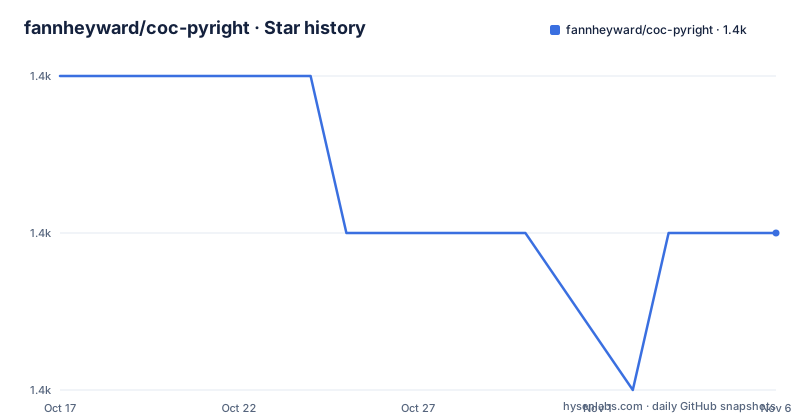
- fannheyward/coc-pyright1,362 ★ · -1
| Repository | 2026-10-17 | 2026-11-06 |
|---|---|---|
| fannheyward/coc-pyright | 1.4k | 1.4k |
-1 Stars in the last 20 days, measured from the daily GitHub snapshot. Compare with other projects
Editorial analysis
coc-pyright's Python editor role
coc-pyright is a coc.nvim extension for Pyright. It is aimed at developers who edit Python in Neovim through coc.nvim and want language-service results without switching to a separate editor integration. The README lists semantic-token highlighting and inlay hints as additional features. It also documents code actions for adding imports, ignoring a typing check, running tests, and other operations.
The package metadata identifies the package as `coc-pyright`, version `1.1.414`, with the description “Pyright extension for coc.nvim, static type checker for Python”. Its coc engine requirement is `^0.0.80`. The repository is written primarily in TypeScript, while `package.json` points to `lib/index.js` as its main entry. The build scripts use `esbuild.mjs`, and the repository includes TypeScript sources under `src/`.
The extension is not the same thing as the Pyright command-line program. Its documented installation is through coc.nvim, and its commands are editor commands such as `:CocCommand` examples. It is therefore most appropriate for an existing coc.nvim workflow. A project that needs type checking in CI without an editor should use Pyright directly instead of depending on this extension's editor integration.
coc-pyright activation and language-service configuration
Package activation is based on both language and workspace markers. The `activationEvents` list includes `onLanguage:python` and `workspaceContains` entries for `app.py`, `Pipfile`, `setup.py`, `manage.py`, `pyproject.toml`, `requirements.txt`, and `pyrightconfig.json`. These entries indicate that coc.nvim can activate the extension when opening a Python file or seeing a recognizable Python workspace marker.
The README documents several Pyright settings in `coc-settings.json`. `python.analysis.diagnosticMode` defaults to `openFilesOnly`, so the documented default limits analysis to open files rather than every workspace file. `python.analysis.typeCheckingMode` defaults to `basic`. Other settings control automatic import completions, automatic search paths, custom stub files, typeshed paths, diagnostic severity overrides, and use of library implementations for type information.
The extension also adds commands around the language service. `pyright.version` reports the Pyright version currently in use. `pyright.restartserver` forces the type checker to discard cached type information and restart analysis. The README says this is useful after installing new type stubs or libraries. `pyright.createtypestub` creates type stubs for a supplied module name, with `numpy` given as the example module.
These controls are useful because Pyright's results depend on both workspace context and available type information. However, the README does not describe every precedence rule for stubs, `pyrightconfig.json`, or workspace folders. Users should inspect the effective project structure rather than assume that coc.nvim activation guarantees correct analysis.
Installing coc-pyright and selecting Python execution
The README provides a single installation instruction for coc.nvim users:
:CocInstall coc-pyrightThe command should be run through the coc.nvim command interface. It installs the extension into the editor environment. The package metadata's `main` field points to `lib/index.js`, but the README does not instruct end users to build that file manually after installation.
The README warns that Pyright may not work as expected if coc.nvim cannot detect the project root. It points to issue `#521` and coc.nvim's workspace-folder documentation for that subject. This is the clearest setup limitation in the visible documentation. A Python project can contain recognizable files and still require correct workspace-folder handling for imports and type information to resolve as intended.
The Python executable is controlled by `python.pythonPath`, whose documented default is `python`. `python.venvPath` identifies a folder containing virtual environments and defaults to an empty string. The README does not provide a project-specific virtual-environment example, so users should configure these keys according to their local environment rather than copy an invented value. The extension's Python integrations may otherwise select a different interpreter from the one used by the project.
Formatting, linting, imports, and extraction integrations
coc-pyright exposes integrations beyond Pyright diagnostics, but the README treats them as configurable choices. Formatting can use `ruff`, `yapf`, `black`, `autopep8`, `darker`, `blackd`, or `pyink`. The default `python.formatting.provider` is `autopep8`. Separate settings allow paths and arguments to be supplied for several formatters, including `black`, `darker`, `pyink`, `blackd`, and `yapf`.
The `blackd` integration has dedicated settings for `python.formatting.blackdPath`, `python.formatting.blackdHTTPURL`, and `python.formatting.blackdHTTPHeaders`. The presence of an HTTP URL setting indicates support for connecting the editor to a `blackd` service. The README does not say that coc-pyright starts a server, so this configuration should be treated as a connection setting rather than a bundled service.
Linting support covers `bandit`, `flake8`, `mypy`, `ruff`, `prospector`, `pycodestyle`, `pydocstyle`, `pyflakes`, `pylama`, `pylint`, and `pytype`. The broad `python.linting.enabled` setting defaults to `true`, while the individual linter settings shown in the README default to `false`. That means external linting is an available integration layer, not an automatic requirement to run every named linter.
Import sorting is available through `ruff`, `isort`, and Pyright. The `python.sortImports` command can sort imports with `isort` or `ruff`, while `pyright.organizeimports` uses Pyright. Rope supplies method and variable extraction. The README does not claim that all of these tools ship with coc-pyright, so their presence in the integration list is not evidence that the binaries are bundled.
Test commands and editor test support
The README documents test support for `unittest` and `pytest`, including codeLens support. Two commands are listed for running tests: `pyright.fileTest`, which runs the test for the current test file, and `pyright.singleTest`, which runs the nearest single test. The command list also says that codeActions can run tests, although it does not provide a complete command reference for every related action.
This feature is useful when a project already has test files arranged in a way that Pyright and coc.nvim can discover. It does not remove the need for a test runner or test configuration. The README does not document pytest plugin selection, unittest discovery options, environment-variable handling, coverage configuration, or a standalone report format. Those details would need to come from the underlying test tools and the project's own configuration.
Compared with using `pytest` or `unittest` from a terminal, the editor integration offers local commands and codeLens discovery. Compared with a full test-runner extension, the visible documentation leaves discovery and reporting behavior unspecified. The right choice depends on whether editor-local execution is the main requirement or whether CI and command-line test automation are the priority.
Configuration boundaries and failure cases
The extension has several independent configuration surfaces. Pyright settings control analysis scope, type-checking mode, search paths, stubs, and severity. Python settings select the interpreter and virtual-environment location. Formatting settings select a provider and formatter paths or arguments. Linting settings select individual external tools. Import sorting can use Ruff, isort, or Pyright, and Rope handles extraction actions.
That separation is useful because it avoids forcing one tool onto every project. It also creates several failure cases. If the workspace root is wrong, Pyright may not resolve the intended project context. If `python.pythonPath` points to the wrong interpreter, type information can reflect the wrong environment. If an external linter or formatter is not installed, its editor command cannot complete. If `blackd` is selected without a reachable server, formatting requests can fail even though Pyright remains usable.
The README does not document a universal health-check command that validates every optional dependency. `pyright.version` checks the currently used Pyright version, and `pyright.restartserver` refreshes cached analysis, but neither is documented as a complete dependency audit. The appropriate first checks are therefore configuration-specific: inspect the selected Python executable, workspace root, and the exact tool named by the feature being used.
Repository maintenance and upgrade surface
The repository is not archived, and its last push was on 2026-10-01. It has no GitHub releases. That means the repository provides current source activity but does not provide release notes or a GitHub release entry for comparing versions. The absence of releases is a limitation for teams that want a documented upgrade history, not proof that the extension is unusable.
For source development, the repository's `justfile` defines commands for building, installing, linting, watching, and cleaning. The relevant target bodies are visible in the repository: `node esbuild.mjs`, `npm install`, `npm run lint`, `node esbuild.mjs --watch`, and `rm -rf ./node_modules ./lib`. The package scripts also include `build`, `prepare`, `check`, and `schema`. These are repository maintenance and development operations, not the documented end-user installation route.
The project declares the MIT license. That is the license identifier supplied by the repository metadata, but license review for a deployment may also need to cover Pyright and any separately installed tools. The README does not document rollback, automatic upgrades, compatibility guarantees for every listed formatter, or a migration procedure between versions. Teams adopting the extension should record the installed coc-pyright version and verify the documented command set when updating it.
Editorial conclusion
Adopt coc-pyright when you use coc.nvim for Python and want Pyright diagnostics with editor actions and optional integrations to tools such as Ruff, Black, and pytest. Do not treat it as a standalone command-line checker or assume every named Python tool is bundled. Verify project-root detection, `python.pythonPath`, `python.venvPath`, and the selected external executables first. The repository is not archived, its last push was on 2026-10-01, and it has no GitHub releases.
Frequently asked questions
How do I install coc-pyright for coc.nvim?
Run `:CocInstall coc-pyright` in coc.nvim. The README documents this command for installing the extension and does not provide a separate end-user installation command.
What should I check if Pyright does not detect the Python project correctly?
The README specifically warns about project-root detection. Check coc.nvim workspace-folder handling first, then verify `python.pythonPath`, `python.venvPath`, and the relevant `python.analysis` settings.
Does coc-pyright include Ruff, Black, and pytest?
The README documents integrations with `ruff`, `black`, `yapf`, `autopep8`, `pytest`, and `unittest`, but it does not state that these tools are bundled. Each selected external tool must be available separately.
Official sources
Add this badge to your README
If you maintain this project, the badge below links readers to this analysis and shows its maintenance status from the daily GitHub snapshot. Paste the markdown into your README; add ?metric=license or ?metric=stars to the image URL for a different field.

[](https://hysenlabs.com/projects/fannheyward-coc-pyright)Star history chart for your README
[](https://hysenlabs.com/projects/fannheyward-coc-pyright)Was this useful?