@fastify/swagger: OpenAPI documents generated from your route schemas
Swagger documentation generator for Fastify
At a glance
- What is it?
- @fastify/swagger is a Fastify plugin that assembles a Swagger or OpenAPI document from the JSON schemas you already attach to your routes, or serves a static specification you supply. It suits a Fastify service that already validates its inputs and wants the documentation to come from the same source, and it produces the document rather than the UI that renders it.
- Who is it for?
- @fastify/swagger suits a Fastify 5 service whose routes already carry JSON schemas, because the documentation then cannot drift from the validation, and it suits a team that wants to serve a hand written specification instead through the static mode. It does not suit you if you want a browsable API explorer, since the front end is a separate plugin, and it does not suit you if you need routes generated from an existing OpenAPI file, which is what fastify-openapi-glue is for.
- Can I use it commercially?
- Yes. MIT is a permissive licence: you can use, modify and sell software built on it, as long as you keep its copyright and licence notices.
- Is it still maintained?
- Yes. The repository last received commits 6 days ago.
- What is it written in?
- Mainly JavaScript, according to GitHub's language statistics.
Answers come from the project's GitHub data, last synced on November 7, 2026, and from our analysis. They are not legal advice.
Star history
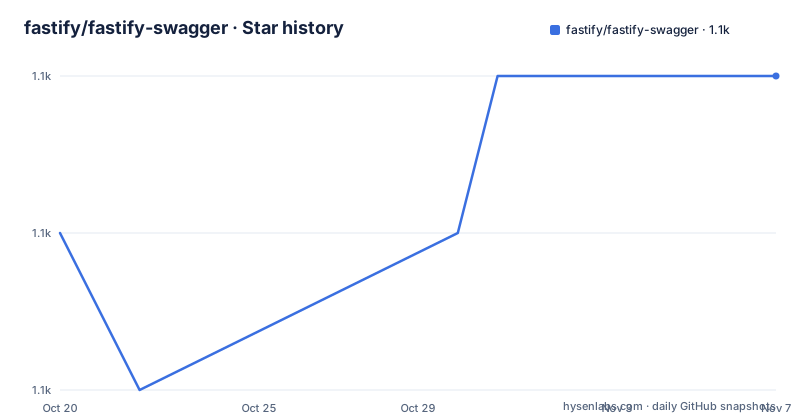
- fastify/fastify-swagger1,101 ★ · +1
| Repository | 2026-10-20 | 2026-11-07 |
|---|---|---|
| fastify/fastify-swagger | 1.1k | 1.1k |
1 Stars in the last 18 days, measured from the daily GitHub snapshot. Compare with other projects
Editorial analysis
The document is derived from the schemas you already wrote
Fastify validates requests with JSON Schema attached to the route definition, and @fastify/swagger reads those same schemas to build the API description. That is the whole idea: the request body, the parameters and the response are described once, and the same description both validates traffic and documents it. The plugin serves either a Swagger (OpenAPI v2) schema or an OpenAPI v3 schema, and it can also serve a specification you already have, in which case the plugin is acting as a delivery mechanism rather than a generator. The README is explicit about the two directions. It points at fastify-openapi-glue for the opposite workflow, generating routes from an existing OpenAPI schema, and it names the front ends that consume the definitions this plugin produces, @fastify/swagger-ui and @scalar/fastify-api-reference. So this is a schema producer, not a documentation site. That division matters when you plan the work, because the browsable API explorer is a second package with its own version to track and its own place in the compatibility matrix.
The repository layout is small and conventional for a Fastify plugin. The entry point is index.js, the implementation lives in lib/, the TypeScript declarations are in types/, the tests are in test/ and the examples/ directory carries a file per scenario, including dynamic-swagger.js, dynamic-openapi.js, dynamic-overwrite-endpoint.js, collection-format.js, json-in-querystring.js, options.js, and the static variants with both a JSON and a YAML specification file.
Registration order decides what appears in the document
The usage pattern is register, pass options, call the swagger API. The plugin has to be registered before any route, and the README calls this out with a note: routes registered before the plugin will not appear in the generated documentation. That is not a stylistic preference, it follows from how the plugin works, because it observes the route table as routes are added. The consequence for larger services is the @fastify/autoload pattern, where routes live in a directory and are registered by a plugin, and the swagger plugin has to be registered before the autoload plugin runs.
const fastify = require('fastify')()
await fastify.register(require('@fastify/swagger'), {
  openapi: {
    openapi: '3.0.0',
    info: {
      title: 'Test swagger',
      description: 'Testing the Fastify swagger API',
      version: '0.1.0'
    },
    servers: [
      {
        url: 'http://localhost:3000',
        description: 'Development server'
      }
    ]
  }
})
await fastify.ready()
fastify.swagger()
The document is only complete after fastify.ready(), because that is when every plugin has been loaded and every route registered. Getting the two steps in the wrong order is the most common way to end up with an empty or partial document, and it is a silent failure, since nothing errors, the document just misses routes. The final call, fastify.swagger(), returns the assembled object, and that object is what the UI plugins render.
Dynamic mode reads routes, static mode serves what you supply
The plugin has two registration modes and the choice is more consequential than it first appears. In dynamic mode, which is the default, the API schemas are auto-generated from the route schemas, so the document is a byproduct of the running server. In static mode, you hand the plugin a specification and it serves that instead, which is how you serve a hand written or externally generated OpenAPI file. The examples directory shows both shapes, with example-static-specification.js, example-static-specification.json and example-static-specification.yaml for the static case and static-json-file.js and static-yaml-file.js for serving a file directly. Within dynamic mode there is a further choice of output dialect. The plugin generates schemas that adhere to the Swagger specification by default, and providing an openapi option instead generates OpenAPI compliant schemas. Every property of either specification can be used, so the openapi block accepts info, externalDocs, servers, components, security and tags, and the swagger block accepts the older host, schemes, consumes, produces and securityDefinitions equivalents. The example code in the README shows a components block with a securitySchemes entry defining an apiKey scheme, and a route whose schema carries a matching security array.
The OpenAPI version string decides what the document can express
The version of the generated document is taken from the openapi.openapi string, and it defaults to 3.0.3. Setting it to 3.1.0 or 3.2.0 changes what the generator is able to emit, and the README describes the differences concretely rather than leaving you to discover them. The top level properties introduced by the newer versions are passed through to the generated document, which means webhooks in 3.1 and the $self property plus the summary, parent and kind properties of the tag object in 3.2.
{
  openapi: {
    openapi: '3.2.0',
    $self: 'https://example.com/openapi.json',
    tags: [
      { name: 'products', summary: 'Products', kind: 'nav' },
      { name: 'books', summary: 'Books', parent: 'products', kind: 'nav' }
    ]
  }
}
There is a second consequence in 3.2. Routes registered with the QUERY HTTP method are documented like any other method with a request body, and the routes of HTTP methods without a fixed field in the Path Item Object, such as the ones added through fastify.addHttpMethod() for PROPFIND, are listed in the additionalOperations map. Older OpenAPI versions cannot describe those methods at all, so a service that uses custom HTTP methods has to either accept that they are missing from the document or move to the newer version string. This is a good example of the plugin tracking the specification rather than lagging it, and it is also a case where the choice is not reversible without changing what your clients see.
Version compatibility is tied to the Fastify major line
The plugin is versioned in lockstep with Fastify itself, and the README publishes the mapping.
Plugin 9.x and above goes with Fastify 5.x, plugin 7.x up to but not including 9.x goes with Fastify 4.x, plugin 6.x goes with Fastify 3.x, plugin 3.x up to but not including 6.x goes with Fastify 2.x, and plugin 1.x up to but not including 3.x goes with Fastify 1.x.
The note underneath is worth reading as a policy statement. If a Fastify version is out of support, then the corresponding versions of this plugin are out of support too, and the README points at Fastify's LTS policy for the detail. That means an upgrade is a coordinated decision, and picking a plugin version by its own release date rather than by the Fastify major you are on is a mistake that shows up later. The current release line is 9.x, with v9.9.2 tagged on 2026-10-09, following v9.9.1 and v9.9.0 in the weeks before it, and the last push was on the same day as the newest tag. The plugin is published as @fastify/swagger, it is MIT licensed, and the package itself is CommonJS with type set to commonjs, with the type declarations shipped separately in types/index.d.ts. A MIGRATION.md file covers moving from version 7.x or lower to 8.x and above, which is a sign that the 8.x boundary changed the options shape.
The repository is small, tested and typed
The engineering setup is plain and easy to reason about. The package scripts are lint, lint:fix, test, and the test script itself runs two suites, test:unit and test:typescript. The unit suite runs under c8 with the node test runner, and the coverage threshold is 100, which is an unusually strict commitment for a plugin and explains the size of the test/ directory relative to lib/. The TypeScript suite runs through tstyche, which type checks the published declarations against usage, so a change that breaks the type surface fails the build rather than surfacing in a consumer. The dev dependencies show the shape of the test fixtures. @apidevtools/swagger-parser is used to validate the generated documents, joi and joi-to-json and fluent-json-schema are there to test that alternative schema sources are converted, and fastify itself is pinned to the 5.x line to match the compatibility table. The code style is neostandard with eslint 9 and a flat config. The plugin is part of the Fastify ecosystem, funded through GitHub Sponsors and OpenCollective.
Where @fastify/swagger is the wrong tool
Three cases stand out. The first is a team that wants the documentation to be a design artefact rather than a description of the code. The dynamic mode is faithful to the routes, which is exactly what you want when the schemas are the contract, and exactly what you do not want if the API is designed first in a specification file and the code is supposed to follow. The README points at fastify-openapi-glue for that direction, and the difference in approach is fundamental: one reads the server to describe it, the other reads the description to build the server. The second case is a service with a hand maintained OpenAPI file and no Fastify route schemas, where the static mode serves the document but the plugin adds little beyond a file route, and a plain static file server would do the same job. The third is a consumer who expects a documentation UI. The plugin emits an object, and the interactive experience comes from @fastify/swagger-ui or @scalar/fastify-api-reference, so a team that installs only this package and expects a browsable explorer will be disappointed. Two smaller limits are worth noting. The generated document reflects only the routes that were registered after the plugin, so a service that registers routes early, or that builds its route table in a way the plugin cannot observe, will have gaps. And there is no mention in the README of serving the document over a route, since the examples call fastify.swagger() and hand the result to a front end plugin, so if you need an openapi.json endpoint you are wiring that yourself.
Editorial conclusion
@fastify/swagger suits a Fastify 5 service whose routes already carry JSON schemas, because the documentation then cannot drift from the validation, and it suits a team that wants to serve a hand written specification instead through the static mode. It does not suit you if you want a browsable API explorer, since the front end is a separate plugin, and it does not suit you if you need routes generated from an existing OpenAPI file, which is what fastify-openapi-glue is for. Before you rely on it, register the plugin before your routes, since routes registered earlier are absent from the generated document, and check the compatibility table, because version 9.x of the plugin targets Fastify 5 and the last push was on 2026-10-09.
Frequently asked questions
How do I install @fastify/swagger?
Run npm i @fastify/swagger. The plugin is published under the @fastify scope, and version 9.x targets Fastify 5.
Why are some of my routes missing from the generated document?
The plugin must be registered before any routes, and routes registered before it will not appear in the generated documentation. The README says the same about @fastify/autoload, where the swagger plugin has to be registered before the autoload plugin loads the routes.
What is the difference between the dynamic and static modes?
Dynamic is the default and auto-generates API schemas from your route schemas, while static mode serves an existing Swagger or OpenAPI specification that you supply, for example a JSON or YAML file.
Which OpenAPI version does @fastify/swagger generate?
The version comes from the openapi.openapi string and defaults to 3.0.3. Setting it to 3.1.0 or 3.2.0 enables the newer top level properties, and at 3.2.0 or higher the routes of HTTP methods without a fixed field, such as PROPFIND, are listed in the additionalOperations map.
Official sources
Add this badge to your README
If you maintain this project, the badge below links readers to this analysis and shows its maintenance status from the daily GitHub snapshot. Paste the markdown into your README; add ?metric=license or ?metric=stars to the image URL for a different field.

[](https://hysenlabs.com/projects/fastify-fastify-swagger)Star history chart for your README
[](https://hysenlabs.com/projects/fastify-fastify-swagger)Was this useful?