The USB Host Shield library compiles flat, one file per device family
Revision 2.0 of USB Host Library for Arduino.
At a glance
- What is it?
- USB_Host_Shield_2.0 lets an Arduino speak USB host through a MAX3421E shield, and the repository is laid out as a flat set of C++ files, one per device family, rather than as an Arduino library with a src/ tree. Installing it means renaming the directory by hand.
- Who is it for?
- This library fits a maker or engineer who needs an Arduino to act as a USB host for a keyboard, a mass storage device or a game controller, and who can accept that each device family has its own quirks and its own file at the repository root. It is a poor fit for a production firmware project that needs a stable API contract, since the newest release is 1.7.0 from 2024-07-23 and the board list is maintained by editing settings.h rather than by configuration.
- Can I use it commercially?
- Not without permission. GitHub finds no licence file in the repository, and without a licence all rights are reserved by default: you may read the code but not reuse it. Check the README, or ask the authors, before using it.
- Is it still maintained?
- Yes. The repository last received commits 155 days ago.
- What is it written in?
- Mainly C++, according to GitHub's language statistics.
Answers come from the project's GitHub data, last synced on October 23, 2026, and from our analysis. They are not legal advice.
Star history
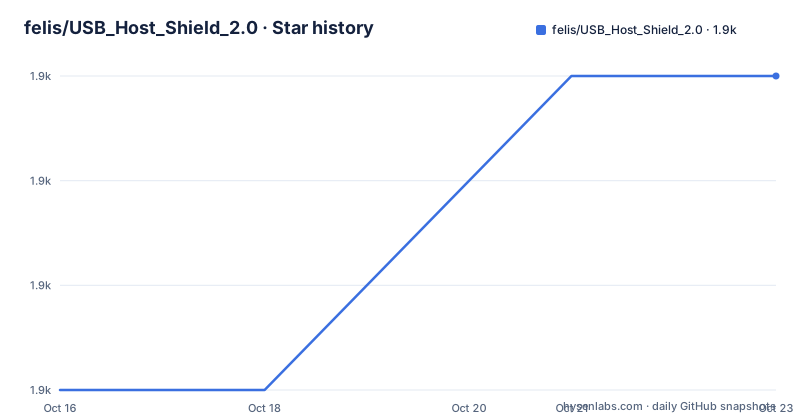
- felis/USB_Host_Shield_2.01,944 ★ · +3
| Repository | 2026-10-16 | 2026-10-23 |
|---|---|---|
| felis/USB_Host_Shield_2.0 | 1.9k | 1.9k |
3 Stars in the last 7 days, measured from the daily GitHub snapshot. Compare with other projects
Editorial analysis
The repository root is the library
There is no src/ directory and no library.properties in the visible listing. The headers and sources sit at the top level, one pair per device family: PS3BT.cpp and PS3BT.h, PS4Parser, PS5Parser with PS5Trigger, SwitchProBT, Xbox across XBOXOLD, XBOXONE, XBOXONESParser and XBOXRECV, Wii, MIDI through the amBX and MiniDSP files, BTD and BTHID for Bluetooth, plus the core Usb.cpp, Usb.h and UsbCore.h and the pin abstraction avrpins.h.
That layout is a consequence of the Arduino build model. The flat tree also makes the device families easier to see in the repository listing.
The cost is that the top level reads as a parts bin. Nothing in the file names tells you which of the Xbox files to include, and the answer depends on whether the controller connects over USB or over Bluetooth and which generation it is. The examples directory is organised better, with separate folders for Bluetooth, HID, PS3USB, PS4USB, PS5USB, SwitchProUSB, PSBuzz, USBH_MIDI, Xbox, acm, adk, ambx, ftdi, hub_demo, pl2303 and others, which is where you should start when you want a working sketch.
Installing it means renaming the folder yourself
There are two installation paths, and the manual one has a step that trips people up.
The easy path is the Arduino Library Manager, which requires Arduino IDE 1.6.2 or newer.
The manual path starts from the master archive zip. Uncompress it, then rename the directory to USB_Host_Shield_20, because the Arduino IDE does not support the special characters in the original name. Then create a libraries directory inside your sketchbook location, found under File > Preferences in the IDE, and move the renamed folder into it. The library folder then sits inside the libraries directory of your sketchbook, one level below the Arduino folder itself.
Restarting the IDE is the last step, after which the examples appear under File > Examples > USB_Host_Shield_20.
Two details in that sequence are worth internalising.
settings.h is the configuration surface for every board
There is no board configuration in the sketch. Everything about which hardware you are running on, and which features are compiled in, is decided in a single header file, settings.h.
The first entry is debugging, which is off by default and enabled by changing a define:
#define ENABLE_UHS_DEBUGGING 1With that set, the library prints what it sees on the serial port while enumerating devices, which is the difference between hours and minutes when a device does not appear.
The second entry is manual board activation. The README lists boards that must be enabled by hand in settings.h rather than being detected, starting with the Arduino Mega ADK, and notes that with Arduino 1.5.5 or newer there is no need to activate it.
A third use is pin assignment. The README gives explicit pins for several boards because the shield cannot be plugged in anywhere: the ESP32 mapping is GPIO5 for SS, GPIO17 for INT, GPIO18 for SCK, GPIO19 for MISO and GPIO23 for MOSI, the SEEED XIAO nRF52840 Sense uses pin 7 for SS and 5 for INT, and the ESP8266 uses pin 15 and 5. The Intel Galileo uses pin 2 and 3 for INT and SS by default and needs hardware modifications to the shield, with the details in the hardware manual's interface modifications section.
ESP8266 loses pins, and native USB host does not exist here
Two limitations in the board list are stated firmly enough to be worth quoting.
On ESP8266, GPIO16 is not usable because it is reserved for other purposes, with resetting the SoC from sleep mode given as an example. GPIO6 through 11 are also not usable, because they are wired to the SPI flash chip that stores the executable. That removes several pins from a board with very few to begin with, and it is a hardware constraint rather than a library limitation.
On Intel Galileo, Galileo 2 and Intel Edison, native USB host is not supported on any of these platforms, and the shield has to be used instead. The Teensy 3.x line has its own requirement: download the separate SPI library from the spi4teensy3 repository and add its header with an include directive at the top of the.ino file.
Beyond AVR boards, the list includes Balanduino, Sanguino, Black Widdow, anything supported by MightyCore, RedBearLab nRF51822, Adafruit Feather nRF52840 Express, Digilent chipKIT, STM32F4 with the NUCLEO-F446RE as the currently supported part, and Logic Green LGT8F328p through the LGT8fx core. Each entry carries a link or a note, which tells you this list has been maintained by people reporting what actually worked rather than by a compatibility matrix.
Device families, contributors, and what the project does not do
The library is organised by device, and the README credits a specific developer to each family. Alexei Glushchenko is listed for the USB Core, HID, FTDI, ADK, ACM and PL2303 libraries. Kristian Sloth Lauszus is credited for Bluetooth and the device parsers: BTD, BTHID, SPP, PS5, PS4, PS3, Wii, Switch Pro, Xbox and PSBuzz. Andrew Kroll made major contributions to mass storage, guruthree added Xbox ONE controller support, Yuuichi Akagawa wrote the MIDI library, and Aran Vink wrote amBX. Oleg Mazurov is listed first among the developers.
The credit matters because each family has its own maintainer, which means the quality of a mass storage sketch and the quality of a PS5 parser are not the same thing. If your project depends on one device class, that class's developer is the person whose recent changes to look at.
What the library is not is a general purpose USB stack. It drives a MAX3421E based shield on boards whose native USB peripheral cannot act as a host, and the scope is host side only. There is no device or OTG mode here, no hub support beyond the hub_demo example, and no class for the long tail of composite devices.
Documentation is generated and published at felis.github.io/USB_Host_Shield_2.0, with hardware details in a separate manual at chome.nerpa.tech. The README states the code is released under the GNU General Public License, and no licence file appears in the top level listing of the repository. The most recent release is 1.7.0 from 2024-07-23, and the last push was on 2026-05-21.
Editorial conclusion
This library fits a maker or engineer who needs an Arduino to act as a USB host for a keyboard, a mass storage device or a game controller, and who can accept that each device family has its own quirks and its own file at the repository root. It is a poor fit for a production firmware project that needs a stable API contract, since the newest release is 1.7.0 from 2024-07-23 and the board list is maintained by editing settings.h rather than by configuration. Before wiring hardware, check your board's pin assignments in the README, because several supported boards need SS and INT on specific pins and some, such as ESP8266, lose whole GPIO ranges to the SPI flash.
Frequently asked questions
How do I install USB Host Shield 2.0 manually?
Download the master archive zip, uncompress it, rename the directory to USB_Host_Shield_20 because the Arduino IDE rejects special characters, move it into a libraries folder in your sketchbook directory, then restart the IDE. The examples then appear under File > Examples > USB_Host_Shield_20.
How do I turn on serial debugging in USB Host Shield 2.0?
Serial debugging is disabled by default. Change ENABLE_UHS_DEBUGGING to 1 in settings.h so the line reads `#define ENABLE_UHS_DEBUGGING 1`.
Which pins does the shield use on an ESP32?
The README lists GPIO5 as SS, GPIO17 as INT, GPIO18 as SCK, GPIO19 as MISO and GPIO23 as MOSI. Other boards have their own fixed assignments, for example the ESP8266 uses pin 15 and 5.
Can I use USB Host Shield 2.0 on an ESP8266?
Yes, through the ESP8266 Arduino core, but GPIO16 is not usable and GPIO6 to 11 are not usable because they are wired to the SPI flash chip that stores the executable binary.
Official sources
Add this badge to your README
If you maintain this project, the badge below links readers to this analysis and shows its maintenance status from the daily GitHub snapshot. Paste the markdown into your README; add ?metric=license or ?metric=stars to the image URL for a different field.

[](https://hysenlabs.com/projects/felis-usb-host-shield-2-0)Star history chart for your README
[](https://hysenlabs.com/projects/felis-usb-host-shield-2-0)Was this useful?