FFXIV Teamcraft ships a web app, an Electron build and a Windows DLL bridge
A ffxiv tool to handle collaborative crafts easily
At a glance
- What is it?
- FFXIV Teamcraft is a collaborative crafting tool for Final Fantasy XIV, hosted at ffxivteamcraft.com and packaged for the desktop through Electron. The repository shows the deployment shape clearly: Firebase for the backend, an Nx workspace of apps and libs, Crowdin for translations and a bundled Windows bridge executable for packet capture.
- Who is it for?
- Adopt FFXIV Teamcraft if you play the game and craft with a static group, since the collaboration and rotation planning is the product. Do not adopt it as a component library or a general backend reference, because nothing in the repository is exported for reuse.
- Can I use it commercially?
- Yes. MIT is a permissive licence: you can use, modify and sell software built on it, as long as you keep its copyright and licence notices.
- Is it still maintained?
- Yes. The repository last received commits 2 days ago.
- What is it written in?
- Mainly TypeScript, according to GitHub's language statistics.
Answers come from the project's GitHub data, last synced on November 7, 2026, and from our analysis. They are not legal advice.
Star history
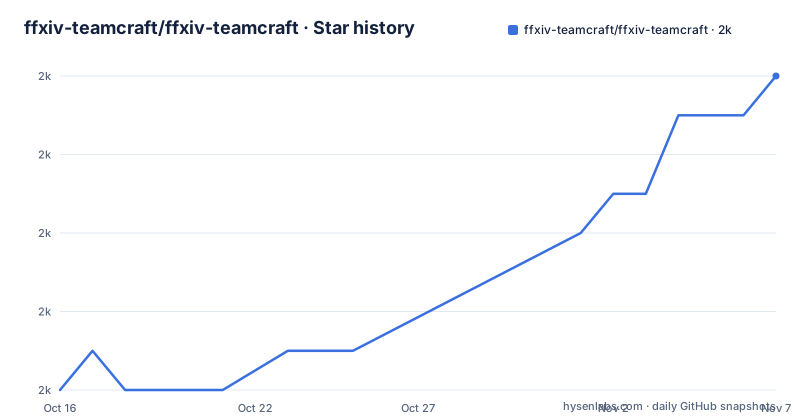
- ffxiv-teamcraft/ffxiv-teamcraft1,972 ★ · +8
| Repository | 2026-10-16 | 2026-11-07 |
|---|---|---|
| ffxiv-teamcraft/ffxiv-teamcraft | 2k | 2k |
8 Stars in the last 22 days, measured from the daily GitHub snapshot. Compare with other projects
Editorial analysis
The repository is a workspace, not an application
FFXIV Teamcraft presents itself as a collaborative crafting tool for Final Fantasy XIV with a hosted site, a wiki for feature documentation and user guides, and a Discord for support and contributor discussion. The repository description says the same thing in fewer words: an FFXIV tool to handle collaborative crafts easily.
Underneath, the layout is a monorepo orchestrated by Nx, with nx.json at the root and tsconfig.base.json holding shared compiler settings. The directories separate concerns by deployment target rather than by feature: apps/ for the shipped applications, libs/ for shared code, functions/ for the Firebase side, data-extraction/ for the data pipeline, desktop/ and deucalion-bridge/ for the native pieces, and tools/ for build scripts.
Tests are configured at the root with jest.config.ts, setup-jest.ts and tsconfig.spec.json, and linting uses .eslintrc.json with Prettier configuration in .prettierrc and .prettierignore. Formatting is not optional here, which matters for a repository that takes contributions from outside during Hacktoberfest, listed among the repository topics.
Electron with three different native payloads per platform
The build section of package.json is where this project stops being a normal Angular application. The package main points at dist/apps/electron/main.js, so the default entry is the Electron main process rather than a web bundle, and the product name is FFXIV Teamcraft with an appId of ffxiv-teamcraft.
Each platform carries extra files, and they are not the same. Windows and macOS both copy the deucalion-bridge directory filtering for .exe files, while the general extraFiles entry pulls .dll files out of node_modules/@ffxiv-teamcraft/pcap-ffxiv/lib/deucalion. So the packet capture component arrives as a native library on Windows and as a bundled executable on macOS and Linux.
Linux builds a single artifact named ${productName}.AppImage and publishes it to GitHub releases; Windows uses the squirrel target with a sign script at ./tools/build/sign-windows.js and a publisherName. Output goes to a release directory containing dist.
A custom URL scheme and one unpacked asar path
Two details in the Electron configuration are the kind of thing that is invisible until you hit it. The first is a registered protocol:
"protocols": [
  {
    "name": "ffxiv-teamcraft",
    "schemes": [
      "teamcraft"
    ]
  }
]
That configures a teamcraft:// URL scheme with the operating system.
The second is asarUnpack pointing at./dist/apps/electron/workers/lodestone.js. Electron packages the app into an asar archive, and paths listed there are written to disk as loose files instead. Something in that worker has to be a real file at runtime, whether because it is read as text, loaded by path or executed, and the README does not say which, so anyone modifying that worker should find out before packaging changes.
Firebase is the backend, and firestore.rules is the boundary
The hosting and backend story is visible in the root files rather than described anywhere in the README: firebase.json for hosting configuration,.firebaserc for the project binding, firestore.rules for database access control, and.gcloudignore alongside.dockerignore.
The repository includes firestore.rules, making its Firestore access-control configuration visible in the project files.
There is also crowdin.yml, so translations are managed outside the repository. That explains a pattern you would otherwise find strange: text pulled from a translation platform rather than written inline, which makes it easy to miss a string when reading the code and easy to localise properly once you know it is there.
The data extraction pipeline is a separate concern
A crafting tool has to know recipes, materials and item data, and none of that is invented by the community. The data-extraction/ directory exists for it, distinct from apps/ and libs/, which tells you the game data is a build input with its own process rather than a hardcoded constant inside a component.
The repository also carries TROUBLESHOOTING.md and CHANGELOG.md at the root. For an application that reads game state through a native packet capture component, a troubleshooting document is not decoration; it is where problems that are not bugs, like a game client blocking capture or an antivirus quarantining the bridge executable, get written down.
Responsive behaviour is handled by @angular/flex-layout, with the README linking to that project's Responsive API documentation rather than restating it. So the project uses @angular/flex-layout for responsive tooling, alongside the native bridge and data pipeline.
Releases follow the game's patch cycle, and staging is the default branch
The version in package.json is 11.4.32, matching the newest GitHub release v11.4.32 published on 2026-10-13, with 11.4.31 on 2026-09-08 and 11.4.30 on 2026-08-12. The exact relationship between these version numbers and a semantic version scheme is not documented in the repository.
The default branch is staging, not main, and the licence links in the README point at the staging branch. Releases are cut from there, so contributions land on the branch that ships, and a version bump is part of the game cycle rather than a code change.
Continuous integration runs on CircleCI, with a.circleci/ directory at the root, and the README badges its workflow status. The README links to Conventional Commits 1.0.0.
Where this is the wrong thing to adopt
It is wrong as a library. Nothing here is published to a package registry for reuse, the license is MIT but the code is an application, and the interesting parts are bound to a specific game.
It is also the wrong tool if you want your own infrastructure. Collaboration data lives in the project's Firestore instance, so adopting the tool means trusting the maintainers' backend with your group's data, and there is no documented self-hosting path in the README.
For a Linux user, note the asymmetry in the build: the native bridge ships as .exe files on macOS and Linux while the general extraFiles path handles the .dll payload, which is worth checking on your distribution before assuming parity with Windows.
The alternative for planning crafts outside the game is a spreadsheet. Given that the tool's value is shared state and rotation planning rather than the recipe database itself, a spreadsheet remains adequate for a group of two who already know their rotations. The collaborative layer is what you are paying for with trust in a hosted backend.
Editorial conclusion
Adopt FFXIV Teamcraft if you play the game and craft with a static group, since the collaboration and rotation planning is the product. Do not adopt it as a component library or a general backend reference, because nothing in the repository is exported for reuse. Verify first the version you install, since releases track the game's own patch cycle with tags like 11.4.32, and expect your data to live in someone else's Firestore instance rather than in your own infrastructure.
Frequently asked questions
What is FFXIV Teamcraft used for?
It is a collaborative crafting tool for Final Fantasy XIV, hosted at ffxivteamcraft.com with a wiki for feature documentation and user guides. The goal is to make group crafting sessions easier to coordinate.
Which platforms is FFXIV Teamcraft built for?
The Electron build targets Linux as an AppImage published to GitHub releases, Windows with the squirrel target and a signing script, and macOS with its own icon and extra files. The package main is dist/apps/electron/main.js.
What technology does FFXIV Teamcraft use?
Angular with @angular/flex-layout for responsive tooling, an Nx workspace of apps and libs, Firebase for hosting and Firestore for data with firestore.rules in the repository, Jest for tests, ESLint and Prettier for linting and formatting, and CircleCI for continuous integration.
How is FFXIV Teamcraft licensed and released?
The project is MIT licensed, and its version numbers follow the game's patch cycle, with releases such as 11.4.32 on 2026-10-13. The default branch is staging and releases are cut from it, with commit messages following Conventional Commits.
Official sources
Add this badge to your README
If you maintain this project, the badge below links readers to this analysis and shows its maintenance status from the daily GitHub snapshot. Paste the markdown into your README; add ?metric=license or ?metric=stars to the image URL for a different field.

[](https://hysenlabs.com/projects/ffxiv-teamcraft-ffxiv-teamcraft)Star history chart for your README
[](https://hysenlabs.com/projects/ffxiv-teamcraft-ffxiv-teamcraft)Was this useful?