FinalBurn Neo C++ Emulator Architecture, Builds, and Constraints
FinalBurn Neo - We are Team FBNeo.
At a glance
- What is it?
- FinalBurn Neo is a C++ multi-system arcade and console emulator for players, preservation users, and porting developers. Its portable source design supports several platforms, but incomplete nightly builds and a custom license require careful evaluation before adoption.
- Who is it for?
- FinalBurn Neo fits players and developers who need a broad arcade emulator with a portable core, plus engineers prepared to maintain platform-specific code. It is less suitable for users who need only current stable releases, a documented launch workflow, or a standard software license.
- Can I use it commercially?
- Check first. The repository uses a licence we do not classify automatically, so read its LICENSE file before any commercial use.
- Is it still maintained?
- Yes. The repository received new commits within the last day.
- What is it written in?
- Mainly C++, according to GitHub's language statistics.
Answers come from the project's GitHub data, last synced on November 7, 2026, and from our analysis. They are not legal advice.
Star history
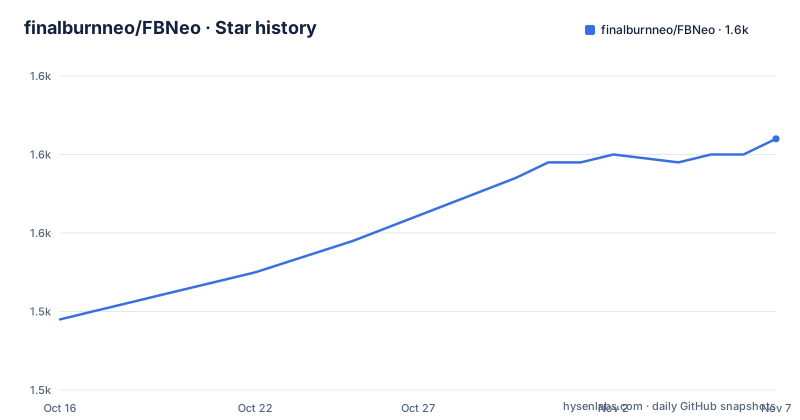
- finalburnneo/FBNeo1,562 ★ · +23
| Repository | 2026-10-16 | 2026-11-07 |
|---|---|---|
| finalburnneo/FBNeo | 1.5k | 1.6k |
23 Stars in the last 22 days, measured from the daily GitHub snapshot. Compare with other projects
Editorial analysis
FinalBurn Neo's Multi-System Emulation Scope
FinalBurn Neo addresses the need to run games from numerous arcade platforms and selected consoles through one emulator rather than a collection of unrelated applications. The README explicitly names Capcom CPS-1, CPS-2, and CPS-3, Neo Geo, Sega System 16, ColecoVision, Master System, Mega Drive, MSX1, Kaneko, and Taito among its supported or represented areas. It continues the FinalBurn and FB Alpha projects and is based in part on FinalBurn and older MAME versions.
The intended audience extends beyond ordinary emulator users. Players benefit from a multi-system frontend with documented capabilities such as netplay, rewinding, and shader effects. Preservation-oriented users may value the source tree and the ability to inspect how systems and hardware devices are implemented. Porting developers are also an intended audience because the project maintains portable type definitions and organizes platform code around a common interface.
This is not a general-purpose console emulator replacement for every platform. The repository description and topics emphasize arcade hardware, while the README qualifies console support as selective. The README does not provide a complete current compatibility list, so an engineer should check the relevant driver and port files before assuming that a particular game, revision, or console is supported.
Inside the burn, cpu, and intf Source Layout
The source tree separates an emulator core from its hardware implementations and presentation layer. Core emulation code lives in `src/burn`. Within it, `src/burn/devices` contains emulated devices such as EEPROMs, `src/burn/drv` contains game and system drivers, and `src/burn/snd` contains sound chips and other sound-generating devices. CPU implementations are placed under `src/cpu`, while external dependencies such as `libpng` are grouped in `src/dep`.
The frontend is located in `src/burner`. A likely operating path begins with a driver that identifies a supported system and game, reaches the relevant CPU, video, input, memory, and sound implementations, and then uses the interface layer for platform-specific output. The README does not document a complete initialization sequence or public API, so the directory structure establishes the separation of responsibilities rather than a verified function-by-function execution path.
Platform adaptation is concentrated in `src/intf`. Existing video, sound, and port implementations there are presented as reusable pieces for new systems. FBNeo defines `UINT8`, `INT8`, `UINT16`, `INT16`, `UINT32`, `INT32`, `INT64`, and `UINT64` as portability types. Contributors are also directed to the other defines and structs in Burn and Burner headers because these interfaces form part of the porting contract. This arrangement reduces the need to redesign every emulator driver for a new platform, although each port still has to implement the relevant frontend and hardware requirements.
Building FinalBurn Neo with the Documented SDL Targets
The README documents two direct source-build paths. The SDL 1.2 target requires SDL1.2, GCC, make, perl, and nasm. From the repository root, the documented command is:
make sdlThis builds the target described in the README. The repository links to `README-SDL.md` for fuller procedures, but it does not give a launch command. After compilation, use the binary produced at the location defined by that guide or makefile.
The SDL2 route has a separate dependency list. Build it from the repository root with:
make sdl2This command requires SDL2, SDL2_image, GCC, make, perl, and nasm. The two targets should not be treated as interchangeable. A system that has the newer SDL libraries can satisfy the documented SDL2 requirements, while `make sdl` expects SDL1.2 instead.
The repository contains makefiles for MinGW, Visual C++, Meson, and other targets, but the README does not document exact commands for those build systems. Their presence does not confirm that each target is currently supported on every platform. Port developers should follow the build file named for the toolchain they intend to test rather than infer a command from its filename.
macOS, LibRetro, and RetroArch Routes
The README directs macOS users to `README-macOS.md` and a separate set of macOS releases. It does not reproduce the macOS commands in `README.md`. Engineers using that route must follow the linked guide and check which external dependencies it requires.
For users who do not want to maintain a native frontend, the README points to the separate LibRetro port. It states that builds are available through RetroArch for supported platforms. This is a concrete difference from building FBNeo's own SDL frontend: LibRetro places the emulator behind another frontend and porting project, while a native build compiles the FBNeo frontend along with the emulator.
The README does not state how quickly the separate LibRetro port receives changes from the main repository, nor does it promise feature parity between native and LibRetro distributions. A team selecting that route should verify support for its intended systems and compare the release dates of both repositories. The availability of RetroArch builds should not be treated as evidence that every native FBNeo feature is exposed by that integration.
Nightly FinalBurn Neo Builds Versus Official Releases
The repository publishes a nightly release from the latest commit. The README warns that these downloads may not become available immediately after a new commit. It also states that a nightly build represents the last commit and can contain incomplete code, crashes, or other problems that official releases avoid. That distinction matters for players and for engineers validating a repeatable installation.
The release history shows how stable versions have been labeled. Versions `v1.0.0.0` and `v1.0.0.2` are dated 2020-11-01 and 2021-05-01, while the nightly release is dated 2026-10-15. The last push was also on 2026-10-16, and the repository is not archived. These facts show that repository activity continues, but they do not establish a regular schedule for named stable releases.
For a first installation, an official release is the more conservative choice because the README explicitly warns about nightly instability. A developer who needs the newest source changes may follow the nightly route and accept that failures may concern unreviewed work. The README does not document a rollback procedure or an automated way to select a known-good commit after an unsuccessful nightly build.
C++03 Portability as the Main Engineering Constraint
A distinctive design constraint is the project's commitment to compiling on older systems. The contributing guide says FBNeo aims for C++03 compliance as a minimum, and pull requests are expected to preserve that requirement. This is relevant to retro-computing users, who may run older hardware, and to maintainers creating ports for constrained systems. It is also a concrete source review rule rather than a general statement about compatibility.
The cost appears in the surrounding requirements. Contributions must use tabs for indentation, and the repository's `.editorconfig` treats tabs as four columns. The README includes a C++ function example to illustrate the expected naming, brace, and parenthesis style. Contributors also need to account for established headers, structs, macros, and interface conventions instead of relying only on a current compiler's defaults.
This policy does not imply that every platform or compiler combination is supported. The README names GCC for the SDL routes and provides several platform-specific build files. It also links to Raspberry Pi instructions under `README-PI.md`, but marks that entry as struck through. Source compliance, compiler compatibility, and working hardware support are separate checks. Port authors should verify all three before treating a new target as complete.
Custom Licensing, Port Scope, and the Right Adoption Choice
Use of FinalBurn Neo and its source code is subject to `src/license.txt`. Repository metadata classifies the license as custom because GitHub cannot place it under a standard category. The repository root also contains `LICENSE.md`, while the README specifically directs users to `src/license.txt`. Anyone considering source integration, redistribution, or a port should read the actual license files first. Public source availability alone does not settle those permissions.
Maintenance work spans several layers. Core changes can affect device emulation, game drivers, sound chips, CPU implementations, dependencies, and the frontend. Platform work adds another layer through `src/intf`. Contributors must preserve C++03 compatibility and repository formatting, which can constrain implementation choices. Ports may also live outside the main repository, as shown by the LibRetro and macOS links, so upstream changes do not automatically represent a complete update for every distribution.
FinalBurn Neo is best suited to players who need broad multi-system arcade support and developers who value a source structure designed for reuse across platforms. It is a poor choice for someone requiring a fully documented one-command installation, automatic rollback, or a conventional open-source license without a separate terms review. Before adoption, inspect `src/license.txt`, confirm driver coverage for the target hardware, follow the relevant platform guide, and select an official release instead of a nightly build when predictable behavior takes priority.
Editorial conclusion
FinalBurn Neo fits players and developers who need a broad arcade emulator with a portable core, plus engineers prepared to maintain platform-specific code. It is less suitable for users who need only current stable releases, a documented launch workflow, or a standard software license. Before adoption, inspect src/license.txt, choose an official release when stability matters, and verify that the selected platform port covers the target systems.
Frequently asked questions
How do I build FinalBurn Neo with SDL2?
From the repository root, run `make sdl2`. The README lists SDL2, SDL2_image, GCC, make, perl, and nasm as requirements and points to `README-SDL.md` for fuller instructions.
Does FinalBurn Neo provide a LibRetro or RetroArch version?
The README links to a separate LibRetro port and says builds are available through RetroArch for supported platforms. It does not document update timing or feature parity between that port and the main repository.
Why should I prefer an official FinalBurn Neo release over a nightly build?
The README warns that a nightly build is made from the last commit and may contain incomplete code, crashes, or other issues. It says those problems will not have appeared in official releases.
Official sources
Add this badge to your README
If you maintain this project, the badge below links readers to this analysis and shows its maintenance status from the daily GitHub snapshot. Paste the markdown into your README; add ?metric=license or ?metric=stars to the image URL for a different field.

[](https://hysenlabs.com/projects/finalburnneo-fbneo)Star history chart for your README
[](https://hysenlabs.com/projects/finalburnneo-fbneo)Was this useful?