Kin: A Semantic Graph of Record for AI-Written Software
The system of record for AI-written software. A persistent graph of entities, relationships, changes, and provenance, so humans and AI agents see what a change touches before it merges. Beside Git today.
At a glance
- What is it?
- Kin is an early-alpha Rust project that records software as a graph of entities, relations, changes, and provenance, giving humans and AI agents a semantic authority to query before merging. It sits beside Git, not as a replacement, and its current limitations make it a tool for evaluation, not critical workflows.
- Who is it for?
- Adopt Kin if you are evaluating semantic review surfaces for AI-generated code and can tolerate a pre-1.0 alpha with breaking changes. Do not use it in critical workflows yet; the README itself warns of rough edges.
- Can I use it commercially?
- Yes. Apache-2.0 is a permissive licence: you can use, modify and sell software built on it, as long as you keep its copyright and licence notices.
- Is it still maintained?
- No. The owners have archived the repository on GitHub, so it is read-only and no longer receives changes.
- What is it written in?
- Mainly Rust, according to GitHub's language statistics.
Answers come from the project's GitHub data, last synced on October 22, 2026, and from our analysis. They are not legal advice.
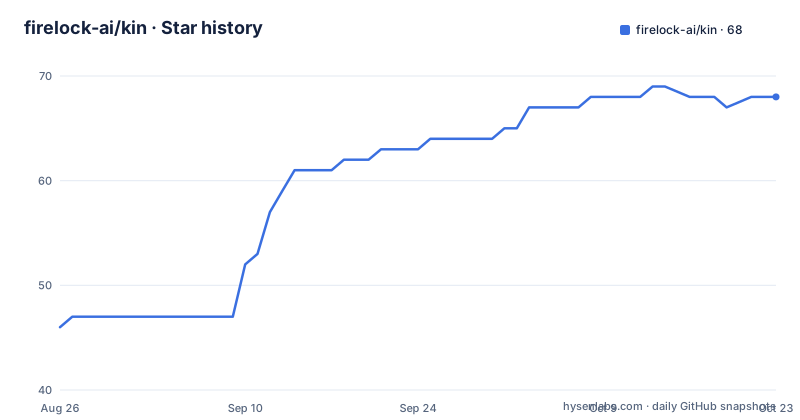
Star history
- firelock-ai/kin68 ★ · +22
| Repository | 2026-08-26 | 2026-10-22 |
|---|---|---|
| firelock-ai/kin | 46 | 68 |
22 Stars in the last 57 days, measured from the daily GitHub snapshot. Compare with other projects
Editorial analysis
The Diff Is Not the Change
Kin starts from a blunt observation: a diff shows lines, but not consequences. When an AI agent edits a function signature, the diff shows the one-line change, but the blast radius includes every caller and everything those callers pull in. Git records file history; it does not record semantic relationships. Kin builds a graph of entities, relations, changes, and provenance, so a question like "what does this touch?" can be answered from graph truth rather than by re-reading the repository. The README's example on ripgrep shows a one-line signature change; `kin impact` names the affected entities before any compiler runs. That is the core value: not correctness, but reach. The project is explicitly early alpha, pre-1.0, with breaking changes expected. It is for teams that want a semantic authority for AI-written code, not for teams that need a stable production tool today.
A Graph, Not a Patch: How Kin Stores Software
Kin's architecture is a layered stack around a central graph authority. The graph stores entities, relations, changes, and provenance. Underneath, `kin-db` provides graph storage, snapshots, indexing, text search, and vector search. `kin-model` defines the canonical types. `kin-blobs` is content-addressable blob storage. `kin-search` and `kin-vector` handle lexical and nearest-neighbor search. `kin-infer` provides inference and embedding substrate, and `kin-lsp` feeds the semantic layer through language-server enrichment. These are not separate products; they are implementation layers of one system. The daemon answers queries from graph authority, not by re-reading the tree. The graph is built beforehand by `kin init`, and that build is the expensive part. After that, impact questions are answered from the graph. This design trades build time for query speed: you pay once, then ask repeatedly. The README stresses that the graph is built before the impact example, and no compiler ran during the query.
Multiple Surfaces, One Daemon
Kin exposes several access points, all of which talk to the same daemon. The CLI is the primary surface for humans and scripts. The MCP server, launched with `kin mcp start`, provides typed graph tools for AI agents. The VS Code extension, `kin-editor`, offers an entity explorer, semantic search, trace, review, and rename surfaces. `kin-vfs` projects graph-owned files through normal filesystem calls, so existing editors and build systems keep seeing files. This is a key design choice: instead of forcing tools to understand the graph, Kin makes the graph look like a filesystem. The daemon is the single authority; no surface re-reads the repository. Git sits beside the graph as an import and export boundary, not as an answer path. The README's architecture diagram shows humans and agents entering through CLI, MCP, or editor, all querying the same daemon, which answers from the graph. This unified approach avoids the fragmentation of having separate tools with separate state.
Installation and First Steps: What the README Shows
The README gives a concrete installation path for macOS or Linux. You run `curl -fsSL https://get.kinlab.dev/install | sh`, then `exec "$SHELL" -l`, then `kin setup --intent agent`. The installer resolves the latest stable release, verifies its SHA-256 checksum, installs managed binaries under `~/.kin`, and launches setup. The `agent` intent configures the built-in MCP server for detected supported clients. For CLI and filesystem use without MCP, use `--intent local`. For the VS Code path, use `--intent editor`. To remove setup-managed integrations, run `kin setup uninstall`. The setup is managed, meaning the tool controls its own installation root. This is a pragmatic approach for an alpha tool. The README notes that the default managed root is under `~/.kin`, but the text is truncated there. The key commands are clear: `kin init` builds the graph, `kin impact` answers what a change touches. The installation is scripted, which lowers the barrier for evaluation.
What Kin Does Not Do: Limits and Failure Modes
Kin is not a correctness checker. The README is explicit: whether a change is correct stays with your compiler, tests, and review. Kin only surfaces what the change touches. That is a genuine limitation for teams hoping for automated review. Another limitation is the graph build cost. The README says building the graph is the expensive part. On a large repository, that initial build could be slow, and the README does not provide benchmarks. The project is pre-1.0, so breaking changes are expected; adopting it in a critical workflow is risky. The README also notes that the raw run directory for the ripgrep example is not public yet, so the impact claim is a recipe you can re-run, not a trace you can audit. That is a transparency gap. Finally, KinLab, the hosted collaboration and control plane, is proprietary, and public repository connection is not a first-run flow yet. So the open-source core is limited to local use and MCP integration; the hosted layer is not ready for public adoption.
A Real Alternative: Git Itself, and What Kin Adds
The most direct alternative is Git, which Kin explicitly sits beside, not replaces. Git records files and line history; it does not record semantic relationships. Kin adds a graph of entities and relations, plus provenance. The difference in approach is fundamental: Git is a content-addressable store of snapshots, while Kin is a semantic graph that is built by an analysis pass. For impact analysis, you could manually trace callers in Git, but that is slow and error-prone. Kin automates that trace. Another alternative is a static analysis tool like `grep` or a language server, but those work per-file or per-symbol, not across a whole repository graph. The README's example shows that `kin impact` names callers and their transitive dependencies, which a simple grep cannot do. However, Kin's graph build is a one-time cost, while Git's operations are incremental. If you only need to know what a change touches occasionally, the graph build may not be worth it. Kin is not a drop-in replacement for Git; it is a complementary layer for semantic queries.
Licensing and Maintenance Costs
Kin is licensed under Apache-2.0, which is permissive and allows commercial use with attribution. The open-source core includes `kin`, `kin-db`, `kin-vfs`, and `kin-editor`, plus supporting libraries. The proprietary layer, KinLab, is separate. This is an open-core model: the local tooling is free, but the hosted collaboration plane is not. The maintenance cost is significant because the project is pre-1.0. The README warns of breaking changes, so you should expect to update your workflows and possibly the graph format. The release cadence is active: recent versions include v0.6.1, v0.6.0, and v0.5.52 within a few days, which indicates rapid iteration but also instability. The last push was 2026-08-29, so the project is under active development. For a team, the cost is not just installation but also keeping up with changes and rebuilding the graph after Kin updates. The benchmark spec and verifier are public, but the runner is private, so you can verify claims only with a separate bundle verifier.
Editorial conclusion
Adopt Kin if you are evaluating semantic review surfaces for AI-generated code and can tolerate a pre-1.0 alpha with breaking changes. Do not use it in critical workflows yet; the README itself warns of rough edges. Before adopting, verify the graph build cost on your repository, check that the MCP server integrates with your agent clients, and confirm that the proprietary KinLab layer is not required for your use case. The project is worth a trial on a non-critical repository, but the graph build is expensive and the raw proof run is not auditable, so treat any impact claims as reproducible recipes, not verified traces.
Frequently asked questions
What repository shapes does kin init refuse?
Shallow clones, submodules and Git LFS are unsupported outright. Git hooks, a sparse checkout, or an unfinished merge or rebase also stop the import. The command names the fix for each case.
Does kin modify my repository when I initialize it?
It reads your Git history without changing it or your tracked files. It adds a .kin directory and one line to the Git exclude file, and reports what uncommitted or untracked changes it left out.
Which AI coding tools does kin connect to?
Claude Code, Codex, Cursor and Gemini among others, over MCP. Setup asks before connecting the tools it finds, and there is no separate linking step. VS Code uses a separate editor intent, and on Windows you connect tools inside WSL2.
Is semantic search available immediately after kin init?
Not quite. Semantic search uses a local model of about 523 MB that setup asks about before downloading. Until it is ready, locate falls back to lexical and graph signals and reports the missing vector coverage.
Can I install kin from a package registry?
No. Kin is not published on the registry, and the crate published there under that name is an unrelated project. Use the Node installer or the standalone shell script instead.
Official sources
Add this badge to your README
If you maintain this project, the badge below links readers to this analysis and shows its maintenance status from the daily GitHub snapshot. Paste the markdown into your README; add ?metric=license or ?metric=stars to the image URL for a different field.

[](https://hysenlabs.com/projects/firelock-ai-kin)Star history chart for your README
[](https://hysenlabs.com/projects/firelock-ai-kin)