Flagsmith: self-hosted feature flags where the core stays BSD-3-Clause
Flagsmith is an open-source feature flag platform with remote config, experimentation, and self-hosted or cloud deployment options.
At a glance
- What is it?
- Flagsmith is a Python and React feature flag platform you can run from a single docker-compose file, with remote config, segments and A/B testing. The catch is that self-hosting comes as a free open-source build or a fully supported Enterprise edition, and the release cadence is fast.
- Who is it for?
- Adopt Flagsmith if you need feature flags and remote config inside your own infrastructure and you can live with the split between the free open-source build and the Enterprise edition. Do not adopt it if you need enterprise governance features without a commercial licence, or if you cannot absorb a repository that shipped v2.288.0, v2.288.1 and v2.288.2 within a few hours of each other.
- Can I use it commercially?
- Yes. BSD-3-Clause is a permissive licence: you can use, modify and sell software built on it, as long as you keep its copyright and licence notices.
- Is it still maintained?
- Yes. The repository last received commits 1 day ago.
- What is it written in?
- Mainly Python, according to GitHub's language statistics.
Answers come from the project's GitHub data, last synced on November 13, 2026, and from our analysis. They are not legal advice.
Star history
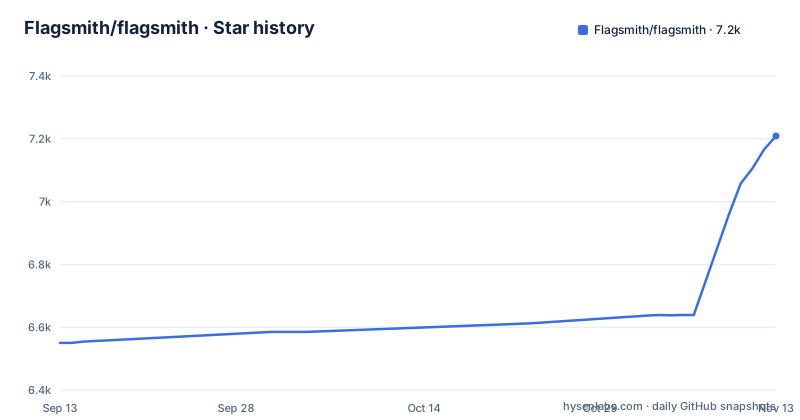
- Flagsmith/flagsmith7,209 ★ · +659
| Repository | 2026-09-13 | 2026-11-13 |
|---|---|---|
| Flagsmith/flagsmith | 6.6k | 7.2k |
659 Stars in the last 61 days, measured from the daily GitHub snapshot. Compare with other projects
Editorial analysis
The problem Flagsmith solves, and who ends up running it
The README frames the problem in release terms: roll out, segment, and optimise, with granular control, and make changes without deploying new code. That is the whole pitch. A team wants to ship a feature behind a switch, turn it on for beta testers first, and change its audience without a build. Flagsmith is the server that holds those switches and the API that serves them.
The audience is narrower than the feature list suggests. Because the quickest documented path is a docker-compose file you download and run yourself, the natural first user is a platform or backend engineer who is willing to own a service. The README also points at a hosted version at flagsmith.com for people who are not. Those two paths lead to different operational lives, and the repository is the one that matters if you pick the first.
Language coverage is broad on paper: the README claims 15+ SDKs including Typescript, .NET and Java, with framework integrations named for React and Next.js. A Python repository with a React front end is a reasonable guess at what you are actually deploying, though the README does not spell out the service topology.
Flag, segment, environment: the model the API serves
The README describes the mechanism at a high level rather than as a schema. You wrap a section of code with a flag, and Flagsmith decides whether it is on for a given environment, user or user segment. Segments are the unit of targeting: the README gives beta testers as the example, and says segments are also how A/B and multivariate tests are run. Remote config sits alongside the flag, so a value can change without a deploy, not just a boolean.
Organisation management is listed as orgs, projects and roles for team members. That three-level structure is what you inherit when you bootstrap, because the README says that on a fresh install the dashboard walks you through creating your admin account and your first organisation. The data flow is therefore: SDK in your application asks the Flagsmith API for the flag state for an identity, the API evaluates environment and segment rules, and your code branches on the result.
What the README does not give you is the evaluation semantics. Whether segments are evaluated server side per request, what the caching story is, and how identity traits are transmitted are questions for the docs site. If you are deciding between self-hosted and cloud on latency grounds, that gap matters and you will need the docs site.
Getting it running: two commands and a password reset link
The README's quickstart is short enough to quote in full. You fetch the compose file and start it:
curl -o docker-compose.yml https://raw.githubusercontent.com/Flagsmith/flagsmith/main/docker-compose.yml docker-compose -f docker-compose.yml up
That is the entire documented install. Once the containers are up, the README says to open http://localhost:8000, where on a fresh install the dashboard walks you through creating your admin account and your first organisation.
Two things follow from pulling the compose file from the main branch rather than a tagged release. First, the file you get is whatever main looks like that day, which is not the same as the file that shipped with v2.288.2. Second, the compose file's comments point to the docs site for the full list of API and UI environment variables. The one config surface the repository does expose is the compose file itself, so read it before you run it.
The open core boundary, as the README draws it
The licence is BSD-3-Clause for the repository, and the README states that the majority of the platform is open source under that licence. It also offers self-hosting as a free open-source build or a fully supported Enterprise edition.
This is the single most important thing to verify before adoption, and it cannot be verified from the repository alone. Governance features in a flag platform are not decorative. They are the audit trail, the approval workflow, the permission model that stops one engineer from flipping a production flag for every customer. The README lists roles for team members as part of the open feature set, which suggests some permission handling is in the core, but where the Enterprise edition's features begin is something to confirm with Flagsmith.
No legal advice here: read the BSD-3-Clause text yourself, and have someone who knows your compliance requirements look at where the line falls for the features you intend to use.
Release cadence is the real upgrade cost
The release list is the most concrete operational signal. v2.288.0, v2.288.1 and v2.288.2 all landed on 2026-10-29, a minor release followed by two patches within a few hours. The last push to the repository was on 2026-11-02.
That cadence is good for fixes and bad for anyone who treats a self-hosted flag service as infrastructure that changes on a quarterly rhythm. The version numbers are past 2.288, which tells you the project does not batch changes into occasional large releases. If you self-host, you are choosing between pinning to a tag and upgrading deliberately, or tracking something close to main and accepting the churn.
Given the release frequency, database migrations, upgrade procedures and compatibility between releases are the things to check in the docs before upgrading. A flag service that fails to start after an upgrade takes your release process down with it, because the flags your application reads at boot are served by that service.
Where Flagsmith is the wrong tool
Flagsmith is a server. If your requirement is a flag evaluated locally with no network dependency and no separate process to operate, this is the wrong shape of tool, and no amount of SDK coverage changes that. The README's own quickstart makes the point: you are running docker-compose, which means containers, a database behind them, and a URL your applications call.
A second case: if the governance features you need are the enterprise ones, the open repository alone will not get you there. The README lists a fully supported Enterprise edition as a separate self-hosted option alongside the free open-source build. Adopting the open core and discovering later that the audit or approval workflow you assumed was included is not, is an expensive mistake to unwind once flags are load-bearing in production.
A third: if you want a flag system that is a library inside your application rather than a service beside it, the architecture here is the opposite. That is a design choice, not a defect, and it buys you centralised control and remote config at the cost of an operational dependency.
The alternative that changes the architecture, not the feature list
The meaningful alternative to a self-hosted Flagsmith is not another hosted flag SaaS. It is a file-based flag system, where flag definitions live in your repository or a config store your application already reads, and evaluation happens in process with no API call.
The difference is where the decision is made. With Flagsmith, flags are toggled from the platform rather than the codebase, which is what makes remote config and segment-based A/B testing possible without a deploy. A file-based approach gives you the same boolean branch in your code but moves every change back into your deployment pipeline. You lose the ability to flip a flag for one segment at 3pm without a build, and you gain the absence of a service that can be down.
Neither is strictly better. If your flags change weekly and your team already deploys continuously, the file-based route removes a dependency you would otherwise have to page someone about. If flags are how you run experiments and staged rollouts, the server-side model is the point, and Flagsmith is one implementation of it.
What to check before you commit to it
Map every feature you plan to rely on against what the free open-source build and the Enterprise edition include. That is the decision that determines whether the BSD-3-Clause licence covers your use case or whether you are looking at a commercial conversation.
Then read the docker-compose.yml you downloaded, before running it, and note which services it starts and which ports they bind. The README points you at http://localhost:8000 for the dashboard.
Finally, pick a tag rather than main for the compose file and for the image, and check what changed between consecutive releases. With v2.288.0, v2.288.1 and v2.288.2 on the same day, the upgrade path is the part of this project the README leaves most open, and it is the part you will live with every week.
Editorial conclusion
Adopt Flagsmith if you need feature flags and remote config inside your own infrastructure and you can live with the split between the free open-source build and the Enterprise edition. Do not adopt it if you need enterprise governance features without a commercial licence, or if you cannot absorb a repository that shipped v2.288.0, v2.288.1 and v2.288.2 within a few hours of each other. Before committing, check the docker-compose.yml for the services it actually starts, and confirm the SDK for your language is among the 15+ listed.
Frequently asked questions
What does Flagsmith do?
It is a feature management platform with remote configuration and experimentation. You wrap a section of code in a flag, then toggle that flag on or off for different environments, users or user segments without deploying new code. Segments also drive A/B and multivariate tests, and organisations, projects and roles decide who can change them.
how to use flagsmith
Fetch the repository's docker-compose.yml with curl and run docker-compose up on it. Once the containers are up, open http://localhost:8000, where on a fresh install the dashboard walks you through creating your admin account and your first organisation. From there you read flags with one function call using your environment key.
is flagsmith open source
Yes. The repository is BSD-3-Clause licensed, the last push to main was on 2 November 2026, and the newest release tag is v2.288.2 from 29 October 2026. Self-hosting comes as a free open-source build or a fully supported Enterprise edition, alongside private cloud and cloud deployments.
flagsmith alternatives
The README points at OpenFeature as the vendor-neutral route, with providers for Go, Java, client-side and server-side JavaScript, Kotlin, .NET, Python, Ruby and Rust, and gives the reason plainly: you are never locked into one vendor.
Official sources
Where this project is recommended
Add this badge to your README
If you maintain this project, the badge below links readers to this analysis and shows its maintenance status from the daily GitHub snapshot. Paste the markdown into your README; add ?metric=license or ?metric=stars to the image URL for a different field.

[](https://hysenlabs.com/projects/flagsmith-flagsmith)Star history chart for your README
[](https://hysenlabs.com/projects/flagsmith-flagsmith)Was this useful?