Fluid Player: an HTML5 player built around VAST ad serving
Fluid Player - an open source VAST compliant HTML5 video player
At a glance
- What is it?
- Fluid Player is a free MIT licensed HTML5 video player whose defining feature is VAST support, so an ad server can insert and track creatives into an ordinary page video. It is published on npm and served from a CDN, and its documentation lives outside the repository.
- Who is it for?
- Fluid Player suits publishers who need to monetise an HTML5 video with VAST served creatives and want a player they can host themselves, and it is the wrong tool for a project that only needs to play a file or that has to support a richer ad protocol than VAST.
- Can I use it commercially?
- Yes. MIT is a permissive licence: you can use, modify and sell software built on it, as long as you keep its copyright and licence notices.
- Is it still maintained?
- Yes. The repository last received commits 3 days ago.
- What is it written in?
- Mainly JavaScript, according to GitHub's language statistics.
Answers come from the project's GitHub data, last synced on November 7, 2026, and from our analysis. They are not legal advice.
Star history
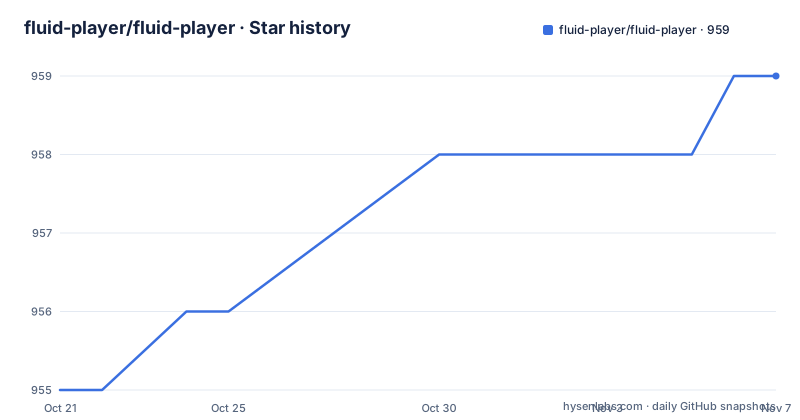
- fluid-player/fluid-player959 ★ · +4
| Repository | 2026-10-21 | 2026-11-07 |
|---|---|---|
| fluid-player/fluid-player | 955 | 959 |
4 Stars in the last 17 days, measured from the daily GitHub snapshot. Compare with other projects
Editorial analysis
A player whose reason to exist is the ad server
Fluid Player is described as a free HTML5 video player that is lightweight, easy to integrate and has advanced VAST capabilities. VAST is the IAB's Digital Video Ad Serving Template, and the readme links to the VAST 4.0 specification for the idea behind it and the full details.
That framing tells you what this library is for. A plain HTML5 `<video>` element plays a file. A VAST compliant player plays a file while also handling the ad server side of the equation: requesting a VAST response, presenting the creatives it returns, and reporting what happened back to the ad server. Publishers who sell advertising need the second behaviour, and building it by hand against an ad server is where the complexity lives.
So the audience is publishers and video platforms that monetise with VAST and want an embeddable player rather than a full platform. The homepage is fluidplayer.com, and the project is maintained under the `fluid-player` organisation with the npm package named `fluid-player` and the author listed as EXOGROUP.
The licence is MIT with the text in the LICENSE file, which matters for a component you embed in someone else's page. The repository also carries a CHANGELOG.md with the full list of changes and updates, and a CONTRIBUTING.md.
The last push to the default branch was on 2026-10-06, and the newest published release is v3.60.0 from 2026-07-29, preceded by v3.59.0 and v3.58.0, both on 2026-07-02.
Version 3 changed the integration surface, and the README still says so
The readme opens with a notice that a new major version of Fluid Player was released on May 20, 2020, and that existing version 2 users are recommended to upgrade, with a link to the quick setup guide in the documentation.
That notice has been sitting at the top of the readme for a long time, and the version numbers in the package.json tell their own story. The current version is 3.60.0. Sixty minor releases inside the same major version is a project that has settled on an API and kept refining it, rather than one that keeps breaking its users.
The structure of the numbers is worth noting for anyone planning an upgrade path. A three component version with a high minor count usually means most changes are additive: new configuration options, new ad formats, new player features, with occasional larger steps folded into a minor bump. The readme points to the CHANGELOG for the actual list, and the documentation site at docs.fluidplayer.com for the integration and configuration details, which the readme says fully outline both.
Because the documentation lives on an external site rather than in the repository, the readme is short by design. There is no configuration reference in the repository itself, which is worth knowing before you plan to keep a copy of the docs for offline reference.
The dependency list says what the player can actually play
The runtime dependencies in package.json describe the playback surface without needing to read the source.
For adaptive streaming there is `hls.js` at ^1.5.13 for HTTP Live Streaming and `dashjs` at ^4.5.2 for MPEG-DASH. `videojs-vtt.js` handles WebVTT subtitles, and `es6-promise` at ^4.2.8 is there as a Promise implementation. The 360 degree video side is the heavier dependency: `@photo-sphere-viewer/core` at ^5.14.1 together with its `equirectangular-video-adapter`, `gyroscope-plugin` and `video-plugin` packages, plus `three` at ^0.179.1, which is the rendering engine underneath.
Two conclusions follow. First, this is a player that handles more than one delivery format out of the box, since HLS, DASH, plain progressive files and 360 video are all covered by declared dependencies. Second, the 360 capability is not a small feature: it pulls in a viewer and a 3D engine, which is a meaningful part of the bundle for a site that never shows a panoramic video.
The browserslist in package.json is also informative. It targets `> 0.25%`, `not dead` and explicitly `IE 11`. Keeping Internet Explorer in the list in a project at version 3.60 means the output is compiled for a browser that has been out of support for years, which constrains which JavaScript features and transpilation targets the build can use.
Webpack builds a bundle and a versioned CDN artifact
The build system is webpack, and the scripts show the three shapes it produces.
"build": "webpack --mode=production",
"build-cdn": "webpack --mode=production --env dist='current' && webpack --mode=production --env dist='versioned'",
"build-dev": "webpack --mode=development"
The `build-cdn` script runs the production build twice, once with `dist='current'` and once with `dist='versioned'`. That is the mechanism behind the CDN: the package.json declares a `com_fluidplayer` block with the CDN address `https://cdn.fluidplayer.com`, and the two builds produce an unversioned artifact for the current release and a versioned one so that a pinned URL keeps serving the same code after a new release ships.
For development there are several dev server variants. `dev-server` serves on `0.0.0.0`, `dev-server-https` adds the `https` environment flag, `dev-server-debug` adds `debug`, and `dev-server-test` runs in production mode with live reload disabled. The `start` script points at the debug server.
End to end testing is done with Playwright. The e2e scripts run `npx playwright test`, with `e2e-ui` opening the Playwright UI and `e2e-report` showing the report, and the repository holds a `playwright.config.ts` alongside an `e2e/` directory and a `test/` directory. There is also a `vendor/` directory and a `.babelrc`, so the source is Babel transpiled rather than shipped as it is written.
Where Fluid Player is the wrong choice
The first case is a project that only needs to play video. If you have one file, or a set of files, and no advertising, a native video element or a plain HLS library is less code and fewer dependencies than a VAST capable player with a 360 viewer attached to it.
The second case is protocol coverage. Everything documented here is about VAST, and the specification linked from the readme is VAST 4.0. If your ad stack speaks something else, or needs features the player does not implement, the readme does not describe any other protocol support, and there is nothing in the dependency list that suggests it. This is a VAST player, and its value and its limits are the same thing.
The third is documentation ownership. The integration and configuration are fully outlined in the hosted documentation rather than in the repository, so the repository is not a self contained reference. If your organisation has a policy about relying on external docs for a component embedded in your product, that is a procurement question as much as a technical one.
The fourth is the release gap. The newest published release is v3.60.0 from 2026-07-29 while the last push was on 2026-10-06, so the branch is moving faster than the tags. Anyone pinning a version should read the CHANGELOG between the pinned release and the current branch state to see what has landed since, since the repository itself does not publish release notes per version in the readme.
How a VAST player differs from plain video playback
The difference in approach between Fluid Player and just embedding a video element is what happens around the content.
With a plain element, you set a source, the browser fetches it, and the only decisions are yours: controls, poster, captions. There is no request to an ad server, no creative selection, no impression or completion reporting, and no notion of a content break where an ad replaces or wraps the main video.
Fluid Player takes on that side of the problem. The player is the component that talks to the ad server, asks for a VAST response, decides what to show, and reports back. The publisher's page then contains a player rather than a video element, and the advertising behaviour is a property of the player rather than of an ad management script layered on top of one.
That also explains the shape of the configuration surface and the documentation. A player that has to reconcile a VAST response with a video element has settings for the ad behaviour, for the creative formats, and for how the two interact with the content, and those settings are what the documentation site describes.
For a publisher with VAST creatives and an existing player, the difference is that the player is theirs to host and modify, at the cost of owning the integration and the ad server relationship. For a publisher with no ad server at all, the extra capability is simply weight.
Editorial conclusion
Fluid Player suits publishers who need to monetise an HTML5 video with VAST served creatives and want a player they can host themselves, and it is the wrong tool for a project that only needs to play a file or that has to support a richer ad protocol than VAST. Before adopting it, read the quick setup guide in the Fluid Player documentation and confirm that the VAST responses your ad server returns match what the player expects, and check the CHANGELOG before pinning a version, since the last push was on 2026-10-06 while the newest published release is v3.60.0 from 2026-07-29.
Frequently asked questions
What is Fluid Player?
It is a free, MIT licensed HTML5 video player described as lightweight, easy to integrate and equipped with advanced VAST capabilities. VAST is the IAB Digital Video Ad Serving Template, and the readme links to the VAST 4.0 specification.
How do I install Fluid Player?
The package is published on npm under the name `fluid-player`, and the readme points to the quick setup guide in the Fluid Player documentation at docs.fluidplayer.com for the integration steps. The repository itself does not contain the configuration reference.
Does Fluid Player support HLS and DASH streaming?
Both are declared runtime dependencies, `hls.js` at ^1.5.13 and `dashjs` at ^4.5.2, along with `videojs-vtt.js` for WebVTT subtitles. 360 degree video is handled through `@photo-sphere-viewer` packages together with `three`.
How does Fluid Player distribute releases through a CDN?
The `build-cdn` script runs two production webpack builds, one with `dist='current'` and one with `dist='versioned'`, and package.json declares the CDN address `https://cdn.fluidplayer.com`.
How is Fluid Player tested?
End to end tests run through Playwright, with scripts for `npx playwright test`, the Playwright UI and showing the report. The repository holds a `playwright.config.ts` and separate `e2e/` and `test/` directories, and the source is transpiled with Babel.
Official sources
Add this badge to your README
If you maintain this project, the badge below links readers to this analysis and shows its maintenance status from the daily GitHub snapshot. Paste the markdown into your README; add ?metric=license or ?metric=stars to the image URL for a different field.

[](https://hysenlabs.com/projects/fluid-player-fluid-player)Star history chart for your README
[](https://hysenlabs.com/projects/fluid-player-fluid-player)Was this useful?