Flyto2 Core: A Replayable Execution Kernel for AI Agent Workflows
Flyto2 Core is the open-source execution kernel for automation and AI-agent workflows: 452 registry-backed modules, MCP-native transport, YAML recipes, evidence capture, replay, triggers, queue, versioning, and metering.
At a glance
- What is it?
- Flyto2 Core is an open-source Python package that turns AI agent tasks into traceable, replayable YAML recipes backed by 480 registry modules. It focuses on deterministic execution and evidence capture, not on agent orchestration or intent governance.
- Who is it for?
- Adopt Flyto2 Core if you need a local, auditable execution engine for browser automation, API workflows, or AI agent tool calls where replay and evidence are more important than agent autonomy. Skip it if you expect built-in intent routing, provider governance, or procedure scoring; those live in the sibling packages flyto-ai and flyto-blueprint.
- Can I use it commercially?
- Yes. Apache-2.0 is a permissive licence: you can use, modify and sell software built on it, as long as you keep its copyright and licence notices.
- Is it still maintained?
- Yes. The repository last received commits 2 days ago.
- What is it written in?
- Mainly Python, according to GitHub's language statistics.
Answers come from the project's GitHub data, last synced on November 13, 2026, and from our analysis. They are not legal advice.
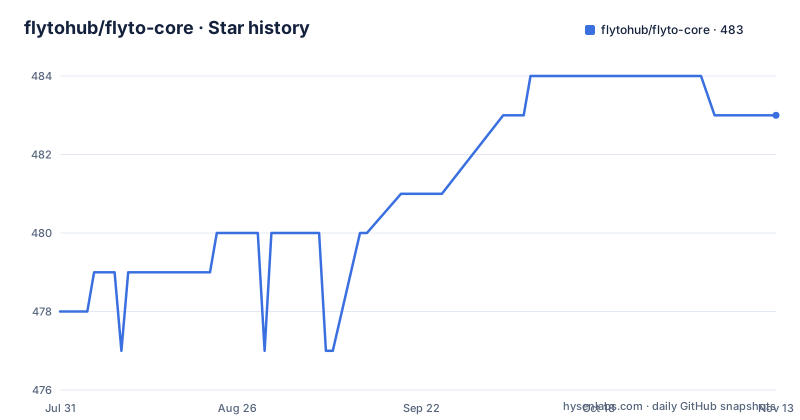
Star history
- flytohub/flyto-core483 ★ · +5
| Repository | 2026-07-31 | 2026-11-13 |
|---|---|---|
| flytohub/flyto-core | 478 | 483 |
5 Stars in the last 105 days, measured from the daily GitHub snapshot. Compare with other projects
Editorial analysis
The Niche: Verified Execution, Not Agent Orchestration
Flyto2 Core solves a specific problem: when an AI agent says it finished a task, how do you trust it? The README frames this as "AI said it finished. Flyto2 shows the proof." The package is an execution kernel that runs deterministic, replayable procedures and emits evidence for every step. It is not a full AI agent framework in the sense of handling intent, routing, or provider choice. Those responsibilities belong to the companion packages flyto-ai and flyto-blueprint. Flyto2 Core is for engineers who want a runtime that can execute a YAML recipe, capture screenshots and Web Vitals, and let you retry only the failed step. The target user is someone doing browser automation, API integration, web scraping, or MCP server automation who needs audit-ready traces. If your question is "did this workflow actually run and can I prove it," this package is aimed at you.
How the Execution Kernel Works: Modules, Registry, and Replay
The core mechanism is a ModuleRegistry that backs 480 modules across 88 catalog categories. The documentation says docs/TOOL_CATALOG.md is generated from this registry, not hand-counted. That is a strong signal that the module surface is machine-checked. Each module, such as browser.launch or browser.evaluate, is a reviewed, schema-validated unit. When you run a recipe, the engine executes steps sequentially, records per-step timing, and captures evidence like screenshots or JSON reports. The replay feature is the standout: if step 8 fails, you can run flyto replay --from-step 8, and steps 1 through 7 are skipped, preserving full context. This is fundamentally different from a shell script where a failure means re-running everything. The README gives a concrete example: a 12-step competitor-intel recipe that captures desktop and mobile screenshots, extracts pricing, and records Web Vitals. The trace output shows each step with a checkmark and duration, ending with "Every step traced." That trace is the evidence.
Getting Started: Install and First Recipe
Installation is straightforward. The README shows three variants: pip install flyto-core for the core engine plus CLI and MCP server, pip install flyto-core[browser] for Playwright-based browser automation, and playwright install chromium as a one-time browser setup. The quickstart command is flyto recipe competitor-intel --url https://github.com/pricing. That runs a 12-step recipe that launches a browser, navigates, extracts pricing, takes screenshots at two viewports, and captures Web Vitals. The output is a step-by-step trace with timings and saved files. There are 41 built-in recipes, including full-audit for SEO, accessibility, and performance, and scrape-to-csv for turning a selector into a CSV export. The CLI also supports replay with --from-step, which is the core differentiator. The MCP server is included in the base install, so MCP-compatible clients can call the reviewed modules through schemas rather than arbitrary generated code. That boundary is what makes the tool attractive for AI agent integration: agents call modules, not invented functions.
The YAML Recipe Format: A Concrete Comparison
The README makes a direct comparison: an 85-line Python script using Playwright versus a 12-step YAML recipe. The Python version handles browser launch, page navigation, DOM extraction, screenshots, and viewport changes with explicit asyncio code. The YAML version declares steps with module names and params, such as browser.goto with url: "{{url}}" and browser.screenshot with path: desktop.png. The YAML is declarative, which means the engine can trace each step, record timing, and support replay. That is the trade-off: you give up the full expressiveness of Python for a constrained, reviewable format. The constraint is intentional. The README emphasizes that MCP-compatible clients call reviewed modules through schemas, not arbitrary generated code. That is a safety boundary for AI agents. But it also means complex logic that does not fit into the 480 modules requires either a custom module or a workaround. The YAML format is not Turing-complete; it is a workflow description, not a programming language.
Limitations and Failure Modes
The most obvious limitation is that flyto-core does not own intent or provider governance. The README states that explicitly: it does not require flyto-ai or flyto-blueprint, but it also does not handle routing new work to the right model or scoring procedures. If you need those, you must adopt the other packages or build your own. Another limitation is the replay feature's promise of "full context preserved." The README does not specify what context means across different module types. For browser steps, it likely means the browser session state, but for API calls or file operations, context preservation could be partial. The documentation is thin on this detail. Also, the module count is impressive but not a guarantee of coverage. 480 modules across 88 categories is a large surface, but you still need to check whether the specific integration you need exists. Finally, the package is Python-only. If your stack is Node.js or Go, this is not a fit. The recent release notes mention IPv6 SSRF hardening and boundary coverage enforcement, which suggests security is taken seriously, but also that the codebase is evolving quickly.
Alternatives: How Flyto2 Core Differs from General Workflow Engines
The most direct alternative is writing raw Playwright scripts, as the README's comparison shows. That gives you full control but no trace, no replay, and no evidence capture without additional work. Another alternative is a general-purpose workflow engine like Apache Airflow or Prefect. These handle scheduling, retries, and dependencies, but they are not designed for AI agent tool calls or MCP integration. Airflow is built for data pipelines, not for browser automation with evidence capture. Prefect is closer but still lacks the module registry and replay-from-step semantics. A third alternative is a dedicated AI agent framework like LangChain or AutoGen. Those focus on agent reasoning and tool use, but they do not provide a verified execution boundary. Flyto2 Core's approach is to constrain what an agent can call to a reviewed module set, which is a different philosophy. LangChain lets you call any Python function; Flyto2 Core forces you to use its modules. That is a trade-off between flexibility and safety.
Maintenance, Licensing, and Upgrade Considerations
The repository is under Apache-2.0, which is permissive for commercial use, but you should check the exact terms if you plan to redistribute. The project is actively maintained: the last push was 2026-08-14, and releases come frequently, with v2.28.1 on the same day as v2.28.0. The release notes for v2.28.0 mention IPv6 SSRF hardening, and v2.27.0 mentions boundary coverage enforcement. That suggests a security-conscious development cycle, but also that you will need to track releases to stay current. The README does not mention a migration guide or upgrade path, so upgrading may require reading changelogs. The module registry is generated, which means the module list changes with each release. If you rely on a specific module, you should pin your flyto-core version. The package is on PyPI, so pip install flyto-core==2.28.1 is the way to freeze. The documentation is at docs.flyto2.com, and the MCP docs are separate, so plan to consult those for configuration details beyond the README.
Editorial conclusion
Adopt Flyto2 Core if you need a local, auditable execution engine for browser automation, API workflows, or AI agent tool calls where replay and evidence are more important than agent autonomy. Skip it if you expect built-in intent routing, provider governance, or procedure scoring; those live in the sibling packages flyto-ai and flyto-blueprint. Before committing, verify that the 480 modules cover your specific integrations, confirm that the Apache-2.0 license fits your distribution plans, and test the replay-from-step feature on a failure-prone workflow to see if it truly preserves context as documented.
Frequently asked questions
How many modules does flyto-core provide?
The README and the project description in pyproject.toml both say 481 registry backed modules across 89 catalog categories, and the MCP section repeats the 481 figure. The repository description field on the project page still says 452, which is the number that lags.
Which Python versions does flyto-core support?
The classifiers list 3.10, 3.11, 3.12 and 3.13. A comment in pyproject.toml records that the floor used to say 3.9 even though aiohttp 3.14.3 requires 3.10 or newer, so pip accepted the package and then failed to find a distribution, and that CI only ever ran 3.11, which is why it went unnoticed.
How do I install flyto-core with browser automation?
Install the browser extra and then fetch the browser once: pip install flyto-core[browser] followed by playwright install chromium. The bare pip install flyto-core gives the core engine, CLI and MCP server, and pip install flyto-core[api] adds the HTTP API used by flyto serve.
How does replay work in flyto-core?
You name the step to resume from, as in flyto replay --from-step 8, and the earlier steps return instantly with their context preserved. The same capability is exposed over HTTP as POST /v1/workflow/{id}/replay/{step}, alongside POST /v1/workflow/run, POST /v1/execute, GET /v1/modules and POST /mcp.
What version of flyto-core is current?
Two answers, depending on where you look. pyproject.toml declares 2.33.0, while the newest published release is v2.28.1 from 2026-08-14, and the two before it are v2.28.0 and v2.27.0. The default branch main last moved on 2026-09-23.
Does flyto-core expose an MCP server?
Yes, over stdio or Streamable HTTP. The stdio form is added with claude mcp add flyto-core -- python -m core.mcp_server, or by putting the command python with args -m core.mcp_server into an MCP config, and the HTTP transport is served at POST /mcp once flyto serve is running.
Official sources
Add this badge to your README
If you maintain this project, the badge below links readers to this analysis and shows its maintenance status from the daily GitHub snapshot. Paste the markdown into your README; add ?metric=license or ?metric=stars to the image URL for a different field.

[](https://hysenlabs.com/projects/flytohub-flyto-core)Star history chart for your README
[](https://hysenlabs.com/projects/flytohub-flyto-core)Was this useful?