FreeCAD: A Parametric Modeler That Puts the History in Your Hands
FreeCAD models objects in 3D using editable parameters and workbenches for different design tasks.
At a glance
- What is it?
- FreeCAD is a free, open-source parametric 3D modeler built on OpenCASCADE and Qt. This review looks at how it handles design history, its cross-platform reach, and where its complexity can trip up new users.
- Who is it for?
- Adopt FreeCAD if you need a free, cross-platform parametric modeler and are willing to invest time in learning its workbench model and Python API. Skip it if you require a single integrated CAD environment or need commercial support.
- Can I use it commercially?
- Yes, with conditions. LGPL-2.1 is a weak copyleft licence: you can use it inside commercial and closed-source software, but if you distribute changes to its own files, you must publish those changes under the same licence.
- Is it still maintained?
- Yes. The repository last received commits 1 day ago.
- What is it written in?
- Mainly C++, according to GitHub's language statistics.
Answers come from the project's GitHub data, last synced on November 24, 2026, and from our analysis. They are not legal advice.
Star history
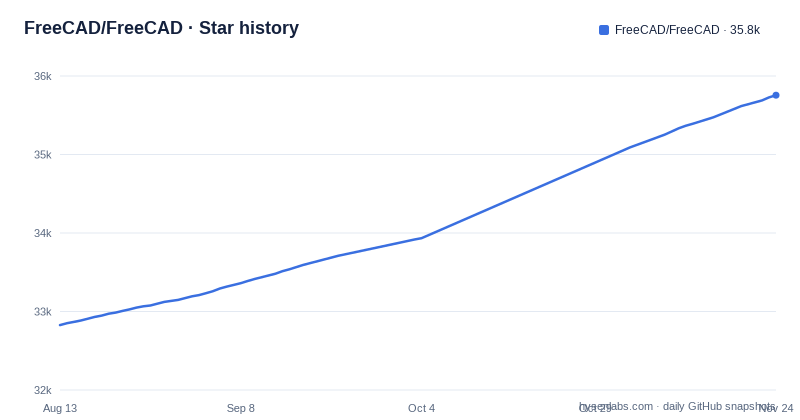
- FreeCAD/FreeCAD35,756 ★ · +2,929
| Repository | 2026-08-13 | 2026-11-24 |
|---|---|---|
| FreeCAD/FreeCAD | 32.8k | 35.8k |
2,929 Stars in the last 103 days, measured from the daily GitHub snapshot. Compare with other projects
Editorial analysis
What FreeCAD Actually Solves
FreeCAD is a parametric 3D modeler for real-life objects, from small parts to architectural models. The core value is in its history-based workflow: you can go back into the model history, change a parameter, and the geometry updates. That is a different approach from direct modeling, where you edit the final shape without a recorded sequence. The README describes it as 'freedom to build what you want.' The target audience is broad: hobbyists, programmers, experienced CAD users, students, and teachers. If you have used commercial parametric CAD, the concept will feel familiar, but FreeCAD's implementation has its own quirks.
The Architecture: OpenCASCADE, Coin3D, Python, and Qt
FreeCAD is not a single monolithic kernel. It relies on OpenCASCADE for geometry, Coin3D for 3D scene representation, Python for scripting, and Qt for the GUI. OpenCASCADE is the geometry kernel, which means FreeCAD inherits its strengths and limitations. Coin3D is an Open Inventor-compliant 3D scene representation library. Python is not just for macros; the README states FreeCAD offers a 'broad Python API,' which allows you to automate modeling tasks and build custom tools. Qt is the GUI layer. This stack is mature, but it also means that debugging geometry issues often requires understanding OpenCASCADE's behavior, not just FreeCAD's code.
Getting Started: Installation and Build Options
The easiest path is to download precompiled packages from the releases page, which covers Windows, macOS, and Linux. Most Linux distributions also have FreeCAD in their software center.. For those who want the latest features, there are weekly development builds, named like 'weekly-2026.10.28.' These are not stable releases, but they give you a taste of what is coming. If you need to compile from source, the README points to the Developers Handbook for getting started. That handbook is the authoritative source for build instructions; the README does not include a single build command, so expect to read that guide carefully. Compiling a project with OpenCASCADE, Coin3D, and Qt is not trivial, so most users should stick with the prebuilt packages.
The Workbench Model: Power and Confusion
FreeCAD organizes its features into workbenches, which are collections of tools for specific tasks like sketching, part design, or architecture. This is a modular approach that keeps the interface from being overwhelming, but it also means you have to learn which workbench does what. The README mentions that FreeCAD can 'create 3D from 2D and back,' referring to the sketch-constraint workflow. That is a strong feature, but it requires you to understand constraints and how they propagate through the model history. For a beginner, the workbench model adds a learning curve that is steeper than the parametric concept itself.
Real Limitations: Where FreeCAD Is the Wrong Tool
FreeCAD is not a one-stop solution for every CAD need. The README does not claim to handle simulation, CAM, or rendering out of the box, though workbenches exist for some of those. If you need a fully integrated product lifecycle management system, FreeCAD is not that. The geometry kernel, OpenCASCADE, is described in the README as a powerful geometry kernel. Also, the weekly builds are development versions, so they may contain bugs. The issue reporting guide asks users to test on the 'most updated stable or development versions.' If your project has a hard deadline, you should stick to stable releases and test thoroughly before committing.
Alternatives: The Difference in Approach
A direct alternative is a commercial parametric modeler like SolidWorks or Fusion 360. Those products offer a more polished, integrated experience with built-in simulation and CAM, but they are proprietary and often require a subscription. The difference in approach is fundamental: FreeCAD's open-source model means you can inspect and modify the source code, which is impossible with closed-source tools. Another open-source alternative is OpenSCAD, which uses a programming language to define models instead of a graphical interface. OpenSCAD is better for programmers who want to generate geometry from code, but it lacks the interactive sketching and parametric history that FreeCAD provides. If you prefer a scripted workflow, OpenSCAD is simpler; if you want a GUI-driven parametric modeler, FreeCAD is the stronger choice.
Maintenance and License: What You Need to Know
The project is active, with weekly releases and a last push in October 2026. The license is LGPL-2.1, which is permissive for linking but has specific obligations if you modify the source. For a typical user, this means you can use FreeCAD for commercial work without paying a fee, but you should not redistribute modified versions without complying with the LGPL terms. The README also mentions the FreeCAD Project Association (FPA), which offers grants to developers. If you need a feature urgently, you may have to wait or implement it yourself, which is a real cost for a team considering adoption.
Editorial conclusion
Adopt FreeCAD if you need a free, cross-platform parametric modeler and are willing to invest time in learning its workbench model and Python API. Skip it if you require a single integrated CAD environment or need commercial support. Before adoption, verify that your preferred workbench and file format (FCStd) work with your existing tools, and test the weekly builds if you need recent features.
Frequently asked questions
Is FreeCAD actually free to use?
Yes. It is an open-source parametric 3D modeler licensed LGPL-2.1, distributed under that licence, with precompiled packages for stable releases on Windows, macOS and Linux and no paid edition mentioned anywhere in the README. The project receives infrastructure support from DigitalOcean and KiCad Services Corp., and the FPA offers developers the opportunity to apply for a grant to work on projects of their choosing.
how to install freecad
Precompiled packages for stable releases are available for Windows, macOS and Linux on the repository's latest releases page, and weekly development builds are on the same releases page. Other options are described on the wiki download page, and compiling from source is covered by the Developers Handbook under Getting Started rather than by a command in the README.
how to install freecad on ubuntu
The README says that on most Linux distributions FreeCAD is directly installable from the software center application, which is the route it describes for Linux generally. The alternative is a precompiled package from the latest releases page, or a build from source using the Developers Handbook instructions.
how to use freecad
The wiki holds the documentation: a getting started page, a features list, a frequent questions page, a page on workbenches, and scripting documentation under the power users hub. The README also describes the underlying technology, which is the OpenCASCADE geometry kernel with a broad Python API and a Qt interface, and the forum is named as the place to get help with specific problems.
how to use freecad for 2d drawing
FreeCAD lets you sketch geometry-constrained 2D shapes and use them as a base to build 3D objects, and it provides tools to adjust dimensions and create high-quality production drawings from 3D models.
how to use freecad 1.1.1
The README does not discuss version 1.1.1 specifically. The most recent releases listed for the repository are the development build weekly-2026.10.28 (2026-10-28), weekly-2026.10.21 and the release candidate 26.3rc2 (2026-10-18). When reporting an issue the README asks you to use the most up to date stable or development version, so an older version is not a good base for a bug report.
Official sources
Add this badge to your README
If you maintain this project, the badge below links readers to this analysis and shows its maintenance status from the daily GitHub snapshot. Paste the markdown into your README; add ?metric=license or ?metric=stars to the image URL for a different field.

[](https://hysenlabs.com/projects/freecad-freecad)Star history chart for your README
[](https://hysenlabs.com/projects/freecad-freecad)Was this useful?