WeChatBridge: forwarding WeChat chat exports to AI agents and Obsidian from macOS
A native macOS tool that forwards WeChat chat history to AI Agents and Obsidian with one click.
At a glance
- What is it?
- WeChatBridge is a native macOS Share Extension that catches WeChat's merge-forward ZIP files and sends them to AI agents like Codex, Claude or DeepSeek Harness, or archives them in Obsidian. It requires no database access and imposes no network calls on the Share Extension sandbox.
- Who is it for?
- WeChatBridge suits macOS users on 14 Sonoma or later who work with WeChat daily and want to send chat exports to an AI agent or Obsidian without touching the WeChat database. Anyone needing cross-platform support should check the Windows WPF port separately, since the macOS app and the Windows app are distinct codebases.
- Can I use it commercially?
- Yes. MIT is a permissive licence: you can use, modify and sell software built on it, as long as you keep its copyright and licence notices.
- Is it still maintained?
- Yes. The repository last received commits 7 days ago.
- What is it written in?
- Mainly Swift, according to GitHub's language statistics.
Answers come from the project's GitHub data, last synced on October 23, 2026, and from our analysis. They are not legal advice.
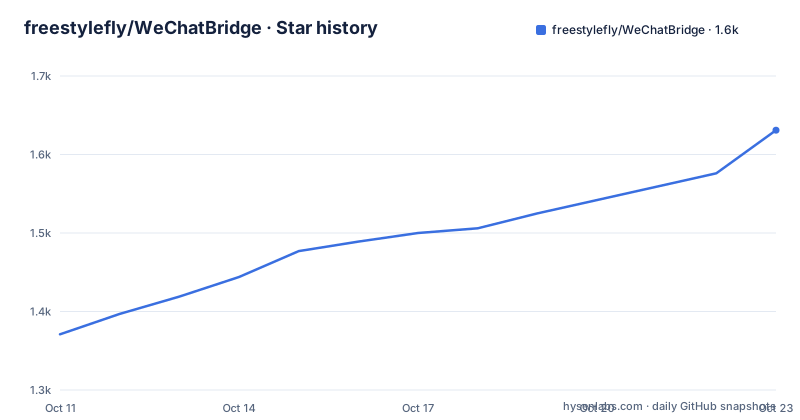
Star history
- freestylefly/WeChatBridge1,631 ★ · +260
| Repository | 2026-10-11 | 2026-10-23 |
|---|---|---|
| freestylefly/WeChatBridge | 1.4k | 1.6k |
260 Stars in the last 12 days, measured from the daily GitHub snapshot. Compare with other projects
Editorial analysis
WeChat 4.1.13 added merge-forward; WeChatBridge adds the Share Extension to receive it
macOS WeChat version 4.1.13 introduced the ability to select multiple chat messages and use a merge-forward action to send them to a third-party app. WeChat packages the selected messages as a ZIP file containing a TXT transcript plus images and videos. The system's share sheet shows only apps that register a Share Extension, so without a registered receiver, the ZIP cannot reach an AI agent directly from the WeChat share menu.
WeChatBridge registers that Share Extension. When a user selects messages in WeChat and taps the merge-forward option, WeChatBridge appears in the list of targets without requiring the user to open the main WeChatBridge window first. The extension receives the ZIP, unpacks the content, and dispatches it to whichever target the user selects.
The flow has no intermediate server. Chat content arrives from WeChat's own export mechanism, passes through the Share Extension sandboxed on the local machine, and ends up at the target app or folder. The Share Extension runs in the macOS sandbox with no network permission, so the content never leaves the device through WeChatBridge.
12 forwarding targets in the share menu, from 7 AI apps to Obsidian and a custom list
WeChatBridge registers 12 Share Extension entries. Seven target AI applications: Codex, Claude, Doubao, Qianwen Office, WorkBuddy, WeSight and DeepSeek Harness. Two targets handle local archiving: Obsidian (which creates a Markdown note with the original ZIP attached) and a user-selected folder (which writes a Markdown file and attachments with a Finder notification). One entry is for batch collection, one copies to the clipboard, and one forwards to a custom application list the user manages.
For the AI agent entries, the app activates the target application and pastes the chat archive along with any scene instruction the user attached. For apps that are not installed, the entry is labelled accordingly in the WeChatBridge settings, so the user can see which entries are actionable without attempting a forwarding run that will fail.
The batch entry is designed for conversations with more than 100 messages, since WeChat's single-selection limit stays in place. Each selection in WeChat is shared individually to the batch entry. The floating status bar shows how many batches have been collected and the first and last items of the last batch; when all parts are in, the user taps a completion button to send them together with a single scene choice.
Download the signed DMG or build from source with swift test and make-app.sh
A signed, notarized DMG for both Apple Silicon and Intel Macs is available on the project's GitHub page. Both Apple Silicon and Intel Macs are supported in a single Universal binary. After downloading, drag the app into the Applications folder.
To build from source, clone the repository and run the following commands:
git clone https://github.com/freestylefly/WeChatBridge.git
cd WeChatBridge/macos
swift test
CONFIG=release Scripts/make-app.sh
The build output is at `macos/dist/微信流.app`. To install the development build and register the Share Extension, run:
Scripts/install-dev-build.shAfter installation, open the main app, go to Settings, and enable the forwarding entries you need. The same entries can also be managed through macOS System Settings under General, Login Items and Extensions, and then Sharing.
Builds from source use the Apple Development or Developer ID certificate from the keychain if one is available. Without a valid certificate, the build uses ad-hoc signing, and macOS may ask for accessibility permissions to be re-granted after installation.
Screen recording reads only the WeChat title bar; the Share Extension sandbox has no network access
WeChatBridge lists four system permission requirements. Accessibility permission is needed to activate target applications and execute paste. Screen recording permission is needed for the chat name identification feature, which reads the WeChat title bar to label the chat in the archive. Images from the screen capture are processed only in memory; no screenshot file is saved. Both of these permissions are requested at runtime rather than preconfigured, and screen recording is only needed if the user wants the chat name attached to the archive.
The Share Extension runs inside the macOS sandbox with no network permission declared. That boundary is significant because the share sheet is the point where WeChat's content enters WeChatBridge. No data from the chat export leaves the device through the extension.
Chat archives, scene prompts and forwarding records are stored on the local machine. The README states explicitly that WeChatBridge does not read the WeChat database, does not decrypt anything, does not inject into the WeChat process, and does not modify it. The processing boundary is limited to the ZIP file that WeChat itself produces.
Scenes pair a chat with a context prompt; SKILL.md loads agent capabilities for compatible targets
The scenes feature lets users save a prompt paired with an AI agent choice for a specific group chat. When forwarding a batch of messages, the user picks a scene rather than typing the context prompt each time. This is useful for recurring workflows such as summarizing a project chat or extracting tasks from a team group.
Skills extend that idea for AI agents that support a SKILL.md capability file. The WeChatBridge skills center manages these files and can load them into a forwarding session alongside the chat archive. The shared/ directory at the repository root holds a Skills directory with a skill catalog and skill package files, which are used by both the macOS and Windows builds.
The design separates configuration from dispatch. Scenes and skills are stored locally and are chosen at forwarding time, not baked into the Share Extension registration. A user who manages several group chats with different purposes can assign each one a scene and a skill set, then select the right combination from the main app before confirming the batch.
Auto-update code exists but is not yet active; signing without a certificate resets accessibility
The privacy section of the README contains a line that stands out from the rest: the auto-update infrastructure is in place but not yet active, according to the README. The source code includes a Sparkle update channel pointed at the site/ directory, but automatic checking is not enabled in the current configuration. Users who install the DMG must check for updates manually by watching the repository.
The three most recent releases are v0.1.15 from 2026-09-30, v0.1.14 and v0.1.13 both from 2026-09-22, and the last push was on 2026-10-06. The MIT licence is in the LICENSE file at the repository root.
Ad-hoc signing is the practical concern for developers building from source. Without an Apple Development or Developer ID certificate in the keychain, the build falls back to ad-hoc signing. macOS treats ad-hoc-signed apps differently from notarized builds, and the project documentation warns that this may require accessibility permissions to be re-granted. A signing configuration script in the Scripts/ directory verifies the bundle ID and App Group settings before a build is distributed.
macOS 14 is the minimum, a Windows WPF port exists, and manual export is the nearest alternative
WeChatBridge requires macOS 14 Sonoma or later. Building from source requires Xcode 16 or Swift 6-compatible Command Line Tools. The project also includes a Windows implementation under the `windows/` directory: a WPF .NET application with its own solution, a Windows Share Target helper, and a sparse MSIX package for Share Target registration. The Windows build uses xUnit tests, built with:
dotnet test windows/WeChatBridge.Windows.sln -c ReleaseDocumentation for the Windows port lives in `windows/AGENTS.md` and `windows/docs/README.zh-CN.md`, not in the main README.
The closest alternative is the manual workflow: select messages in WeChat, export the ZIP directly, then open the target AI app and paste the content by hand. The difference is that WeChatBridge automates the activation and paste step through the Share Extension, so the transcript reaches the AI app without any intermediate file handling by the user. For users who only occasionally need to send a chat to an AI app, the manual route requires no installation and no permission grants.
For teams already using Obsidian as a knowledge base, the Obsidian forwarding target creates a Markdown note organized by chat name and saves the original attachments, which is a specific behavior the manual approach does not provide out of the box.
Editorial conclusion
WeChatBridge suits macOS users on 14 Sonoma or later who work with WeChat daily and want to send chat exports to an AI agent or Obsidian without touching the WeChat database. Anyone needing cross-platform support should check the Windows WPF port separately, since the macOS app and the Windows app are distinct codebases. Before adopting, verify the accessibility and screen recording permission prompts comply with your security policy, confirm the ad-hoc signing path does not reset accessibility permissions, and check whether your AI agents are among the 12 built-in entries or require a custom target.
Frequently asked questions
What is WeChatBridge?
WeChatBridge is a native macOS Share Extension that receives WeChat merge-forward chat exports as ZIP files and sends them to AI agents such as Codex, Claude or DeepSeek Harness, or archives them in Obsidian. It requires macOS 14 Sonoma or later.
How do I install WeChatBridge?
Download the signed DMG from GitHub Releases, open it and drag the app into Applications. The package is notarized by Apple and supports both Apple Silicon and Intel Macs. A source build path is also available using swift test and Scripts/make-app.sh.
Does WeChatBridge read the WeChat database?
No. WeChatBridge works only with the ZIP files WeChat exports through its merge-forward share action. It does not read the WeChat database, does not decrypt anything, and does not inject into or modify the WeChat process.
Why does WeChatBridge need screen recording permission?
Screen recording is used only to identify the chat name from the WeChat title bar. Images captured for this purpose are processed in memory and not saved. The permission is optional; it is needed only if you want the chat name to appear in the archive.
Does WeChatBridge support Windows?
There is a Windows WPF implementation in the windows/ directory of the repository, with its own Share Target helper and MSIX package. Documentation for the Windows port is in windows/AGENTS.md and windows/docs/README.zh-CN.md, separate from the main README.
Official sources
Add this badge to your README
If you maintain this project, the badge below links readers to this analysis and shows its maintenance status from the daily GitHub snapshot. Paste the markdown into your README; add ?metric=license or ?metric=stars to the image URL for a different field.

[](https://hysenlabs.com/projects/freestylefly-wechatbridge)Star history chart for your README
[](https://hysenlabs.com/projects/freestylefly-wechatbridge)Was this useful?