Bolero, F# and Blazor with the Elmish model in the middle
Bolero brings Blazor to F# developers with an easy to use Model-View-Update architecture, HTML combinators, hot reloaded templates, type-safe endpoints, advanced routing and remoting capabilities, and more.
At a glance
- What is it?
- Bolero is a set of F# libraries for running applications in WebAssembly on Blazor, and it is not simply Blazor with F# syntax. The interesting parts are the Elmish integration in both directions, routing expressed as a discriminated union in the model, remoting that lets the client call server functions as if they were local, and an assembly post-processing step that strips F# signature data to shrink what the browser downloads.
- Who is it for?
- Bolero fits an F# team that wants a typed model, a discriminated union for its routes and server functions it can call from the browser without hand-writing a protocol. It does not fit a team that wants server-side rendering for search engines, and it does not fit a project that has to commit to a stable API, since the version numbers sit in the 0.25 range and the pre-1.0 label usually means the surface still moves.
- Can I use it commercially?
- Yes. Apache-2.0 is a permissive licence: you can use, modify and sell software built on it, as long as you keep its copyright and licence notices.
- Is it still maintained?
- Yes. The repository last received commits 62 days ago.
- What is it written in?
- Mainly F#, according to GitHub's language statistics.
Answers come from the project's GitHub data, last synced on November 7, 2026, and from our analysis. They are not legal advice.
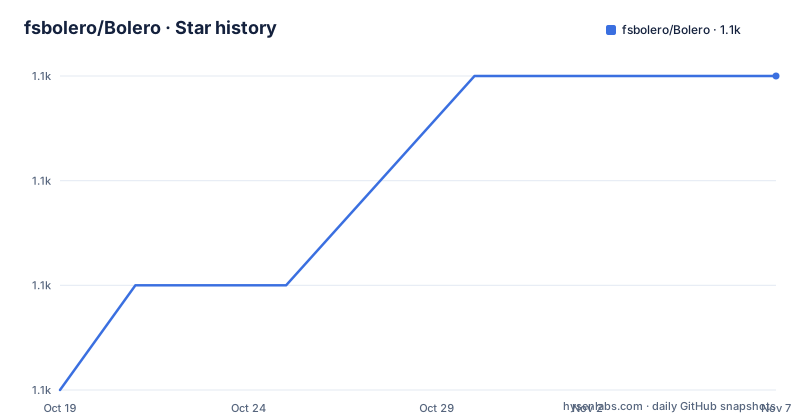
Star history
- fsbolero/Bolero1,139 ★ · +3
| Repository | 2026-10-19 | 2026-11-07 |
|---|---|---|
| fsbolero/Bolero | 1.1k | 1.1k |
3 Stars in the last 19 days, measured from the daily GitHub snapshot. Compare with other projects
Editorial analysis
A set of libraries rather than a framework
Bolero is a set of tools and libraries to run F# applications in WebAssembly using Blazor. The framing matters, because Bolero is not a competing web framework that replaces Blazor, and it is not a compiler for F# to JavaScript in the Fable mould. It is a layer of F# conveniences on top of Blazor, and the readme describes its contents as a list of capabilities rather than a philosophy.
The first is HTML functions using a familiar syntax similar to WebSharper.UI or Elmish.React. The comparison is telling, because both of those are F# libraries for building HTML directly in code, and the claim is that an F# developer who has used either will not have to learn a new shape.
The second is templating, where you write HTML in a separate file and bind it to F# using a type provider. A type provider is a F# specific mechanism where the compiler generates types from a source, so the binding between the template and the code is checked at compile time, and a renamed field in the template becomes a compile error rather than a blank space in the output.
The third is the Elmish integration, the fourth is routing, the fifth is remoting, and the sixth is an F# specific optimisation. Each of those is worth its own look, because in each case the design decision is about how much of the F# type system can be carried across the client-server boundary.
Routing as a discriminated union in the model
The routing description is short and unusually specific. Bolero associates the page's current URL with a field in the Elmish model, defined as a discriminated union, and lets you define path parameters directly on this union.
This is the Elmish pattern applied to URLs, and the point of it is that the set of pages your application has becomes a type. A union with one case per page means the compiler can tell you that a case is unhandled, that two cases have the same route, or that a path parameter is missing. It also means the URL is not a string that gets parsed at runtime into something loosely typed, but a value of a known type that the application dispatches on.
The path parameters living on the union is what makes the type useful rather than decorative. A case that represents a user page can carry the user identifier as a field of a known type, so the route pattern and the value the page receives are declared in one place, and the compiler checks that a handler for that case uses the parameter it was given.
For anyone coming from a string-routing framework, this is the single most noticeable difference in the library, and for anyone coming from Elmish it is the feature they will miss most if they move to plain Blazor. The cost is the same in both directions: the application has to commit to a page type up front, and adding a page is a change to a union that the compiler then helps you complete.
Remoting: server functions you call from the client
Remoting is described in one sentence: define asynchronous functions running on the server and simply call them from the client.
That simplicity is the result of a lot of machinery, and it is the feature that most changes how a Blazor application is written. In a typical Blazor application, calling something on the server from the client means defining the contract in one place and the client-side proxy in another. Bolero lets you write an ordinary F# function on the server and call it directly from the browser code, and the plumbing takes care of the transport.
The F# specific benefit is in the types. A function that takes a record and returns a discriminated union carries that shape across the boundary, and a mismatch is a compile error on both sides of the wire rather than a runtime deserialisation surprise. Serialisation is a place where dynamic languages tend to fail quietly, and a static type on the payload is the reason the design is worth the extra machinery.
Because the functions are asynchronous, the natural F# and.NET async model carries through, which matters for anything that waits on I/O, and the server side is the same process that hosts the Blazor application, so there is no separate service to deploy.
Elmish in both directions
The Elmish integration is described in a way that covers two separate cases: run an Elmish program as a Blazor component, and Blazor components as Elmish views.
The first direction is the one that matters most for a team with existing Elmish code. An Elmish program has a model, a view function and an update function, and the model is a discriminated union or a record. Bolero lets that whole shape become a Blazor component, so the rendering, the update logic and the view function stay as they are, and the component sits in a Blazor page alongside other components. The Elmish model becomes the Blazor component's state, and the update function is what mutates it.
The second direction is the reverse, exposing a Blazor component as an Elmish view, which lets a page written in Elmish embed a component someone else wrote in Blazor. That is the more unusual of the two, and it is the kind of thing that only pays off in a mixed codebase.
Together they make Elmish a first-class citizen rather than a compatibility layer. For a team that has already decided to write its UI in Elmish, Bolero is what lets them keep the Blazor ecosystem for the parts they did not want to write, such as authentication, or hosting, without rewriting the UI they already have.
Stripping F# signature data from the shipped assemblies
The optimisation is F# specific and it is about size. Bolero strips F# signature data from assemblies to reduce the size of the served application.
The reason this matters is specific to F# and to WebAssembly. F# assemblies carry a large amount of metadata that exists to support type inference at compile time: the inferred types of every function, the full shape of every union case, the names of the type variables. A browser has no use for that, because there is no compiler in the browser, and in a WebAssembly application the download is a large part of the user-visible cost.
Stripping it is therefore a meaningful reduction rather than a marginal one, and it is the kind of step that is easy to forget when the application is assembled with a general purpose .NET toolchain. Bolero does it as part of its build, which means a project that uses Bolero gets it without thinking about it.
The build files in the repository show how the rest of the assembly is put together. There is a Directory.Build.props for the shared MSBuild properties, a global.json to pin the SDK, a version.json for the version, paket.dependencies with paket.lock for dependency management, a Bolero.slnx solution file with a DotSettings file beside it, a build.ps1 script, and directories for src/, tests/ and tools/. There is also a CHANGELOG.md, a CONTRIBUTING.md, and the licence file, which is Apache-2.0, in the root as LICENSE.md.
Getting a project off the ground
The path from nothing to a running application is three commands, and the only prerequisite is the .NET SDK 10.0.
First the project templates are installed:
dotnet new install Bolero.TemplatesThen a project is created, named with the bolero-app template and an output directory:
dotnet new bolero-app -o MyBoleroAppAnd finally it is run, from inside the new project, targeting the server project inside the src folder:
cd MyBoleroApp
dotnet run --project src/MyBoleroApp.Server
That last detail is worth noticing. The generated application has a server project, which is what hosts the Blazor application and the server side of the remoting, and the command runs that project rather than the whole solution. The templates are published as a separate package, Bolero.Templates, which is why the install step exists at all: the templates carry the project structure, the .fsproj files and the build wiring, and the library itself is a different package.
The documentation is hosted at fsbolero.io/docs, and the readme points there for the details. The package is on NuGet under the name Bolero, with a pre-release version badge in the readme, which tells you the published version is currently a pre-release.
Where Bolero is the wrong tool
The first limit is the rendering model. Bolero is built on Blazor, and Blazor WebAssembly ships the application to the browser and runs it there. For a site that needs its content in the initial HTML for search engines, for a social preview, or for a client without a modern JavaScript and WebAssembly runtime, that is a poor fit, and the readme does not discuss server-side rendering as a mode.
The second is the version number. The releases are 0.24.39 from December 2024, 0.25 from August 2026 and 0.25.65 in September 2026. A pre-1.0 version with patch numbers in the sixties tells you the surface is still moving, and the readme itself advertises a pre-release package on NuGet. An application built against a given version of Bolero needs upgrading when the framework moves, and there is no long-term support branch described.
The third is the language. Bolero is F# only. A team with an existing C# or TypeScript frontend has no way to reuse it, and the Elmish interop is a benefit only if Elmish is something you already know or want.
The fourth is a small inconsistency in the readme itself, which is a fair signal about where the project sees itself. The contributing section asks you to use the issue tracker at the intellifactory repository and links the contributing guide in that same repository, while the repository you are reading is under fsbolero. The same section, however, does say that Bolero welcomes contributions, which is a good sign about intent even if the links need fixing.
Editorial conclusion
Bolero fits an F# team that wants a typed model, a discriminated union for its routes and server functions it can call from the browser without hand-writing a protocol. It does not fit a team that wants server-side rendering for search engines, and it does not fit a project that has to commit to a stable API, since the version numbers sit in the 0.25 range and the pre-1.0 label usually means the surface still moves. Before adopting it, read the issue tracker link in the readme, which points at the intellifactory repository rather than the fsbolero one, so you know where the project actually wants reports to go, and plan on .NET SDK 10. The licence is Apache-2.0, version 0.25.65 was published on 2026-09-06, and the last push was on the same day.
Frequently asked questions
What is Bolero?
A set of tools and libraries to run F# applications in WebAssembly using Blazor. It includes HTML functions with a syntax similar to WebSharper.UI or Elmish.React, templating that binds separate HTML files to F# through a type provider, Elmish integration, routing, remoting and an F# specific size optimisation.
How do I create and run a Bolero project?
You need the .NET SDK 10.0. Then run `dotnet new install Bolero.Templates`, create the project with `dotnet new bolero-app -o MyBoleroApp`, and from inside it run `dotnet run --project src/MyBoleroApp.Server`. The templates are published as a separate package, Bolero.Templates.
How does Bolero handle routing?
It associates the page's current URL with a field in the Elmish model, defined as a discriminated union, and path parameters are defined directly on that union. The set of pages is therefore a type the compiler can check rather than a set of strings parsed at runtime.
How does Bolero reduce the size of a WebAssembly application?
It strips F# signature data from the assemblies, which is the metadata the compiler needs for type inference and which a browser has no use for. The reduction is applied as part of the build, so projects get it without extra steps.
Can Bolero run Elmish code as a Blazor component?
Yes, and in both directions. The readme describes running an Elmish program as a Blazor component, and Blazor components as Elmish views, so Elmish code and Blazor code can be mixed in one application.
Official sources
Add this badge to your README
If you maintain this project, the badge below links readers to this analysis and shows its maintenance status from the daily GitHub snapshot. Paste the markdown into your README; add ?metric=license or ?metric=stars to the image URL for a different field.

[](https://hysenlabs.com/projects/fsbolero-bolero)Star history chart for your README
[](https://hysenlabs.com/projects/fsbolero-bolero)Was this useful?