ugrep is a grep replacement you can symlink over grep itself
🔍 ugrep 7.8 file pattern searcher -- a user-friendly, faster, more capable grep replacement. Includes a TUI, Google-like Boolean search with AND/OR/NOT, fuzzy search, hexdumps, searches (nested) archives (zip, 7z, tar, pax, cpio), compressed files (gz, Z, bz2, lzma, xz, lz4, zstd, brotli), pdfs, docs, and more
At a glance
- What is it?
- A C++ file pattern searcher that stays command line compatible with GNU and BSD grep while adding a query TUI, Google-like Boolean patterns, nested archive search, and document filters.
- Who is it for?
- ugrep earns its place when your searches outgrow a line oriented grep: when the pattern has AND/OR/NOT structure, when the interesting match lives inside a zip or a docx, or when you want to type a query and watch results update in a TUI. Against plain GNU or BSD grep the comparison is close to settled, since ugrep is compatible enough that you can copy or symlink `ug` over `grep`, `egrep` and `fgrep` and keep your scripts.
- Can I use it commercially?
- Yes. BSD-3-Clause is a permissive licence: you can use, modify and sell software built on it, as long as you keep its copyright and licence notices.
- Is it still maintained?
- Yes. The repository last received commits 4 days ago.
- What is it written in?
- Mainly C++, according to GitHub's language statistics.
Answers come from the project's GitHub data, last synced on October 23, 2026, and from our analysis. They are not legal advice.
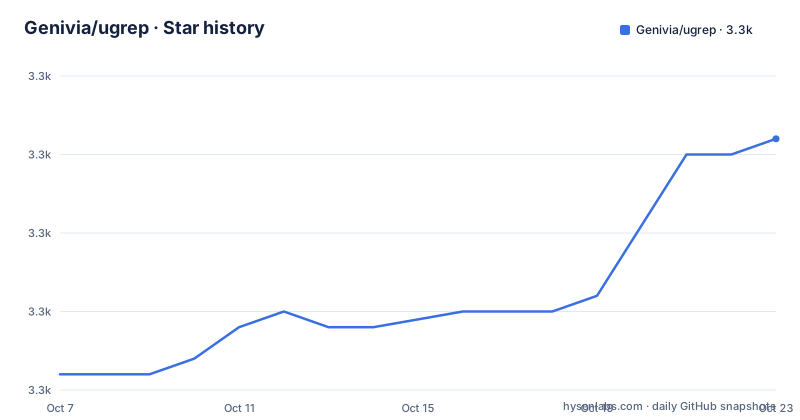
Star history
- Genivia/ugrep3,321 ★ · +15
| Repository | 2026-10-07 | 2026-10-23 |
|---|---|---|
| Genivia/ugrep | 3.3k | 3.3k |
15 Stars in the last 16 days, measured from the daily GitHub snapshot. Compare with other projects
Editorial analysis
The compatibility claim is the whole pitch
ugrep describes itself as a file pattern searcher and a drop-in replacement for BSD and GNU grep. The README is unusually direct about why that matters, pointing out that tools advertised as grep alternatives often implement incompatible command line options and a different regex matcher, offering Perl regex only where grep offers POSIX BRE for grep and ERE for egrep. ugrep's position is that it supports all of those regex modes, so the compatibility is real rather than nominal.
The practical test the README proposes is crude and convincing: copy or symlink `ug` to `grep`, and to `egrep` and `fgrep` as well. If your existing scripts keep working, the compatibility holds. That is a much sharper claim than a feature list, and it is the reason to try ugrep even if you have no interest in its extras.
Underneath that, it is a C++ program with autotools build files: `configure.ac`, `aclocal.m4`, `Makefile.am`, and a `build.sh` driver. The source layout has the pieces you would expect at `src/`, `include/`, `lib/`, `patterns/`, `man/`, `completions/`, and `tests/`, plus Visual Studio and MinGW support under `vs/` and `msvc/`. Licence is BSD-3-Clause, which matters if you are shipping it inside a product, since it is permissive and carries no copyleft obligation.
Two other claims deserve a skeptic's eye. The README says ugrep is typically faster than rg, ag, and GNU grep, and it links that claim to a separate ugrep-benchmarks repository rather than asserting a number here, which is the right way to make a speed claim. It also points to a ugrep-testing repository for quality assurance, so the reliability work lives outside the main tree.
Building it from the Dockerfile the project ships
The README does not lead with a build recipe, and there is no install section in the visible documentation; the user guide at ugrep.com is the place it points for that. What the repository does ship is a Dockerfile plus a minimized variant, which is the most honest way to see what ugrep actually depends on.
FROM ubuntu
WORKDIR /ugrep
RUN git clone --single-branch --depth=1 https://github.com/Genivia/ugrep /ugrep
RUN autoreconf -fi
RUN ./build.sh
RUN make install
RUN ugrep --version
ENTRYPOINT [ "ugrep" ]
That dependency list is more informative than it looks. `libpcre2-dev` is there, which is what gives ugrep Perl compatible regex alongside POSIX. Then there is `libz-dev`, `libbz2-dev`, `liblzma-dev`, `liblz4-dev`, `libzstd-dev` and `libbrotli-dev`, one library per compression format in the feature list. The README advertises searching gz, Z, bz, bz2, lzma, xz, lz4, zstd and brotli, and here is what that costs at build time. Build tooling is autoconf, automake, clang, make and pkg-config.
The Dockerfile clones from GitHub at depth 1 and comments that you can uncomment an `ADD . /ugrep` line to build from local source instead, which makes it a reasonable base for a pinned CI image. Note that it installs into the container and sets `ugrep` as the entrypoint, so running it against your host filesystem means mounting the host root, which is what the usage comments at the top of the file show.
Two commands, and the TUI that explains itself
ugrep ships four command names and the distinction is worth internalising. `ug` is for interactive use and loads an optional `.ugrep` configuration file from your working directory or home directory, so your preferences follow you. `ugrep` is for batch use like GNU grep, without the config file. The plus variants, `ug+` and `ugrep+`, additionally search PDFs, documents, e-books and image metadata.
That single distinction decides where ugrep belongs in a pipeline. In a script or CI job you want `ugrep`, because a stray config file changing your flags mid-run is exactly the class of bug nobody enjoys. In a terminal you probably want `ug`.
Built-in help is unusually good. `ug --help WHAT` displays options related to whatever you are looking for, and the README calls out `ug --help regex`, `ug --help globs`, `ug --help fuzzy` and `ug --help format`. You can also save preferences rather than typing them: `ug --save-config ...options-you-want-to-save...` writes a `.ugrep` config in the current directory, and doing it in your home directory makes those options your defaults everywhere.
The interactive query TUI is the feature that has no equivalent in grep or ripgrep. `-Q` opens a query box and replaces the usual positional pattern so you can type a search and watch results update:
ug -Q
ug -Q -e PATTERN
F1 or CTRL-Z opens help inside the TUI, TAB and SHIFT-TAB navigate between directories and files, and ALT plus a letter toggles a short option on and off, so ALT-n shows or hides line numbers. For someone who learned to search with grep flags, being able to flip flags from inside the result view instead of retyping the command is a real change in how the tool feels.
Boolean patterns and search that goes inside archives
The `-%` option gives ugrep a Google-style query syntax using AND, OR and NOT, with quoting for exact matches and parentheses for grouping. Each interactive form has a plain regex equivalent, which is how you would script it:
ug -% 'A B C' ...
ug -% 'A|B C' ...
ug -% 'A -B -C' ...
ug -% 'A -(B|C)'...
ug -% '"abc" "def"' ...
The mapped flag form is `-e` as an or, plus `--and`, `--andnot` and `--not`, so the third line above is the same search written as `-e 'A' --andnot 'B' --andnot 'C'`. One subtlety that will bite you if you skip it: Boolean conditions apply to single lines by default, because grep utilities are line based. If you want a file to match when the conditions hold anywhere across the whole file, you need `-%%`, which is the `--bool --files` form, and `--stats` will print the query back in human readable form after the search.
Archive and compression support is the other half of what separates ugrep from a source code searcher. `-z` searches inside archives including zip, tar, pax, jar, cpio and 7z, and compressed files. `--zmax` ranges from 1 by default to 99, so `-z --zmax=2` searches archives nested inside archives. Since decompression bombs are a genuine risk with recursive archive walking, that cap is a limit you should set deliberately rather than leave at default on untrusted input.
Document search goes through filters, which is a different mechanism entirely. A filter maps a filename extension to an external utility that converts it to text:
ug --filter='pdf:pdftotext % -' PATTERN ...
ug --filter='odt,docx,epub,rtf:pandoc --wrap=preserve -t plain % -o -' PATTERN ...
ug --filter='pem:openssl x509 -text,cer,crt,der:openssl x509 -text -inform der' PATTERN ...
ug --filter='latin1:iconv -f LATIN1 -t UTF-8' PATTERN ...
So searching a PDF means `pdftotext` is installed, Office formats mean `pandoc` or headless `soffice`, and reading a certificate means `openssl x509`. ugrep is not parsing these formats itself, it is orchestrating tools you already have or can install. That is a fair trade for enormous capability and a real caveat for a container image: the search works, but only for the formats whose filter utility you shipped.
ugrep and ripgrep disagree about what a search tool is
The comparison people actually want is ugrep against ripgrep, so it is worth being concrete about the difference in approach rather than about benchmark numbers.
ripgrep is a Rust program that walks a tree respecting `.gitignore`, with first class support for searching source code, and it is opinionated about staying fast at that one job. ugrep is a C++ program whose declared compatibility is with grep, the tool that predates all of this. It matches Unicode by default and searches UTF-8, UTF-16 and UTF-32 encoded files automatically, and it does multi-line matching with `\n` or `\R` in the pattern without needing a special flag, which grep users have historically had to request through awkward option combinations.
The practical consequences are these. If your work is scanning a checkout of source, both work and both are quick, and the deciding factor will be which one's regex dialect matches your habits. If your work involves PDFs, Office documents, certificates, zips and 7z archives, ripgrep will simply not do it and ugrep will, provided the filter tools exist. If your work is mostly interactive, the `-Q` TUI and the ALT-key option toggles are the differentiator. And if you maintain scripts that shell out to grep, ugrep's symlink compatibility is the feature ripgrep has no answer to.
Two more differences belong in the honest column. ugrep can search binary files and produce hexdumps, which is closer to a file inspection tool than a code searcher. And it ships a separate indexer project, ugrep-indexer, for slow and cold file systems, which means large network mounts are a case the project has thought about explicitly.
Three recent releases are all about regex engine limits
The last three releases, v7.8.3 on 2026-07-30, v7.8.4 on 2026-08-05 and v7.8.5 on 2026-09-15, tell you what the maintainer is actually worried about. It is not missing features, it is keeping the regular expression engine inside its bounds.
v7.8.3 updated regular expression compilation to address a DFA memory threshold issue, where explosive DFA growth is theoretically possible but is expected to stay within a worst case footprint of roughly 1GB to 2GB. That same release updated the LZMA SDK to 26.02 and fixed a man page formatting issue that had dropped a sentence ending.
v7.8.4 added MinGW portability, tested with MinGW-w64 UCRT64 and MSYS2 GCC 16.1. It carries an honest caveat: `make test` skips the directory recursive searches there because of a lack of MinGW symlink handling, referencing issue #553 where a leading slash in a pattern gets expanded to a path when the command line reaches ugrep's `main()`. The release also made ugrep fail fast when DFA position sets exceed complexity limits.
v7.8.5 is the most useful one for day to day use, because it made the matching mode flags `-E`, `-F`, `-G` and `-P` respect their order on the command line, permitting overrides the way BSD grep does. Previously a mode flag could be silently overridden by another. The same release now prints an error when regex matching mode flags appear in a config file rather than ignoring them, which turns a subtle behaviour into a visible one. It also added `--encoding=CP437`, retaining LF and CR codes in the output, and set reasonable decoding limits for xz and lzma under `-z`.
Taken together, these are the changes of a tool in maintenance mode with a hard performance constraint. The last push was 2026-09-21, days after v7.8.5 shipped, and the project is not archived.
Editorial conclusion
ugrep earns its place when your searches outgrow a line oriented grep: when the pattern has AND/OR/NOT structure, when the interesting match lives inside a zip or a docx, or when you want to type a query and watch results update in a TUI. Against plain GNU or BSD grep the comparison is close to settled, since ugrep is compatible enough that you can copy or symlink `ug` over `grep`, `egrep` and `fgrep` and keep your scripts. Against ripgrep it is a different bet on purpose rather than a straight speed contest. ugrep is a C++ autotools project with a build.sh, a patterns directory and an optional document filter layer that shells out to pandoc, soffice or pdftotext, while ripgrep is a focused Rust searcher. If you want a single binary that searches source fast and nothing else, ripgrep is the calmer dependency. If you want one tool to answer document and archive questions too, ugrep is the one that will still be there in ten years. The first thing to verify is your regex dialect, because ugrep offers POSIX BRE, POSIX ERE, Perl, fixed string and fuzzy modes and silently accepting a pattern that means something different is the realistic failure. Current version is 7.8.5 from 2026-09-15, with 3302 stars, 142 forks and 8 open issues.
Frequently asked questions
What is ugrep?
ugrep is a file pattern searcher written in C++ that is a drop-in replacement for GNU and BSD grep. Beyond grep compatibility it adds an interactive query TUI, Google-like Boolean patterns with AND, OR and NOT, fuzzy search, and search inside archives, compressed files, PDFs and Office documents.
What are the key differences between ripgrep and ugrep?
ripgrep is a Rust source code searcher that stays focused on fast tree walking, while ugrep is a C++ tool built for grep compatibility that also searches archives, compressed files and documents through external filter utilities, and ships a `-Q` query TUI. ugrep can be symlinked over grep, egrep and fgrep; ripgrep has no equivalent compatibility path.
How do I install ugrep?
The project points to its user guide at ugrep.com for install instructions. The repository also ships a Dockerfile that clones the source, runs autoreconf, then build.sh and make install, with dependencies including libpcre2-dev and one library per supported compression format.
Can ugrep search inside zip archives and PDFs?
Yes. Option `-z` searches zip, tar, pax, jar, cpio and 7z archives plus compressed formats, and `--zmax` sets how many decompression or de-archiving steps are allowed, from 1 by default up to 99 for nested archives. PDF and Office formats are searched through `--filter`, which shells out to tools such as pdftotext, pandoc or soffice.
What is the difference between ug and ugrep?
`ug` is intended for interactive use and loads an optional .ugrep configuration file from the working directory or home directory. `ugrep` is for batch use like GNU grep and does not read that config file. The plus variants `ug+` and `ugrep+` additionally search PDFs, documents, e-books and image metadata.
Official sources
Add this badge to your README
If you maintain this project, the badge below links readers to this analysis and shows its maintenance status from the daily GitHub snapshot. Paste the markdown into your README; add ?metric=license or ?metric=stars to the image URL for a different field.

[](https://hysenlabs.com/projects/genivia-ugrep)Star history chart for your README
[](https://hysenlabs.com/projects/genivia-ugrep)Was this useful?