GeoTools ships three release lines from one repository and a BOM for your dependency tree
Official GeoTools repository
At a glance
- What is it?
- GeoTools is an LGPL Java library for geospatial data, built with Maven and released in parallel maintained lines rather than one. The repository layout, with modules/, bom/, platform-dependencies/ and licenses/, describes more about how to consume it than the README does.
- Who is it for?
- Adopt GeoTools if you are on Java and need to read, write or transform vector and raster geospatial formats without a commercial GIS stack, since the module structure and the per-module documentation are organised for exactly that. It is a poor fit if you need a single stable version, because 33.6, 34.5 and 35.1 are all maintained and released on the same day, and choosing wrong costs you a support matrix conversation later.
- Can I use it commercially?
- Yes, with conditions. LGPL-2.1 is a weak copyleft licence: you can use it inside commercial and closed-source software, but if you distribute changes to its own files, you must publish those changes under the same licence.
- Is it still maintained?
- Yes. The repository received new commits within the last day.
- What is it written in?
- Mainly Java, according to GitHub's language statistics.
Answers come from the project's GitHub data, last synced on October 23, 2026, and from our analysis. They are not legal advice.
Star history
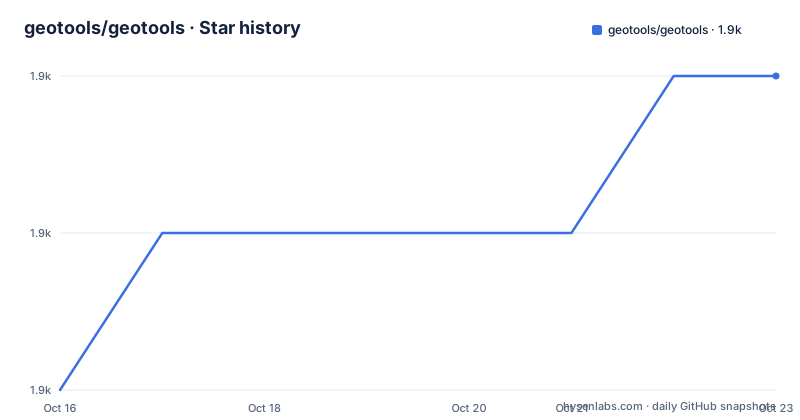
- geotools/geotools1,931 ★ · +2
| Repository | 2026-10-16 | 2026-10-23 |
|---|---|---|
| geotools/geotools | 1.9k | 1.9k |
2 Stars in the last 7 days, measured from the daily GitHub snapshot. Compare with other projects
Editorial analysis
Three versions, one timestamp, three maintained lines
The release history is the first thing to understand about GeoTools, and it is not what a Maven Central habit expects.
Recent releases are 35.1, 34.5 and 33.6, and all three were tagged on 2026-08-21.
That is a maintenance policy, not a coincidence. GeoTools keeps several release lines alive at once so that users pinned to an older Java or an older set of transitive dependencies are not forced to move. The cost of that policy is that there is no single current version, and choosing one is a decision you make rather than one you inherit.
The default branch is `main`, and the latest push is recent; the latest listed release is 35.1 from 2026-08-21. A `VERSION.txt` at the repository root records the version for that build, which is how a Maven multi-module build propagates a single version across every module.
For an application, that means your `pom.xml` pins a version the way it pins Spring or Guava, and your choice of line determines which transitive dependency set you inherit.
modules/ is the library, and everything else is scaffolding
The repository root lists are the clearest description of the project's shape.
`modules/` is where the actual code lives, split into individual modules per capability rather than one library. The topics attached to the repository name the format and backend areas involved: geojson, shapefile, postgis, oracle-spatial, mongodb, mysql and sqlserver alongside the general geospatial and gis terms. That list is effectively the datastore and format coverage, and it is why GeoTools has a module-per-format design: each format or spatial database gets its own artifact with its own dependency set, and you take the ones you need.
Around that sit the build directories. `build/` and `src/` hold shared build configuration and common sources. `platform-dependencies/` is the interesting one: it exists to manage the versions of the underlying platform libraries so that every module agrees on them. `bom/` is the bill of materials artifact, and `BOM-USAGE.md` at the root documents how to use it. `licenses/` collects licence metadata for the shipped artifacts.
`docs/` and `tutorials/` are separate, with the tutorials directory holding worked examples outside the main documentation tree.
There is also a `release/` directory for release mechanics, `.mvn/` for Maven wrapper configuration, and `info-logging.properties` alongside `quiet-logging.properties`, which is a reminder that a library used inside a server needs a way to be quiet by default.
mvn clean install from the root, and a build with consequences
Building is one command:
mvn clean installrun from the root of the repository, using Apache Maven. The user guide's build section has the details.
The reason the root matters is the module graph. This is a Maven multi-module build where modules depend on each other, and `mvn install` puts each produced artifact in your local repository so the next module can resolve it. Running the command from a subdirectory builds that subtree; running it from the root builds everything.
A build of the full tree is not quick, and for a contributor this is the first practical hurdle: you are building every format module and every datastore module, not one jar.
`.mvn/` at the root indicates Maven configuration is committed, which normally means a pinned Maven version and repository settings, so a contributor's local Maven behaves the same as anyone else's.
For consumers, none of this applies. You declare the modules you want as dependencies and never run the build, which is the intended path.
LGPL for the library, something looser for docs and examples
The licence is LGPL, and the README draws a distinction that matters if you write documentation or samples.
GeoTools itself is licensed under the LGPL. The user guide has its own, less restrictive licence covering documentation and source code examples. So the code you link against carries LGPL terms, while the snippets you copy out of the user guide do not carry those terms with them.
This is a genuinely different arrangement from a permissively licensed library, and it is the part to have confirmed by your own process rather than assumed. What it does not mean is that there is nothing to review; the LGPL text is what governs, and this is a licensing question rather than a technical one.
The repository contains `LICENSE.md` at the root and a `licenses/` directory, so the per-artifact licence metadata that ends up in your dependency report is maintained here rather than generated at release time.
JIRA for bugs, Sourceforge lists for everything else
The support channels are dated, and knowing which one to use saves a wasted issue.
Bug tracking runs through JIRA at osgeo-org.atlassian.net under the GEOT project, hosted by Atlassian. That is where defects go.
Questions are handled on two Sourceforge mailing lists. `geotools-gt2-users` is for usage questions and `geotools-devel` is for questions about working on the library itself.
Contributions are described in the developer guide's contribute page, which covers patches, pull requests and setting up new modules. The README adds one warning worth heeding: if you are already experienced with GitHub, read the pull request page before starting, because the project has a specific process.
That last point is not bureaucratic caution for its own sake. With three maintained release lines and a module graph this wide, an unsolicited pull request that lands on `main` in a shape the maintainers did not expect creates real work, and the documented process exists to prevent that.
The repository also carries CODE_OF_CONDUCT.md, CONTRIBUTING.md and SECURITY.md, so the governance documents are all in the repository itself rather than on a separate site.
What GeoTools is not
Two boundaries are worth stating because the name invites the wrong expectation.
It is a library, not an application. There is no desktop GIS here, no map viewer and no server. If you want to open a shapefile and look at it, that is a different tool. Its modules can provide reusable format-handling components to geospatial applications.
It is also not a data source. GeoTools does not ship datasets. Where the test data comes from, and how much of it you need to exercise a format path, is a question for the module documentation and the tutorials directory rather than the README.
The other thing to plan for is the surface area. A library with modules per format and per spatial database has a dependency footprint that is proportionally large, and a module that pulls in a JDBC driver and a format parser together will conflict with other things in your build. This is what the bill of materials in `bom/` and the `BOM-USAGE.md` documentation exist to manage.
The homepage is http://geotools.org and the user guide overview at docs.geotools.org covers core features, supported formats and standards support, which is where you should start to establish whether a format you need is covered at all.
Editorial conclusion
Adopt GeoTools if you are on Java and need to read, write or transform vector and raster geospatial formats without a commercial GIS stack, since the module structure and the per-module documentation are organised for exactly that. It is a poor fit if you need a single stable version, because 33.6, 34.5 and 35.1 are all maintained and released on the same day, and choosing wrong costs you a support matrix conversation later. Before adding the dependency, read BOM-USAGE.md and import the bill of materials rather than pinning individual modules, since that is how the project distributes its own module version alignment.
Frequently asked questions
Which GeoTools version should I use?
Several lines are maintained in parallel: 35.1, 34.5 and 33.6 were all released on 2026-08-21. Choose based on your Java version and the transitive dependencies you can accept, since no single line is current.
How do I build GeoTools from source?
Run mvn clean install from the root of the repository, which uses Apache Maven. Running from the root builds the whole module graph rather than one module.
What licence applies to GeoTools?
The library is LGPL. The user guide has a separate, less restrictive licence covering documentation and source code examples, so snippets copied from the guide are not covered by the library terms.
Where do I report a GeoTools bug?
Through JIRA at osgeo-org.atlassian.net under the GEOT project. Usage questions go to the geotools-gt2-users list and development questions to geotools-devel.
How should I declare GeoTools as a dependency?
Import the bill of materials artifact from the bom/ directory rather than pinning individual modules, following the guidance in BOM-USAGE.md at the repository root. This keeps module versions aligned with each other.
Official sources
Add this badge to your README
If you maintain this project, the badge below links readers to this analysis and shows its maintenance status from the daily GitHub snapshot. Paste the markdown into your README; add ?metric=license or ?metric=stars to the image URL for a different field.

[](https://hysenlabs.com/projects/geotools-geotools)Star history chart for your README
[](https://hysenlabs.com/projects/geotools-geotools)Was this useful?