AndroidProject-Kotlin: an application template you copy instead of an architecture you adopt
Android 技术中台 Kotlin 版本,但愿人长久,搬砖不再有
At a glance
- What is it?
- A Kotlin rewrite of a long lived Android project template, distributed as a Gradle application module plus a library module, with the pitch that you clone it and delete the demo screens. Useful for teams that keep starting Android apps from the same file, awkward for teams that want a library dependency.
- Who is it for?
- Adopt AndroidProject-Kotlin if your team starts several Android apps from a shared skeleton and you want the skeleton to include dialogs, base activities and the common utility layer, since the release history shows the same template maintained across versions rather than a library you must upgrade through.
- Can I use it commercially?
- Yes. Apache-2.0 is a permissive licence: you can use, modify and sell software built on it, as long as you keep its copyright and licence notices.
- Is it still maintained?
- Yes. The repository last received commits 16 days ago.
- What is it written in?
- Mainly Kotlin, according to GitHub's language statistics.
Answers come from the project's GitHub data, last synced on November 6, 2026, and from our analysis. They are not legal advice.
Star history
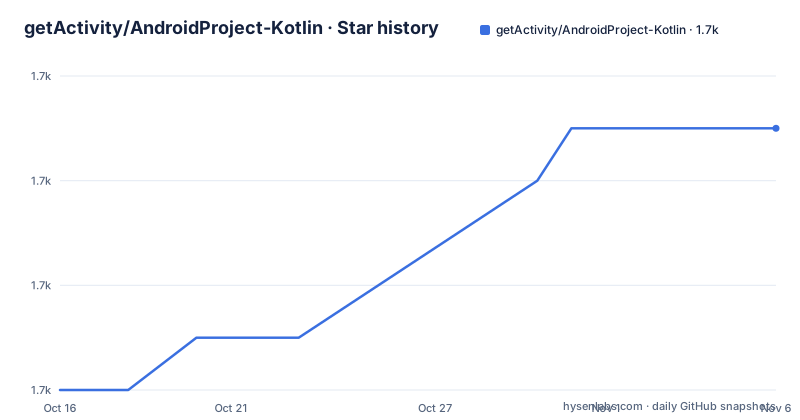
- getActivity/AndroidProject-Kotlin1,723 ★ · +5
| Repository | 2026-10-16 | 2026-11-06 |
|---|---|---|
| getActivity/AndroidProject-Kotlin | 1.7k | 1.7k |
5 Stars in the last 21 days, measured from the daily GitHub snapshot. Compare with other projects
Editorial analysis
It is a template, not a dependency
The repository is described in Chinese as an Android technical middle platform in Kotlin, and the project description line is a wish that the bricklaying stops. That framing is the product description: this is infrastructure you copy into a new project rather than a library you depend on.
The layout confirms it. The repository root holds app/ and library/ as the two Gradle modules, alongside a localMaven/ directory, settings.gradle.kts, build.gradle.kts, gradle.properties and the standard gradlew and gradlew.bat wrapper scripts. There is no coordinates block to consume, no published artifact named in the README, and no dependency snippet. If you want these classes in your app, you take the source.
That decision has consequences worth naming before you start. You own the copy, so nobody else can fix a bug in it for you, and you inherit whatever version you copied at the moment you copied it. The upstream project keeps improving, as the release list shows, and your fork does not.
What you get in exchange is a project that already builds. The README's own argument is about not having to copy code out of an old project to start a new one, which implies the intended workflow is cloning this one instead.
The licence is Apache-2.0, which is permissive enough for commercial use and is one of the clearer reasons this template is easy to adopt inside a company.
The repository topics reveal an unresolved architecture debate
The topic list attached to this repository includes mvi, mvp, mvvm and mvvmhabit, alongside compose, glide, okhttp, retrofit, recyclerview, popupwindow, titlebar, toast, dialog and baseactivity, and flutter as well.
Listing three architectures at once is unusual and is the most informative line in the metadata. It suggests the project deliberately does not force a pattern, or that the topic list accumulated over years as the sample code changed. Either way, a team that arrives expecting a clean architecture demonstration will not find one specified, and the actual structure lives in the source.
The rest of the topics describe a component inventory rather than a philosophy. baseactivity and titlebar are the scaffolding every screen sits on. dialog and toast are the two feedback mechanisms. recyclerview and popupwindow are the list and overlay primitives. okhttp and retrofit are the HTTP pair, and glide is image loading. compose appearing alongside those suggests Jetpack Compose code exists somewhere in the sample, which is worth checking directly if your team has already chosen a UI toolkit.
This is why the README's screenshots carry more information than the README's prose. It presents 36 activity screenshots, 18 dialog screenshots and 12 animated GIFs, which is a catalogue of what the template already handles.
One concrete API improvement over startActivityForResult
The README names exactly one piece of design work in detail, and it is worth reading because it shows what kind of contribution this project accepts.
The claim is that AndroidProject improves on startActivityForResult so that a listener object can be passed directly into the method, removing the need to override onActivityResult to receive the callback. It adds that the original startActivityForResult also requires a requestCode parameter, whereas AndroidProject generates that code automatically and checks it inside onActivityResult before calling back into the object passed from outside.
That is a small, contained change with an obvious ergonomic payoff, and it is described in enough detail to be verifiable in the source. It is also a fair sample of the project's stated style: wrap a repetitive Android idiom so the same feature code is not repeated, deciding case by case whether something belongs in a base class, a utility class or the framework rather than over abstracting for its own sake.
The same section is candid that this is the visible part. It says more good design decisions have to be discovered by reading the source, and declines to enumerate them. For an adopter that is a real cost: the value of a template is concentrated in code you did not write, and this one asks you to read rather than read a document.
Version numbering and a long maintenance claim
The release history is the evidence for how this project is maintained. The recent list holds v17.0 dated 2026-10-11, v16.0 dated 2025-12-23 and v13.2 dated 2022-01-08, and the last push was on 2026-10-14, three days before 2026-10-17. The repository is not archived.
The gap between 13.2 in 2022 and 16.0 in 2025 is the interesting part. Either releases were infrequent for a while or the version jumped for reasons not recorded in the README.
The README also states the Java precursor project has been maintained for more than seven years, with the original at the getActivity/AndroidProject repository. That continuity is the strongest argument for the template, and it is an argument about the maintainer rather than about the code.
There is a demonstration path as well: an APK is linked from the 13.1 release download, so you can run the sample on a device before deciding whether to copy the code.
Documentation is split across three separate places. HelpDoc.md in this repository holds common questions, a code standard document lives at getActivity/AndroidCodeStandard, and version adaptation guidance lives at getActivity/AndroidVersionAdapter. Three documents for one template is a sign of what the template is trying to cover.
The useful part is the surrounding library family
The most interesting content in the README is not about this repository. It is the list of the author's other projects, which between them cover most of what an Android application needs before any business logic exists.
There is a permission framework in XXPermissions, a toast framework in Toaster, a networking framework in EasyHttp, a title bar framework in TitleBar, a floating window framework in EasyWindow, a device compatibility framework in DeviceCompat, ShapeView and ShapeDrawable for drawing shapes, MultiLanguages for runtime language switching, GsonFactory for fault tolerant Gson parsing, Logcat for viewing logs, and NestedScrollLayout for nested scrolling.
That inventory is the actual architecture argument in this project. Instead of one framework with everything inside it, the author has published narrow components and the template composes them. It also means adopting the template is a decision about the whole family, because the convenience it offers comes from integrating those libraries rather than from its own code.
EasyHttp in particular is the component that will decide whether the template fits you. If you already have a networking layer with its own conventions, retrofit and OkHttp configured your way, and error handling you have opinions about, then the template's network layer is the part most likely to be deleted and the part most likely to be fought with.
If you are starting from nothing, the family is a coherent set and using it as intended is the cheaper path.
What you have to do that the README does not do for you
There are no installation instructions in the README, because there is nothing to install. The steps a new adopter performs are the ones any copied Android project needs.
Rename the package and the application id, because leaving a template's identifiers in a shipping app is a mistake that survives review. Replace the signing configuration, since debug keystores do not ship. Replace the launcher icons and the app name. Then delete the demo screens, which is the point of the exercise and also the most tedious part.
After that, the compatibility claim deserves scrutiny. The README argues that a single person with a single device cannot find compatibility problems, and credits the wider community's testing across hundreds of devices for catching issues that careful code review would not. That is a reasonable argument and also an admission that the template's edge case coverage came from other people's bug reports rather than from a test suite.
The optimisation claims in the README, covering memory, layout, code and size, come with a stated basis of long running testing and carry no numbers. Treat them as the author's judgement rather than as measurements.
Finally, the framework expects a decision from you. Compose appears in the topic list next to the older view based components, so find out which one the current sample code actually uses before you start building on it.
Editorial conclusion
Adopt AndroidProject-Kotlin if your team starts several Android apps from a shared skeleton and you want the skeleton to include dialogs, base activities and the common utility layer, since the release history shows the same template maintained across versions rather than a library you must upgrade through. Do not adopt it as a Gradle dependency, because the repository is structured as an application with app/ and library/ modules and no coordinates to depend on, and do not adopt it if your team insists on MVVM with a specific state library, since the repository topics list mvi, mvp and mvvm alongside each other rather than committing to one. Before copying, read HelpDoc.md and the version adaptation documentation, and replace the demo package name and signing configuration rather than leaving them in place.
Frequently asked questions
How do I use AndroidProject-Kotlin in a new app?
By copying it. The repository is an application project with app/ and library/ modules and no published coordinates, so you clone it, rename the package and application id, replace the signing configuration and icons, then delete the demo screens.
What licence is AndroidProject-Kotlin under?
Apache-2.0, recorded in the repository root alongside a LICENSE file. That grant is permissive enough for commercial use and does not require you to open source your application.
Which architecture pattern does the template use?
The repository does not commit to one. Its topics list mvi, mvp, mvvm and mvvmhabit side by side along with compose, okhttp, retrofit, recyclerview and glide, so the actual structure is in the source rather than in a documented convention.
What does the template improve over startActivityForResult?
The README describes a design where a listener object is passed directly into the method instead of overriding onActivityResult, and where the requestCode is generated automatically and checked before the callback fires.
Where is the documentation for this template?
HelpDoc.md in this repository holds the common questions, the code standard is in the separate getActivity/AndroidCodeStandard repository, and version adaptation guidance is in getActivity/AndroidVersionAdapter.
Official sources
Add this badge to your README
If you maintain this project, the badge below links readers to this analysis and shows its maintenance status from the daily GitHub snapshot. Paste the markdown into your README; add ?metric=license or ?metric=stars to the image URL for a different field.

[](https://hysenlabs.com/projects/getactivity-androidproject-kotlin)Star history chart for your README
[](https://hysenlabs.com/projects/getactivity-androidproject-kotlin)Was this useful?