Slickgrid-Universal: A Framework-Agnostic Take on the SlickGrid Data Grid
Slickgrid-Universal is a monorepo which includes all Editors, Filters, Extensions, Services related to SlickGrid usage and is also Framework Agnostic
At a glance
- What is it?
- Slickgrid-Universal bundles editors, filters, extensions, and services for SlickGrid into a single monorepo, aiming for framework agnosticism. The project delivers a batteries-included grid but carries a larger footprint and a learning curve compared to the bare-bones original.
- Who is it for?
- Adopt Slickgrid-Universal if you need a feature-complete data grid across multiple frameworks and you value built-in editing, filtering, and tree data over a minimal footprint. Skip it if you only need a basic grid with the smallest possible bundle, where the original @6pac/SlickGrid may suffice.
- Can I use it commercially?
- Check first. The repository uses a licence we do not classify automatically, so read its LICENSE file before any commercial use.
- Is it still maintained?
- Yes. The repository last received commits 19 days ago.
- What is it written in?
- Mainly TypeScript, according to GitHub's language statistics.
Answers come from the project's GitHub data, last synced on October 4, 2026, and from our analysis. They are not legal advice.
Star history
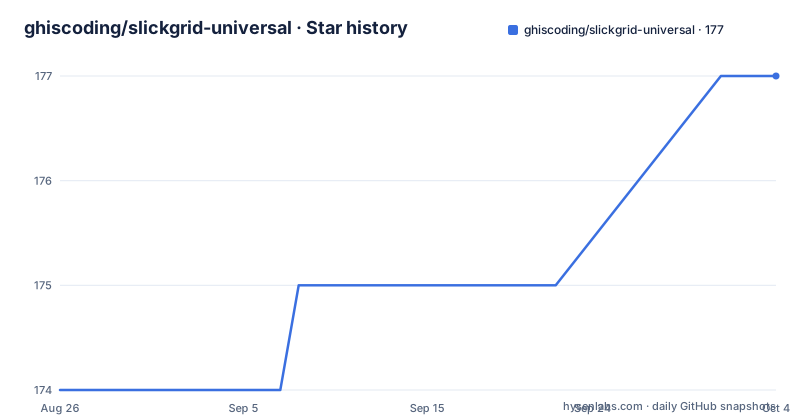
- ghiscoding/slickgrid-universal177 ★ · +3
| Repository | 2026-08-26 | 2026-10-04 |
|---|---|---|
| ghiscoding/slickgrid-universal | 174 | 177 |
3 Stars in the last 39 days, measured from the daily GitHub snapshot. Compare with other projects
Editorial analysis
What Slickgrid-Universal Actually Solves
The core problem Slickgrid-Universal addresses is code duplication across framework-specific SlickGrid implementations. Before this project, each framework wrapper had to reimplement editors, filters, and services, leading to drift and extra maintenance. By consolidating these into a monorepo, the project provides a single set of features that work across Angular, Aurelia, and other frameworks, as well as plain JavaScript. The target user is a developer building data-heavy applications who needs advanced grid capabilities like sorting, filtering, inline editing, and tree data without assembling them from scratch. The README explicitly contrasts this with the original SlickGrid, which it describes as an unassembled IKEA product. Slickgrid-Universal is the assembled version, trading a larger download size for immediate functionality.
Inside the Monorepo: Decoupled Services and Framework Agnosticism
The project is structured as a monorepo using pnpm workspaces and Lerna-Lite. The key design choice is decoupling: not every service is required by every project. The README lists OData, GraphQL, Export to CSV/Excel/PDF, Composite Editor, and RxJS as examples of services that can be included selectively. This means you can pull in only the packages you need, which mitigates the larger footprint somewhat. The core library is framework agnostic, written in TypeScript, and can be used in plain ES6, as demonstrated by the author's use in Salesforce LWC. The framework wrappers, such as angular-slickgrid and aurelia-slickgrid, live in the same repository, ensuring they stay in sync with the core. This architecture avoids duplicate code across frameworks, which was the primary motivation for the monorepo structure.
Getting Started: Installation and First Grid
The README points to a GitBook documentation site for version 4.0 and later, with older versions using the project wiki. For installation, you would typically install the common package via npm, such as @slickgrid-universal/common, and then add the specific packages you need for editors, filters, and services. The live demo shows two themes, Material Design and Salesforce, with Bootstrap and Bulma used in framework demos. To get a grid running, you would create a grid instance with a column definition and a dataset, but the exact code is not in the README. The documentation website is the primary source for the actual commands and configuration keys. The project also provides Stackblitz links for all supported frameworks, which is the fastest way to see a working example without setting up a local environment.
Theming and Customization: More Than Bootstrap
A notable feature is the theming system. The project offers multiple pre-built themes: default, Bootstrap, Material, Salesforce, and Fluent UI. These are provided as SCSS files, such as slickgrid-theme-material.scss. The README emphasizes that while demos use Bootstrap or Bulma, you can use any UI library, including Google Material or MS Fluent UI. This is possible because the project exposes a large set of CSS/SASS variables for customization. This is a genuine strength for teams with strict design systems, as it avoids the common problem of grid components being tightly coupled to a specific CSS framework. However, the theming system is only as flexible as the variables allow; if you need to override a specific component's internal style, you may still need to dig into the SCSS source.
Limitations and When It Is the Wrong Tool
The most obvious limitation is the size and complexity. The README admits that Slickgrid-Universal has a larger download and installation size compared to the original SlickGrid. For a simple grid with only a few hundred rows and no editing or filtering, this is overkill. The project also lacks official wrappers for SolidJS and Svelte, as noted in the README. If you are on those frameworks, you would have to use the core library directly or contribute a wrapper, which is a significant hurdle. Another potential failure mode is the decoupling of services: if you need OData or GraphQL, you must configure them separately, and the README does not provide detailed setup instructions, leaving that to the documentation. This could lead to integration challenges for teams unfamiliar with the architecture.
Alternative: The Original SlickGrid (@6pac/SlickGrid)
The direct alternative is the original SlickGrid, now maintained as @6pac/SlickGrid, where the author is also a maintainer. The difference is fundamental: the original is a bare-bones grid with no built-in editors, filters, or formatters. You have to implement sorting, filtering, editing, and other features yourself. This makes the original much smaller in bundle size and gives you complete control, but it requires significantly more development effort. For a project with simple requirements and a strict performance budget, the original is a better fit. For a project that needs a rich grid quickly, Slickgrid-Universal saves time at the cost of size and learning curve. The choice is essentially between assembling your own furniture or buying it pre-assembled, to use the README's analogy.
Maintenance and Upgrade Considerations
The project is actively maintained, with recent releases like v10.10.0 in August 2026. The monorepo structure means that upgrades are coordinated across the core and framework wrappers, which can reduce version mismatch issues. However, the use of Lerna-Lite suggests a release process that may introduce breaking changes across packages, so you should review the changelog for each wrapper before upgrading. The license is listed as NOASSERTION, which is unusual. This means the repository does not assert a specific license, despite the README containing an MIT badge image. This is a red flag for legal compliance; you should contact the maintainers to clarify the licensing terms before using it in a commercial product. The README also requests sponsorship, which indicates a community-funded project, so you should not expect commercial support.
Editorial conclusion
Adopt Slickgrid-Universal if you need a feature-complete data grid across multiple frameworks and you value built-in editing, filtering, and tree data over a minimal footprint. Skip it if you only need a basic grid with the smallest possible bundle, where the original @6pac/SlickGrid may suffice. Before committing, verify the framework wrapper you need is actively maintained, check the theming options against your UI library, and test the OData or GraphQL services against your backend, as these are decoupled and may require additional configuration.
Frequently asked questions
What is the difference between Slickgrid-Universal and @6pac/SlickGrid?
The original SlickGrid is described as bare bone and unassembled, and you implement sorting, filtering, and editing yourself. Slickgrid-Universal is the assembled version, with Formatters, Editors, Filters, and Tree Data built in, at the cost of a larger download and installation size. The author maintains both projects.
Does Slickgrid-Universal still depend on @6pac/SlickGrid?
Not since v4.0. It originally required @6pac/SlickGrid as an external dependency, that was dropped in v4.0, and it has been a standalone library ever since. Documentation also split at that point, with GitBook for version 4.0 and later and the Wikis kept for older versions.
Which frameworks have a Slickgrid-Universal wrapper?
The table ships Angular-Slickgrid and Aurelia-Slickgrid, and the root package.json has dev scripts for angular, aurelia, react, react-fluent, and vue, with the bare dev script starting the Vanilla flavor. There is no SolidJS and no Svelte wrapper, and the project invites a Discussion if you want to add one.
How do I change the look of a Slickgrid-Universal grid?
Choose one of the five theme packages, default, Bootstrap, Material, Salesforce, or Fluent UI, each shipping a CSS and a SASS file, then customise further through the project's set of CSS and SASS variables. The demos use Bootstrap or Bulma, but the project states you could use Google Material, MS Fluent UI, or anything else.
How do I start a dev session for one framework?
Use the framework specific script, for example `pnpm dev:angular`, which builds the universal core first, then runs that framework's check-both-builds, then starts the universal and framework watchers together. The bare `pnpm dev` starts the Vanilla flavor instead, and `pnpm install` on its own installs everything.
Official sources
Add this badge to your README
If you maintain this project, the badge below links readers to this analysis and shows its maintenance status from the daily GitHub snapshot. Paste the markdown into your README; add ?metric=license or ?metric=stars to the image URL for a different field.

[](https://hysenlabs.com/projects/ghiscoding-slickgrid-universal)Star history chart for your README
[](https://hysenlabs.com/projects/ghiscoding-slickgrid-universal)