gitcoffee-os/postbot: a browser extension that publishes one post to every platform you are logged into
PostBot 内容同步助手 一款开源的多平台内容同步分发生产力工具。 支持将文章、笔记、动态、图片、视频、音频等内容,一键同步发布至主流媒体平台。覆盖微信/微博/今日头条/小红书/知乎/百家号/企鹅号/视频号/抖音/快手/哔哩哔哩(B站)等国内主流媒体平台,可轻松扩展兼容 X(Twitter)、Facebook、Instagram、TikTok、YouTube、LinkedIn 等国际媒体平台。
At a glance
- What is it?
- PostBot is an open source TypeScript browser extension for writing once and publishing to WeChat, Weibo, Xiaohongshu, Zhihu, Bilibili, Douyin and other Chinese media platforms, reusing the login state already in your browser rather than storing credentials in a cloud service. The default publishing engine consumes no AI tokens, and the main branch is explicitly a fast iteration branch, with a separate stable tag for local development.
- Who is it for?
- Adopt PostBot if you publish to several Chinese media platforms and want one editor and one click instead of a dozen copy and paste routines, since the content adapters and the per platform publishers are the part of the work that is genuinely tedious to write yourself.
- Can I use it commercially?
- Yes. Apache-2.0 is a permissive licence: you can use, modify and sell software built on it, as long as you keep its copyright and licence notices.
- Is it still maintained?
- Yes. The repository last received commits 1 day ago.
- What is it written in?
- Mainly TypeScript, according to GitHub's language statistics.
Answers come from the project's GitHub data, last synced on November 7, 2026, and from our analysis. They are not legal advice.
Star history
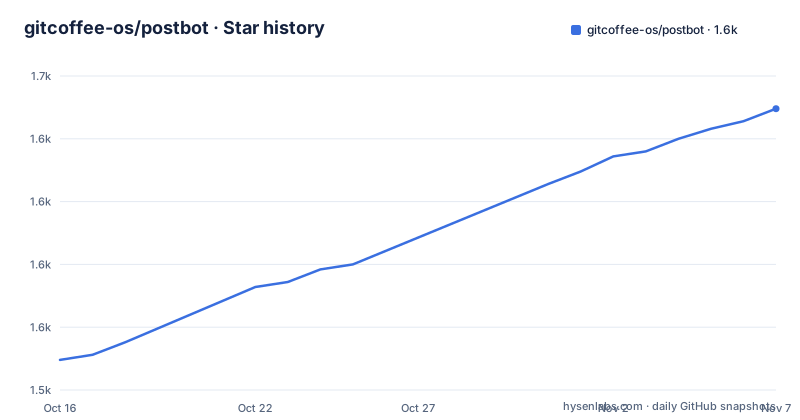
- gitcoffee-os/postbot1,637 ★ · +100
| Repository | 2026-10-16 | 2026-11-07 |
|---|---|---|
| gitcoffee-os/postbot | 1.5k | 1.6k |
100 Stars in the last 22 days, measured from the daily GitHub snapshot. Compare with other projects
Editorial analysis
One editor, a list of destinations
PostBot is described as an open source multi platform content synchronisation and distribution tool, and the feature set starts with content types rather than with platforms. It supports articles, notes, short posts, images, video and audio, and text content can be written in HTML or Markdown.
The platform coverage is where the tool's real value sits. The list names WeChat, Weibo, Toutiao, Xiaohongshu, Zhihu, Baijiahao, the Penguin account, WeChat Channels, Douyin, Kuaishou and Bilibili, with the note that the international platforms such as X, Facebook, Instagram, TikTok, YouTube and LinkedIn can be added on top.
The workflow it replaces is the obvious one. You format something once, and then for each platform you paste, adjust the formatting, upload the images, set the tags and publish. The one click publishing feature is that the same content can be synchronised and published to every platform you are logged into, and the platform adaptation feature is the claim that the content is automatically adjusted to meet each platform's requirements rather than being pasted identically everywhere.
The repository layout backs that claim up. The dependencies include content adapters, a content reader, a publish engine, a publisher module for Chinese platforms, a publisher for debugging, and a publisher for other industries, so the per platform differences are separate packages rather than a switch statement inside one.
The privacy decision is the reason the extension exists
The feature list marks security as the point that distinguishes this tool from others, and the mechanism is specific: the operation happens locally, reusing the login state already present in your browser, which avoids the privacy risk of storing account information in the cloud.
That is a real architectural decision with real consequences. A tool that asks for your platform credentials and stores them on a server is asking you to trust a third party with every account you publish to. A tool that drives the publishing page in a browser where you are already logged in holds no credentials at all, because the session cookie is already there and stays there.
The cost of that model is that the tool has to work through user interfaces rather than through APIs, since it is really automating a web page. Which is why the multi engine feature exists, with Playwright listed among the options.
The storage layer follows from the same choice, with `@plasmohq/storage` as the extension storage dependency and a separate `@gitcoffee/storage` package in the list. The project's own argument is that the browser extension community edition is fully open source, permanently free, and needs no AI API key and consumes no tokens to do the core synchronised publishing, which is the position it takes for individual creators, personal media and small teams to use at zero cost.
Plasmo, the build, and how the extension is packaged
The build tooling is Plasmo, and the `package.json` shows the whole shape of the project in a few lines.
"scripts": {
  "dev": "plasmo dev",
  "build": "bash -c 'plasmo build && cp LICENSE README.md build/chrome-mv3-prod/ && for arg in \"$@\"; do if [ \"$arg\" = \"--zip\" ]; then cd build/chrome-mv3-prod && zip -r ../chrome-mv3-prod.zip .; fi; done' --",
  "package": "plasmo build && cp LICENSE README.md build/chrome-mv3-prod/ && plasmo package"
}
The build is a Chromium Manifest V3 extension, since the output path is `build/chrome-mv3-prod`, and the script copies the licence and readme into the build directory so the packaged artefact carries them. A `--zip` argument produces a zip of the built extension, which is what you would load unpacked or upload to a store.
The rest of the stack is a Vue and Tailwind front end, with `@ant-design/icons-vue` for the icon set, `postcss.config.js` and `tailwind.config.js` at the top level, and a TypeScript configuration with the project built on pnpm, given the `pnpm-lock.yaml`.
Almost every other dependency is an internal `@gitcoffee/` package, and the naming tells you how the system is decomposed: `postbot-content-reader` for the reader, `postbot-content-services` and `postbot-content-ui` for the content side, `postbot-publish-engine` for the publishing, `postbot-publisher-cn`, `postbot-publisher-debug` and `postbot-publisher-industry` for the targets, `postbot-plugin-engine` for the plugin system, `postbot-stores` and `postbot-events` for state and messaging, plus `api`, `auth`, `browser` and `storage` foundations and an `i18n` package.
The reader, the editor and the AI question
Two features deserve a closer look because they decide how much work the tool actually removes.
The first is the built-in smart web reader for extracting content from a web page, and the dependency list shows how it is done, with `@mozilla/readability` at 0.6.0, the same library that powers reader mode in a browser. That means you can point the extension at an article you want to repurpose, have the text extracted, and then format and publish it, which removes the copy and paste of the body of the article as well as the formatting.
The second is the AI question, and the project handles it in a way worth noting. AI integration is listed as extensible rather than required, and the multi engine section says the default core publishing engine never consumes any AI API token quota. The optional engines it names are Playwright, PageAgent, OpenClaw, Hermes Agent and DeepSeek Harness, and the framing is that you can pick the engine that matches your workflow for more complex distribution scenarios.
So there is a path that needs no model at all, which is the path most people publishing the same content to several platforms actually want, since the value is in the distribution rather than in the rewriting. And there is a path where an agent drives the process, which is where the token cost and the unpredictability come in.
The extension list is broader still: plugins, an SDK, API interfaces, MCP, a CLI tool in a separate `postbot-cli` repository, AI Skills, AI agents, and an open platform with an app market.
The warning at the top, and the international sibling
The README opens with a warning that shapes how you should treat the main branch. The current state is a rapid iteration, daily development version, provided for open source contributors to collaborate and iterate quickly, and developers who need a local development runtime are pointed to the stable release v1.1.20 instead.
The version in the `package.json` is 1.3.2, which is the iteration version, while the branch named 1.1.20 is the stable one. That is an unusual arrangement, and it is the kind of thing that catches out a team that clones main and expects a working build. The practical rule is simple: if you are running it, use the stable branch; if you are contributing, use main and expect churn.
There is also a separate product for international platforms. Postar is the international version of the content synchronisation assistant, aimed at X, Facebook, Instagram, TikTok, YouTube and LinkedIn, with its own repository and documentation site. So the international coverage is not a missing feature in PostBot, it is a sibling project.
The project is hosted in three places, GitHub, Gitee and AtomGit, which is a practical detail if you are working in a network where one of those is more reliable. The documentation lives on its own site, with a user guide, a quick start, a development guide and a CLI guide, and there is a cloud hosted demo for people who want to see the interface before installing anything.
The licence is the GitCoffee Open Source License, described as essentially Apache 2.0 but with some additional restrictions, and the repository metadata classifies the project under Apache-2.0. The additional restrictions are the part to read before you depend on it commercially.
Where this approach stops
The first limit is the browser extension itself. Everything is driven through pages you are logged into, so the tool cannot publish to a platform where you have no session, and any platform that changes its publishing flow can break it. That is the cost of the privacy model, and it is a recurring cost rather than a one-off.
The second limit is that the platform coverage is weighted towards Chinese media platforms, with the international set handled by the separate Postar project and described as an extension path rather than as shipped support. A team whose audience is entirely outside that market would be building the international adapters themselves.
The third is the licence. The project states that its licence is Apache 2.0 with additional restrictions, and a restriction of unknown content is a blocker for any commercial evaluation until somebody reads it. The README does link a business cooperation page, which suggests there is a paid path, but the open source terms are what apply to a self hosted deployment.
The fourth is the churn implied by the warning. A tool that automates a dozen third-party publishing interfaces will break whenever one of them changes, and the main branch's rapid iteration is the author's answer to that, but it means a deployment tracks a moving target.
None of this makes the tool a bad fit for its stated audience. For an individual creator or a small team publishing the same piece to WeChat, Weibo, Xiaohongshu and Bilibili, the work it removes is real and the credential exposure it avoids is the reason it is built this way.
Editorial conclusion
Adopt PostBot if you publish to several Chinese media platforms and want one editor and one click instead of a dozen copy and paste routines, since the content adapters and the per platform publishers are the part of the work that is genuinely tedious to write yourself. Do not adopt it if your publishing needs a server side API integration, because the whole design is a browser extension that drives the platforms you are already logged into, and that is both its privacy advantage and its scope limit. Verify first which branch you are building from, since the README points developers who want a local runtime at the stable v1.1.20 release rather than the main branch, and read the GitCoffee Open Source Licence, which is Apache 2.0 with additional restrictions.
Frequently asked questions
Which platforms does PostBot support?
The documented coverage is WeChat, Weibo, Toutiao, Xiaohongshu, Zhihu, Baijiahao, the Penguin account, WeChat Channels, Douyin, Kuaishou and Bilibili, and it can be extended to international platforms such as X, Facebook, Instagram, TikTok, YouTube and LinkedIn. A separate project, Postar, targets the international platforms.
Does PostBot need an AI API key to publish?
No. The default core publishing engine consumes no AI API tokens, and the community browser extension edition is described as fully open source and free with all core synchronised publishing available. AI integration is optional, and alternative engines such as Playwright, PageAgent, OpenClaw, Hermes Agent and DeepSeek Harness can be integrated for more complex workflows.
How does PostBot handle my platform credentials?
It operates locally and reuses the login state already in your browser rather than storing account information in the cloud, which the project presents as the core privacy advantage over tools that collect and keep platform credentials.
How do I build PostBot?
The project uses Plasmo. `pnpm dev` starts the development build and `pnpm build` runs `plasmo build` and copies the licence and readme into the `build/chrome-mv3-prod` directory, with an optional `--zip` argument to produce a zip of the built Manifest V3 extension.
Which branch should I use for local development?
The README warns that the current main branch is a rapid iteration daily development version intended for contributors, and points developers who need a local development runtime to the stable release v1.1.20 instead. The package version on main is 1.3.2.
Official sources
Add this badge to your README
If you maintain this project, the badge below links readers to this analysis and shows its maintenance status from the daily GitHub snapshot. Paste the markdown into your README; add ?metric=license or ?metric=stars to the image URL for a different field.

[](https://hysenlabs.com/projects/gitcoffee-os-postbot)Star history chart for your README
[](https://hysenlabs.com/projects/gitcoffee-os-postbot)Was this useful?