gkd: An Accessibility-Based Screen Tapper Driven by CSS-Like Selectors and Subscription Rules
GitHub describes it as An Android app with custom screen tapping based on Accessibility, Advanced Selectors, and Subscription Rules. The repository metadata lists Kotlin as its primary language. The metadata lists the GPL-3.0 license. This article stays within the project description and details documented in the GitHub repository README.
At a glance
- What is it?
- gkd is an open-source Android app that uses accessibility services and a custom selector language to automate screen taps, such as skipping splash screens or confirming logins. This review covers its mechanism, setup, and limitations.
- Who is it for?
- Adopt gkd if you are a technically inclined Android user who wants to automate repetitive taps without writing full scripts, and you are comfortable with a steep learning curve for its selector syntax. Avoid it if you need out-of-the-box rules, as it ships with none, or if you cannot tolerate the privacy and stability risks of an accessibility service.
- Can I use it commercially?
- Yes, with conditions. GPL-3.0 is a copyleft licence: if you distribute software that includes it, you must release that software's source code under the same licence. Running it internally without distributing it does not trigger that obligation.
- Is it still maintained?
- Yes. The repository last received commits 2 days ago.
- What is it written in?
- Mainly Kotlin, according to GitHub's language statistics.
Answers come from the project's GitHub data, last synced on November 15, 2026, and from our analysis. They are not legal advice.
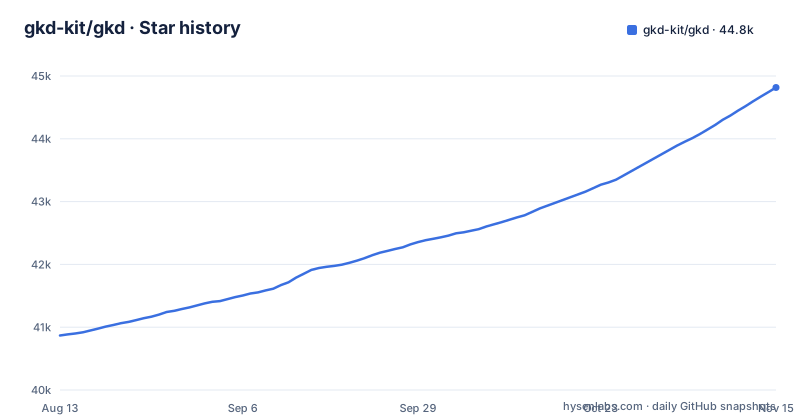
Star history
- gkd-kit/gkd44,817 ★ · +3,949
| Repository | 2026-08-13 | 2026-11-15 |
|---|---|---|
| gkd-kit/gkd | 40.9k | 44.8k |
3,949 Stars in the last 94 days, measured from the daily GitHub snapshot. Compare with other projects
Editorial analysis
The Problem It Solves and Who It Serves
gkd addresses a narrow but persistent annoyance: repetitive taps on Android screens that follow a predictable pattern. The README gives two concrete use cases. One is skipping tedious startup flows, such as a splash screen that requires a tap to dismiss. The other is simplifying repeated actions, like confirming a computer login from a phone. The target user is not a casual phone owner. It is someone who can write or import rules, understands the concept of node trees, and accepts the responsibility of granting an accessibility service. The project is explicit that it provides no default rules, so the user must be willing to build or subscribe to rule sets. This positions gkd as a tool for automation hobbyists, power users, or developers who want fine-grained control over their device's UI interactions.
The Mechanism: Accessibility, Selectors, and Subscriptions
The core mechanism is a combination of three components. First, it uses Android's accessibility service to inspect the current screen's node hierarchy. Second, it applies a custom selector language, which the README describes as similar to CSS selectors, to identify specific nodes based on their properties and relationships. Third, it executes an action, such as tapping the matched node or a specific coordinate, when the selector matches. The selector example in the README shows the syntax: [@[vid="menu"] < [vid="menu_container"] - [vid="dot_text_layout"] > [text^="广告"]]. This selector navigates from a node with id 'menu', through parent and sibling relationships, to a node whose text starts with the Chinese characters for 'advertisement'. The '^' operator indicates a prefix match. This is a powerful approach because it allows context-aware matching, not just a simple text lookup. The subscription mechanism allows remote rule sets, which can be updated without reinstalling the app. The README points to a subscription template for building your own remote subscription, and a GitHub topic for third-party subscription lists.
Getting It Running: Installation and Rule Setup
Installation is straightforward. The README links to a guide, the Google Play Store, and the GitHub releases page. The app is available under the package id li.songe.gkd. After installation, the user must enable the accessibility service, which is a standard Android permission. The critical step is adding rules. The README states: 'GKD 默认不提供规则,需自行添加本地规则,或者通过订阅链接的方式获取远程规则'. This means you must either write local rules or subscribe to a remote rule set. The subscription template repository is a starting point for creating your own. For those who want to avoid writing rules from scratch, the README mentions a GitHub topic 'gkd-subscription' where third-party subscriptions are listed. The selector syntax is documented on the project's guide page. The learning curve here is real. Writing a selector like the one in the README requires understanding the node tree, attribute names like 'vid', and operators like '<', '-', '>', and '^'. The README also mentions a '快照审查' (snapshot inspection) tool, which is a separate repository, suggesting that users can inspect snapshots to craft selectors.
A Real Limitation: The Accessibility Service Trade-off
The most significant limitation is inherent to the approach. gkd relies on Android's accessibility service, which is a powerful permission that can read screen content and perform actions. This has two consequences. First, it is a privacy and security risk. Users must trust the app and its rule subscriptions, because a malicious rule could, in theory, tap on sensitive buttons. The README includes a disclaimer that the project is for learning and communication only, and prohibits commercial or illegal use, but that does not mitigate the risk of third-party subscriptions. Second, accessibility services can be flaky. Android may disable them after system updates or aggressive battery optimization. The README links to a FAQ page for troubleshooting, which implies common issues. Another limitation is that the selector language is custom. It is not a standard like CSS, so users must learn its syntax and operators. The documentation is only linked, not included in the README, so the user must visit the external site. Finally, the app has no default rules, which means the out-of-box experience is bare. A user who expects to install and immediately skip ads will be disappointed.
The Right Tool? When gkd Is the Wrong Choice
gkd is the wrong tool for users who want a zero-configuration ad skipper. gkd ships no pre-built rules. The README is clear: you must add rules yourself or subscribe to a remote set. This makes the initial setup heavy. Also, gkd is not a general-purpose automation tool like Tasker or MacroDroid, which allow scripting with conditions and loops. gkd is specialized for tapping specific nodes when conditions are met. If your automation need involves complex logic, such as waiting for a network response or reading sensor data, gkd will not handle it. The selector language is designed for UI node matching, not for programming logic. For simple tap sequences, gkd is sufficient. For anything beyond that, a full automation app is a better fit.
Alternatives: A Different Approach to UI Automation
A direct alternative is the open-source project 'Auto.js' or its variants, which use JavaScript to script UI interactions. The difference in approach is fundamental. Auto.js gives you a full programming language, so you can write loops, conditionals, and call APIs. gkd uses a declarative selector language, so you describe what to match and what to do, and the app handles the rest. This makes gkd simpler for pure tap actions, but less flexible. Another alternative is 'Tasker', which is commercial and uses a plugin system for accessibility actions. Tasker's approach is event-driven and allows more complex automation, but it is not open source and requires a paid license. The key difference is that gkd's selector language is optimized for UI hierarchy traversal, which can be more precise for matching nodes based on their parents and siblings. For users who need to match a node deep in a hierarchy, gkd's selectors are a better fit. For users who need to combine UI actions with other device events, a scripting tool is more appropriate.
Maintenance and Upgrade Cost, License Implications
The repository shows active maintenance, with the latest releases v1.13.0-beta-3 (2026-10-30), v1.13.0-beta-4 (2026-10-31) and v1.13.0-beta-5 (2026-11-01), and the last push on 2026-11-02. This suggests a steady release cadence. The upgrade cost for users is low: they can download new APKs from the releases page or update via Google Play. However, rule subscriptions may break if the selector syntax changes between versions, although the project likely maintains backward compatibility. The README mentions derivative projects, including kotlin-json5 and priv-kit, which are used by gkd. This indicates a modular development approach, but it also means that users who want to fork or extend gkd must understand these dependencies. The license is GPL-3.0, which is a strong copyleft license. This means that if you distribute a modified version of gkd, you must release your changes under the same license. For personal use, this is not a concern, but for commercial use, it is a significant restriction. The README explicitly prohibits commercial use, but that is a project policy, not a license requirement. The GPL-3.0 license itself allows commercial use, but the project's disclaimer adds a non-commercial clause. This is a contradiction worth noting: the license permits commercial use, but the README forbids it. Users should be aware of this mismatch and decide how to interpret it. No legal advice is given here, but the discrepancy is factual.
Editorial conclusion
Adopt gkd if you are a technically inclined Android user who wants to automate repetitive taps without writing full scripts, and you are comfortable with a steep learning curve for its selector syntax. Avoid it if you need out-of-the-box rules, as it ships with none, or if you cannot tolerate the privacy and stability risks of an accessibility service. Before adopting, verify that your target apps expose stable view IDs or text attributes, and test the subscription workflow with a simple rule. The project is actively maintained, with releases as recent as November 2026, but its GPL-3.0 license and lack of built-in rules mean you must invest in learning and rule creation.
Frequently asked questions
Does gkd ship any rules when I install it?
No. GKD provides no rules by default, so you add local rules yourself or supply remote rules through a subscription link. A subscription-template project is provided for building your own remote subscription, and third-party lists live under the gkd-subscription topic on GitHub.
How do I install gkd on my phone?
Through one of three links in the README: the guide at https://gkd.li/guide/, the Google Play listing under li.songe.gkd, or the GitHub releases page.
How do I write a gkd rule for an app?
A rule pairs a selector with a condition and an action: on a given screen, when a condition holds such as specific text being present, it clicks a node or a position or performs another operation. Selectors are CSS-like and can relate node context, for example `@[vid="menu"] < [vid="menu_container"] - [vid="dot_text_layout"] > [text^="广告"]`, and snapshot review through the separate gkd-kit/inspect tool is the project's answer to building them.
Official sources
Add this badge to your README
If you maintain this project, the badge below links readers to this analysis and shows its maintenance status from the daily GitHub snapshot. Paste the markdown into your README; add ?metric=license or ?metric=stars to the image URL for a different field.

[](https://hysenlabs.com/projects/gkd-kit-gkd)Star history chart for your README
[](https://hysenlabs.com/projects/gkd-kit-gkd)Was this useful?